

A thermostat earns its place on your wall by matching your heating and cooling system, your daily routine, and the way you prefer to adjust comfort. A busy household may appreciate schedules and room sensors, while a straightforward conventional system can be better served by a clear non-programmable control. The nine options below cover line-voltage baseboard heat, standard 24V HVAC setups, touchscreen controls, learning schedules, and DIY-friendly installation paths.
The Main Contenders

meross Matter Smart Thermostat for Electric Baseboard Heaters
PRO1 T701 Single Stage Thermostat for 1 Heat/1 Cool

ecobee Smart Thermostat Premium WiFi

ecobee Smart Thermostat Essential WiFi
Google Nest Thermostat Programmable WiFi Charcoal
ecobee Smart Thermostat Enhanced WiFi
Honeywell Home RTH9585WF Wi-Fi Smart Color Thermostat Touch Screen

Google Nest Learning Thermostat 4th Gen with Temperature Sensor

Sensi Smart Thermostat Wi-Fi ST55
What Each Pick Brings To The Table
Electric baseboard heat needs a thermostat built for line voltage, meaning the 120V to 240V power used by electric heaters rather than low-voltage HVAC controls. The meross Matter Smart Thermostat is aimed at baseboard, convector, and fan-forced electric heat, making it notably different from the 24V-focused picks below.
Matter support lets one thermostat work across several smart-home platforms at once, which may suit a household using more than one control app. Its schedule view, electricity-use history, and open-window response give you practical tools for managing electric heat room by room.
Good Reasons To Consider
- Fits 120V to 240V electric heating systems.
- Supports Matter-based smart-home control.
- Weekly schedules can match workdays and weekends.
- Usage tracking helps you notice heating patterns.
- Open-window detection pauses heating during ventilation.
Things To Consider
- It does not work with standard 24V heating and cooling systems.
- Confirm your heater type and line voltage before installation.
meross Matter Smart Thermostat for Electric Baseboard Heaters
Some homes need a dependable wall control, not app settings or automatic routine learning. The PRO1 T701 keeps the job focused on a single-stage conventional 1 heat/1 cool system, with a large blue backlit display and a glow-in-the-dark light button.
Its color-coded terminals and universal sub-base can make replacement work more approachable for a capable DIY household. You also get cycle-rate adjustment, temperature calibration, and compressor delay protection, though the honest read is that this model favors direct manual control over automation.
Useful Highlights
- Large illuminated display is easier to read after dark.
- Color-coded terminals can simplify wire matching.
- Runs on batteries or hardwired power.
Worth Noting
- No scheduling or remote app control is included.
- It suits only conventional single-stage 1 heat/1 cool equipment.
- Verify terminal labels before removing your existing thermostat.
Who It Suits Best
You benefit most from the PRO1 T701 when your conventional system needs simple daily adjustment without wireless features.
Where Another Pick Suits Better
The ecobee Smart Thermostat Essential WiFi suits homes wanting touchscreen schedules and remote temperature changes.
The ecobee Smart Thermostat Premium takes a broader view of comfort than a single wall sensor can provide. Its included SmartSensor measures the room where you place it, helping the thermostat respond to spaces such as a frequently used bedroom or home office.
Compared with the straightforward PRO1 T701, this is a feature-dense route for a connected home with uneven room temperatures. Built-in occupancy awareness, air-quality monitoring, geofencing, and compatibility with several smart-home systems may appeal to households that spend time in different rooms.
A Few Highlights
- Included SmartSensor can prioritize a chosen room.
- Occupancy tools can adapt settings around household presence.
- Air-quality monitor adds another at-home reading.
- Works with several major smart-home platforms.
- Compatible with 95% of systems.
Trade Offs
- Its deeper feature set can be more than a simple household needs.
The ecobee Smart Thermostat Essential strips the smart thermostat idea back to a color touchscreen, app control, and scheduled temperature changes. It makes sense for your first connected thermostat, especially where the Premium model’s sensor-led extras would sit unused.
The unit works with 85% of systems and can follow a schedule that lowers heating or cooling while you are away. For most homes with predictable weekdays, that focused approach is enough, though checking compatibility before wall mounting remains a necessary step.
The Upside
- Color touchscreen gives you direct wall control.
- App access lets you adjust temperature away from home.
- Schedules support different home and away periods.
- Software updates can add refinements over time.
Minor Gripes
- It works with fewer systems than ecobee Smart Thermostat Premium WiFi.
- Check your equipment through the compatibility tool first.
Made For
You will appreciate this model in a conventional home that needs scheduling and app access without extensive smart-home extras.
Consider Something Else When
The ecobee Smart Thermostat Premium WiFi is better for homes where a separate room sensor matters.
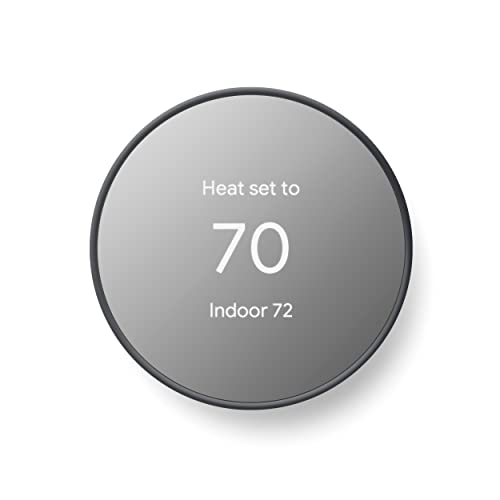
Google Nest Thermostat Programmable WiFi Charcoal is built around simple remote control through the Google Home app. You can change the setting from bed or while handling errands, provided your home has working Wi-Fi and internet access.
Unlike the ecobee Smart Thermostat Essential WiFi touchscreen approach, this Nest model is especially appealing for a household already using the Google Home app. It can reduce its setting while you are away, and its usual self-install path may suit a comfortable DIY project.
Positive Points
- Google Home app supports remote temperature changes.
- Can lower its setting while your home is empty.
- Designed for self-installation in many homes.
Room For Improvement
- Remote access depends on a working internet and Wi-Fi connection.
- Compatibility still deserves a check before installation.
- Households wanting a separate room sensor may prefer the 4th Gen Learning model.
Right Fit For
You get the most from this thermostat in a Wi-Fi-connected home where Google Home already handles everyday controls.
Not Your Match When
Google Nest Learning Thermostat 4th Gen with Temperature Sensor suits rooms needing separate sensor-based temperature attention.
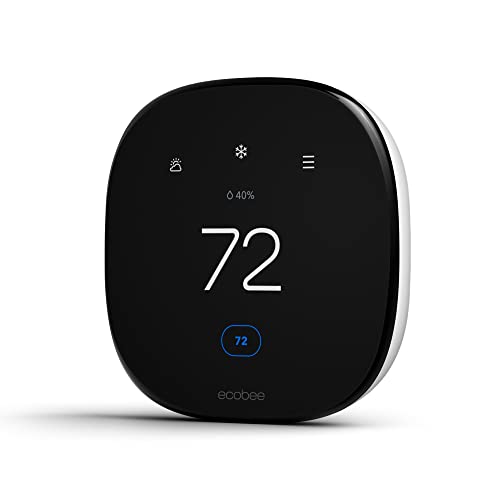
Built-in radar occupancy sensing is the defining feature of ecobee Smart Thermostat Enhanced WiFi. Rather than relying only on a fixed clock, it can recognize occupancy and adjust temperatures around home and away periods.
That makes it a middle path between the Essential’s simpler scheduled approach and the Premium model’s included room sensor. The package includes a Power Extender Kit and trim kit, which may help a DIY installation where a C-wire is absent or wall coverage needs tidying.
What Stands Out
- Radar occupancy sensing responds to home presence.
- Schedule suggestions can reflect changing routines.
- Power Extender Kit is included for installation flexibility.
- Trim kit can help cover the previous thermostat area.
- Compatible with 90% of systems.
Points To Note
- Occupancy-driven control may be unnecessary in a consistently occupied home.
- Confirm system compatibility before using the included installation hardware.
A customizable color touchscreen gives the Honeywell Home RTH9585WF a more visible wall presence than the understated Nest models. You can select a screen background that works with your room, then use the touchscreen or remote app controls for temperature changes.
Its seven-day programming supports day-by-day routines, and automatic heat-to-cool changeover selects heating or cooling based on the home’s needs. One thing worth considering is the required C-wire, a continuous low-voltage power wire that must already be available at the thermostat location.
What Pays Off
- Color touchscreen can coordinate with your room decor.
- Seven-day programming supports different daily routines.
- Automatic heat-to-cool changeover reduces manual switching.
- Filter and humidifier-pad reminders support regular upkeep.
Softer Spots
- A C-wire is required for installation.
- It is not compatible with line-voltage heating.
- Check for the needed wire before selecting this model.
The Google Nest Learning Thermostat 4th Gen combines routine learning with an included Nest Temperature Sensor. That sensor expands comfort control beyond the thermostat’s wall location, which can be useful where a bedroom, nursery, or office runs warmer or cooler.
Compared with Google Nest Thermostat Programmable WiFi Charcoal, this version adds learning behavior and broader 24V system compatibility. It also works with many homes without a C-wire, though your specific wiring and equipment still determine installation fit.
A Favorable Mix
- Included temperature sensor supports room-focused comfort.
- Learns temperature preferences as routines change.
- Works with many gas, electric, oil, radiant, and heat-pump systems.
- Most homes can install it without a C-wire.
- Google Home app offers remote adjustment.
- Polished Gold finish gives the wall a distinct look.
Small Caveats
- Learning controls suit changing routines more than fixed schedules.
The Sensi Smart Thermostat Wi-Fi ST55 puts installation guidance front and center. A built-in level helps position the wall plate, while the companion app provides step-by-step setup, a helpful detail for your first thermostat replacement.
Its privacy position also stands apart from many connected-home choices because Sensi states that personal information is not sold to third parties. You may find it especially comfortable as a practical first move into Wi-Fi control, without the more elaborate room-sensing approach of ecobee Smart Thermostat Premium WiFi.
A Few Strong Suits
- Built-in level helps align the thermostat during mounting.
- Step-by-step app guidance supports DIY installation.
- Wi-Fi control lets you manage settings away from home.
- Privacy policy states personal information is not sold to third parties.
Areas To Watch
- Confirm HVAC compatibility before starting the wire transfer.
- Wi-Fi access is needed for connected controls.
Best Suited To
You are well served by the Sensi ST55 when you want guided installation and Wi-Fi control for a compatible HVAC system.
A Better Fit Elsewhere
The Honeywell Home RTH9585WF Wi-Fi Smart Color Thermostat Touch Screen suits homes with a C-wire seeking a customizable display.
What Matters Before Installing a Thermostat
Match the Electrical System
Start with the system type, because a thermostat for 120V to 240V electric baseboard heat cannot replace a standard 24V HVAC thermostat. Conventional heating and cooling systems, heat pumps, radiant systems, and line-voltage heaters each have different control requirements. Check your existing wiring labels and heating equipment before narrowing the list.
Decide Between Schedules and Sensing
A schedule works well for predictable workdays, school runs, and overnight temperature preferences. Occupancy sensing adds another layer by responding to whether your household is home, while a remote sensor measures conditions in a separate room. Homes with one stubborn warm or cool space benefit more from a sensor than homes where every room already feels similar.
Check Power and Wall Coverage
A C-wire supplies continuous power to many Wi-Fi thermostat models, but some options include a Power Extender Kit or can work without one in many installations. Look at the existing wall footprint before removing the old unit, especially where paint fading or screw holes may be visible. A trim plate can make a replacement look more finished.
Consider Your Control Habits
Touchscreen controls suit households that want adjustments at the wall, while app-based control works well for changing temperatures away from home. A non-programmable model keeps things direct for a simple conventional system. Nothing flashy is required when your comfort routine rarely changes.
Details That Shape Long-Term Fit
Common Shopping Slip Ups
Installing a 24V thermostat on line-voltage baseboard heat is a major mismatch. Avoid it by identifying your heating type, wire count, and power needs before selecting a model.
Where the Extra Money Goes
Higher-tier thermostats add tools such as room sensors, occupancy detection, learning routines, and broader system compatibility. Those extras matter most in larger homes, changing schedules, or rooms with uneven temperatures.
Frequently Asked Questions
Can a smart thermostat work with electric baseboard heaters?
Some smart thermostats work with electric baseboard heat, but they must support line voltage. The meross Matter Smart Thermostat is designed for 120V to 240V electric heating systems.
What does a C-wire do for a thermostat?
A C-wire provides steady low-voltage power to the thermostat. Several Wi-Fi models require it, while others include alternative installation support.
Are room sensors useful with a thermostat?
Room sensors are useful where a bedroom or office differs from the hallway thermostat location. They allow supported models to consider temperature in the room you use most.
Is a non-programmable thermostat still a good choice?
A non-programmable thermostat works well for straightforward temperature changes and simple conventional systems. The PRO1 T701 is designed around that direct-control approach.
Which thermostat suits changing work schedules?
Occupancy-aware and learning models can suit routines that change week to week. ecobee Smart Thermostat Enhanced WiFi and Google Nest Learning Thermostat 4th Gen both focus on adapting beyond a fixed schedule.
