

A thermostat earns its place on your wall by fitting your heating and cooling system, your daily routine, and the rooms you use most. Remote temperature changes help during commutes, travel, and busy evenings, while schedules reduce the need to adjust settings by hand. The right choice also depends on wiring, system type, and whether one room regularly feels warmer or cooler than the rest.
A Fast Comparison Of The Options

Google Nest Temperature Sensor (2nd Gen)

ecobee Smart Thermostat Essential
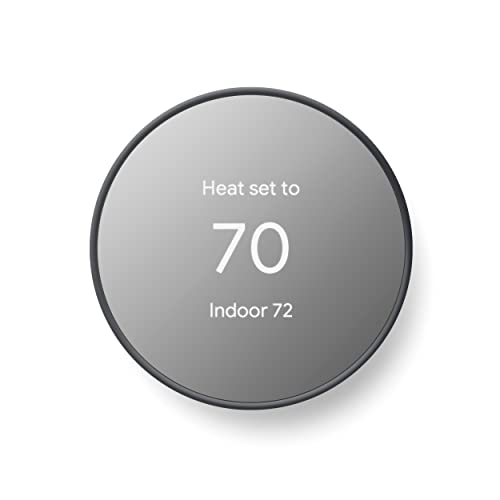
Google Nest Thermostat Charcoal
Honeywell Home RTH9585WF Wi-Fi Smart Color Thermostat

Google Nest Learning Thermostat + Temperature Sensor Obsidian

Google Nest Learning Thermostat + Temperature Sensor Silver

Honeywell Home X2S Smart Thermostat

Sensi Smart Thermostat ST55

Vine Thermostat Touchscreen Color Display
Meet The Standout Selections
A hallway thermostat can miss the temperature in a nursery, office, or upstairs bedroom. Google Nest Temperature Sensor (2nd Gen) adds a separate room measurement to compatible Nest systems, so scheduling can prioritize the space where you spend time.
It runs on battery power, which makes placement more flexible than a wired accessory. The honest read is that this is an add-on, not a wall thermostat, so it suits homes already using a compatible Nest Learning Thermostat or Nest Thermostat E.
The Upside
- Targets comfort decisions around a preferred room.
- Battery operation avoids routing a new wire.
- Scheduling supports different room priorities across the day.
Things To Consider
- Requires a compatible Nest thermostat before it can help.
- Placement matters, so keep it away from direct sun or drafts.
Who It Suits Best
You benefit most when a compatible Nest setup leaves one frequently used room noticeably less comfortable.
Where Another Pick Suits Better
ecobee Smart Thermostat Essential fits better for a full thermostat replacement with touchscreen control.
ecobee Smart Thermostat Essential keeps the daily controls straightforward with a color touchscreen and app access. That combination works well for households that want a set schedule without learning a more involved interface.
Its scheduling adjusts temperatures around home and away periods, a useful routine for regular workdays. Compatibility remains the first task, especially in older homes where existing thermostat wiring varies.
Practical Pluses
- Color touchscreen gives you direct wall control.
- App changes help during travel or irregular workdays.
- Scheduled adjustments reduce repetitive manual changes.
- Software updates can add improvements over time.
Worth Noting
- Check your HVAC system against ecobee compatibility guidance first.
Google Nest Thermostat Charcoal takes a simpler route than the Learning Thermostat bundles later in this list. You get programmable Wi-Fi control and Google Home app access without the included room sensor or learning-focused package.
Remote adjustments make sense for a late commute, a weekend away, or an unexpected change in plans. You may find its self-install approach appealing in a standard setup, though confirming system compatibility remains sensible before removing your current thermostat.
The Case For It
- Remote app access lets you adjust settings away from home.
- Programmable operation supports repeatable daily routines.
Trade Offs
- Internet and Wi-Fi are needed for remote functions.
- It does not include the room sensor bundled with the fourth-generation Learning Thermostat.
- Confirm your heating and cooling system before installation.
Made For
You’ll appreciate this model when straightforward app control matters more than separate room sensing.
Consider Something Else When
Google Nest Learning Thermostat + Temperature Sensor Obsidian suits you better when room-level scheduling is a priority.
A large color touchscreen gives Honeywell Home RTH9585WF a more visual, on-wall experience than Google Nest Thermostat Charcoal. Its customizable screen color can coordinate with surrounding decor, while the seven-day schedule offers separate control across the week.
Auto changeover means the thermostat can switch between heating and cooling based on indoor needs. For homes with distinct weekday and weekend patterns, that level of schedule control may feel worth the added setup time.
Reasons It Performs
- Color touchscreen keeps key adjustments visible at the wall.
- Seven-day programming supports different daily routines.
- Filter and humidifier-pad reminders help organize maintenance tasks.
- Indoor temperature and humidity alerts add useful awareness.
- Screen color customization can blend with your room.
Points To Note
- A C-wire, the common wire that supplies steady thermostat power, is required.
- It does not work with line-voltage heating.
Google Nest Learning Thermostat + Temperature Sensor Obsidian combines a learning thermostat with the room-focused accessory from the first selection. It can learn preferred temperatures as routines shift, while the included sensor gives you a way to account for a room beyond the main thermostat location.
That pairing suits a household with changing work hours and a regularly occupied bedroom or office that runs differently from the hallway. Nothing flashy about the decision: the package is most compelling when you’ll actually use both parts.
Positive Points
- Learning behavior can adapt as household routines change.
- Included sensor supports comfort planning around a selected room.
- App control lets you make adjustments while away.
- Works with many 24-volt heating and cooling systems.
- Most homes can install it without a C-wire.
- Obsidian finish suits darker wall accents.
Softer Spots
- System compatibility still deserves a check before installation.
The Silver bundle has the same fourth-generation Learning Thermostat and second-generation temperature sensor arrangement as the Obsidian version. Your decision between the two comes down largely to finish preference, not a change in heating and cooling capabilities.
Silver can sit more quietly against light paint, brushed hardware, or cooler-toned finishes. For a home with a variable schedule and an uncomfortable upstairs space, the learning controls and sensor remain the reason to choose it.
A Few Highlights
- Includes a separate sensor for a preferred room.
- Learning controls can follow changes in your routine.
- App access supports away-from-home adjustments.
- Compatible with many 24-volt system types.
Small Caveats
- Remote control depends on a working internet and Wi-Fi connection.
- Choose Silver for your wall finish, since functions match the Obsidian bundle.
- Confirm compatibility for your exact HVAC equipment.
Right Fit For
You’ll get the most from this bundle in a light-toned home with a changing schedule and a problem room.
Not Your Match When
Google Nest Thermostat Charcoal makes more sense for a simpler Nest-based replacement without an included sensor.
Honeywell Home X2S Smart Thermostat stands apart through Matter support, a common smart-home connection standard designed to help compatible platforms work together. That matters in homes where your household already uses more than one connected-home ecosystem.
It supports conventional systems up to two heat and two cool stages, plus heat pumps up to two heat and one cool stage. Interchangeable white and gray accent pieces are a small touch, but they can help a thermostat look more intentional on the wall.
Noteworthy Benefits
- Matter support broadens compatible connected-home options.
- Flexible scheduling fits regular weekday patterns.
- Auto-away can adjust settings around household absences.
- Indoor humidity monitoring adds useful room context.
- Filter reminders keep a basic maintenance task visible.
Areas To Watch
- Check system staging before installation, especially with a heat pump.
- The decorative pieces are white and gray, limiting color choices.
- Remote use requires a Wi-Fi connection.
Sensi Smart Thermostat ST55 brings a practical installation angle, with a built-in level and app-guided setup. That makes it especially approachable for your first thermostat replacement, where keeping the wall plate straight can remove one small source of frustration.
Unlike Honeywell Home X2S Smart Thermostat, its appeal is less about multi-platform connection standards and more about guided installation. The privacy policy around personal information is also notable for households that want clear limits on third-party data sharing.
Advantages To Know
- Built-in level helps you align the thermostat on the wall.
- Step-by-step app instructions support DIY installation.
- Wi-Fi control lets you change settings beyond the home.
Honest Caveats
- Check HVAC compatibility before starting a replacement.
- Remote adjustments depend on your home Wi-Fi connection.
Built With In Mind
You’ll appreciate this choice most when replacing a thermostat yourself for the first time.
A Better Fit Elsewhere
Honeywell Home RTH9585WF Wi-Fi Smart Color Thermostat suits you better for a color touchscreen and detailed weekly programming.
Vine Thermostat Touchscreen Color Display offers a detailed seven-day plan with up to eight periods per day. That is a meaningful advantage for homes where mornings, school runs, work hours, and evenings all call for different settings.
The 2.8-inch color touchscreen keeps controls concentrated in a compact display. It requires a C-wire, so your installation decision starts with checking the existing thermostat cable rather than choosing a schedule pattern first.
Positive Takeaways
- Up to eight daily periods allow detailed routine planning.
- Color touchscreen provides direct wall adjustments.
- Auto home and away mode can support changing occupancy.
- Filter reminders keep maintenance tasks visible.
Practical Considerations
- A C-wire is required for installation.
- Run the compatibility check before removing your existing thermostat.
- The smaller display may suit concise controls more than information-heavy screens.
- Confirm your system falls within its supported conventional or heat-pump configurations.
What Matters Before Installing a Wi-Fi Thermostat
Start With Your HVAC Wiring
Your existing thermostat wiring determines much of the shortlist. A C-wire supplies continuous power to many Wi-Fi models, while some Nest models can work without one in most homes. Take a clear photo of your current wire terminals before selecting a replacement.
Match the System Type
Conventional furnaces and air conditioners, heat pumps, radiant setups, and line-voltage heating do not use the same compatibility rules. System stages describe separate heating or cooling output levels, so a two-stage setup needs thermostat support for those stages. Check your equipment type before focusing on screen style or app functions.
Choose the Right Scheduling Style
Seven-day schedules suit households with different weekday and weekend patterns. Auto-away settings can help homes that are empty at predictable times, while learning controls better fit routines that move around. A room sensor is most useful where the main thermostat location does not represent the space you use most.
Decide How You’ll Control It
A touchscreen favors quick adjustments at home. App control helps during trips or irregular commutes, though it relies on working Wi-Fi. Matter support can be useful where your connected-home setup includes compatible platforms from different brands.
Small Details That Shape Ownership
Common Shopping Slip Ups
Do not assume every Wi-Fi thermostat works with every heating setup. Check for a C-wire, system stages, and line-voltage limits before removing your old unit.
Where The Extra Money Goes
Higher-tier models often add learning schedules, room sensors, broader system support, or more detailed on-wall displays. Spending more makes sense when those added controls match a real comfort problem in your home.
Frequently Asked Questions
Does a Wi-Fi thermostat need internet access?
Internet access is needed for remote app control and connected features. Local temperature control may still be available at the thermostat itself.
What is a C-wire?
A C-wire is a common wire that supplies steady power to a thermostat. Many Wi-Fi models require one, so check your existing wiring before installation.
Can a Wi-Fi thermostat work with a heat pump?
Many can, but heat-pump support varies by model and system stage. Confirm the thermostat’s stated heat-pump limits against your equipment.
Are room sensors useful with a thermostat?
Room sensors help when the main thermostat does not reflect a bedroom, office, or upstairs area. They are most useful in homes with noticeable room-to-room temperature differences.
Can you control a Wi-Fi thermostat while away?
Yes, supported models let you adjust settings through their companion app. You need a functioning internet connection and home Wi-Fi for remote access.
