

Like the trusty tools in a sailor’s chest, I’ve gathered seven HomeKit accessories that make a smart home feel reliable and effortless. I’ll walk you through switches, lighting, climate control, and a secure smart lock that actually simplifies daily life. There’s practical tech here, not gimmicks, and a few choices might surprise you—stick around to see which ones suit your setup.
meross Smart Light Switch for HomeKit, Alexa, Google
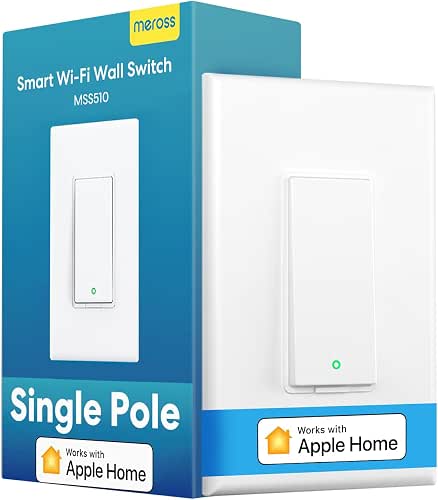
Should you want a straightforward way to make standard lights smart, the meross Smart Light Switch is ideal — it brings HomeKit, Alexa, and Google control to a single-pole circuit without a hub, letting you use Siri, voice assistants, or scheduled automations to run lights from anywhere (with an Apple Home hub for remote HomeKit access). You’ll need a neutral wire and 2.4GHz Wi‑Fi; installation takes under 15 minutes and fits Decora faceplates. It’s single‑pole only, 110–120V, 4A/400W, SPST, and supports scheduling, timers, and energy saving. Data uses AWS US servers; one‑year warranty and photo‑based support are available.
Best For: Homeowners or renters who want an easy, budget-friendly way to convert single‑pole household lights to smart control with HomeKit/Alexa/Google without needing a hub.
Pros:
- Works with HomeKit, Alexa, Google Assistant, and SmartThings for broad voice and automation support.
- Quick, under‑15‑minute installation that fits standard Decora faceplates and requires no hub.
- Scheduling, timers, and remote control (with Home hub) enable energy savings and convenient automation.
Cons:
- Requires a neutral wire and only supports single‑pole (not 3‑way) installations.
- Operates on 2.4GHz Wi‑Fi only and has a modest 4A/400W rating, limiting high‑load fixtures.
- HomeKit remote access needs an Apple Home hub (HomePod/Apple TV) that must stay online.
Meross Smart Power Strip with 4 AC, 4 USB

Should you need a compact, HomeKit-ready power hub that charges multiple devices at once, the Meross Smart Power Strip is a great pick — you get four individually controlled AC outlets plus four grouped USB ports providing up to 4.0A for phones, tablets, and more. It includes a 6ft cord and works with HomeKit (iOS 13+), Siri, Alexa, Google Home, and SmartThings. For HomeKit remote access you’ll need a HomePod, Apple TV, or iPad. Set schedules, timers, and sunrise/sunset rules to save energy. Built from ETL/FCC-certified flame-retardant material, it supports devices up to 15A for added safety.
Best For: users who want a compact, HomeKit-ready power hub to charge and control multiple devices (AC and USB) with voice assistants and scheduling features.
Pros:
- Four individually controlled AC outlets plus four USB ports (up to 4.0A) let you power and charge several devices simultaneously.
- Wide smart-home compatibility (HomeKit, Siri, Alexa, Google Home, SmartThings) and no hub required for most functions.
- Scheduling, timers, and sunrise/sunset rules help automate usage and save energy; built with ETL/FCC-certified flame-retardant material for safety.
Cons:
- HomeKit remote access requires a HomePod, Apple TV, or iPad acting as a bridge for off-network control.
- USB ports are group-controlled (not individually), limiting per-port management.
- Requires a 2.4GHz or dual-band WiFi network; may face connectivity limits on crowded networks.
Kasa Smart Ceiling Fan & Dimmer Switch (KS240)

Should you want precise, app-controlled comfort for both fan and light, the Kasa KS240 is a strong pick — it gives you four fan speeds and dimmable lighting you can set from the Kasa or Apple HomeKit apps. You’ll control fan speed and brightness remotely or with voice via HomeKit, Alexa, or Google Assistant. Schedule and automate routines for comfort and security, including away mode. Installation needs a neutral wire and standard wall plate; the app guides wiring so you don’t need electrician-level knowledge. Keep in mind it works on 2.4GHz Wi‑Fi only. It’s a straightforward upgrade for smarter ceiling fan and light control.
Best For: Homeowners or renters who want app- and voice-controlled ceiling fan and dimmable lighting with simple app-guided installation and scheduling.
Pros:
- Four adjustable fan speeds and dimmable lighting controllable via Kasa or Apple HomeKit apps for precise comfort.
- Works with Alexa and Google Assistant for voice control and supports scheduling/away automation for convenience and security.
- App-guided wiring simplifies installation (requires neutral wire) without needing advanced electrical knowledge.
Cons:
- Requires a neutral wire, which may not be present in older homes and could necessitate electrician work.
- Operates on 2.4GHz Wi‑Fi only, so it won’t work on 5GHz-only networks without router adjustment.
- No physical master/auxiliary wiring simplification for complex multi-switch setups—may not suit every existing wiring configuration.
SwitchBot RGB Floor Lamp with Matter (Smart)

Should you want a versatile, hub-free lamp that works natively with Apple Home and other voice assistants, the SwitchBot RGB Floor Lamp with Matter is a smart pick—its Matter support lets you control color, temperature, and brightness via Apple Home, Alexa, or Google Assistant without extra hardware. You’ll also use the SwitchBot app or included remote for direct control. With separate RGB, warm (2700K), and cool (6500K) LEDs, 1200 lumens, 16 million colors, preset scenes, DIY modes, music sync, and scene shortcuts, it adapts to movie nights, gaming, or ambient tasks. Place it vertically or horizontally and pair it with SwitchBot sensors for automated lighting.
Best For: tech-savvy homeowners and renters who want a versatile, hub-free smart floor lamp that integrates natively with Apple Home, Alexa, and Google Assistant while offering rich color, temperature, and automation features.
Pros:
- Native Matter support for direct voice control across Apple Home, Alexa, and Google Assistant without a hub.
- Wide lighting customization: separate RGB, warm (2700K) and cool (6500K) LEDs, 1200 lumens, 16 million colors, preset scenes and DIY modes.
- Music sync and compatibility with SwitchBot sensors for immersive scenes and automated on/off with motion.
Cons:
- Advanced features (scenes, automations) may require use of the SwitchBot app and ecosystem for best experience.
- May be overkill for users who only need simple white light or basic on/off control.
- Physical placement options (vertical or horizontal) may not suit all room layouts or decor preferences.
meross Smart Wi‑Fi Thermostat (Matter, Alexa, HomeKit)

Looking for a smart thermostat that plays nicely with nearly every modern HVAC setup? You’ll like the meross Smart Wi‑Fi Thermostat. It supports about 95% of systems—heat pumps, ACs, furnaces, boilers, humidifiers and dehumidifiers—though it won’t work with electric baseboard heaters, millivolt, or two‑wire systems; some setups need a C‑wire. It’s Matter‑certified for local HomeKit, Alexa, Google Home, Home Assistant and SmartThings control, plus app and voice access remotely. You get 24/7 scheduling, usage tracking, filter and fault alerts, a sleek glass black or white face, guided setup, and phone/chat/email support.
Best For: Homeowners with modern multi-stage HVAC systems who want Matter‑certified smart control (HomeKit/Alexa/Google/Home Assistant/SmartThings) and energy‑saving scheduling, provided their system has a compatible C‑wire.
Pros:
- Broad compatibility with ~95% of HVAC systems (heat pumps, ACs, furnaces, boilers, humidifiers/dehumidifiers).
- Matter‑certified for local integration with HomeKit, Alexa, Google Home, Home Assistant, and SmartThings plus app and voice remote control.
- 24/7 scheduling, usage tracking, and smart alerts (filter life, system faults) to optimize comfort and energy use.
Cons:
- Not compatible with 110/120/240V electric baseboard heaters, millivolt, or two‑wire systems.
- Some wiring configurations require a C‑wire, which may need professional installation or an adapter.
- No built‑in support for legacy/two‑wire setups, limiting use in older homes without electrical upgrades.
Kasa KS220 Apple HomeKit Smart Dimmer Switch
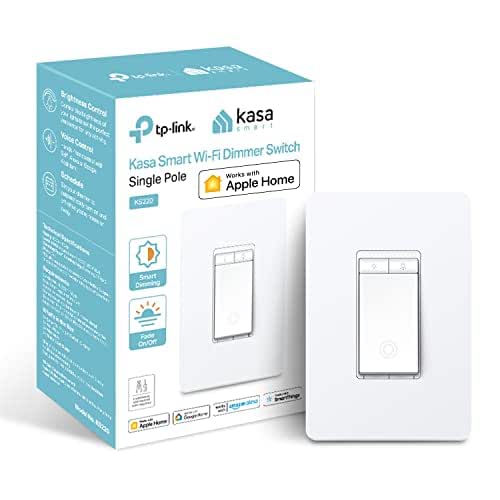
Should you want a HomeKit-ready dimmer that drops right into a standard wall plate and runs without a hub, the Kasa KS220 is a great pick — it supports Siri, Alexa, and Google Assistant, needs only 2.4 GHz Wi‑Fi, and offers useful features like Gentle Off and Away Mode while requiring a neutral wire for installation. You’ll get UL certification, push-button touch control, and app-based scheduling via the free Kasa app. It fits standard plates, handles 100–120 VAC at 2.5 A, and replaces most single-pole switches. For HomeKit remote access you’ll need a HomePod or Apple TV on the network.
Best For: HomeKit users and smart-home beginners who want a hub-less, wall-plate compatible dimmer that supports Siri (plus Alexa/Google), app scheduling, and basic automation for single-pole residential lighting.
Pros:
- Works natively with Apple HomeKit (also supports Alexa and Google Assistant) and connects directly over 2.4 GHz Wi‑Fi with no hub required.
- Useful features like Gentle Off, Away Mode, and scheduling via the free Kasa app, with UL certification and push-button touch control.
- Fits standard wall plates, replaces most single-pole switches, and is compact with guided in-app installation.
Cons:
- Requires a neutral wire, which may not be present in older homes and can complicate installation.
- Limited to 2.5 A and single-pole circuits, so not suitable for high-load fixtures or 3-way installations.
- HomeKit remote control requires an additional on-network Apple device (HomePod or Apple TV) for access when away from home.
HomeKit Thread Smart Fingerprint Keypad Door Knob

Should you want a compact, secure smart lock that plays nicely with Apple Home and Thread, the ThorBolt MK1 Titanium is a top pick — it lets you open with Siri, a fingerprint, passcode, the app, or a backup key while supporting up to 50 users and 100 fingerprints. You’ll get Thread HomeKit integration for Siri and automations (requires a Thread-enabled hub within 33 feet) and manage access in the Sleekpoint app with real-time status, 100 passcodes, and firmware updates. The zinc-alloy, ambidextrous design resists water, fits most US doors, installs with a screwdriver, runs on four AA cells, and has Type‑C backup power.
Best For: HomeKit users who want a compact, user-friendly smart lock for interior doors (bedrooms, offices, rentals) that supports Thread, multiple access methods, and local fingerprint storage.
Pros:
- Thread-based HomeKit integration for Siri, automations, and remote control when a Thread-enabled hub is within 33 feet.
- Multiple unlocking options (fingerprint, passcode, Siri, app, backup key) with support for up to 50 users, 100 passcodes, and 100 fingerprints.
- Durable zinc-alloy construction, ambidextrous ergonomic handle, easy DIY installation, long AA battery life, and Type-C backup power.
Cons:
- Requires a Thread-enabled Apple home hub and iOS for full functionality (no Android/HomeKit alternatives).
- Batteries not included and may need replacement after about a year depending on use.
- Designed for interior doors only, so it may not be suitable for exterior/outdoor use or heavy-duty security needs.
Factors to Consider When Choosing Homekit
As you pick HomeKit accessories, I look initially at device compatibility to make sure everything will actually work together. I also check networking needs, power and wiring, voice assistant support, and the security and privacy features that protect my home. Keep those factors in mind and you’ll avoid costly surprises down the road.
Device Compatibility
Before I pick a HomeKit accessory, I initially confirm it actually supports Apple HomeKit so it’ll work seamlessly with Siri and the Home app. I also check whether it needs a specific HomeKit bridge—HomePod or Apple TV, for example—to enable remote access and automation. I verify supported control methods: native app control, voice commands through Siri, and scheduling within the Home ecosystem. Installation needs matter too; some smart switches require a neutral wire or special mounting, so I inspect wiring and physical requirements before buying. Finally, I confirm supported Wi‑Fi bands—many devices rely on 2.4 GHz for stable connections—and make certain those constraints fit my home setup so the accessory performs reliably.
Networking Requirements
When I pick HomeKit accessories, I pay close attention to networking requirements because they determine whether devices stay responsive and automations run reliably. I look for devices that support stable 2.4GHz Wi‑Fi, since many HomeKit products don’t handle 5GHz. I also confirm where the HomeKit hub or bridge will sit on my LAN; the hub and accessories must share the same network segment for seamless communication. Remote control depends on a bridge staying online and connected to Wi‑Fi, so I plan for reliable placement and monitoring. Because HomeKit relies on local connectivity, any Wi‑Fi outage or bridge downtime can break automations. Finally, I secure my home Wi‑Fi—strong passwords, updated firmware, and network isolation where appropriate.
Power And Wiring
When I pick HomeKit switches and dimmers, I always check the wiring and power requirements because installation mistakes are the most common reason smart gear fails to work. I verify whether a neutral wire is required—many smart switches and dimmers need it to function reliably. I confirm the circuit is standard 110–120V and whether the device supports single-pole or multi-way (3-way) setups; multi-way compatibility is often limited. I also match terminal types—clamp versus screw—to my existing wiring and make certain the device fits standard wall plate sizes. Finally, I check connectivity: most HomeKit switches use 2.4GHz Wi‑Fi and don’t support 5GHz, so network placement matters for stable operation.
Voice Assistant Support
Wiring and power will only get you so far in case you can’t actually control the devices smoothly, so I also look closely at voice assistant support while choosing HomeKit gear. I value hands-free control because it makes daily routines faster and more accessible. I check compatibility with Siri initially, then whether a device also plays nicely with Alexa or Google Assistant for broader integration. I confirm whether a hub or bridge is required for remote access and extended features so I’m not surprised by extra hardware. Responsiveness and accurate command recognition matter a lot; lag or misinterpretation ruins the experience. Finally, I prefer devices that support advanced voice features—automation triggers or personalized responses—to make interactions feel smarter and more useful.
Security And Privacy
Because your smart home holds personal routines and sensitive data, I prioritize security and privacy during picking HomeKit accessories. I look for devices that use HomeKit’s encryption and, whenever feasible, keep sensitive data locally rather than pushing everything to the cloud. Remote control is convenient but requires a hub that stays online; I choose hubs from vendors that use Apple’s secure AWS-backed infrastructure for transmission and storage. I also require strong user authentication—biometrics, passcodes, or voice recognition—to prevent unauthorized access. End-to-end encryption support and Apple’s strict app review give me added confidence that third-party apps won’t leak data. In short, I favor accessories designed to minimize cloud exposure and maximize built-in HomeKit protections.
Automation Capabilities
Strong security and thoughtful privacy controls are essential, but automation is what really makes a HomeKit setup feel smart and useful. I rely on scheduling to have lights and plugs switch on or off at set times, and triggers tied to sunrise or sunset keep things aligned with daylight automatically. I build scenes that adjust multiple devices at once—lighting, shades, and thermostats—to create instant ambiance or morning routines. Geofencing means devices react once I arrive or leave, which is incredibly convenient. Motion and contact sensors let lights and cameras activate only once needed. Keep in mind that advanced remote automations usually need a home hub like HomePod or Apple TV, so factor that into any setup provided you want full functionality and remote access.
Energy Efficiency Features
Should I evaluate HomeKit devices, energy efficiency is near the top of my checklist because it affects both bills and environmental impact; features like scheduling, timers, and energy monitoring let me automate power use and spot wasteful devices. I look for precise scheduling and sunrise/sunset triggers so lights and outlets only run whenever needed, and timers that shut things off after short tasks. Energy-monitoring plugs and app dashboards let me track consumption remotely, identify power hogs, and confirm savings. I rely on automations to control lighting and appliances—like closet or garage lights—to avoid wasted runtime. Integration with HomeKit thermostats gives me 24/7 temperature schedules tied to occupancy. Remote control rounds out management allowing me to shut down forgotten devices.
Installation Complexity
Once I evaluate HomeKit gear I start with checking how hard it’ll be to install in my house, since things such as missing neutral wires or multi-way switch setups can turn a quick swap into a weekend project. I initially confirm whether the device needs a neutral—older homes often lack one, and adding it complicates things. I also check whether my switches are single-pole; many smart switches don’t support multi-way or 3-way setups without extra modules. I verify Wi‑Fi requirements too: most HomeKit devices use 2.4GHz only, so 5GHz-only networks won’t work. As soon as wiring is standard, installation often takes about 15 minutes. I rely on guided setups and vendor support in case I hit snags.
