

You want the most gaming performance for your money, without unnecessary frills. Here are four smart picks that do just that—from a compact Ryzen 9 mini system to a budget-ready OptiPlex—each tuned for different needs and budgets. I’ll analyze what makes each one stand out and where they compromise, so you can spot the best fit for your setup and playstyle.
| GMKtec Mini Gaming PC Ryzen 9 8945HS (K11) |

| Performance Powerhouse | Processor: AMD Ryzen 9 8945HS (8c/16t, up to 5.4 GHz) | Graphics: Integrated/APU-class GPU (Ryzen 9 8945HS) with external GPU support via OCuLink | Memory (RAM): 32 GB DDR5 (2×16GB) 5600 MHz, expandable to 96 GB | VIEW LATEST PRICE | Read Our Analysis |
| Prebuilt Gaming PC — Ryzen 5 5600 RTX 3050 |

| Best Value Midrange | Processor: AMD Ryzen 5 5600 (6c/12t, up to 4.4 GHz) | Graphics: NVIDIA GeForce RTX 3050 (6 GB GDDR6) | Memory (RAM): 32 GB DDR4 3200 MHz (dual-channel) | VIEW LATEST PRICE | Read Our Analysis |
| Thermaltake LCGS View i570-170 Gaming Desktop (i9 RTX 5070) |

| Enthusiast Beast | Processor: Intel Core i9-14900KF | Graphics: NVIDIA GeForce RTX 5070 | Memory (RAM): 32 GB DDR5 6000 MT/s RGB | VIEW LATEST PRICE | Read Our Analysis |
| Dell OptiPlex Gaming Desktop i7 RX 550 (Renewed) |
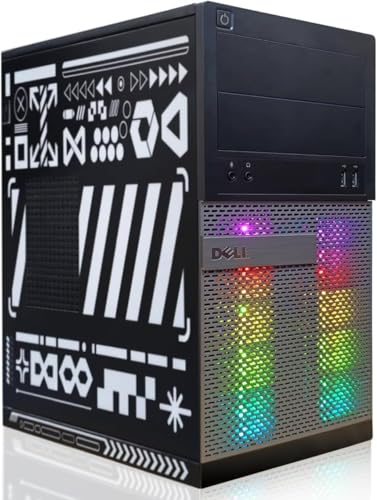
| Budget Starter | Processor: Intel Core i7 (quad-core, up to 3.9 GHz) | Graphics: AMD Radeon RX 550 (4 GB) | Memory (RAM): 16 GB RAM | VIEW LATEST PRICE | Read Our Analysis |
More Details on Our Top Picks
GMKtec Mini Gaming PC Ryzen 9 8945HS (K11)
Should you want a compact powerhouse that handles gaming, streaming, and creative work without breaking the bank, the GMKtec K11 delivers—its AMD Ryzen 9 8945HS (8 cores/16 threads, up to 5.4 GHz) plus 32GB DDR5 and a 2TB PCIe 4.0 SSD gives you desktop-class performance in a mini chassis, with upgrade paths for more RAM, storage, and even an eGPU via OCuLink. You’ll get dual USB4-C DisplayPort, HDMI 2.1 (8K@60Hz), and four-screen support, plus dual 2.5Gbps Intel NICs, Wi‑Fi 6, and Bluetooth 5.2. Metal case, dual fans, removable lid, and a one-year warranty round it out.
- Processor:AMD Ryzen 9 8945HS (8c/16t, up to 5.4 GHz)
- Graphics:Integrated/APU-class GPU (Ryzen 9 8945HS) with external GPU support via OCuLink
- Memory (RAM):32 GB DDR5 (2×16GB) 5600 MHz, expandable to 96 GB
- Storage:2 TB M.2 2280 PCIe 4.0 SSD installed; dual-slot support (up to 2×2 TB)
- Cooling Solution:Dual-fan design with upgraded copper base and removable lid
- Connectivity (Networking & I/O):Dual Intel i226V 2.5 Gbps NICs, Wi‑Fi 6, Bluetooth 5.2; USB4/USB-C, HDMI 2.1, DisplayPort
- Additional Feature:OCuLink external GPU port
- Additional Feature:Removable rotating lid
- Additional Feature:Dual 2.5Gbps NICs
Prebuilt Gaming PC — Ryzen 5 5600 RTX 3050
Should you want solid 1080p gaming without overspending, this prebuilt is a smart pick: the Ryzen 5 5600 and RTX 3050 combo gives you reliable frame rates and ray-tracing entry-level effects, backed with 32 GB of RAM and a 1 TB NVMe for smooth multitasking and fast load times. You’ll get a 6-core, 12-thread CPU boosting to 4.4 GHz on an MSI A520M-A PRO board, plus a 6 GB GDDR6 RTX 3050. The case includes five 120 mm ARGB fans, intelligent temperature management, Wi‑Fi/Bluetooth, and a 550 W 80 Plus Bronze PSU. Contact the seller for shipping or foam removal issues.
- Processor:AMD Ryzen 5 5600 (6c/12t, up to 4.4 GHz)
- Graphics:NVIDIA GeForce RTX 3050 (6 GB GDDR6)
- Memory (RAM):32 GB DDR4 3200 MHz (dual-channel)
- Storage:1 TB M.2 NVMe PCIe SSD
- Cooling Solution:Five 120 mm ARGB fans with intelligent temperature management
- Connectivity (Networking & I/O):Wi‑Fi and Bluetooth; rear I/O with USB ports (standard); GPU video outputs (varies)
- Additional Feature:Five 120mm ARGB fans
- Additional Feature:550W 80 Plus Bronze
- Additional Feature:Shock-absorbing packaging foam
Thermaltake LCGS View i570-170 Gaming Desktop (i9 RTX 5070)
Should you want a high-end gaming rig that balances flagship CPU performance with a mid-high tier GPU, the Thermaltake LCGS View i570-170 is a smart pick—its Intel Core i9-14900KF and liquid-cooled 240mm radiator keep demanding games and streaming workloads running smoothly while the RTX 5070 delivers excellent 1440p frame rates. You get 32GB DDR5-6000 RGB memory and a 1TB NVMe M.2 for fast multitasking and storage. The B760 board provides solid fundamentals, while DisplayPort and HDMI cover monitors. It includes WiFi, Windows 11, basic front/rear I/O, and thoughtful PSU ventilation for cooler, quieter operation.
- Processor:Intel Core i9-14900KF
- Graphics:NVIDIA GeForce RTX 5070
- Memory (RAM):32 GB DDR5 6000 MT/s RGB
- Storage:1 TB NVMe M.2 SSD
- Cooling Solution:Closed-loop liquid cooling (240 mm radiator)
- Connectivity (Networking & I/O):Wi‑Fi; rear/front I/O including USB 3.0, DisplayPort and HDMI
- Additional Feature:240mm AIO liquid cooler
- Additional Feature:RGB ToughRam memory
- Additional Feature:PSU cover with ventilated side-mount
Dell OptiPlex Gaming Desktop i7 RX 550 (Renewed)
Provided that you’re after a budget-friendly rig that still handles popular esports and open-world titles at playable settings, the renewed Dell OptiPlex Gaming Desktop with an Intel Core i7 and Radeon RX 550 gives you that balance of CPU power and a 4 GB GPU without breaking the bank. You get a professionally inspected, tested unit that’s cleaned and repackaged, plus Windows 11 Pro preinstalled. Specs include a quad-core i7 up to 3.9 GHz, 16 GB RAM, and a 512 GB SSD. RGB front lighting, keyboard and mouse are included, and connectivity offers Wi‑Fi 600M and Bluetooth 5.0.
- Processor:Intel Core i7 (quad-core, up to 3.9 GHz)
- Graphics:AMD Radeon RX 550 (4 GB)
- Memory (RAM):16 GB RAM
- Storage:512 GB SSD
- Cooling Solution:(Refurbished desktop) active cooling (internal fans); RGB-front ventilation — standard air cooling
- Connectivity (Networking & I/O):Wi‑Fi (600M), Bluetooth 5.0; front RGB, USB ports; Windows 11 Pro installed
- Additional Feature:Included RGB keyboard/mouse
- Additional Feature:Remote-controlled front RGB
- Additional Feature:Professionally refurbished condition
Factors to Consider When Choosing a Value Gaming Pc
Whenever you’re hunting for a value gaming PC, focus on performance per dollar so you get the most frame rates for your budget. Consider upgradeability and longevity—can you swap in a better GPU or more RAM later—and balance GPU versus CPU to match the games you play. Also check cooling and noise levels plus the available connectivity and ports so the system stays quiet, cool, and compatible with your peripherals.
Performance Per Dollar
Start via crunching the cost-to-frame-rate ratio—divide the total system price via expected FPS in your target games (e.g., $/FPS at 1080p) to get a clear, comparable metric of performance per dollar. Use benchmark databases and price trackers to convert raw FPS into normalized scores and historical $/benchmark trends so you spot real bargains. Favor balanced CPU/GPU pairs—put more budget into the GPU for 1080p, but don’t skimp on a CPU with at least 6 cores/12 threads to avoid bottlenecks during modern titles and streaming. Match memory and storage to needs: 16–32GB RAM and an NVMe SSD deliver the best load-time and multitasking value. Finally, check upgrade headroom so initial savings don’t cost you later.
Upgradeability And Longevity
After you’ve balanced performance per dollar, consider about how long that value will last—upgradeability and longevity determine whether today’s bargain becomes tomorrow’s obsolete rig. Pick a motherboard with current-generation CPU socket support, at least one M.2 PCIe 4.0 slot and extra SATA ports so faster SSDs and more drives fit later. Prioritize dual-channel RAM and spare DIMM slots to grow from 16–32GB to 64–96GB as needed. Check PSU wattage, efficiency (80 Plus Bronze or better) and available PCIe power connectors to handle future GPUs. Choose a case with spare drive bays, accessible expansion slots and strong airflow supporting bigger coolers or radiators. Finally verify I/O and internal expansion—multiple USB, USB-C/DisplayPort lanes and PCIe x16/x4 slots—for peripheral and performance flexibility.
GPU Versus CPU Balance
Consider the GPU and CPU as teammates: the GPU usually drives frame rates and visuals, so prioritize a stronger GPU for most modern games, but pair it with a CPU that has enough cores, threads and single‑thread speed to avoid bottlenecks—typically 6–8 cores for midrange cards and 8+ cores for flagship GPUs. You should allocate roughly 50–70% of your budget to the GPU and 20–30% to a competent CPU. Match core/thread counts (e.g., 6c/12t–8c/16t for midrange) and favor higher turbo clocks should you chase esports‑level framerates. Consider your target resolution and settings: CPU impact rises in low‑res, high‑Hz, or simulation/AI workloads. Finally, pick a platform with CPU socket and PCIe lane headroom so future GPU upgrades won’t be held back.
Cooling And Noise Levels
Good cooling keeps performance predictable and noise tolerable, so you should match active cooling to component heat and plan airflow from day one. Choose air coolers or AIOs rated for your CPU/GPU TDP—65–125W for mainstream CPUs, higher for boosted chips—to avoid thermal throttling. Inspect case airflow: aim for front intake and rear/top exhaust with at least two 120 mm fans rather than a single-fan layout. Compare fan RPM and dBA; expect 30–45 dBA under load and prefer larger fans or low-noise models to reduce perceived sound. Make sure GPU and PSU have unobstructed intake/exhaust paths so hotspots and PSU fan strain don’t spike noise. Use quality bearings and PWM/fan curves to balance cooling capacity with acoustic targets.
Connectivity And Ports
Why check your PC’s ports before you buy? You need the right outputs to drive modern displays—at least one HDMI 2.1 or DisplayPort 1.4+ for 4K@120Hz or 8K@60Hz. Also verify multiple USB types: USB-A 3.2 Gen1/2 for peripherals and fast external drives, plus USB-C/USB4 for display output, power delivery, and high-bandwidth accessories. Confirm wired and wireless networking: a dedicated Ethernet port (1Gbps or 2.5Gbps) plus Wi‑Fi 6/6E and Bluetooth 5.x to keep online play low-latency. Check audio/mic jacks or optical/SPDIF and front-panel ports for headsets and streaming gear. Finally, inspect internal expansion—PCIe lanes, M.2 slots, and Thunderbolt/OCuLink options—to support future GPUs or NVMe upgrades.
