

A smart plug is like a quiet conductor, cueing your home’s devices whenever to perform. You’ll use them to save energy, shore up security, and automate daily routines with minimal fuss. They’ll let you power-cycle stubborn gadgets, manage high-draw setups safely, and tie into Matter or Thread for instant local control. Stick around to see seven practical setups and the best models that make them work.
| Kasa Smart Plug Mini 15A 4-Pack (EP10P4) |

| Best Compact Pick | Wi‑Fi Connectivity: 2.4 GHz Wi‑Fi (no hub) | Voice Assistant Support: Amazon Alexa, Google Assistant (also SmartThings, IFTTT, vera) | Individual On/Off Control: On/off control (app, schedules, timers, Away Mode) | VIEW LATEST PRICE | Read Our Analysis |
| Kasa Smart KP303 Power Strip with USB Ports |
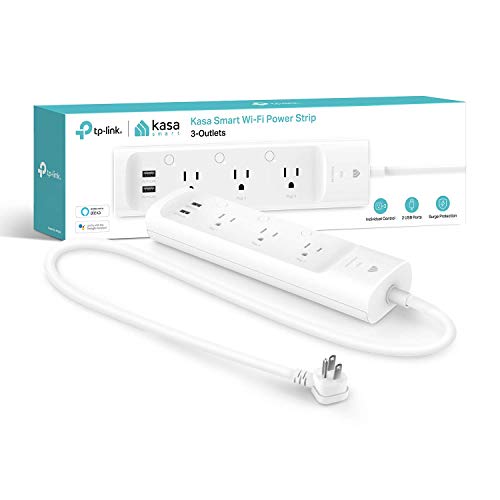
| Best Power Hub | Wi‑Fi Connectivity: Wi‑Fi (2.4 GHz, no hub) | Voice Assistant Support: Alexa, Google Assistant, Microsoft Cortana | Individual On/Off Control: Individual on/off control for each of 3 outlets (app, schedules) | VIEW LATEST PRICE | Read Our Analysis |
| Govee Dual Smart Plug 2-Pack (WiFi & Bluetooth) |

| Best Space-Saver | Wi‑Fi Connectivity: Wi‑Fi (2.4 GHz) + Bluetooth (no hub) | Voice Assistant Support: Alexa, Google Assistant | Individual On/Off Control: Independent control per socket (app & voice) | VIEW LATEST PRICE | Read Our Analysis |
| Feit Smart Wi‑Fi Indoor Plug for Alexa & Google |

| Best Heavy‑Duty Option | Wi‑Fi Connectivity: 2.4 GHz Wi‑Fi (no hub) | Voice Assistant Support: Amazon Alexa, Google Assistant | Individual On/Off Control: On/off control (app, schedules, routines) | VIEW LATEST PRICE | Read Our Analysis |
| Eve Energy Matter Smart Plug (2-Pack) |

| Best for Apple Users | Wi‑Fi Connectivity: Matter over Thread (primary) and lists Wi‑Fi entry (requires border router for Thread) | Voice Assistant Support: Apple Home, Amazon Alexa, Google Home, SmartThings (via Matter) | Individual On/Off Control: On/off control via app/voice/Matter | VIEW LATEST PRICE | Read Our Analysis |
| Meross Smart Plug Mini 15A (4-Pack) |
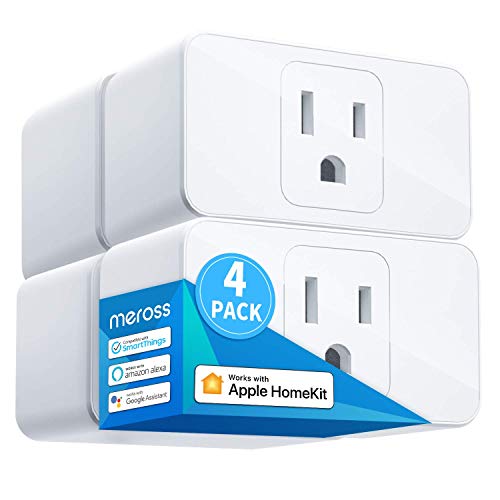
| Best HomeKit Value | Wi‑Fi Connectivity: 2.4 GHz Wi‑Fi (no hub) | Voice Assistant Support: Alexa, Google Assistant, Apple HomeKit/Siri (HomeKit compatibility) | Individual On/Off Control: App on/off control and automation (schedules, timers) | VIEW LATEST PRICE | Read Our Analysis |
| Amazon Basics Smart Plug Power Strip with USB-C |

| Best for Alexa Enthusiasts | Wi‑Fi Connectivity: 2.4 GHz Wi‑Fi (hub‑free, Alexa integration) | Voice Assistant Support: Works with Alexa (Alexa‑only integration) | Individual On/Off Control: Individually controlled outlets (6 outlets on/off via app/Alexa) | VIEW LATEST PRICE | Read Our Analysis |
More Details on Our Top Picks
Kasa Smart Plug Mini 15A 4-Pack (EP10P4)
Provided that you want a compact, no‑hub smart plug that reliably handles heavier household devices, the Kasa Smart Plug Mini 15A 4‑pack (EP10P4) is a strong choice—its 15A/1800W rating makes it suitable for fans, humidifiers, holiday lights and other small appliances while still leaving the second socket accessible. You’ll connect these ultra‑compact units into standard outlets, control devices via the Kasa app or voice with Alexa and Google Assistant, and set schedules, timers or Away Mode over 2.4 GHz Wi‑Fi. They’re UL certified, flame‑retardant, backed by a two‑year warranty, and come four per pack.
- Wi‑Fi Connectivity:2.4 GHz Wi‑Fi (no hub)
- Voice Assistant Support:Amazon Alexa, Google Assistant (also SmartThings, IFTTT, vera)
- Individual On/Off Control:On/off control (app, schedules, timers, Away Mode)
- Scheduling & Timers:Schedules, timers, countdowns, Away Mode
- 15A / 1800–1875W Capacity:15A max; 1800 watts
- Compact / Multi‑Outlet Design:Ultra‑compact single smart plug (4‑pack)
- Additional Feature:Ultra-compact design
- Additional Feature:Away Mode simulation
- Additional Feature:PCMag Reader’s Choice
Kasa Smart KP303 Power Strip with USB Ports
In case you need compact, surge‑protected control for multiple gadgets, the Kasa Smart KP303 is a great choice—its three independently controllable outlets plus two always‑on USB ports let you manage and charge up to five devices without a hub. You’ll plug it into any Type B outlet, connect via Wi‑Fi, and use the Kasa app or voice assistants (Alexa, Google, Cortana) to control outlets remotely. Set schedules, timers, and mount it on a surface. ETL‑certified surge protection and 1875W capacity protect gear. It’s lightweight, portable, and backed by a two‑year warranty for home or small‑office use.
- Wi‑Fi Connectivity:Wi‑Fi (2.4 GHz, no hub)
- Voice Assistant Support:Alexa, Google Assistant, Microsoft Cortana
- Individual On/Off Control:Individual on/off control for each of 3 outlets (app, schedules)
- Scheduling & Timers:Schedules and timers per outlet
- 15A / 1800–1875W Capacity:125V; 1875 watts total (3 outlets)
- Compact / Multi‑Outlet Design:Power strip with 3 smart outlets + 2 USB ports
- Additional Feature:ETL surge protection
- Additional Feature:Two always-on USBs
- Additional Feature:Surface-mountable design
Govee Dual Smart Plug 2-Pack (WiFi & Bluetooth)
Should you want compact, app- and voice-controlled expansion for a crowded outlet, the Govee Dual Smart Plug 2-Pack is a smart choice — its two horizontal sockets turn one wall receptacle into four independently controlled outlets. You’ll get two ETL- and FCC-certified plugs (H5082) that work over 2.4 GHz Wi‑Fi or Bluetooth with no hub, controlled via the Govee Home App, Alexa, or Google Assistant. Setup takes about a minute; create or log into an account, plug in, and follow prompts. Each outlet supports 120V/15A (1800W), timers, and independent schedules for tidy, reliable automation.
- Wi‑Fi Connectivity:Wi‑Fi (2.4 GHz) + Bluetooth (no hub)
- Voice Assistant Support:Alexa, Google Assistant
- Individual On/Off Control:Independent control per socket (app & voice)
- Scheduling & Timers:Customizable timers and on/off schedules
- 15A / 1800–1875W Capacity:15A; 1800 watts
- Compact / Multi‑Outlet Design:Dual stacked sockets in one plug (2‑pack)
- Additional Feature:Dual-socket single outlet
- Additional Feature:Bluetooth + Wi‑Fi
- Additional Feature:Requires app login
Feit Smart Wi‑Fi Indoor Plug for Alexa & Google
Should you want a simple, reliable smart plug that works with Alexa and Google without a hub, the Feit Smart Wi‑Fi Indoor Plug is a great pick—its 2.4 GHz Wi‑Fi support and 15‑amp rating let you control everything from lamps to heavier appliances remotely. You’ll use the Feit app or voice to switch devices on/off, set schedules, timers, and routines, and group plugs for unified scenes. Its compact white design fits standard outlets without blocking adjacent sockets. With 1800W capacity, improved safety features, live chat support, and a one‑year warranty, it’s a practical choice for busy homes and pet owners.
- Wi‑Fi Connectivity:2.4 GHz Wi‑Fi (no hub)
- Voice Assistant Support:Amazon Alexa, Google Assistant
- Individual On/Off Control:On/off control (app, schedules, routines)
- Scheduling & Timers:Schedules, timers, routines, grouping
- 15A / 1800–1875W Capacity:15 Amps; 1800 watts
- Compact / Multi‑Outlet Design:Compact single indoor plug (doesn’t block other socket)
- Additional Feature:Real-time notifications
- Additional Feature:Enhanced safety features
- Additional Feature:Live chat support
Eve Energy Matter Smart Plug (2-Pack)
Should you want a reliable smart plug that works across Apple, Google, and Alexa ecosystems without sending your data to the cloud, the Eve Energy Matter 2‑pack is a great fit — it uses Matter over Thread for local, low‑latency control and keeps everything on your network. You’ll get two white Type A/B plugs (2.36 x 2.76 x 1.52 in, 6 oz each) that switch 120V loads up to 15A (1,800W) and report locally without Eve’s cloud. Setup’s quick with Thread border routers (HomePod mini, Apple TV, Nest Wifi Pro, Echo 4th gen, SmartThings hub). UL‑certified, two‑year warranty, no registration required.
- Wi‑Fi Connectivity:Matter over Thread (primary) and lists Wi‑Fi entry (requires border router for Thread)
- Voice Assistant Support:Apple Home, Amazon Alexa, Google Home, SmartThings (via Matter)
- Individual On/Off Control:On/off control via app/voice/Matter
- Scheduling & Timers:App scheduling and automation via Matter
- 15A / 1800–1875W Capacity:15 Amps; 1800 Watt‑hours (rated for 120V/1800W)
- Compact / Multi‑Outlet Design:Single smart plug (2‑pack) compact form factor
- Additional Feature:Matter over Thread
- Additional Feature:No cloud / local-only
- Additional Feature:Requires Thread border router
Meross Smart Plug Mini 15A (4-Pack)
Assuming you want compact, HomeKit‑ready smart plugs that handle heavier appliances, the meross Smart Plug Mini 15A (4‑pack) delivers 15A capacity in a single‑outlet design and works with HomeKit, Alexa, and Google Assistant over 2.4 GHz Wi‑Fi. You’ll control lamps, space heaters, or coffee makers via the meross app, voice, or schedules including sunrise/sunset. The tiny housing lets you stack two plugs per outlet. HomeKit remote control needs a HomePod, Apple TV, or iPad on the same network and online. Built from PC flame‑retardant material, it’s ETL and FCC certified for safety.
- Wi‑Fi Connectivity:2.4 GHz Wi‑Fi (no hub)
- Voice Assistant Support:Alexa, Google Assistant, Apple HomeKit/Siri (HomeKit compatibility)
- Individual On/Off Control:App on/off control and automation (schedules, timers)
- Scheduling & Timers:Timers and schedules (including sunrise/sunset)
- 15A / 1800–1875W Capacity:Supports up to 15A
- Compact / Multi‑Outlet Design:Compact mini plug designed to allow stacking (4‑pack)
- Additional Feature:HomeKit compatibility
- Additional Feature:Sunrise/sunset schedules
- Additional Feature:PC flame-retardant material
Amazon Basics Smart Plug Power Strip with USB-C
Provided you want centralized control of multiple devices and fast charging in one compact hub, the Amazon Basics Smart Plug Power Strip with USB‑C is a great choice—especially for Alexa households. You’ll get six individually controlled outlets plus two USB‑A and one USB‑C port, so you can group or manage devices separately or together via Alexa routines, schedules, or voice commands. It connects over 2.4 GHz Wi‑Fi with no hub, sets up in minutes through the Alexa app, and includes surge protection. At 15A/120V and a compact 14.17‑inch body, it’s ideal for desks, entertainment centers, and charging stations.
- Wi‑Fi Connectivity:2.4 GHz Wi‑Fi (hub‑free, Alexa integration)
- Voice Assistant Support:Works with Alexa (Alexa‑only integration)
- Individual On/Off Control:Individually controlled outlets (6 outlets on/off via app/Alexa)
- Scheduling & Timers:Schedules and routines via Alexa app
- 15A / 1800–1875W Capacity:15 Amps; 120V rating
- Compact / Multi‑Outlet Design:Power strip with 6 individually controlled outlets + 3 USB ports
- Additional Feature:Six individually controlled outlets
- Additional Feature:Built-in USB-C charging
- Additional Feature:Alexa-only integration
Factors to Consider When Choosing Use For Smart Plug
Before you pick a smart plug, check the power capacity limits so you don’t overload it and confirm your device compatibility needs. Make sure the plug’s connectivity requirements match your Wi‑Fi or hub, and look for automation and scheduling features you’ll actually use. Don’t forget safety and certifications to keep your home protected.
Power Capacity Limits
When you pick a smart plug, check its current and wattage limits so you don’t overload it. Look at the ampere rating (commonly 10–15 A) and confirm it meets or exceeds your appliance’s draw. Verify the wattage limit—typical plugs handle about 1800–1875 W at 120 V—and compare that to running wattage for heaters, kettles, and similar loads. Account for motor-start and surge currents: refrigerators, air conditioners, pumps, and vacuums can spike above steady-state ratings, so don’t use ordinary plugs with high-inrush devices unless rated for motor loads. Distinguish continuous versus intermittent loads; continuous devices need plugs rated for sustained duty. Always leave a 20–25% safety margin and calculate expected current from the device nameplate (I = P/V).
Connectivity Requirements
After checking power limits, you’ll want to confirm how the smart plug connects to your home network and control systems. Confirm the wireless protocol—Wi‑Fi 2.4 GHz, Bluetooth, Thread, or Zigbee—since range, latency, and hub needs differ. Check whether the plug needs a separate hub or works hub‑free; hubless Wi‑Fi/Bluetooth units simplify setup, while Zigbee/Thread hubs increase reliability and mesh range. Verify supported network bands: many plugs only support 2.4 GHz, so make certain your router broadcasts that SSID or runs dual‑band. Consider simultaneous-device and throughput limits because Wi‑Fi plugs share bandwidth and can suffer on congested networks. Finally, decide between cloud and local control: cloud-dependent plugs require internet for remote access, whereas local/Thread options can operate without external servers.
Device Compatibility Needs
Because a smart plug only works well whenever it fits your ecosystem, check that its wireless protocol (2.4 GHz Wi‑Fi, Bluetooth, Zigbee, Thread) and any required hub or border router match your home setup, confirm compatibility with your preferred voice assistants and platforms (Apple Home, Alexa, Google, SmartThings), and make sure it supports the control methods you want—local, cloud, or Matter/Thread—while also matching electrical ratings and app features like schedules, energy monitoring, and multi‑user access. Beyond connectivity, verify voltage, amperage, and wattage ratings for the devices you’ll plug in, especially heaters or pumps. Confirm the outlet form factor fits power strips and space-limited sockets. Check app feature parity and account sharing so everyone can control devices without workarounds.
Automation And Scheduling
Once you’ve confirmed compatibility and power ratings, consider how the plug will actually automate your day: schedules, timers, and recurring events let you set lights, fans, and appliances to run on predictable routines (lights at sunset, a fan off after two hours). Make sure the plug and app support countdowns, per-device schedules, grouping, and timezone-aware or sunrise/sunset triggers so routines adapt whenever daylight or travel changes. Prefer platforms that offer multiple control methods—app, voice, and local schedules—and that retain automations locally so they run during internet outages. Look for condition-based automations and integrations with sensors or presence detection to create situational-aware schedules that cut energy use and increase convenience without creating conflicting rules.
Safety And Certifications
While convenience is the main draw, you shouldn’t overlook safety—check for third‑party certifications like UL, ETL, or FCC and confirm the plug’s current and wattage ratings (typically ~15 A / 1800–1875 W) so it can handle both startup surges and continuous loads. Also verify flame‑retardant housing and built‑in thermal or overload protection to reduce fire risk during heavy or prolonged use. Confirm compliance with regional rules like RoHS and local electrical codes to avoid hazardous materials or illegal installations. Read the manufacturer’s safety documentation—installation steps, operating temperature, and limitations—and observe warranty length as an indicator of support. In the event an appliance approaches the plug’s limits, choose a higher‑rated model or professional installation to stay safe.
Frequently Asked Questions
Can Smart Plugs Work Outdoors or in Wet Environments?
About 60% of outdoor smart plug failures stem from moisture; yes, you can use outdoor-rated, IP65+ smart plugs in wet conditions, but you’ll need weatherproof enclosures, proper GFCI outlets, and routine inspections to stay safe and reliable.
Do Smart Plugs Increase My Electricity Bill When Idle?
No, smart plugs won’t markedly raise your bill while idle; they draw a tiny standby current, usually under a watt, so you’ll only see a few cents extra monthly—unless you have dozens left plugged in constantly.
Can I Use Smart Plugs With Large Appliances Like Ovens?
No — you can’t safely plug ovens into cheap smart plugs; they’d sag like a tired superhero. You should only use smart plugs with low– to moderate–power devices, and consult appliance ratings and a qualified electrician initially.
Do Smart Plugs Pose a Cybersecurity Risk to My Home Network?
Yes — they can. You should assume smart plugs introduce risks, so you’ll secure them: change default passwords, use a separate IoT network, keep firmware updated, disable unused features, and monitor traffic to reduce attack surface.
Can Multiple Smart Plugs on One Circuit Overload It?
Coincidentally, yes—you can overload a circuit provided too many smart plugs power high-draw devices simultaneously. You should check the circuit’s amp rating, total load, and device wattages, and avoid clustering heaters, ACs, or large appliances together.
