

A thermostat earns its place on your wall by fitting the way your household actually runs, from empty weekdays to busy evenings and weekend trips. You may want simple scheduled temperature changes, app-based adjustments from another room, or room-by-room airflow control where a single thermostat leaves bedrooms uneven. These nine options cover straightforward single-stage systems, connected HVAC controls, and two smart vents for targeted airflow management.
Your Options, Compared

Honeywell Home X2P Thermostat, Single-Stage White

ecobee Smart Thermostat Essential WiFi
Google Nest Smart Thermostat, Charcoal

Mysa Smart Thermostat for Heating & Cooling

Flair Smart Vent 6×10 White

Flair Smart Vent 4×12 White
ecobee Smart Thermostat Enhanced
Honeywell Home RTH9585WF Wi-Fi Smart Color Thermostat Gray

Sensi Smart Thermostat Wi-Fi ST55
The Details Behind The Selections
The Honeywell Home X2P keeps the focus on planned routines rather than connected-home extras. It supports single-stage 1 heat/1 cool systems, a setup where one heating output and one cooling output are controlled separately.
You can select 7-day, 5-1-1, 5-2, or one-week programming, which gives a weekday commuter a more useful schedule than a fixed manual setting. The honest read is that this suits households wanting familiar wall control, not remote app access.
A Favorable Mix
- Several schedule formats suit regular work and school routines.
- Single-stage system focus keeps the setup decision straightforward.
- Filter-change reminders help keep routine maintenance visible.
- White and gray accent pieces let you adjust the wall appearance.
Things To Consider
- Confirm that your HVAC equipment is a single-stage 1 heat/1 cool system.
- Remote Wi-Fi control is not part of its stated feature set.
ecobee Smart Thermostat Essential adds Wi-Fi control and a color touchscreen to a clean, everyday thermostat format. Compared with the Honeywell Home X2P, it gives you temperature changes through the ecobee app instead of relying entirely on the wall unit.
That matters for households where departure times shift through the week or where you want to adjust the setting from bed. You may find its simpler feature set more comfortable than a sensor-heavy control panel.
Points In Its Favor
- Color touchscreen gives you direct temperature adjustments at the wall.
- App control adds flexibility during errands or travel.
- Schedule-based changes can better follow an empty-home routine.
Worth Noting
- Check your HVAC system against ecobee’s compatibility resources before installation.
- App functions depend on a working Wi-Fi connection.
Who It Suits Best
You benefit most from this ecobee model when you want basic Wi-Fi scheduling and a touchscreen without moving into occupancy-based automation.
Where Another Pick Suits Better
ecobee Smart Thermostat Enhanced suits you more when occupancy sensing and included installation hardware matter to your home.
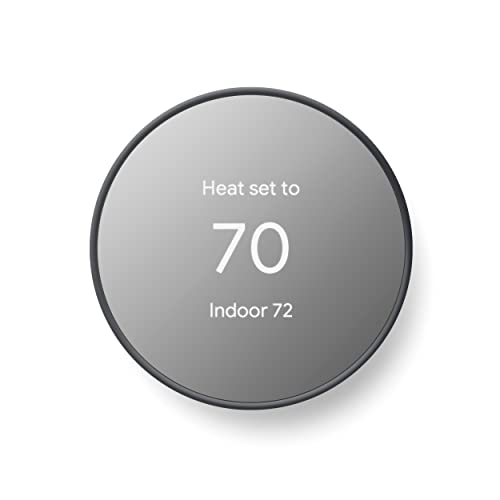
The charcoal Google Nest Thermostat takes a pared-back visual approach while keeping scheduling and remote adjustment central. Like the ecobee Essential, it needs Wi-Fi for remote controls, but it works through the Google Home app.
Its automatic setback feature can reduce the set temperature while your home is empty, which may suit a household with long weekday absences. A self-installation route is available, though your existing wiring still deserves a careful check.
Reasons It Performs
- Google Home app access lets you change settings away from the wall.
- Automatic setback supports routines with regular empty hours.
- Charcoal finish gives you a subdued alternative to white controls.
- Designed with DIY installation in mind.
- Mobile notifications can flag potential HVAC concerns on eligible systems.
Trade Offs
- Remote functions and notifications require internet and Wi-Fi.
Mysa leans further into automation than the Google Nest Thermostat, adding geofencing, 7-day schedules, vacation mode, and humidity monitoring. Geofencing uses your phone’s location to adjust settings around arrivals and departures.
For a home that sits empty during workdays but has irregular return times, that can reduce manual schedule changes. One thing worth considering is its C-wire requirement, a common wire that provides steady thermostat power.
Practical Advantages
- Direct Wi-Fi connection avoids adding a separate hub.
- Geofencing can follow departures without daily schedule edits.
- Humidity monitoring gives you another indoor-condition reading.
- Vacation mode suits homes left empty for extended trips.
Minor Gripes
- A C-wire is required for installation.
- It is intended for most 24V central HVAC equipment, not every heating arrangement.
- Location-based automation depends on app permissions and phone settings.
Made For
You get the most from Mysa in a 24V central HVAC home with a C-wire and a schedule that changes from day to day.
Consider Something Else When
Honeywell Home X2P Thermostat suits you better for a single-stage setup where simple on-wall programming is the priority.
Flair Smart Vent 6×10 is different from every thermostat above because it manages airflow at a register rather than replacing your wall control. It can open and close based on thermostat and temperature-sensor information, helping central systems direct airflow room by room.
That makes sense in a shared home where a sunny room and a shaded bedroom rarely feel alike. The catch is that it needs a Flair Bridge and a temperature source for every equipped room.
The Value In It
- 6×10 sizing fits matching floor, wall, or ceiling register openings.
- No drilling or wiring is needed for the physical vent replacement.
- Individual room schedules offer more targeted daily control.
- Inactive-room settings can reduce airflow to spaces not in use.
- Works alongside smart or traditional thermostats.
- App guidance supports device connection and setup.
Room For Improvement
- A Flair Bridge is a separate required component.
- Each room with a smart vent needs its own temperature source.
The 4×12 Flair Smart Vent has the same connected airflow role as the 6×10 version, but its register dimensions serve a different opening. Measure the existing grille opening before deciding between these two, because size fit is the whole starting point here.
Once paired with the needed Bridge and temperature source, you can create a separate 7-day plan for this room. In a narrow bedroom register, that targeted control may feel more relevant than replacing the main thermostat.
The Helpful Details
- 4×12 dimensions fit matching narrow rectangular vent openings.
- Drop-in replacement avoids drilling into walls, floors, or ceilings.
- Works with a traditional thermostat or a smart wall thermostat.
- Room-by-room schedules suit bedrooms with different daily occupancy.
Points To Note
- It cannot operate without the separately available Flair Bridge.
- Measure carefully because 4×12 is not interchangeable with 6×10.
- A temperature sensor or compatible thermostat source is needed in each room.
Right Fit For
You benefit most from this size when an existing 4×12 register serves a room needing more individual airflow attention.
Not Your Match When
Flair Smart Vent 6×10 White fits you better where your existing register opening measures 6×10.
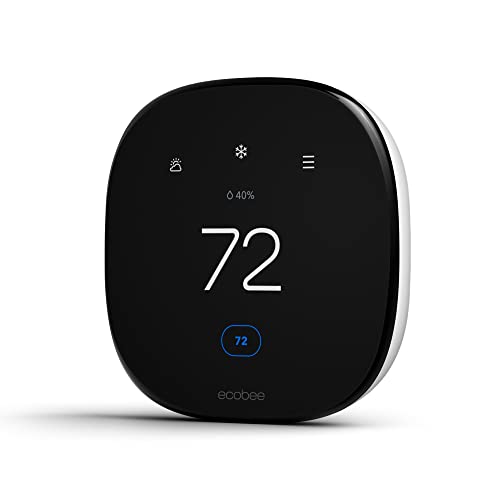
ecobee Smart Thermostat Enhanced builds beyond the Essential model with built-in radar occupancy sensing and an included Power Extender Kit. Radar occupancy sensing detects presence so the thermostat can adjust around whether someone is home.
That extra layer suits households with variable schedules, where fixed calendar blocks often miss the mark. For most homes without a C-wire, the included Power Extender Kit can be a meaningful installation advantage.
Useful Strengths
- Built-in radar sensing responds to occupied and empty periods.
- Schedule suggestions can help refine a routine over time.
- Included Power Extender Kit supports more installation situations.
- Trim kit helps cover the wall area around an older thermostat.
- App and smartwatch control add convenient temperature access.
Softer Spots
- Compatibility still depends on your specific HVAC wiring and equipment.
- Occupancy-based adjustments suit changing routines more than a consistently empty house.
Honeywell Home RTH9585WF puts its large visual interface front and center with a customizable color touchscreen. Unlike the pared-back charcoal Nest design, this model lets you select a screen background that better suits your wall color or room style.
Its flexible programming, remote app management, weather display, and automatic heat-to-cool switching make it well suited to hands-on households. The honest limitation is upfront: it requires a C-wire and does not work with line-voltage heating.
What Helps Most
- Color touchscreen can be customized to your room’s finish.
- Seven-day programming supports different settings across the week.
- Automatic heat-to-cool switching reduces manual seasonal toggling.
- Filter and humidifier-pad reminders keep maintenance tasks visible.
Small Caveats
- A C-wire is required.
- Line-voltage heating systems are not compatible.
- Remote management requires Wi-Fi.
Sensi Smart Thermostat ST55 is aimed squarely at approachable DIY installation, with a built-in level and guided app instructions. Compared with the C-wire-required Honeywell RTH9585WF, its broader stated HVAC compatibility may be appealing, though you still need to confirm your system before beginning.
The privacy-focused policy is another notable point for households that prefer not to have personal information sold to third parties. For a first connected thermostat project, that mix of guidance and familiar wall-control format is reassuring.
A Few Strong Suits
- Built-in level helps you mount the thermostat straight.
- Step-by-step app guidance supports a DIY installation path.
- Wi-Fi access lets you manage settings through the mobile app.
- Personal information is not sold to third parties under Sensi’s stated policy.
Areas To Watch
- Confirm HVAC compatibility before removing your existing thermostat.
- Mobile controls depend on your Wi-Fi connection.
Best Suited To
You will appreciate Sensi ST55 most when you want guided DIY help and a straightforward Wi-Fi thermostat for a compatible HVAC system.
A Better Fit Elsewhere
Mysa Smart Thermostat for Heating & Cooling suits you more when geofencing, vacation mode, and humidity monitoring are priorities.
What Matters Before Installing a Smart Thermostat
Start With Your HVAC Wiring
Your heating and cooling equipment determines the thermostat options that fit your wall. Check the existing terminals, identify whether you have a C-wire, and confirm whether your system is central 24V HVAC or line-voltage heating before narrowing the list. A C-wire provides continuous power, which several connected models need for Wi-Fi and touchscreen functions.
Match Scheduling to Your Actual Week
A fixed weekday job often works well with 5-2 or 5-1-1 scheduling, while varying shifts make 7-day plans more useful. Geofencing can help where arrival times change often, but it relies on phone location permissions. App control is useful for travel or bedtime adjustments, though it depends on reliable home Wi-Fi.
Decide Between Whole-Home and Room Control
A wall thermostat manages the HVAC system as a whole. Flair vents work at the register level and are meant for homes where one room regularly runs warmer or cooler than the rest. They need a Bridge and a temperature source for each room you equip, so measure vent openings and map out the rooms that actually need attention.
Consider the Installation Finish
A trim kit can cover paint lines or screw marks from an older thermostat. Touchscreen color customization may also matter in a prominent hallway or kitchen. Small details are not essential to temperature programming, but they can make a wall upgrade feel less like an afterthought.
A Few Details That Prevent Installation Frustration
Common Shopping Slip Ups
Skipping compatibility checks is the most common mistake. Confirm system voltage, wiring, heating stages, and the presence of a C-wire before removing the old thermostat. For smart vents, measure the register opening instead of estimating from the grille face.
Where The Extra Money Goes
Higher-tier controls often add occupancy sensing, geofencing, humidity readings, more flexible app functions, or included installation hardware. Those additions make the most sense where household schedules shift regularly or where wiring limitations need a supplied workaround.
Frequently Asked Questions
Do smart programmable thermostats need Wi-Fi?
Wi-Fi is needed for app-based remote controls and connected features. Basic on-wall scheduling can still be useful without remote access.
What is a C-wire?
A C-wire is a common wire that provides continuous power to a thermostat. Several Wi-Fi thermostat models require it for full operation.
Can you replace a thermostat yourself?
Many models include guided installation instructions for DIY work. Your HVAC wiring and system compatibility should be checked before starting.
Are smart vents replacements for thermostats?
Smart vents manage airflow at individual room registers rather than controlling the HVAC system directly. They work alongside an existing thermostat and need their own connected components.
Which schedule format works for workweeks?
A 5-2 schedule suits households with similar weekday routines and different weekends. A 7-day schedule gives you separate settings for every day.
