

A thermostat swap can make a hallway wall far more useful, especially when your daily routine includes school runs, office commutes, or changing work hours. The right model lets you adjust temperature from your phone, follow a schedule, and use Google Home voice controls without turning HVAC setup into a mystery. Compatibility matters more than screen size, so start with your heating and cooling wires before falling for extra features.
A Snapshot Of The Selections

WiFi Thermostats for Home Single-Stage 1Heat/1Cool

vine Smart Thermostat for House WiFi Thermostats for Home

Vine Smart Thermostat for House with Nightlight 4.3 Inches

ecobee Smart Thermostat Premium WiFi Smart Sensor

ecobee Smart Thermostat Essential WiFi Thermostat
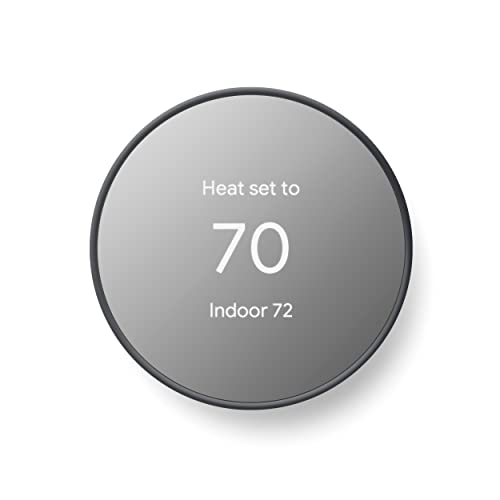
Google Nest Thermostat Programmable WiFi Charcoal
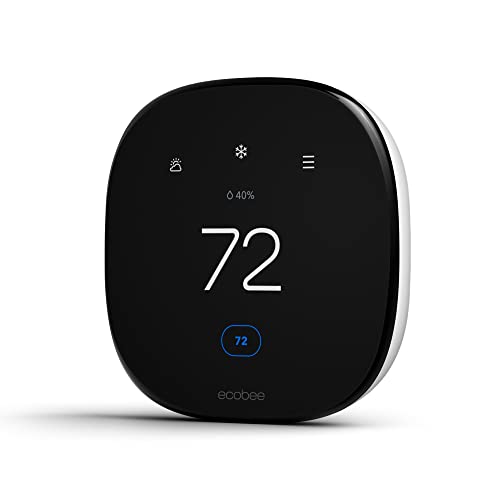
ecobee Smart Thermostat Enhanced Programmable WiFi

Google Nest Thermostat Snow (Renewed)

Google Nest Learning Thermostat 4th Gen Sensor Silver
More Details On Our Top Picks
This compact thermostat takes a narrow, clearly defined route: conventional single-stage heating and cooling systems with RH, RC, W, Y, G, and C terminals. A common wire, also called a C-wire, supplies continuous 24V power for the thermostat rather than battery power.
For a straightforward gas, oil, electric, or air-conditioning setup, the 4.72-inch-wide display and app scheduling can be a sensible update from a basic wall control. The honest read is that its narrow compatibility is a strength only after your wiring matches exactly.
The Practical Payoff
- Supports seven-day temperature planning around work and sleep routines.
- Remote app adjustment helps during commutes or changing travel plans.
- Backlit LCD remains readable in a dim hallway or basement.
Things To Consider
- Requires a C-wire and cannot operate from batteries.
- Does not suit heat pumps, multi-stage systems, mini splits, or line-voltage heaters.
Compared with the first thermostat’s single-stage focus, this vine model reaches into conventional 2H/2C systems, heat pumps with auxiliary or emergency heat, and heat-only or cool-only 24V systems. That broader fit makes it more appealing for homes where the HVAC label lists more than one stage.
Its eight daily schedule periods give you more room to separate morning, daytime, evening, and overnight settings. For households with predictable weekdays but loose weekends, Auto Home/Away mode may reduce manual temperature changes.
Everyday Advantages
- Works with Google Home for hands-free temperature changes.
- Supports eight periods across each day of a weekly schedule.
- Temperature alerts can bring attention to unusual indoor conditions.
- Filter reminders help you keep routine HVAC maintenance visible.
Worth Noting
- A C-wire remains necessary for installation.
- Use the compatibility check before removing your existing thermostat.
- Google Home voice use depends on your connected home setup and internet access.
Who It Suits Best
You benefit most from this model with a compatible 24V system and a schedule that changes across the day.
Where Another Pick Suits Better
Vine Smart Thermostat for House with Nightlight 4.3 Inches suits you better when touchscreen visibility is a daily priority.
The 4.3-inch touchscreen is the defining difference here. Unlike the standard vine model, this version adds a soft nightlight, which can make a thermostat easier to find in a dark entryway without relying on phone control.
Support for 2H/2C conventional systems and compatible heat pumps keeps the broader system coverage intact. You may appreciate the weather display and fan controls most in a home where the thermostat is adjusted directly several times each week.
Notable Gains
- Large touchscreen offers a more visible wall control point.
- Nightlight helps in hallways, stair landings, and darker rooms.
- Google Home voice controls reduce trips to the thermostat.
- WiFi reconnection support can help after routine network interruptions.
- Includes wall plate, mounting hardware, wire labels, and guide.
Trade Offs
- Requires a C-wire, so inspect your current wall wiring first.
A thermostat sensor can shift attention away from the hallway wall and toward the room you actually use. The included SmartSensor is made for that job, helping temperature decisions reflect another area of your home rather than a single thermostat location.
That makes this ecobee a compelling step up for a family room that runs warmer or cooler than the rest of the house. The feature set is broader than the Vine models, though you should still use the system compatibility checker before installation.
Bright Spots
- Included SmartSensor can prioritize comfort in a chosen room.
- Works with Google Assistant for voice-based adjustments.
- Built-in air-quality monitoring adds another home-status view.
- Geofencing can respond to household location patterns.
- Power Extender Kit can assist homes lacking a C-wire.
- Trim kit can help cover marks from an older thermostat.
Minor Gripes
- Its broader feature set may be more than you need for a simple schedule.
- Sensor placement deserves thought, since the room location guides its value.
Made For
You get the most from this ecobee in a home with rooms that do not stay at the same temperature.
Consider Something Else When
Google Nest Thermostat Programmable WiFi Charcoal suits you better when you want a more direct Google Home-focused setup.
The Essential takes a quieter approach than ecobee Smart Thermostat Premium WiFi Smart Sensor. You still get WiFi control, app access, and a color touchscreen, but without the supplied remote room sensor or the Premium model’s extra monitoring tools.
That pared-back setup may fit an apartment, starter home, or single-zone space where the thermostat location already reflects the room you use most. Its stated compatibility reaches 85% of systems, so checking your equipment remains the first step.
Strengths Worth Knowing
- Color touchscreen provides direct temperature adjustment without a phone.
- App control lets you alter settings while away from home.
- Schedule-based adjustment supports regular workday patterns.
Room For Improvement
- Does not include the separate room sensor found with the Premium model.
- Compatibility coverage is narrower than ecobee Smart Thermostat Enhanced.
- Check your system before planning a DIY replacement.
For a Google Home household, this Nest model keeps the control path familiar: use the Google Home app or a compatible voice-control device. It can also lower its setting while you are away, which may suit a weekday routine where the house sits empty for long stretches.
Installation is intended for DIY replacement and is commonly described as taking around 30 minutes. Still, your exact wiring and HVAC system decide whether that estimate applies in your home.
What Makes Sense
- Google Home app access keeps temperature controls in a familiar place.
- Programmable settings support regular household routines.
- Away adjustment can reduce unnecessary heating or cooling while you are out.
- Charcoal finish offers a darker alternative to the Snow version.
Points To Note
- Remote controls and notifications require functioning WiFi and internet.
- Compatibility varies by HVAC system, so check before removing the old thermostat.
- Voice changes require a compatible connected device.
- Its sensor-free package differs from Google Nest Learning Thermostat 4th Gen Sensor Silver.
Right Fit For
You benefit most from this Nest thermostat when Google Home already manages much of your connected home.
Not Your Match When
ecobee Smart Thermostat Enhanced Programmable WiFi suits you better for occupancy-aware adjustment and a supplied Power Extender Kit.
This ecobee places more emphasis on household presence than the Essential model. Its built-in radar occupancy sensing can adjust temperature around whether someone is home, a practical benefit for schedules that rarely stay fixed.
The supplied Power Extender Kit and trim kit make it especially worth considering during a replacement project. For a household where the thermostat sits near a frequently used room, occupancy sensing may fit daily life better than manually editing a schedule.
Where It Helps
- Radar occupancy sensing responds to activity at home.
- Schedule suggestions can help refine a routine over time.
- Power Extender Kit supports installations without a C-wire.
- Google Assistant compatibility adds hands-free control.
- Trim kit can cover a larger footprint from a prior thermostat.
Softer Spots
- Occupancy tools make more sense for changing routines than fixed daily schedules.
- Confirm system compatibility before planning the installation.
This Snow version follows the same Google Home-centered approach as Google Nest Thermostat Programmable WiFi Charcoal, but arrives as a renewed item. It has been inspected and restored for working condition, giving you the same familiar thermostat direction in a lighter finish.
You can use phone-based controls, scheduled temperatures, and compatible voice commands. One thing worth considering is that your HVAC compatibility remains separate from the renewal condition, so confirm the system match first.
Practical Pluses
- Google Home integration keeps controls within the same app ecosystem.
- Snow finish can blend into lighter walls and trim.
Small Caveats
- Compatibility varies, so check your HVAC system before installation.
- Remote controls need working WiFi and internet access.
- The package does not include the separate sensor found with the fourth-generation Learning Thermostat bundle.
Best Suited To
You may prefer this version when you want Google Home controls and a Snow thermostat finish for a lighter wall.
A Better Fit Elsewhere
Google Nest Thermostat Programmable WiFi Charcoal suits you better when charcoal better matches your existing decor.
Google Nest Learning Thermostat 4th Gen Sensor Silver is built around changing routines rather than a schedule you must maintain by hand. It learns temperature preferences over time and includes a second-generation Nest Temperature Sensor for another room-based reference point.
Compared with Google Nest Thermostat Programmable WiFi Charcoal, it brings both learning behavior and an included sensor into the package. For a home where the bedroom, nursery, or living room matters more than the thermostat’s hallway location, that added sensor is the central reason to step up.
Useful Highlights
- Learning controls adapt as household temperature preferences change.
- Included temperature sensor can prioritize another room.
- Google Home app enables remote temperature changes.
- Supports many 24V gas, electric, oil, forced-air, heat-pump, and radiant systems.
Areas To Watch
- System compatibility still needs checking before installation.
What Matters Before Installing a Google Home Thermostat
Start With Your Existing Wiring
Remove the old thermostat cover and identify the terminals before selecting a replacement. A C-wire provides steady low-voltage power, while some models include a Power Extender Kit for homes without one. Heat pumps, multi-stage systems, boilers, radiant systems, and line-voltage heaters require different levels of support.
Match Controls to Your Routine
A seven-day schedule suits a household with regular departure and sleep times. Occupancy sensing or learning controls make more sense for irregular work patterns, school breaks, and frequent trips away. Phone access matters most when you routinely adjust the temperature outside the house.
Think Beyond the Hallway
A thermostat measures conditions where it is installed, which may not reflect a sunny living room or upstairs bedroom. A separate room sensor becomes useful when a particular room drives your comfort decisions. Place any sensor in the room you want the system to prioritize, not beside a heat source or draft.
Check Your WiFi Band
Some thermostats connect only through 2.4GHz WiFi. Many home routers broadcast both 2.4GHz and 5GHz bands, but you need the supported band available during setup. Keep your network name and password handy before beginning installation.
Two Details That Shape Long-Term Fit
Common Shopping Slip Ups
Skipping the wiring check is the most common mistake. Confirm system type, voltage, terminals, and C-wire needs before removing the existing wall unit. Also check whether your home WiFi provides the band required by the thermostat.
Where The Extra Money Goes
Higher-tier models commonly add room sensors, occupancy awareness, learning controls, and installation accessories. Those additions matter most in homes with uneven temperatures or schedules that change from week to week. A basic scheduled model can be enough for a small home with consistent daily patterns.
Frequently Asked Questions
Do Google Home Thermostats Need a C-Wire?
Not every thermostat needs a C-wire, but many models do. Check your existing terminal connections and the thermostat compatibility tool before installation.
Can You Control These Thermostats Away From Home?
Yes, compatible models allow remote adjustment through their companion apps. You need working WiFi and internet access for remote controls.
What Does 2H/2C Mean on a Thermostat?
2H/2C means two heating stages and two cooling stages. Your thermostat must support that configuration to operate it properly.
Does a Room Sensor Replace the Thermostat?
No, a room sensor works alongside the thermostat. It gives the system another temperature reference from a selected room.
Are Learning Thermostats Useful for Fixed Routines?
A learning model can still work well with a fixed routine. A scheduled thermostat may feel more straightforward when your temperature needs rarely change.
