

In case you want the best dimmer switches for Apple HomeKit in 2026, consider meross for simple installation and 0–100% dimming, Leviton Decora for versatile bulb support and straightforward setup, and Legrand Radiant Matter dimmer for secure, unified control. For lamp-friendly options, Legrand Radiant Smart Dimmer Plug with Netatmo offers plug-and-play convenience. Lutron Caseta stands out with no neutral wire needed and hub-based 3-way control. Keep exploring to find the perfect fit for your smart home needs.
| meross Smart Dimmer Switch for HomeKit & Alexa |

| Budget-Friendly Pick | Apple HomeKit Compatibility: Yes, supports Apple HomeKit with remote control via HomePod/Apple TV | Neutral Wire Requirement: Requires neutral wire | Wi-Fi Connectivity (No Hub Required): Wi-Fi 2.4 GHz only, no hub required | VIEW LATEST PRICE | Read Our Analysis |
| Leviton Decora Smart Wi-Fi Dimmer Switch White |

| Most Versatile | Apple HomeKit Compatibility: Yes, works with Apple Home/Siri | Neutral Wire Requirement: Requires neutral wire | Wi-Fi Connectivity (No Hub Required): Wi-Fi 2nd generation, no hub required | VIEW LATEST PRICE | Read Our Analysis |
| Legrand Radiant Wi-Fi Matter Smart LED Dimmer |

| Best for Matter Integration | Apple HomeKit Compatibility: Yes, Matter-compatible including Apple HomeKit | Neutral Wire Requirement: Requires neutral wire | Wi-Fi Connectivity (No Hub Required): Wi-Fi 2.4 GHz, hub required for Matter setup | VIEW LATEST PRICE | Read Our Analysis |
| Legrand Radiant Smart Dimmer Plug with Netatmo |
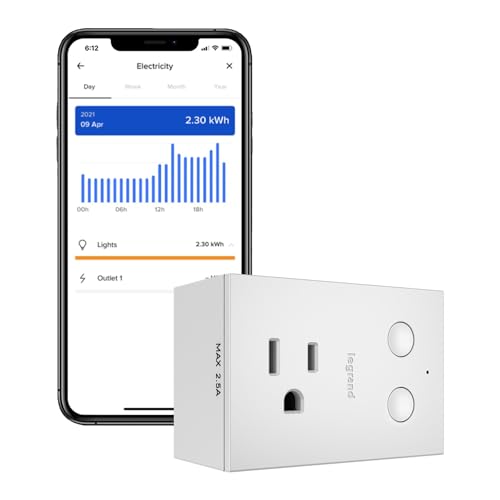
| Easiest Plug-In Solution | Apple HomeKit Compatibility: Yes, compatible with Apple HomeKit | Neutral Wire Requirement: No wiring required (plug-in device) | Wi-Fi Connectivity (No Hub Required): Wi-Fi with Smart Gateway (hub) required | VIEW LATEST PRICE | Read Our Analysis |
| Lutron Caseta Smart Dimmer Switch PD-6WCL-WH |

| Best for No-Neutral Wiring | Apple HomeKit Compatibility: Yes, compatible with Apple Home | Neutral Wire Requirement: No neutral wire required | Wi-Fi Connectivity (No Hub Required): Requires Lutron Smart Hub | VIEW LATEST PRICE | Read Our Analysis |
More Details on Our Top Picks
meross Smart Dimmer Switch for HomeKit & Alexa
In case you want a straightforward, single-pole dimmer switch that seamlessly integrates with Apple HomeKit and Alexa, the meross Smart Dimmer Switch is a solid pick. You’ll need a neutral wire for installation, which takes under 15 minutes, and it fits standard Decora wallplates. It supports 0%–100% dimming for compatible bulbs and offers scheduling, remote control via the Meross app, and voice commands through Siri, Alexa, or Google Assistant. Keep in mind it works only with 2.4 GHz Wi-Fi and single-pole circuits. Its fire-retardant housing and overload protection add safety to your smart home setup.
- Apple HomeKit Compatibility:Yes, supports Apple HomeKit with remote control via HomePod/Apple TV
- Neutral Wire Requirement:Requires neutral wire
- Wi-Fi Connectivity (No Hub Required):Wi-Fi 2.4 GHz only, no hub required
- Voice Assistant Support:Supports Alexa, Siri, Google Assistant
- Dimmer Type and Control Modes:Single pole dimmer switch, on/off and dimming via app, voice, or button
- Installation Type:Hardwired wall switch replacement, typical install under 15 min
- Additional Feature:Dimming 0%-100% range
- Additional Feature:AWS cloud data storage
- Additional Feature:Fits 1-4 gang plates
Leviton Decora Smart Wi-Fi Dimmer Switch White
You’ll appreciate the Leviton Decora Smart Wi-Fi Dimmer Switch White should you want seamless, customizable lighting control that integrates effortlessly with Apple HomeKit. It supports dimmable LED, CFL, incandescent, and MLV bulbs, with options for non-dimmable use as an on/off switch. You can set fade rates, preset light levels, and fine-tune bulb types to prevent flicker. Control it remotely via Wi-Fi and the My Leviton app, or use Siri, Alexa, or Google Assistant. Installation is straightforward with no hub needed, and it offers wired or wireless 3-way operation, making it a versatile choice for smart homes.
- Apple HomeKit Compatibility:Yes, works with Apple Home/Siri
- Neutral Wire Requirement:Requires neutral wire
- Wi-Fi Connectivity (No Hub Required):Wi-Fi 2nd generation, no hub required
- Voice Assistant Support:Supports Alexa, Siri, Google Assistant
- Dimmer Type and Control Modes:Single pole or 3-way dimmer switch, customizable fade and light levels
- Installation Type:Hardwired wall switch replacement, easy install with slim design
- Additional Feature:Customizable fade rates
- Additional Feature:Preset light-level options
- Additional Feature:Flicker prevention design
Legrand Radiant Wi-Fi Matter Smart LED Dimmer
Control your lighting effortlessly with the Legrand Radiant Wi-Fi Matter Smart LED Dimmer, designed for those who want seamless integration across Apple HomeKit and other Matter-compatible platforms. This dimmer replaces one outlet in your home, requiring a neutral wire, while the other outlet stays always on. You’ll need a Matter-compatible hub and a 2.4 GHz Wi-Fi network for setup. Manage your lights via phone or voice assistants like Siri, Alexa, or Google Assistant easily. Its secure, reliable connection lets you unify control of downstream outlets, creating a smooth, automated lighting experience throughout your space.
- Apple HomeKit Compatibility:Yes, Matter-compatible including Apple HomeKit
- Neutral Wire Requirement:Requires neutral wire
- Wi-Fi Connectivity (No Hub Required):Wi-Fi 2.4 GHz, hub required for Matter setup
- Voice Assistant Support:Supports Alexa, Siri, Google Assistant, SmartThings via Matter
- Dimmer Type and Control Modes:Smart LED dimmer, controls downstream outlets, single pole
- Installation Type:Hardwired wall switch replacement, requires neutral
- Additional Feature:Unified outlet management
- Additional Feature:One outlet always on
- Additional Feature:Requires Matter hub
Legrand Radiant Smart Dimmer Plug with Netatmo
Legrand Radiant Smart Dimmer Plug with Netatmo lets you effortlessly add smart dimming to your table or floor lamps without any wiring. Just plug it into any 120V outlet, connect via the Legrand Home + Control app, and control your lights remotely. It supports Tru-Universal dimming, eliminating flicker with any dimmable bulb. You can schedule lights, create groups, and monitor energy use. The device works with Apple HomeKit, Alexa, and Google Assistant, enhancing smart home integration. With Netatmo’s mesh network and Smart Gateway, you get reliable, extended range performance, perfect for larger homes seeking flexible, wireless dimming solutions.
- Apple HomeKit Compatibility:Yes, compatible with Apple HomeKit
- Neutral Wire Requirement:No wiring required (plug-in device)
- Wi-Fi Connectivity (No Hub Required):Wi-Fi with Smart Gateway (hub) required
- Voice Assistant Support:Supports Alexa, Siri, Google Assistant
- Dimmer Type and Control Modes:Plug-in smart dimmer for lamps, supports 1-way, 3-way, 4-way setups
- Installation Type:Plug-in device, no wiring required, uses Smart Gateway mesh
- Additional Feature:Plug-in installation
- Additional Feature:Netatmo mesh networking
- Additional Feature:Energy usage monitoring
Lutron Caseta Smart Dimmer Switch PD-6WCL-WH
In case you want a smart dimmer switch that works seamlessly with Apple HomeKit without needing a neutral wire, the Lutron Caseta Smart Dimmer Switch PD-6WCL-WH is an excellent choice. You’ll need the Lutron Smart Hub to connect it, but once set up, you can control it via the Lutron app, Siri, a wall switch, or a wireless Pico remote (sold separately). It supports up to 150W dimmable LEDs and 600W incandescent bulbs. Plus, it offers 3-way control without extra wiring. With schedules, scenes, and Smart Away features, it’s perfect for smart homes looking for reliable, versatile lighting control.
- Apple HomeKit Compatibility:Yes, compatible with Apple Home
- Neutral Wire Requirement:No neutral wire required
- Wi-Fi Connectivity (No Hub Required):Requires Lutron Smart Hub
- Voice Assistant Support:Supports Alexa, Siri, Google Assistant
- Dimmer Type and Control Modes:Single pole dimmer switch, no neutral wire, 3-way via wireless remote
- Installation Type:Hardwired wall switch replacement, requires separate hub and optional remote for 3-way
- Additional Feature:No neutral wire needed
- Additional Feature:Wireless Pico remote control
- Additional Feature:Seasonal auto-adjust feature
Factors to Consider When Choosing Dimmer Switches for Apple HomeKit
While choosing dimmer switches for Apple HomeKit, you’ll want to make sure they’re fully compatible with the platform and support voice control. Consider whether your wiring includes a neutral wire, as this affects installation options. Also, check the types of bulbs supported and how complex the installation could be for your setup.
Compatibility With Apple HomeKit
Although many dimmer switches claim smart capabilities, you should verify they explicitly support Apple HomeKit or Matter compatibility with HomeKit to guarantee seamless integration. Confirm the dimmer pairs directly with HomeKit or uses Matter over Thread or Wi‑Fi, so you know whether a bridge or specific network frequency is needed. Check that remote access through the Home app works with your existing Apple hub like a HomePod or Apple TV for away control and automations. Make sure the device supports HomeKit features like scenes, automations, brightness reporting, and status updates to fully integrate into your routines. Finally, choose dimmers with firmware that can update to remain compatible with future HomeKit or Matter improvements, ensuring long-term reliability and security.
Neutral Wire Requirements
Since many smart dimmer switches need a neutral wire to power their electronics continuously, you should verify whether your wall box includes one before buying. The neutral wire, usually white, supplies continuous power essential for advanced features like energy monitoring and precise dimming. In case your box lacks a neutral, you can opt for non-neutral dimmers or use accessory remotes or bridges, though these could limit functionality and cause flickering or buzzing with some bulbs. Neutral-requiring dimmers generally work better with a broader range of dimmable LEDs, managing low-current loads to prevent flicker. Installing these dimmers often means connecting their neutral lead to the circuit’s neutral bundle, which could require an electrician when you’re not comfortable with wiring. Always check product documentation to confirm compatibility and correct installation.
Voice Control Integration
Getting the most out of your Apple HomeKit dimmer switch means making sure it plays nicely with Siri and HomeKit voice commands. Initially, guarantee the dimmer explicitly lists Siri/HomeKit compatibility so it can be controlled natively without needing third-party bridges. Check whether Siri supports full dimming levels (0–100%) instead of just simple on/off commands. Also, confirm whether you need a home hub like a HomePod, Apple TV, or iPad for remote voice control whenever you’re away. Consider the device’s design—Wi-Fi or hub-based—and whether it operates locally or relies on cloud services, as this affects latency and reliability. Finally, verify the dimmer supports HomeKit scenes and automations, so you can use Siri to trigger group or scheduled lighting behaviors effortlessly.
Installation Complexity Level
Upon choosing a dimmer switch for your Apple HomeKit setup, you’ll need to take into account several installation factors that affect complexity. Initially, check whether your switch boxes have a neutral wire, as many smart dimmers require one for power. Next, determine whether you need support for single-pole or 3-way/multi-location circuits, since 3-way setups often need companion switches or special wiring. Also, verify circuit amperage and load ratings to avoid overheating or flicker. Pay attention to physical fit—wallbox depth and gang size matter because some modules are larger. Lastly, consider network requirements: some switches need a hub or Matter gateway for HomeKit access, which can add steps to installation. Tackling these factors upfront makes the process smoother and safer.
Supported Bulb Types
Choosing the right dimmer switch for your Apple HomeKit setup means paying close attention to the types of bulbs you plan to use. Not all dimmers support every bulb technology—LED, CFL, incandescent, halogen, or magnetic low-voltage (MLV). Make sure your dimmer explicitly lists compatibility with your bulb type. For LEDs and CFLs, pick dimmers labeled “dimmable” with specified minimum loads to avoid flicker or buzzing at low levels. In case you have low-voltage fixtures, confirm the dimmer supports the correct transformer type—electronic (ELV) or magnetic (MLV). Avoid mixing different bulb types on one circuit unless the dimmer supports mixed loads, as this can cause uneven dimming or bulb failure. Finally, always check the dimmer’s maximum wattage ratings per bulb type and total circuit load to make certain safe operation.
Scheduling And Automation
Although selecting a dimmer switch involves hardware compatibility, you’ll also want to focus on scheduling and automation features to maximize your Apple HomeKit experience. Make sure your dimmer supports HomeKit automation triggers like time-based schedules, sunrise/sunset, and presence sensing, so you can reliably run scenes or routines via the Home app or Shortcuts. Check whether the device allows local scheduling or doesn’t block remote scheduling through solely cloud servers, since HomeKit automations run locally with a Home Hub. Look for gradual fade rates and multiple scene presets to enable smooth light changes and restore specific brightness levels. Finally, confirm reliable state reporting and conditional automations based upon occupancy or ambient light, ensuring fast, predictable responses in multi-device scenes and zone schedules.
Connectivity And Network Needs
Considering connectivity and network needs is essential for guaranteeing your dimmer switch works seamlessly with Apple HomeKit. Initially, make sure your dimmer supports your home’s Wi-Fi band—most require 2.4 GHz, while only a few handle 5 GHz. Check whether it needs a dedicated hub or a Matter border router for remote access; some setups rely on an always-on Apple device to bridge HomeKit remotely. You’ll want to know whether the switch communicates locally over your LAN or depends on cloud servers, as cloud reliance can add latency and privacy concerns. Opt for dimmers supporting Matter or native HomeKit pairing to ease interoperability and futureproof your setup. Finally, prioritize network security with WPA2/WPA3 support and confirm the manufacturer provides regular firmware updates to keep vulnerabilities patched.
Design And Physical Dimensions
Upon selecting a dimmer switch for Apple HomeKit, you’ll want to make certain it fits properly within your existing electrical setup. Measure the depth and width of your electrical box since some smart dimmers are bulkier than standard mechanical ones. Check faceplate and button sizes to confirm the switch aligns with your current Decora or GFCI wallplates without obstructing nearby controls in multi-gang arrangements. Choose a control interface—rocker, paddle, or push-button—that suits your ergonomic preferences and mounting height. Verify terminal types—screw, clamp, or wire-lead—and confirm there’s enough space for neutral and ground wires inside the box. Finally, consider the exterior material and heat rating to guarantee safe operation, especially in warmer environments or behind thick wallplates.
