

You want your PS4 running cool during long sessions, and the right fan can make a real difference. You’ll look for strong airflow, low noise, and a fit that works with Slim, Pro, or original models. Some stands add charging docks and RGB, while others focus purely on performance. Keep these trade-offs in mind as you weigh options—next, we’ll compare specific models and what they offer.
| OIVO PS4 Vertical Cooling Stand with 12 Game Slots |

| All-in-One Stand | Compatibility: PS4 / PS4 Slim / PS4 Pro | Cooling Mechanism: Upgraded external fan cooler (vertical stand) | Power Source: USB cable (USB adapter/hub/PS4) | VIEW LATEST PRICE | Read Our Analysis |
| ElecGear PS4 Slim Internal Cooling Fan Repair Kit |
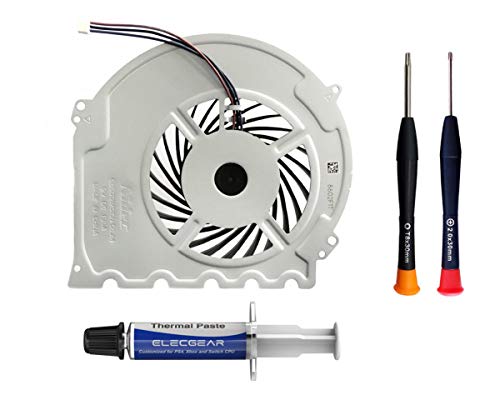
| Repair Kit Pro | Compatibility: PS4 Slim (CUH-20xx / 21xx / 22xx) only | Cooling Mechanism: Internal replacement CPU cooling fan | Power Source: 3-pin DC12V (internal fan powered by console board) | VIEW LATEST PRICE | Read Our Analysis |
| Linkhood 5-Fan USB Cooling Cooler for PS4 |
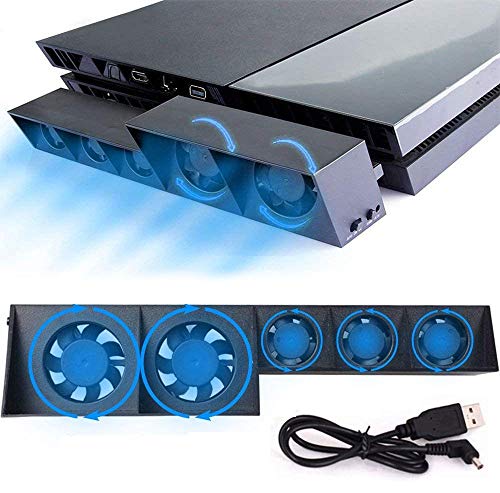
| Original Model Turbo | Compatibility: Original PS4 only | Cooling Mechanism: 5 turbo external fans (USB cooler) | Power Source: DC 5V via PS4 USB port | VIEW LATEST PRICE | Read Our Analysis |
| WFPOWER RGB USB Cooling Fan Pad with IR Remote |

| RGB Style Pad | Compatibility: PS4 (general) and other consoles/PC/laptops | Cooling Mechanism: USB-powered fan pad with fan(s) | Power Source: USB-powered (any USB port) | VIEW LATEST PRICE | Read Our Analysis |
| PS4 Vertical Stand with Cooling Fan & Charger |

| Dual-Charge Hub | Compatibility: PS4 / PS4 Slim / PS4 Pro | Cooling Mechanism: 3 independent external fans (vertical stand) | Power Source: USB port | VIEW LATEST PRICE | Read Our Analysis |
More Details on Our Top Picks
OIVO PS4 Vertical Cooling Stand with 12 Game Slots
Should you be a PS4 owner who values compact organization and cooler, quieter performance during long sessions, the OIVO PS4 Vertical Cooling Stand with 12 game slots is a smart pick — it combines an upgraded fan and metal base to cut temps and stabilize the console while giving you space for a dozen discs and a dual-controller charging dock. You’ll fit Regular PS4, PS4 Slim (extra holder), and PS4 Pro securely. The fan trims heat and runs near 50dB; the metal bottom enhances dissipation and steadiness. Dual-controller charging uses the EXT port for about two-hour full charges, powered via included USB cable.
- Compatibility:PS4 / PS4 Slim / PS4 Pro
- Cooling Mechanism:Upgraded external fan cooler (vertical stand)
- Power Source:USB cable (USB adapter/hub/PS4)
- Orientation / Form Factor:Vertical stand (integrated cooling & storage)
- Additional Functionality:Dual controller charger + 12 game slots
- Plug-and-Play / Installation Ease:Plug-in USB setup (no internal installation)
- Additional Feature:Dual controller charging
- Additional Feature:Metal bottom plate
- Additional Feature:12-game disc storage
ElecGear PS4 Slim Internal Cooling Fan Repair Kit
In case you own a PS4 Slim (CUH-20xx/21xx/22xx) and want a straightforward DIY fix, the ElecGear kit’s upgraded Nidec G85G12MS1CN fan and included tools make it a top choice—especially should you prefer a plug-and-play replacement with thermal paste and tamper-proof screwdrivers to guarantee a clean, lasting repair. You get a brand-new, Sony-authentic 3‑pin 12V PWM fan (compatible with earlier G85G12MS1AN and Delta KSB0912HD), Arctic MX-2 thermal paste, TR8 Torx security and PH00 screwdrivers, plus a spudger. ElecGear supplies tutorials and protective packaging; bear in mind it won’t fit PS4 Fat or PS4 Pro models.
- Compatibility:PS4 Slim (CUH-20xx / 21xx / 22xx) only
- Cooling Mechanism:Internal replacement CPU cooling fan
- Power Source:3-pin DC12V (internal fan powered by console board)
- Orientation / Form Factor:Internal replacement part (installed inside console)
- Additional Functionality:Repair kit (thermal paste + tools) — replacement fan
- Plug-and-Play / Installation Ease:Requires console teardown and installation (tools included)
- Additional Feature:Includes thermal paste
- Additional Feature:Comes with repair tools
- Additional Feature:Model-specific fan replacement
Linkhood 5-Fan USB Cooling Cooler for PS4
Should you want a straightforward, no-fuss way to keep an original PS4 cool during long sessions, the Linkhood 5-Fan USB Cooler is a solid pick — it’s built specifically for the original PS4 and packs five turbo fans to cut heat and dust buildup. You’ll get two speeds (Normal and Turbo) and two modes: ON for constant cooling and AUTO MODE that uses a temperature sensor to kick fans in as needed. It draws DC 5V from your PS4’s USB port—no extra power required—works vertically or horizontally, fits most vertical charging stands, includes a USB cable, and has a 12-month warranty.
- Compatibility:Original PS4 only
- Cooling Mechanism:5 turbo external fans (USB cooler)
- Power Source:DC 5V via PS4 USB port
- Orientation / Form Factor:External cooler usable vertical or horizontal
- Additional Functionality:Auto/temp sensor mode + two speed modes
- Plug-and-Play / Installation Ease:Plug-and-play USB connection
- Additional Feature:Built-in temp sensor
- Additional Feature:Two speed modes
- Additional Feature:USB plug-and-play
WFPOWER RGB USB Cooling Fan Pad with IR Remote
In case you want a USB-powered cooler that doubles as a lighting centerpiece, the WFPOWER RGB USB Cooling Fan Pad with IR Remote is ideal for PS4 owners who play long sessions and care about aesthetics. You plug it into any USB port and the fan pad helps prevent overheating for PS4, Xbox One, PCs, and 12–15″ laptops. The RGB LED strip, operated through a smart IC, gives customizable lighting you control via an RF remote—colors, brightness, speed, and effects. Its multi-functional stand design improves airflow and appearance, making it a simple, portable cooling and lighting upgrade for your setup.
- Compatibility:PS4 (general) and other consoles/PC/laptops
- Cooling Mechanism:USB-powered fan pad with fan(s)
- Power Source:USB-powered (any USB port)
- Orientation / Form Factor:Fan pad (flat pad for laptops/consoles)
- Additional Functionality:RGB lighting with IR remote (lighting control)
- Plug-and-Play / Installation Ease:Plug-in USB connection (simple setup)
- Additional Feature:RGB LED lighting
- Additional Feature:IR remote control
- Additional Feature:Laptop size compatibility
PS4 Vertical Stand with Cooling Fan & Charger
Should you want a compact all-in-one solution, the PS4 Vertical Stand with Cooling Fan & Charger is ideal for gamers who need cooling, controller charging, and disc storage in one unit. You’ll mount your PS4, PS4 Slim, or PS4 Pro using the appropriate attachments, saving space with a vertical orientation. Three independent powerful fans draw heat away during long sessions, reducing thermal throttling. A dual charging dock powers two DualShock controllers at once, so controllers stay ready. You also get storage for up to 12 discs and a USB port for extra connectivity, keeping your setup neat and functional.
- Compatibility:PS4 / PS4 Slim / PS4 Pro
- Cooling Mechanism:3 independent external fans (vertical stand)
- Power Source:USB port
- Orientation / Form Factor:Vertical stand
- Additional Functionality:Dual controller charger + 12 game slots
- Plug-and-Play / Installation Ease:Plug-in USB setup (no internal installation)
- Additional Feature:Triple independent fans
- Additional Feature:Dual controller charger
- Additional Feature:12-disc storage slot
Factors to Consider When Choosing a Cooling Fan For Ps4
Upon choosing a cooling fan for your PS4, you’ll want to prioritize cooling performance and low noise so your console stays cool without sounding like a jet. Check compatibility with your PS4 model and confirm power and connectivity options—USB, AC adapter, or passthrough—match your setup. Also consider extra features like adjustable fan speeds, dust filters, and charging ports that can make the fan more useful.
Cooling Performance
Although size and count aren’t the only things to weigh, the cooling performance of a PS4 fan depends heavily on how many fans it has, their blade size, and whether it includes metal bases or heat sinks to pull heat away from the console. You should favor multiple, larger blades whenever you need stronger airflow and faster heat dissipation. Look for units with variable speed modes and automatic temperature sensors so the fan ramps up only at necessary times, improving efficiency and extending component life. Effective cooling keeps internal temperatures down and prevents thermal throttling during long sessions. Pay attention to build quality—metal bases and integrated heat sinks move heat away from hotspots more reliably than plastic housings, enhancing overall cooling performance.
Noise Levels
How quiet does a cooling fan need to be to stay out of your way during long gaming sessions? You’ll want fans that operate around 50dB or lower to avoid distraction. Keep in mind that noise rises with higher RPMs and turbo modes, so check reported decibel levels at different speeds rather than just peak specs. Efficient blade design, quality bearings, and solid materials let manufacturers cut noise without sacrificing airflow. Also consider how your PS4’s ventilation interacts with the fan: poorly aligned intake or a loose mount can amplify even low-level sounds. Prioritize models with measured noise charts and user feedback on real-world operation so you get cooling power that won’t drown out your game or chat.
Compatibility With Models
Because PS4 models differ in size and internal layout, you’ll need to match a cooling fan to your exact version—original, Slim, or Pro—to guarantee proper fit and function. Check product listings for explicit model compatibility; some fans are made only for PS4 Slim or only for the original PS4 and won’t fit others. In case you’re replacing the internal fan, confirm the Slim model number (CUH-20xx, CUH-21xx, CUH-22xx) so mounting points and connectors align. For external fans or cooling stands, verify that clips and vents line up with your console’s ports and heat zones. Also bear in mind that USB power availability differs across models, so choose a fan that works with your PS4’s port layout and power output.
Power And Connectivity
Curious how you’ll power a PS4 cooling fan? Most draw power via USB, so you can plug them into the console, a USB wall charger, hub, or adapter for flexible placement. Many models run on DC 5V and work straight from the PS4’s USB port without extra power sources, keeping setup simple. USB connectivity usually means plug-and-play operation, so you’ll get immediate cooling after connecting. In case you want extra functionality, look for cooling stands with additional USB ports to power other accessories. Some stands include specialized charging ports (like EXT) to speed up controller charging while cooling the console. Check port types and power draw to make certain your PS4 supplies enough current.
Additional Features
Now that you know how to power and connect a cooling fan, consider the extra features that can make one a better fit for your setup. Look for integrated controller charging stations so you can recharge wireless controllers without extra cables. In case you need organization, choose a cooling stand that adds storage slots for game discs and accessories. Decide whether RGB lighting and customizable fan-speed modes matter for your desk’s look and control. Prioritize models with noise-reduction technology and quiet operation to avoid distracting hum during sessions. Finally, check for convenience features like remote controls or automatic temperature sensors that adjust cooling without your input. Balance these extras against price and space to get the best overall value.
