

Most people don’t realize many power strips with USB now include true surge protection and USB-C Power Delivery. You’ll want gear that’s safe, fast, and built to last, so you can charge laptops, phones, and accessories without worry. I’ll cover top picks—from compact USB-C models to roomy 8-outlet units—and what features really matter, so you can pick the right extender for your setup.
| One Beat 1680J Power Strip Surge Protector (USB-C) |

| Safety-Focused Pick | AC Outlets (count / layout): 5 AC outlets (linear spacing) | USB Ports (count & types): 4 USB (2 USB-C + 2 USB-A) | USB-C output capability: USB-C up to 3A (no 9–22V QC) | VIEW LATEST PRICE | Read Our Analysis |
| Anker 10-in-1 Power Strip with Surge Protection |

| Best for Travel | AC Outlets (count / layout): 6 AC outlets (3-sided / wide-spaced, angled) | USB Ports (count & types): 4 USB (2 USB-C + 2 USB-A) | USB-C output capability: USB-C1 fast charge 20W (explicit fast-charge port) | VIEW LATEST PRICE | Read Our Analysis |
| 6ft 8-Outlet Surge Protector with 4 USB Ports |
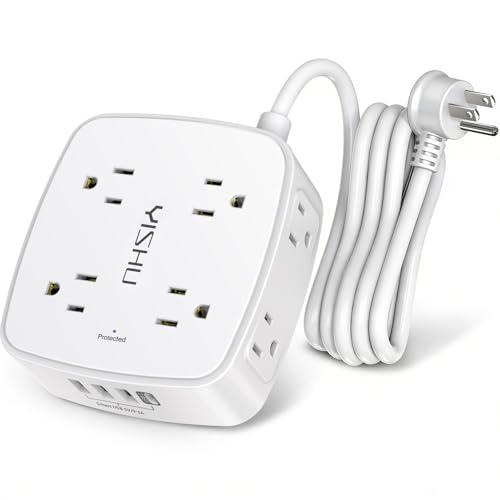
| Multi-Device Workhorse | AC Outlets (count / layout): 8 AC outlets (3-sided) | USB Ports (count & types): 4 USB (1 USB-C + 3 USB-A) | USB-C output capability: USB-C up to 5V/3A | VIEW LATEST PRICE | Read Our Analysis |
| TESSAN Surge Protector Outlet Extender with USB-C |

| Space-Saving Favorite | AC Outlets (count / layout): 4 AC outlets (converts one socket into four; three-sided) | USB Ports (count & types): 3 USB (1 USB-C + 2 USB-A) | USB-C output capability: USB-C up to 3A | VIEW LATEST PRICE | Read Our Analysis |
| HANYCONY 8-Outlet Surge Protector with 4 USB Ports |

| High-Capacity Choice | AC Outlets (count / layout): 8 AC outlets (3-sided) | USB Ports (count & types): 4 USB (2 USB-C + 2 USB-A) | USB-C output capability: USB-C up to 5V/3A | VIEW LATEST PRICE | Read Our Analysis |
More Details on Our Top Picks
One Beat 1680J Power Strip Surge Protector (USB-C)
Should you need a compact power solution that still handles lots of devices, the One Beat 1680J is ideal because it gives you five widely spaced AC outlets plus four USB ports (two USB‑C and two USB‑A) so you can power up to nine devices at once without blocking plugs. You’ll get 1680J surge protection, an indicator light, and an ETL‑certified, fire‑resistant ABS shell. The slim, wall‑mountable design secures with a screw and prong to avoid accidental disconnection. USBs supply smart charging (total 5V/3.1A; USB‑A up to 2.4A, USB‑C up to 3A) but not Quick Charge 3.0 or 9–22V fast charge.
- AC Outlets (count / layout):5 AC outlets (linear spacing)
- USB Ports (count & types):4 USB (2 USB-C + 2 USB-A)
- USB-C output capability:USB-C up to 3A (no 9–22V QC)
- Surge Protection (joules or protection):1680 Joules
- Safety Certifications / Protections:ETL certified; fire-resistant ABS shell
- Mounting / Space-saving Design:Slim wall-mountable design; secures to duplex outlet with screw/prong
- Additional Feature:Slim duplex-friendly profile
- Additional Feature:Screw + plastic prong fastener
- Additional Feature:30-day return / 12-mo warranty
Anker 10-in-1 Power Strip with Surge Protection
Should you need a compact, travel-ready hub that powers several devices without hogging wall space, the Anker 10-in-1 Power Strip is a smart pick. You get six AC outlets, two USB-A and two USB-C ports in an ultra-thin 6.32 x 1.19 x 0.1-inch body tipping the scales at 8.1 ounces. Low-profile, 15° angled and widely spaced outlets make plugging easier and prevent adapter crowding. USB-C1 delivers 20W fast charging (iPhone 15: 0–53% in 30 minutes). A 300-joule surge protector, 18-month warranty and $200,000 connected equipment coverage round out a reliable, travel-friendly option.
- AC Outlets (count / layout):6 AC outlets (3-sided / wide-spaced, angled)
- USB Ports (count & types):4 USB (2 USB-C + 2 USB-A)
- USB-C output capability:USB-C1 fast charge 20W (explicit fast-charge port)
- Surge Protection (joules or protection):300 Joules
- Safety Certifications / Protections:$200k connected-equipment warranty (Anker) and standard protections (warranty) — implied safety testing
- Mounting / Space-saving Design:Ultra-thin, low-profile design keeps unit close to wall; angled outlets
- Additional Feature:Ultra-thin 1.19″ profile
- Additional Feature:15° angled outlets
- Additional Feature:$200K connected-equipment warranty
6ft 8-Outlet Surge Protector with 4 USB Ports
Should you need to power many devices at a desk, dorm room, or home office, this 6ft 8-outlet surge protector with 4 USB ports is a smart pick—its three-sided layout and 1.8-inch spacing keep bulky adapters from blocking neighbors while the four USB ports (three 2.4A USB-A and one 3A USB-C) let you charge phones and tablets without using AC slots. You can power up to 12 devices simultaneously across worldwide 100–240V compatibility. The 6-foot cord has a 45° flat plug, two mounting holes, and ETL-certified protection with 600J surge absorption, overload safeguards, 12-month warranty, and responsive support.
- AC Outlets (count / layout):8 AC outlets (3-sided)
- USB Ports (count & types):4 USB (1 USB-C + 3 USB-A)
- USB-C output capability:USB-C up to 5V/3A
- Surge Protection (joules or protection):≥600 Joules
- Safety Certifications / Protections:ETL certified; overload/short-circuit/overcurrent/overvoltage/overheating protection
- Mounting / Space-saving Design:3-sided design with 6ft cord and 45° flat plug; two mounting holes
- Additional Feature:6-foot cord with 45° plug
- Additional Feature:Three-sided outlet layout
- Additional Feature:Auto power cut-off
TESSAN Surge Protector Outlet Extender with USB-C
Should you need compact, reliable charging for multiple devices, the TESSAN Surge Protector Outlet Extender with USB-C is a smart pick — it turns one wall socket into four AC outlets plus three USB ports (two 2.4A USB-A and one 3A USB-C), so you can charge phones, tablets, and accessories at once without juggling adapters. You’ll get surge protection up to 1875W to guard computers and grooming tools from spikes. The three-sided layout spaces outlets 2.03 inches apart to fit large plugs, and the USB ports auto-detect devices for efficient charging. It mounts over a top outlet without blocking the bottom.
- AC Outlets (count / layout):4 AC outlets (converts one socket into four; three-sided)
- USB Ports (count & types):3 USB (1 USB-C + 2 USB-A)
- USB-C output capability:USB-C up to 3A
- Surge Protection (joules or protection):surge-rated (supports up to 1875W; surge protection implied)
- Safety Certifications / Protections:Designed for surge/overload protection (rated for 1875W); compatible with GFCI/standard receptacles
- Mounting / Space-saving Design:Wall plug extender mounts on top of outlet; compact, fits GFCI and standard receptacles
- Additional Feature:Fits GFCI receptacles
- Additional Feature:3-sided 2.03″ spacing
- Additional Feature:Converts one socket to four
HANYCONY 8-Outlet Surge Protector with 4 USB Ports
Should you need a compact, high-capacity power solution for crowded workspaces or dorms, the HANYCONY 8-outlet surge protector with 4 USB ports is a smart pick. You’ll get a 3-sided layout with eight widely spaced outlets (2.2 inches apart) plus two USB-C and two USB-A ports, letting you power up to 12 devices without blocking neighbors. USB-C delivers 5V/3A, USB-A up to 5V/2.4A, and total USB output hits 5V/3.1A (15.5W), with smart charging for phones and tablets. It offers 1080J surge protection, a lighted circuit-breaker switch, 5-foot braided cord, mounting holes, ETL/RoHS, and flame-retardant housing.
- AC Outlets (count / layout):8 AC outlets (3-sided)
- USB Ports (count & types):4 USB (2 USB-C + 2 USB-A)
- USB-C output capability:USB-C up to 5V/3A
- Surge Protection (joules or protection):1080 Joules
- Safety Certifications / Protections:ETL and RoHS certified; flame-retardant PC shell; overload protection with circuit breaker
- Mounting / Space-saving Design:Compact 3-sided design with 5ft braided cord and right-angle flat plug; two mounting holes
- Additional Feature:5-foot braided extension cord
- Additional Feature:Lighted on/off circuit breaker
- Additional Feature:RoHS + ETL certified
Factors to Consider When Choosing an Outlet Extender With USB
At the time of picking an outlet extender with USB, you’ll want to check how many AC outlets you actually need and whether the outlet spacing can fit bulky adapters. Look at the types of USB ports (A, C, Power Delivery), the total charging power output, and the surge protection rating to keep devices safe and fast. Balancing outlet count, port types, spacing, and power specs will help you choose the right model.
Outlet Count Needed
How many devices do you actually need to power at once? Count every plug and USB device you’ll use simultaneously, and choose an extender with equal or greater AC outlets so you won’t overcrowd or chain extenders. Check outlet spacing—over 1.5 inches between sockets handles bulky adapters without blocking neighbors. Look at outlet orientation and shape: three-sided or angled layouts can make room for oversized plugs and improve access. Integrated USB ports enhance versatility, letting you charge phones and tablets without using AC sockets, but verify the maximum combined USB output so multiple devices charge efficiently without throttling. Match outlet count and layout to your real setup for neat, reliable power without compromises.
USB Port Types
Now that you’ve figured out how many outlets you need and their spacing, look closely at the USB ports on an extender—USB-A and USB-C behave differently and affect charging speed and device compatibility. USB-C generally supports faster charging and newer devices; it often delivers around 5V/3A, which speeds up charging for phones, tablets, and some laptops. USB-A usually provides up to 5V/2.4A, fine for older phones and accessories but slower than USB-C. Keep in mind some USB-C ports only supply 5V and don’t support advanced fast-charge protocols like Quick Charge 3.0, so check specs. Also consider the combined output: simultaneous charging depends on total USB current and whether the extender uses smart charging to allocate power efficiently.
Surge Protection Rating
Because power surges can silently damage electronics, check an extender’s surge protection rating (measured in joules) to gauge how much energy it can absorb before failing. You’ll want a higher rating for better durability: typical values run from about 300 to over 1600 joules. Under 600 joules gives only basic protection suitable for lamps or chargers, while 1000+ joules is preferable for TVs, computers, routers, and other sensitive or frequently used gear. Match the joule rating to the device types you plan to connect so the extender really defends against spikes. Also look for certification from recognized safety organizations — that helps guarantee the stated rating meets industry standards and performs reliably whenever a surge occurs.
Outlet Spacing Size
Questioning whether your new extender will handle bulky adapters? Consider outlet spacing size initially: common gaps range from about 1.5 to over 2 inches, and wider spacing (around 1.78 inches or more) accommodates wide plugs, power bricks, and multi-prong adapters without crowding. In case you often use large chargers, choose extenders with larger center-to-center spacing or multi-sided designs that place outlets on different faces to prevent one plug from blocking another. Beware compact extenders with minimal spacing; they might render adjacent sockets unusable whenever bulky adapters are attached. Spacing matters especially on densely packed power strips and extenders—adequate clearance maximizes simultaneous device connectivity and convenience, reducing the need for additional adapters or rearranging plugs.
Charging Power Output
How much charging power will you need from an outlet extender with USB? Decide based on how many devices you’ll charge and their power needs. Look at total USB power output: combined amperage above 3A lets you charge multiple devices faster. Check each port’s rating—USB-C often supplies up to 3A at 5V, which suits newer phones and tablets, while USB-A usually tops out around 2.4A at 5V for older or basic devices. Verify whether USB-C ports support fast-charging standards or higher voltage ranges for Quick Charge or laptops. Prefer models with smart charging that detect device requirements and allocate power efficiently to avoid overcharging and waste. Balancing per-port specs and total output guarantees reliable, speedy charging.
Build Material Durability
At the moment you pick an outlet extender with USB, pay close attention to the materials and construction since they determine safety and lifespan. Choose durable, fire-resistant ABS or flame-retardant PC plastics rated above 1300°F to reduce fire risk and withstand heat. A high-quality casing protects internal circuitry from impacts, overheating, and electrical surges, while sturdy exteriors resist cracking from frequent plugging and unplugging. Look for ETL or RoHS certifications to confirm materials passed rigorous electrical and fire-hazard testing. Don’t overlook the cord: braided or flat right-angle designs enhance flexibility and strength, cut wear, and keep power delivery consistent. Prioritizing these material features helps guarantee a safer, longer-lasting outlet extender.
Mounting And Placement
Where will you put the extender, and will it stay secure once installed? Consider whether you need a wall‑mountable unit or one that fits neatly into a duplex outlet without blocking neighboring sockets. Check for mounting holes or included hardware so you can fasten it to walls, desks, or shelving for added stability. Size and profile matter: pick a low‑profile design or compact footprint to squeeze behind furniture or in tight corners without obstructing other plugs. Look for angled or flat plugs and short, low‑profile cords to keep things tidy and prevent accidental unplugging. Finally, match the installation method to your setting—home, office, dorm, or travel—so the extender delivers safe, convenient use where you need it.
Warranty And Support
Once you’ve chosen the right spot and mounting style for your outlet extender, check the warranty and support so you’re protected should something goes wrong. Warranty periods typically run 12 to 18 months and cover manufacturing defects and operational faults; prioritize longer terms should you want extended peace of mind. See whether warranties include surge protection failures and offer repair or replacement options. Look for models with generous return policies—about 30 days—to test functionality risk-free. Also consider connected equipment warranties that might cover substantial sums (some reach up to $200,000) in case your devices are critical. Finally, confirm customer support availability and responsiveness; 24-hour support or easy-to-reach service makes troubleshooting and claims straightforward once you need help.
Final Thoughts
You’ll find these outlet extenders strike a pleasing balance between practicality and discretion, letting you power gadgets without fuss. Whenever you pick one, prioritize certified safety, durable materials, and smart USB charging so your devices get a considerate, efficient increase. Look for a layout and cord length that gently accommodate your space, and a solid warranty that quietly promises long-term reliability. Trust your judgment — choose what makes daily life smoother.
