

I’ve tested and compared the top smart switches that work with Google Home so you don’t have to. I focus on reliable Wi‑Fi, voice response, safety certifications, and easy installs—things that matter whenever you’re automating real rooms. Whether you want dimming, motion sensing, or multi‑gang control, I’ve narrowed the options to seven models worth considering. Keep going and I’ll explain which fits your setup best.
TP-Link Tapo Smart Light Switch 4-Pack (S500)

In case you want a reliable, budget-friendly smart switch that works seamlessly with Google Home and doesn’t need a hub, the TP‑Link Tapo S500 4‑pack is a strong choice — it connects over 2.4 GHz Wi‑Fi, supports voice control via Google Assistant, and lets you schedule and monitor lights from anywhere through the Tapo app. You’ll install it using the app’s step-by-step guide; keep in mind it requires a neutral wire and single‑pole wiring. Each pack handles 100–120 VAC, 15 A (600 W), has screw terminals, and is UL certified. You’ll get timers, Away Mode, touch control, and a two‑year warranty.
Best For: homeowners or renters seeking an affordable, hub-free smart switch solution compatible with Google Home (and other voice assistants) who have access to a neutral wire and need reliable app-based scheduling and remote control.
Pros:
- Affordable 4-pack that connects over 2.4 GHz Wi‑Fi and supports Google Assistant, Alexa, and Bixby for voice control.
- App-guided installation with timers, Away Mode, countdowns, touch control, and remote monitoring.
- UL certified, handles 100–120 VAC up to 15 A (600 W) per switch, with a 2-year warranty.
Cons:
- Requires a neutral wire and single‑pole wiring, which may complicate installation in older homes.
- Operates only on 2.4 GHz Wi‑Fi (no 5 GHz support), potentially limiting network placement.
- IP00 rating means no ingress protection — not suitable for damp or outdoor installations.
Kasa Smart Motion Sensor Wi‑Fi Light Switch (2-Pack)

Should you want hands-free, occupancy-driven lighting that also saves energy, the Kasa Smart Motion Sensor Wi‑Fi Light Switch (2‑Pack) is a top pick because it automatically turns lights on with motion and off after a preset interval while sensing ambient daylight to avoid needless activations. You’ll get Smart and Away modes to customize routines and simulate occupancy, plus compatibility with all common bulb types (600W incandescent/halogen, 300W CFL/MLV/ELV). It works with Alexa, Google Assistant, and SmartThings, and the Kasa app offers remote control and guided setup. Requires a neutral wire and 2.4GHz Wi‑Fi; UL certified with a two‑year warranty.
Best For: Homeowners and renters with standard wiring who want hands-free, energy-saving lighting and smart home integration with Alexa/Google/SmartThings.
Pros:
- Automatically detects motion and ambient light to provide convenient, occupancy-based lighting while avoiding unnecessary activations.
- Compatible with all common bulb types and integrates with Alexa, Google Assistant, and SmartThings plus remote control via the Kasa app.
- UL certified, includes a 2-year warranty, and is part of the broader Kasa Smart ecosystem for routines and group automation.
Cons:
- Requires a neutral wire, which may not be present in some older homes or switch setups.
- Only supports 2.4 GHz Wi‑Fi, so it won’t connect to 5 GHz-only networks.
- Installation still requires handling wall wiring despite app-guided steps, which may necessitate an electrician for some users.
GHome Mini WiFi Smart Plug Outlet (4-Pack)
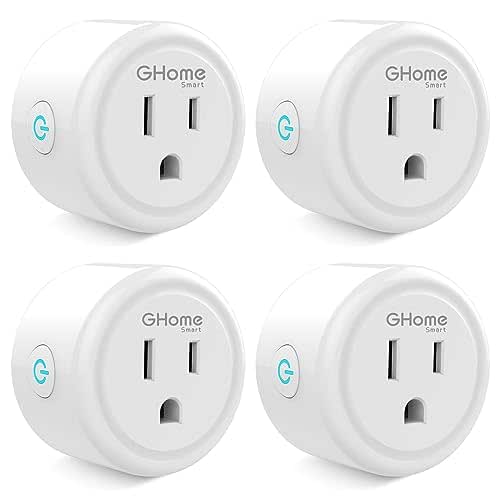
Should you want simple, budget-friendly smart control for multiple rooms, the GHome Mini WiFi Smart Plug (4-pack) is a great pick—its compact design and group-control feature make it ideal for managing lamps and small appliances around the house. You’ll connect each plug to a 2.4GHz network via the GHome app before linking to Google Home or Alexa. Once set up, you can use voice commands, app-based remote control, timers, circular or random schedules, and group actions. ETL/FCC certification and a 10A/1200W/120V rating keep safety practical. Keep in mind it doesn’t support 5G WiFi.
Best For: budget-conscious homeowners or renters who want simple, voice-controlled automation for lamps and small appliances across multiple rooms.
Pros:
- Affordable 4-pack with compact design and group control for managing multiple devices easily.
- Works with Alexa and Google Home after initial GHome app setup; supports voice, remote control, timers, and random/circular schedules.
- ETL and FCC certified with a 10A/1200W/120V rating for basic safety and reliability.
Cons:
- Requires a 2.4GHz WiFi network only and does not support 5G WiFi.
- Initial setup requires the GHome app before linking to Alexa/Google Home, adding an extra step.
- Not suitable for high-power appliances above 1200W or 10A limits.
MOES Smart Toggle Light Switch (WiFi, Alexa/Google)

In case you want a straightforward Wi‑Fi switch that pairs with Google Home and keeps a classic toggle feel, the MOES Smart Toggle is a solid pick because it combines reliable 2.4GHz app/voice control with a self‑locking toggle that reduces wear and shows clear on/off status. You can choose single‑pole or 3‑way models to control lights from one or two locations, and set schedules via the Smart Life app. It needs a neutral wire, works only on 2.4GHz Wi‑Fi, and won’t dim or control smart bulbs. Installation replaces old 3‑way switches without complex rewiring.
Best For: homeowners or renters who want a straightforward, reliable Wi‑Fi wall switch with classic toggle feel and Google/Alexa control for standard on/off lighting setups.
Pros:
- Combines tactile self‑locking toggle design with smart features for clear on/off status and reduced mechanical wear.
- Supports single‑pole and 3‑way setups and scheduling via the Smart Life app for flexible control.
- Works with Alexa and Google Assistant for voice control and remote access over 2.4GHz Wi‑Fi.
Cons:
- Requires a neutral wire, which may complicate installation in older homes without one.
- Only supports 2.4GHz Wi‑Fi and cannot connect to 5GHz networks.
- Not compatible with smart bulbs and does not support dimming functionality.
TREATLIFE Smart Wi‑Fi Light Switch 4-Pack (Neutral)

In case you’ve got neutral wires in your walls and want an affordable, Alexa- and Google-ready solution for multiple rooms, the TREATLIFE Smart Wi‑Fi Light Switch 4‑Pack (Neutral) is a strong pick. You’ll need 2.4GHz WiFi and single‑pole wiring; it won’t work with 3‑way setups. Each switch handles up to 1250W/10A and supports standard bulbs. Connect via the Smart Life app to control lights remotely, set schedules, create groups, share access, and monitor status. It works with Alexa, Google Assistant, and SmartThings for voice control, simulates occupancy, promotes energy savings, and is FCC certified with customer support.
Best For: homeowners or renters with neutral wiring who want an affordable, multi-room, voice‑enabled smart switch solution compatible with Alexa/Google and controlled via the Smart Life app.
Pros:
- Affordable 4‑pack that supports voice control (Alexa, Google Assistant, SmartThings) and app-based remote control.
- Each switch handles up to 1250W/10A, supports standard bulbs, and enables schedules, timers, and occupancy simulation for energy savings and security.
- FCC certified, includes snap‑on wall plates, and offers customer support for setup and reliability.
Cons:
- Requires a neutral wire and only works on 2.4GHz Wi‑Fi, limiting compatibility in some homes.
- Designed only for single‑pole wiring; incompatible with 3‑way switch setups without additional wiring or components.
- Not suitable for 5GHz networks and may require replacing wall plates or switches for certain multi-gang or nonstandard installations.
GHome Wi‑Fi Smart Light Switch (Single‑Pole, Alexa/Google)

Should you want an affordable, no-hub option that works seamlessly with Google Assistant, the GHome Wi‑Fi Smart Light Switch is a solid pick—especially for homes with neutral wiring and 2.4GHz Wi‑Fi. You’ll get single‑pole control, 120V/60Hz support up to 15A (1,800W), UL and FCC certification, and compact dimensions that fit standard boxes. Install uses included jumper wires; it won’t work with smart bulbs. Use the GHome app (search SW5) for remote control, room views, schedules, and sunrise/sunset automations. Firmware V1.1.3 improves stability. Voice control via Google Assistant and Alexa enables effortless hands‑free operation.
Best For: homeowners with existing neutral wiring who want an affordable, no-hub smart switch that works with Google Assistant and 2.4GHz Wi‑Fi for single‑pole lighting control.
Pros:
- Affordable, hub‑free design with Alexa and Google Assistant voice control and remote app access (search model SW5).
- Supports scheduling and sunrise/sunset automations; firmware V1.1.3 improves stability.
- Rated for 120V/60Hz up to 15A (1800W), UL and FCC certified, compact size fits standard electrical boxes.
Cons:
- Requires a neutral wire and only supports 2.4GHz Wi‑Fi (no 5GHz), limiting compatibility in some homes.
- Not compatible with smart bulbs; only controls line‑powered fixtures.
- Installation needs jumper wires and basic wiring knowledge; internal dimensions may be tight in crowded boxes.
Kasa Smart 2-Gang Dimmer Switch HS220-2

Should you want reliable multi-zone control without a hub, the Kasa Smart 2-Gang Dimmer HS220-2 is ideal for homeowners who need to manage two circuits from a single switchplate while keeping things simple. You’ll get a flush, sophisticated two-gang design that needs a neutral wire and 2.4GHz Wi‑Fi. Setup walks you through the Kasa or Tapo app, though you could consult an electrician for unfamiliar wiring. Dim from 1%–100% with smooth fades, control remotely via the app, schedule routines, and use Away mode. It’s Alexa, Google, and SmartThings compatible, UL certified for safety.
Best For: Homeowners who want simple, hub-free multi-zone dimming control for two circuits with remote access and scheduling.
Pros:
- Requires only 2.4GHz Wi‑Fi (no hub) and supports Alexa, Google Assistant, and SmartThings for easy smart-home integration.
- Smooth dimming from 1%–100% with fade on/off for better lighting ambiance.
- App-guided setup, remote control, scheduling, and Away mode for convenience and security; UL certified for safety.
Cons:
- Requires a neutral wire, which may complicate installation in older homes.
- Only supports 2.4GHz Wi‑Fi (no 5GHz), limiting network options.
- Two-gang design controls only two circuits—may not suffice for larger multi-zone setups.
Factors to Consider When Choosing a Light Switch for Google Home
Before you pick a switch for Google Home, I look at a few key factors that actually affect compatibility and performance. Make sure it works with Google Assistant, supports your router’s Wi‑Fi frequency, and fits your home wiring—especially whether it needs a neutral wire or a hub. Also check whether it handles dimming and the types of loads (LED, CFL, incandescent) you’re using.
Voice Assistant Compatibility
Compatibility is the foundation I look for during the selection of a smart switch for Google Home: I make certain it explicitly supports Google Assistant so voice control works reliably, that it runs on 2.4GHz Wi‑Fi (the common requirement for many devices), and that simple voice commands can actually control lights hands‑free; beyond that, I confirm the switch integrates with Google Home routines so I can trigger scenes or schedules via voice. I also prefer models offering remote app control for manual overrides and away‑from‑home access. Before buying, I test or verify voice responsiveness, routine compatibility, and scheduling features in product docs and reviews. That guarantees the switch performs smoothly with Google Assistant for daily hands‑free use.
Wi‑Fi Frequency Support
Now that I’ve confirmed Google Assistant support and routine compatibility, I check the Wi‑Fi frequency the switch uses — most smart switches only work on 2.4 GHz networks, not 5 GHz. I prefer 2.4 GHz for switches because it offers better range and wall penetration, which matters for devices concealed in junction boxes or behind drywall. That limitation comes from electrical wiring environments and reduced interference, so it’s common and expected. Before buying, I verify my router broadcasts a 2.4 GHz band or supports dual-band with separate SSIDs. Placing switches on the correct frequency prevents dropped connections and guarantees reliable Google Home integration. Should your network lump bands together, split them or create a dedicated 2.4 GHz SSID for stability.
Neutral Wire Requirement
Although many modern smart switches need a neutral wire to power their electronics, I’ve learned to check for it before buying or installing one. A neutral completes the circuit and supplies the continuous power most Wi‑Fi switches need for app control, voice commands, and remote access. In case your switch box lacks a neutral—common in homes built before the 1980s—many smart models won’t work or will behave erratically. Manufacturers usually state the requirement, so I always inspect the box or consult an electrician during my wiring assessment. Confirming neutral availability prevents wasted purchases and guarantees full Google Home functionality. Should you don’t have a neutral, look for compatible switches designed for that wiring or plan for rewiring.
Smart Hub Necessity
At the moment I’m choosing a smart light switch for Google Home, one of the initial questions I ask is whether I actually need a separate hub. Many modern switches connect directly to Wi‑Fi, so they work with Google Home through cloud integration without extra hardware. I prefer models that support 2.4 GHz Wi‑Fi and have reliable manufacturer apps that link to Google Home; setup stays simple and I avoid hub costs. That said, I’ll consider a hub in case I want centralized control of diverse protocols or advanced automations that cloud-only devices don’t offer. In short, a hub isn’t mandatory for most Google Home setups in 2026—picking a direct Wi‑Fi switch usually keeps things cheaper and easier unless you need broader device coordination.
Dimming And Load Types
Because I want precise control over mood and safety, I check both dimming capability and load compatibility while picking a Google Home–compatible switch. I make sure the switch actually supports dimming—many smart switches don’t—and that it offers smooth fades and a wide range, often down to about 1% up to 100%. Next I verify load type: incandescent, halogen, CFL, MLV, or ELV, because each switch supports different bulb types and wiring. I also confirm the switch’s maximum wattage and amperage exceed my total fixture load to avoid overheating or tripping breakers. Finally, I observe that some dimming switches don’t play well with smart bulbs, so I match switch and bulb types rather than assuming universal compatibility.
Scheduling And Automations
Now that I’ve checked dimming and load compatibility, I look closely at scheduling and automations because they shape how the switch actually behaves day-to-day. I value precise time-based schedules for lights to match routines and save energy, plus countdown timers for quick, temporary control. Sunrise/sunset triggers that adjust automatically are a must so lighting follows natural light without manual changes. I also rely on away mode to simulate occupancy through randomly cycling lights whenever I’m away, which enhances security. Integration with Google Home for voice set-and-modify commands makes adjustments effortless. Finally, I prefer switches that support grouping so I can synchronize rooms or zones within a single routine—this keeps scenes consistent and reduces setup time.
Safety Certifications And Warranty
While I focus on features and automations, I never skip checking safety certifications and warranty details because they determine whether a switch is reliable and safe in my home. I look for recognized marks like UL, ETL, or FCC—these third-party tests mean the device met rigorous protocols and lowers risks of shocks, fires, or malfunctions. I also confirm voltage, amperage, and compatible wiring types to match my electrical system; a certified switch that isn’t rated properly still isn’t safe. Warranty length matters too: one to two years is typical and signals manufacturer confidence. A solid warranty plus proper certifications gives me peace of mind and real protection against defects or premature failure.
