

I compare performance, privacy, and price; I weigh features, ease of use, and compatibility. I’ve tested the top HomeKit-ready thermostats and picked seven that balance comfort, energy savings, and smart-home friendliness. I’ll walk you through what each model does best, where they fall short, and who they’re ideal for — so you can decide which one suits your home.
Honeywell Home X8S WiFi Smart Thermostat (Black)

Should you want a HomeKit-ready thermostat that pairs advanced occupancy sensing with a large, customizable touchscreen, the Honeywell Home X8S is a top pick — it’s ideal for tech-savvy homeowners who want precise comfort control, IAQ monitoring, and native Matter/Home app compatibility without sacrificing visibility or integration with video doorbells. You’ll get a sleek 5-inch LED touchscreen, Matter certification, and Home/Alexa/Google support. It links with Premier Alert and Ring doorbells for camera view and intercom, monitors humidity and ventilation, and supports multiple HVAC layouts (not electric baseboard). You’ll need Wi‑Fi, a C‑wire, and optional room sensors.
Best For: Tech-savvy homeowners who want a HomeKit/Matter-ready thermostat with advanced occupancy sensing, large customizable touchscreen, IAQ monitoring, and video-doorbell integration.
Pros:
- Large 5-inch customizable LED touchscreen with clear visibility and easy on-device control.
- Matter-certified with native Apple Home, Alexa, and Google Assistant support plus integration with compatible doorbells for camera/intercom access.
- Precision comfort control, IAQ monitoring (humidity/ventilation), ENERGY STAR certified, and support for multiple HVAC system types.
Cons:
- Requires a C‑wire (though an adapter voucher is included) and may need optional room sensors or extra HVAC accessories for full IAQ features.
- Not compatible with electric baseboard heating (120–240V), limiting use in some homes.
- Some advanced features (doorbell integration, certain IAQ functions) depend on separate compatible devices/apps (sold separately).
meross Smart Wi‑Fi Thermostat (Matter, Alexa, HomeKit)

In case you want a Matter-ready thermostat that works locally with HomeKit, Alexa, Google Home, and Home Assistant, the meross Smart Wi‑Fi Thermostat is a solid pick — especially in case your HVAC setup is one of the 95% of supported systems. You’ll get local Matter integration, remote app and voice control, and 24/7 scheduling for home, away, and sleep modes. The meross app tracks usage, issues filter and malfunction alerts, and helps manage energy costs. Installation is guided with clear steps; a C‑wire might be required. The sleek glass face comes in black or white, and support is available through phone, chat, or email.
Best For: Homeowners with standard (non–line-voltage) HVAC systems who want a Matter‑ready, locally integrated smart thermostat that works with HomeKit, Alexa, Google Home, and Home Assistant.
Pros:
- Works locally via Matter for reliable HomeKit/Alexa/Google/Home Assistant integration and voice/app control.
- Flexible 24/7 scheduling plus usage tracking, filter/malfunction alerts, and energy‑management features in the meross app.
- Sleek glass design (black or white) and guided installation with phone/chat/email support.
Cons:
- Not compatible with line‑voltage (110/120/240V) baseboard heaters, millivolt, or two‑wire systems.
- Some wiring setups require a C‑wire, which may necessitate additional work or parts.
- Limited to supported HVAC types (about 95%); uncommon systems may be incompatible.
Honeywell T5 WiFi Smart Thermostat (RTH8800WF2022)

Should you want a budget-friendly, ENERGY STAR–certified thermostat that saves energy with flexible scheduling and geofencing, the Honeywell T5 is a solid pick for homeowners who value straightforward smart features without a steep learning curve. You’ll get 7-day flexible scheduling, geofencing for Auto Home and Away, and monthly energy reports with personalized tips that can yield about 8–16% savings on heating and cooling. It works with Alexa, has a touchscreen, and supports utility rebate and demand-response programs. Confirm you have—or can add—a C-wire; it’s required for most installations and some oil furnace setups.
Best For: homeowners seeking an affordable, ENERGY STAR–certified smart thermostat that offers simple scheduling, geofencing, and basic smart features without complexity.
Pros:
- ENERGY STAR certified with monthly energy reports and tips; scheduling and geofencing can yield ~8–16% HVAC savings.
- 7-day flexible scheduling, Auto Home/Away via geofencing, and Alexa compatibility for convenient control.
- Eligible for utility rebates and demand-response programs; touchscreen interface is easy to use.
Cons:
- Requires a C-wire (or adapter) for most installations; compatibility with some oil furnace systems is limited.
- Lacks advanced smart-home integrations and features found on higher-end thermostats.
- May not suit users who want highly customizable or learning-based temperature control algorithms.
ecobee3 Smarter Wi-Fi Thermostat with Remote Sensor, 2nd Generation
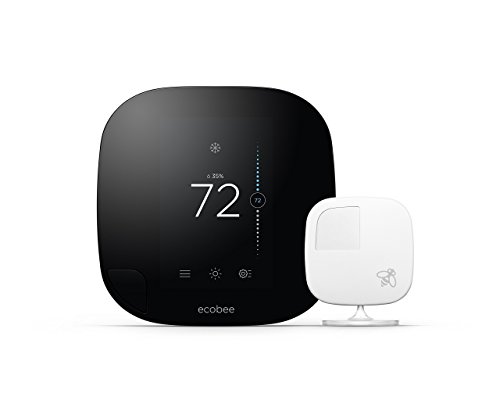
Should you want reliable room-by-room comfort and smarter energy use, the ecobee3 (2nd gen) is a great pick for homes that value precise temperature control and occupancy-aware savings. You’ll use Alexa voice control provided you have a compatible device, making adjustments hands-free. The ecobee3 learns your home’s energy profile, factors in weather and thousands of data points, and decides once to run heating or cooling for efficiency. Remote sensors detect occupancy and which rooms are in use, so it prioritizes comfort where you are and scales back whenever you’re away. That behavior reduces energy waste and trims your utility bills.
Best For: Homeowners seeking precise, room-by-room temperature control and energy savings through occupancy-aware smart thermostat features.
Pros:
- Provides room-specific comfort using remote sensors that detect occupancy and prioritize occupied rooms.
- Learns your home’s energy profile and uses weather and data-driven decisions to optimize heating and cooling for efficiency.
- Supports hands-free adjustments via Alexa voice control when paired with a compatible Alexa device.
Cons:
- Requires compatible Alexa hardware for voice control functionality (sold separately).
- Initial setup and sensor placement may be more involved than a basic thermostat.
- Benefits depend on correct use of sensors and occupancy detection, which may not suit all household patterns.
Sensi Touch 2 Smart Thermostat with Color Touchscreen

Should you want a straightforward, ENERGY STAR–rated thermostat that’s easy to install and works with Alexa and optional Sensi Room Sensors, the Sensi Touch 2 is a solid pick; it blends a color touchscreen with smart features to keep things simple. You’ll get HVAC compatibility for most homes, usage reports, alerts, and maintenance notifications like filter changes. ENERGY STAR certification can cut HVAC energy through about 23%, and flexible scheduling plus remote access optimize consumption. Setup’s DIY-friendly via a top-rated app using Bluetooth—just make sure you have a C-wire. Privacy’s intact, and the box includes manuals and mounting hardware.
Best For: homeowners who want an easy-to-install, ENERGY STAR–rated smart thermostat with a color touchscreen that works with Alexa and optional room sensors for balanced, efficient comfort.
Pros:
- ENERGY STAR-certified, potentially saving about 23% on HVAC energy with flexible scheduling and remote access.
- Easy DIY installation guided by a top-rated app using Bluetooth (includes manuals and mounting hardware).
- Integrates with Alexa and optional Sensi Room Sensors; provides usage reports, alerts, and maintenance reminders.
Cons:
- Requires a common wire (C-wire), which some homes may lack or require professional wiring to add.
- Limited to compatibility with typical residential HVAC systems—may not support specialty or older equipment.
- Bluetooth setup may be less convenient than Wi‑Fi direct provisioning for some users.
Emerson Sensi Touch Wi‑Fi Smart Thermostat (ST75)

Should you want an easy DIY install paired with a clear, color touchscreen, the Emerson Sensi Touch ST75 is a strong pick for HomeKit users who value straightforward setup and daily usability. You’ll get a sleek display in black, white, or silver, intuitive menus, and easy-to-read temps. Installation is DIY-friendly with an integrated level, illuminated easy-click terminals, and app guidance, though a common wire (c-wire) is required. ENERGY STAR certification and features like flexible scheduling, remote access, and usage reports can cut HVAC energy about 23%. The Sensi app also offers performance monitoring, alerts, maintenance notifications, and a privacy policy that doesn’t sell your data.
Best For: HomeKit users and DIY homeowners who want a sleek, easy-to-install smart thermostat with a clear color touchscreen and energy-saving features.
Pros:
- Easy DIY installation with built-in level, illuminated easy-click terminals, and step-by-step app guidance.
- ENERGY STAR-certified with flexible scheduling, remote access, and usage reports to help reduce HVAC energy around 23%.
- Large, intuitive color touchscreen available in black, white, or silver; app offers performance monitoring, alerts, and maintenance reminders.
Cons:
- Requires a common wire (c-wire), which may complicate installs in older homes without one.
- Limited to features supported by the Sensi app and HomeKit integration—may lack advanced smart home automation compared with some competitors.
- Touchscreen and smart features depend on Wi‑Fi; outages can reduce remote-control functionality.
Mysa Smart Thermostat for Electric In-Floor Heating
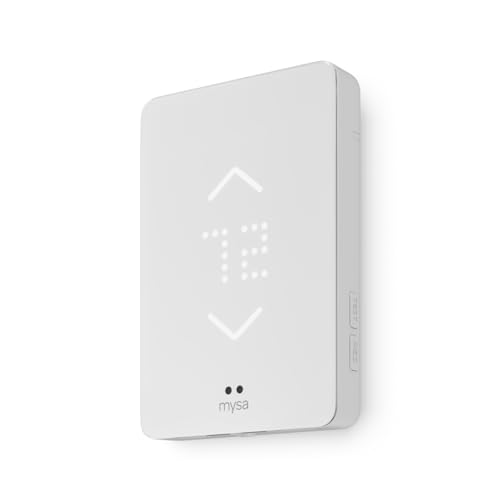
Should you have electric in‑floor heating and want a HomeKit‑friendly, high‑voltage thermostat that’s safe and simple to use, Mysa is a top pick—its built‑in Class A GFCI protects wet‑room wiring while Wi‑Fi and Siri support let you control schedules and temps remotely without a subscription. You’ll install it on 120–240V electric floors (not hydronic systems) using a straightforward replacement process. The app and voice control through Siri, Alexa, and Google Assistant let you set customizable schedules and precise temperatures. With no subscription required and Class A GFCI protection, Mysa combines safety, convenience, and native smart‑home integration.
Best For: Homeowners with electric (120–240V) in‑floor heating who want a HomeKit‑friendly, GFCI‑protected smart thermostat with remote app and voice control and no subscription.
Pros:
- Built‑in Class A GFCI provides enhanced electrical safety for wet‑room/high‑voltage installations.
- Wi‑Fi, app control, and voice assistant support (Siri, Alexa, Google) for remote scheduling and precise temperature control.
- No subscription required and straightforward replacement installation for compatible systems.
Cons:
- Not compatible with hydronic or water‑based (radiant) heating systems.
- Requires a 120–240V electric floor wiring setup, so not suitable for low‑voltage systems.
- Relies on Wi‑Fi for remote features, which may limit functionality if network connectivity is unreliable.
Factors to Consider When Choosing a Smart Thermostat for HomeKit
At the time you’re picking a HomeKit thermostat, I look initially for native HomeKit compatibility and clear wiring requirements so installation is painless. I also check for room sensor support and voice assistant integration to make sure temperature control is accurate and hands-free. Finally, I compare energy efficiency ratings to find a model that saves money and reduces my home’s carbon footprint.
HomeKit Compatibility
Because I want my smart home to actually simplify life, HomeKit compatibility is a top must-have during the selection of a smart thermostat. I look for devices that join Apple’s ecosystem so I can control temperature from the Home app, use Siri for hands-free adjustments, and include my thermostat in scenes and automations with lights or locks. I prioritize models that support Matter because they enhance interoperability across platforms while still working smoothly with HomeKit. Security matters, too: HomeKit-compatible thermostats offer end-to-end encryption, which gives me confidence my data stays private. In short, HomeKit support, Siri control, Home app integration, Matter compatibility, and strong encryption are the core criteria I use in choosing.
Wiring Requirements
Although wiring can feel like a dry detail, I always check it initially because it determines whether a HomeKit thermostat will actually work with my HVAC. Most HomeKit-capable units need a common wire (C-wire) for continuous power to run advanced features, so I inspect the existing thermostat bundle for that conductor. In the event that I find only two wires, I know some models won’t be compatible and I’ll either install a C-wire, fit a C-wire adapter, or choose a different thermostat. I also avoid assuming compatibility with electric baseboard systems; those high-voltage setups usually need specialized thermostats and won’t work with standard low-voltage C-wire devices. Verifying wiring compatibility before purchase saves time and prevents integration headaches.
Room Sensor Support
In case I want a HomeKit thermostat to actually reflect how my home feels, I look for models that support room sensors—these let the system read temperatures (and sometimes humidity or occupancy) in multiple spots instead of trusting the thermostat’s single location. I prefer thermostats that accept multiple remote sensors so the system can balance hot and cold spots, improving comfort throughout the house. Sensors that report humidity and occupancy help the HVAC run only if needed, enhancing efficiency and lowering bills. Before I buy, I verify compatibility and availability of official or third‑party sensors and confirm the thermostat’s app supports grouping, priority scheduling, and sensor-driven setpoints. Proper sensor integration is key to precise zoning and real energy savings.
Voice Assistant Integration
When I pick a HomeKit thermostat, voice integration is a must—Siri control should feel natural and reliable for basic tasks like changing the setpoint, switching modes, or triggering schedules. I check that the thermostat truly integrates with HomeKit so voice commands work without fuss. I confirm it handles common functions—temperature adjustments, mode changes, and schedule setup—via Siri. I prefer devices with local processing and Matter certification to keep conversations private and responses fast. Multi‑room voice control through HomePod or iOS devices matters for consistent control around the house. Finally, compatibility with HomeKit Scenes and Automations lets me create complex voice‑activated routines that include climate alongside lights, locks, and shades.
Energy Efficiency Ratings
Because I want a thermostat that actually lowers bills rather than just looks smart, I focus primarily on certified efficiency and features that drive real savings. ENERGY STAR certification is my initial filter—it proves the device meets strict guidelines. I also look for advanced scheduling and occupancy detection so heating and cooling run only at times needed; those features deliver measurable reductions. Clear monitoring and reporting let me spot wasteful patterns and fine-tune settings, which adds up fast. Integration with utility demand-response programs can earn rebates and cut peak charges, so I value compatible models. Finally, I prefer thermostats that help manage indoor air quality alongside temperature because maintaining system performance prevents extra HVAC cycles and preserves efficiency.
Remote Access Features
While convenience draws many buyers, I prioritize remote access features that actually work whenever I’m away from home. Remote access lets me control and monitor temperatures from anywhere via a compatible smartphone app, and I expect reliable Wi‑Fi—2.4 GHz or 5 GHz—to keep updates real time. HomeKit integration matters because Siri voice control and the Home app make adjustments effortless whenever I’m not home. I also want actionable alerts for system performance, filter changes, and maintenance so small issues don’t become big ones. Finally, strong security protocols are nonnegotiable; encryption and secure authentication protect my data and prevent unauthorized access. In short, dependable connectivity, platform integration, useful alerts, and strong security are essential.
Installation Complexity
Good remote access won’t help much in case you can’t get the thermostat installed, so I look closely at installation complexity before buying. I initially check wiring compatibility—does my HVAC have a C‑wire, or will I need an adapter or wiring mods? Some thermostats handle unconventional setups badly, and electric baseboard or in‑floor systems can need different voltage handling or professional work. I prefer models with clear app guidance, step‑by‑step instructions, and easy‑click terminals that let me avoid calling a technician. Availability of quick start guides, wire labels, and included mounting hardware shortens setup and reduces mistakes. Ultimately, I balance the DIY friendliness against my system’s quirks; should it look risky, I budget for pro installation.
Privacy And Security
Should you value both convenience and safety, I make privacy and security a top priority upon choosing a HomeKit thermostat. I initially confirm the device encrypts data in transit so outsiders can’t intercept sensitive info. I prefer vendors that explicitly state they don’t sell or share personal data and publish transparent data-handling policies. I check for secure authentication—ideally two-factor—to prevent unauthorized control of heating and cooling. I review whether the app and cloud services comply with privacy regulations and offer clear controls for data retention and deletion. Finally, I verify HomeKit integration meets Apple’s privacy standards, ensuring limited access to home data and requiring my consent before any third party can control the thermostat.
