

I promise your whole house won’t turn into a futuristic spaceship overnight, but smart kits can make it feel that way in the best sense. I’ll walk you through six practical options—fans, lights, thermostats, gardens, and DIY kits—that balance convenience, energy savings, and learning potential. In case you want smart upgrades that actually fit your wiring and lifestyle, keep going to find the right match for your home.
Smart Wi‑Fi Ceiling Fan Remote Kit (Alexa/Google)

Should you want an easy, budget-friendly way to make a conventional ceiling fan smart, this Wi‑Fi ceiling fan remote kit is a top pick—because it gives you remote, app, and voice control (Alexa/Google) so you can adjust fan speeds and dim lights from anywhere without rewiring. You’ll use a compact receiver that fits most fans (about 98% compatibility, including Hampton Bay and others), an RF remote with long range, and the Smart Life app for scheduling and automation. You get four fan speeds, four timers, and LED dimming. Installation follows clear instructions and uses quality components for reliable, safe performance.
Best For: Anyone who wants an affordable, simple way to add remote, app, and voice control to an existing ceiling fan without rewiring.
Pros:
- Adds remote, Smart Life app, and Alexa/Google voice control for flexible operation and automation.
- Compact receiver fits ~98% of standard ceiling fans and supports 4 fan speeds, timers, and LED dimming.
- Easy installation with step-by-step instructions and long-range RF remote for reliable everyday use.
Cons:
- May not fit truly non-standard or integrated-light fan models despite high compatibility claim.
- Requires Wi‑Fi and Smart Life app setup, which could be tricky for non-tech-savvy users.
- Some advanced features or integrations beyond Smart Life/Alexa/Google may be limited.
Lutron Caseta Diva Smart Dimmer Kit with Pico Remote

Should you want a reliable, Wi‑Fi‑independent smart dimmer that’s easy to install and expand, the Lutron Caseta Diva Smart Dimmer Kit with Pico Remote is a top pick — especially for renters or homeowners without a neutral wire. You can install it in as little as 15 minutes using step‑by‑step guides, videos, and 24/7 support. The Caseta Smart Hub runs independently of Wi‑Fi, letting you control lights via the Lutron app, scenes, schedules, geofencing, and timers without clogging your network. The Pico remote mounts without wiring, controls up to 10 devices, and offers long range and a 10‑year battery life.
Best For: Renters and homeowners who need an easy-to-install, neutral-free smart dimmer solution with reliable, Wi‑Fi‑independent control and expandable remote options.
Pros:
- No neutral required and quick 15-minute installation with step-by-step guides, videos, and 24/7 support.
- Caseta Smart Hub operates independently of Wi‑Fi for fast, reliable control and integrates with major smart platforms (Alexa, Google, HomeKit, Ring, etc.).
- Pico remote provides wireless, battery‑long control (up to 10 devices, 30 ft through walls, 60 ft line-of-sight) and can be mounted without wiring.
Cons:
- Wallplate not included, sold separately (additional cost and potential mismatch if not purchased correctly).
- Hub is required for full smart features and ecosystem integration, adding to overall system cost.
- Maximum LED load of 150W may limit use on larger multi‑fixture circuits compared with higher‑capacity switches.
Click & Grow Indoor Herb Garden Kit (3 Basil)

In case you want fresh basil year-round with almost no effort, the Click & Grow Indoor Herb Garden Kit (3 Basil) is ideal because its self-watering system and energy-efficient LED lights let you plug in, pop in pods, and harvest without daily upkeep. You’ll choose from 50+ pre-seeded pods—basil, cilantro, lavender, strawberries, thyme, chili peppers—or use seedless pods for other plants. The reservoir handles watering, LEDs replace sunlight, and setup requires no gardening experience. Once ready, you can transplant herbs to wall, hanging, or window planters indoors or outdoors, making this kit a compact, sustainable way to keep fresh herbs at hand.
Best For: Home cooks and beginners who want hassle-free, year-round fresh herbs with minimal space and maintenance.
Pros:
- Simple plug-and-play setup with self-watering reservoir and energy-efficient LED lights.
- Over 50 pre-seeded pod options plus seedless pods for flexibility in what you grow.
- Compact design and transplantable plants allow indoor or outdoor expansion and versatile placement.
Cons:
- Limited to the kit’s capacity (3 pods) unless you buy additional units or accessories.
- Ongoing cost for replacement pods and electricity for the LEDs.
- May not suit experienced gardeners seeking larger harvests or full control over growing conditions.
OSOYOO Arduino Mega2560 IoT Smart Home Learner Kit
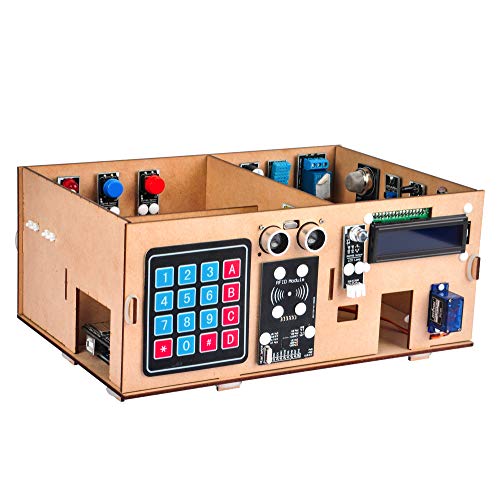
Should you be teaching or learning hands-on IoT and want a kit that scales from beginner exercises to full smart‑home projects, the OSOYOO Arduino Mega2560 Learner Kit is a strong pick because it bundles an Arduino Mega-based controller, a MEGA IoT extension board, and a broad sensor/actuator suite so you can build, test, and remotely control real devices as you progress through 19 structured lessons. You’ll follow tutorials from “Hello World!” to RFID door switches, motion sensing, ultrasonic distance measurement, and a complete smart‑home demo. The wooden house model, relay, LCD, keypad, sensors, and IoT connectivity make it ideal for STEAM classes and self-paced learning.
Best For: hobbyists, students, and educators seeking a hands-on, scalable Arduino Mega–based IoT kit for learning electronics, programming, and building a functional smart‑home prototype.
Pros:
- Comprehensive component set (MEGA2560, IoT extension, sensors, relay, LCD, keypad, wooden house) enabling end-to-end projects from basics to full smart‑home demos.
- Structured 19-lesson tutorial pathway that guides learners from “Hello World!” to advanced IoT applications like RFID access and remote control.
- Real IoT connectivity for remote device control and practical STEAM classroom or self-paced learning use.
Cons:
- Targeted at ages 15+ and may be challenging for younger beginners without instructor support.
- Requires familiarity with Arduino ecosystem and some wiring/coding, which can have a learning curve for absolute novices.
- Wooden house model and some components may need careful assembly and calibration, adding setup time before projects.
ecobee Smart Thermostat Enhanced — Wi‑Fi, Voice Assistant

Should you want reliable, energy‑saving climate control that integrates with your existing smart home, the ecobee Smart Thermostat Advanced is a strong pick because it pairs built‑in radar occupancy sensing with learning algorithms to preheat or precool rooms and cut heating/cooling bills as much as 26% annually. You’ll get automatic away and sleep adjustments, humidity‑aware learning, and radar-triggered preheating for immediate comfort. It’s compatible with about 90% of HVAC systems, includes a Power Extender Kit and Trim Kit for C‑wire issues, and requires hardwired installation. Control it via ecobee app or Siri, Alexa, and Google Assistant for seamless remote operation.
Best For: Homeowners or renters with compatible HVAC systems who want energy-saving, smart-home integrated climate control with occupancy sensing and remote voice/app control.
Pros:
- Built-in radar occupancy sensor and learning algorithms preheat/precool for immediate comfort and can reduce heating/cooling costs up to 26% annually.
- Broad compatibility (about 90% of HVAC systems) with included Power Extender Kit and Trim Kit for homes lacking a C‑wire.
- Works with Siri, Alexa, and Google Assistant and offers remote control via the ecobee app on smartphone, tablet, or Apple Watch.
Cons:
- Requires hardwired installation, which may be difficult for some users or renters without permission.
- Advanced features (like full integration and sensors) may require additional SmartSensors or setup for whole-home optimization.
- May not be compatible with the ~10% of HVAC systems—compatibility should be verified via ecobee’s Compatibility Checker.
Kasa Smart HS210 3-Way Wi‑Fi Light Switch
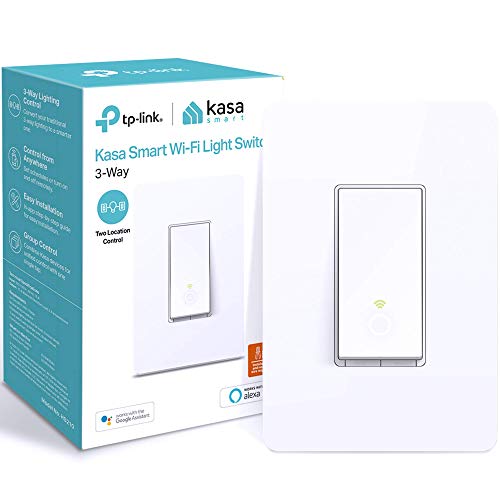
Should you want a straightforward, no-hub way to control lights from two locations, the Kasa Smart HS210 is ideal because it lets you switch between 3-way and single-pole setups while offering app and voice control through Alexa or Google Assistant. You’ll need neutral wiring and 2.4 GHz Wi‑Fi, plus Android 5.0/iOS 10 or higher. Setup walks you through the Kasa/Tapo app, though hire an electrician in case you’re unsure. Use schedules, timers, countdowns, and away mode for automation and security. UL certified and Silicon Valley–designed, the HS210 is trusted amongst over 4 million users for reliable, hub-free smart lighting.
Best For: homeowners or renters who want a simple, hub-free way to control lights from one or two locations with app and voice integration.
Pros:
- Works as a 3-way or single-pole switch and supports app/voice control via Alexa and Google Assistant.
- Supports schedules, timers, countdowns, and away mode for automation and security.
- No hub required, UL certified, and widely trusted with easy setup through the Kasa/Tapo app.
Cons:
- Requires neutral wiring and 2.4 GHz Wi‑Fi, which may limit compatibility in some homes.
- Setup may be challenging for those unfamiliar with electrical work (electrician recommended).
- Requires Android 5.0/iOS 10 or higher and depends on the app for full functionality.
Factors to Consider When Choosing a Smart Home Kit
At the time I’m choosing a smart home kit, I initially check compatibility with my existing devices and whether the hub works with popular ecosystems like Alexa, Google, or HomeKit. I also consider installation and wiring needs, the available control and automation options, and any energy-saving features that can cut my bills. Finally, I make sure the kit offers strong security and privacy controls so my network and data stay protected.
Compatibility With Devices
How do I know a smart home kit will play nicely with the gadgets I already own? I initially confirm the communication protocols—Wi‑Fi, Zigbee, Z‑Wave—match my devices so they integrate without extra hubs. I then verify support for my preferred voice assistant and smart home platform to keep control unified. I check device-type compatibility next: lighting, HVAC, locks, cameras, and sensors must be explicitly supported. I also prioritize kits that handle multiple brands and device classes so I can explore later without lock‑in. Finally, I confirm electrical requirements relevant to devices I’ll replace or add, like neutral wire needs for smart switches, but I don’t investigate installation steps here. Compatibility saves time and prevents costly replacements.
Installation And Wiring
Because wiring determines what you can actually install and who should do it, I start upon checking whether a kit—and its individual devices—require a neutral wire, since that requirement alone can rule out many older homes or compel different device choices. I also assess wiring complexity: can the kit replace existing switches directly or will it demand extra runs or add-on modules? I prefer kits with clear, step-by-step instructions or video walkthroughs that reduce guesswork. Next I check whether devices are hardwired or support wireless connections—wireless options cut electrical work and risk. Finally, I determine whether I need a professional electrician for safety and code compliance; once in doubt, hiring one prevents mistakes and preserves warranties.
Control And Automation Options
Should you want a smart home that feels effortless, prioritize control and automation options that match how you actually live. I look for kits offering multiple control methods — physical remotes, polished mobile apps, and support for major voice assistants — so I can interact the way I prefer. Scheduling and automation are must-haves: timed routines and trigger-based actions save time and reduce friction. I value remote access so I can check or change settings from anywhere, which also enhances security. Advanced automation like geofencing, occupancy detection, and scene creation lets me tailor behavior to presence and routines. Finally, I confirm compatibility with the rest of my ecosystem so automations work smoothly across devices rather than creating isolated silos.
Energy Efficiency Features
Control and automation set the stage, but energy efficiency is where smart kits start saving you real money and environmental impact. I look for automated scheduling and timers initially — they cut wasted power through turning lights and devices off whenever not needed. Occupancy sensors are next: they let heating, cooling, and lighting respond to presence so systems only run once someone’s home. I value smart thermostats with adaptive learning; they tweak temperatures based on behavior and conditions and deliver noticeable annual savings. Remote control matters too — being able to shut appliances off from anywhere prevents avoidable waste. Finally, integration with energy monitoring gives real-time feedback so I can spot drains and prioritize changes that lower bills and emissions.
Security And Privacy Controls
At the moment I evaluate a smart home kit, the initial thing I check is how it protects my data and access—encrypted communications, strong authentication (ideally multi-factor), and regular firmware updates are nonnegotiable. I favor kits that use proven encryption for device-to-app traffic and that push timely firmware patches to fix vulnerabilities. I also insist on multi-factor sign-in to block unauthorized control. Equally crucial is where data lives: local storage or reputable cloud services with clear, strict privacy policies reduces exposure. I review the platform’s privacy settings to guarantee I can limit sharing and understand what’s collected. Transparency and user control over data sharing are deal-breakers; without them I won’t recommend a kit.
Scalability And Expandability
Assuming I plan a smart home that can grow with me, I look for kits that let me add devices and features without redoing the whole system; scalability means the hub and software handle many devices and rising network traffic without lag. I favor expandability that supports third-party platforms and a variety of sensors, remotes, and modules so I can mix brands and add niche gadgets as needs change. Firmware updates and clear compatibility roadmaps matter to me because they keep the system future-proof and enable new integrations. Before buying, I check maximum device counts, mesh or multi-hub options, and whether the kit supports common standards like Matter or Thread to guarantee smooth growth and long-term usability.
Cost And Value
Because smart home kits vary so much in what they include, I initially weigh upfront price against the features and compatibility I actually need, making sure a lower sticker doesn’t mean costly add-ons afterward. I compare initial purchase costs to see which kits bundle sensors, hubs, and smart speakers so I avoid buying multiples. I also factor in ongoing expenses—subscription fees, battery replacements, and extra accessories—that quietly raise total cost of ownership. Durability matters: sometimes paying more up front for reliable hardware saves money over time through reducing replacements. I favor multifunctional devices that consolidate roles and simplify installation; complex setups that require professionals often negate any initial savings. That balanced view helps me pick kits with strong long-term value.
