

Like a thermostat that learns your rhythm, I want to help you find the right smart control for comfort and savings. I’ll walk through seven top Wi‑Fi options for 2026, from simple space‑heater controllers to full HVAC managers, and point out what matters most for installation, sensors, and privacy. Should you care about compatibility and long‑term energy gains, stick with me—there are a few surprises ahead.
SereneLife 1500W Smart Wi‑Fi Space Heater
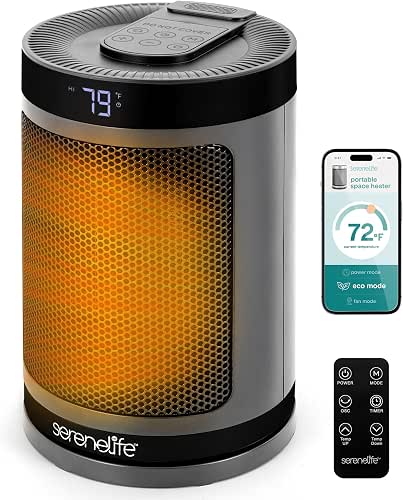
Should you want a compact, quiet heater that pairs with your phone for remote control and energy-saving schedules, the SereneLife 1500W Smart Wi‑Fi Space Heater is a strong choice—its Wi‑Fi app, remote, and ECO thermostat let you warm large rooms efficiently without wasting power. You’ll get fast, even warmth from the 1500W PTC ceramic element and three modes: Power Heat, ECO, and Fan Only. The app and remote let you adjust temperature, set timers, and switch modes from anywhere. Safety features include overheat protection, tip-over shutoff, and a child lock. It’s lightweight, whisper-quiet, and easy to move.
Best For: Compact-home or office users who want a quiet, portable smart heater that offers remote app control, energy-saving schedules, and safe, efficient warmth for larger indoor spaces.
Pros:
- Fast, even heating from a 1500W PTC ceramic element with three modes (Power Heat, ECO, Fan Only).
- Wi‑Fi app and remote control for temperature adjustment, timers, and mode switching from anywhere.
- Multiple safety features (overheat protection, tip-over shutoff, child lock) plus whisper-quiet operation and easy portability.
Cons:
- May be limited for very large open-plan areas despite “large room” claim due to compact size.
- Requires Wi‑Fi and app setup for full smart functionality, which could be a barrier for some users.
- Plastic, compact build may feel less robust than heavier, premium heaters.
Honeywell Home RTH6580WF Wi-Fi 7-Day Programmable Thermostat, White

Should you want a straightforward, budget-friendly smart thermostat that still offers reliable remote control and learning features, the Honeywell Home RTH6580WF is a solid choice—its Total Connect Comfort/Honeywell Home app and voice-assistant support make it easy to manage from anywhere, while Smart Response learns your system’s cycles to balance comfort and efficiency. You’ll install it yourself on compatible forced-air, hot-water, steam, or heat-pump systems, but it won’t work with electric baseboard heat. It needs a C-wire (or adapter) for power, shows settings on a large backlit display, is Energy Star certified, and participates in many utility programs.
Best For: homeowners seeking an affordable, easy-to-install smart thermostat that offers remote control, voice-assistant integration, and basic learning energy-saving features for compatible HVAC systems.
Pros:
- Simple DIY installation and user-friendly large backlit display for easy everyday operation.
- Remote control via Total Connect Comfort/Honeywell Home app plus Amazon Alexa/Google Assistant support.
- Energy Star certified with Smart Response learning to optimize comfort and efficiency and compatibility with many utility programs.
Cons:
- Requires a C-wire (or adapter); not suitable for homes without C-wire unless adapter is used.
- Incompatible with electric baseboard (120–240V) heating systems.
- Lacks some advanced features and integrations found in higher-end smart thermostats (e.g., extensive scheduling algorithms, geofencing, or color touchscreen).
Google Nest Thermostat Smart Wifi Programmable (Snow)

Should you want an ENERGY STAR–certified thermostat that saves energy automatically and fits most homes without a C‑wire, the Google Nest Thermostat (Snow) is a great pick—its Auto‑Away and Savings Finder features tweak temperatures for you, while Nest Renew can prioritize cleaner, cheaper energy. You’ll control it via Wi‑Fi from your phone, tablet, or laptop using Google Home, and use voice commands with Google Assistant, Alexa, or Matter‑certified assistants. Check compatibility—some systems need a C‑wire or power accessory. It also monitors HVAC health, sends maintenance alerts, and might qualify for utility rebates to enhance savings.
Best For: Homeowners and renters seeking an ENERGY STAR–certified, Wi‑Fi smart thermostat that saves energy automatically, works without a C‑wire in most homes, and integrates with Google Home and popular voice assistants.
Pros:
- Automatically saves energy with Auto‑Away, Savings Finder, and Nest Renew features.
- Works without a C‑wire in most installations and has online compatibility checker and power accessory options.
- Remote control via Google Home app and voice control with Google Assistant, Alexa, and Matter‑certified assistants.
Cons:
- Some HVAC systems (heating‑only, cooling‑only, zone or certain heat pumps) may still require a C‑wire or power accessory.
- Advanced features and integrations require Wi‑Fi and compatible smart home devices.
- Potentially limited rebate availability depending on local utility programs.
ecobee Smart Thermostat Essential — Wi‑Fi, Voice Assistant Compatible

Should you want a straightforward, energy‑focused smart thermostat that works with most HVAC systems and voice assistants, the ecobee Smart Thermostat Essential is a strong pick — especially for homes without a C‑wire where the optional Power Extender Kit keeps installation simple. You’ll save up to 23% annually through following schedules and using eco+ features like humidity detection, schedule assistant, and time‑of‑use preheating/precooling. It supports about 85% of 24 VAC systems and integrates with HomeKit, Google Assistant, and Alexa. Control is via touchscreen or the ecobee app, which tracks energy use; additional SmartSensors and trim kits are available.
Best For: homeowners seeking a simple, energy‑focused smart thermostat that integrates with major voice assistants and works well in homes without a C‑wire.
Pros:
- Easy DIY installation option for homes without a C‑wire using the optional Power Extender Kit (PEK).
- Energy‑saving eco+ features (humidity detection, schedule assistant, time‑of‑use preheat/precool) can reduce heating/cooling costs up to 23%.
- Works with Apple HomeKit, Google Assistant, and Alexa and offers remote control plus energy tracking via the ecobee app.
Cons:
- PEK (for C‑wire‑less installs) and SmartSensors are sold separately, adding to total cost.
- Compatibility covers about 85% of systems; some HVAC setups may require verification or professional installation.
- Lacks some advanced features found on higher‑end ecobee models (e.g., built‑in room sensors in the base package).
GoveeLife WiFi Hygrometer Thermometer 6-Pack Sensors

Should you need precise, long‑term humidity and temperature tracking for wine cellars, greenhouses, or storage boxes, the GoveeLife 6‑pack is a strong choice because its Swiss‑made sensors deliver ±0.54°F/±0.3°C and ±3% RH accuracy while the Wi‑Fi gateway lets you monitor up to 10 sensors in real time via the app. You’ll connect the gateway to 2.4GHz Wi‑Fi (models H5151 or H5042), and sensors upload data via Wi‑Fi and Bluetooth every two seconds. The app provides real‑time readings, preset alerts, 20‑day trend charts, two‑year export, and email notifications. Each compact sensor lasts about two years on battery.
Best For: wine cellars, greenhouses, and storage environments needing precise, long-term temperature and humidity monitoring with remote app alerts.
Pros:
- Swiss-made sensors with high accuracy (±0.54°F / ±0.3°C and ±3% RH) for precise monitoring.
- Real-time app monitoring with preset alerts, email notifications, 20-day trend charts, and up to 2 years of exportable data.
- Gateway supports up to 10 sensors on 2.4 GHz Wi‑Fi, sensors upload every 2 seconds, and each sensor has ~2-year battery life.
Cons:
- Requires a 2.4 GHz Wi‑Fi network and compatible gateway models (H5151 or H5042) — no 5 GHz support.
- Initial setup involves pairing a gateway and sensors, which may be complex for some users.
- Data refresh and upload rely on Wi‑Fi/Bluetooth connectivity; disruptions can interrupt real-time monitoring.
TURBRO WiFi Smart Temperature Controller TC01

Should you need precise, remote temperature control for projects like brewing, incubating, or greenhouse work, the TURBRO TC01 delivers with a waterproof probe, Wi‑Fi app control, and a wide 14°F–212°F range so you can monitor and adjust conditions from anywhere. You’ll set targets in °F or °C, enable a buffer to prevent rapid cycling, and use calibration for accuracy. The AIR.ai app on 2.4GHz shows historical data, schedule timers, and interval cycles to save energy. Safety features include high/low alarms, sensor-fail alerts, compressor delay, and child lock. It’s plug‑and‑play with an LCD, wall hook, and 14A output.
Best For: Individuals and small-scale hobbyists needing precise remote temperature control for brewing, fermentation, incubating, greenhouse or aquarium setups.
Pros:
- Waterproof probe and wide 14°F–212°F range enable versatile, accurate monitoring for many applications.
- Wi‑Fi app (AIR.ai) with historical data, scheduling, and interval timers allows remote control and energy-saving automation.
- Safety features like high/low alarms, sensor-fail alerts, compressor delay, and child lock protect equipment and users.
Cons:
- Requires a 2.4GHz Wi‑Fi network (no 5GHz support), which may limit connectivity in some setups.
- Maximum 14A output may be insufficient for very high-power devices without additional relays or contactors.
- LCD and app-dependent controls may be less intuitive for users preferring fully manual or industrial-grade interfaces.
Sensi Touch 2 Smart Thermostat (ST76)

Should you want a straightforward, energy-smart thermostat that plays well with Alexa and room sensors, the Sensi Touch 2 (ST76) is a solid pick. You’ll get ENERGY STAR efficiency and about 23% HVAC savings with flexible scheduling, remote access, and clear usage reports. Installation’s DIY-friendly via a top-rated app and universal Bluetooth, but a common wire (c-wire) is required. It pairs with optional Sensi Room Sensors to balance temperatures, monitors system performance, sends equipment alerts and maintenance notifications, and includes necessary manuals and hardware. Privacy-wise, Sensi doesn’t sell your personal information to third parties.
Best For: homeowners who want an ENERGY STAR certified, Alexa-compatible smart thermostat that’s easy to DIY install and can balance temperatures with optional room sensors.
Pros:
- ENERGY STAR certified and estimates about 23% HVAC energy savings with flexible scheduling and usage reports.
- DIY-friendly installation guided by a top-rated app and universal Bluetooth setup; includes manuals and mounting hardware.
- Integrates with Alexa, optional Sensi Room Sensors, and provides system monitoring, equipment alerts, and maintenance reminders.
Cons:
- Requires a common wire (c-wire) for installation, which some homes may lack without modification.
- Sensi Room Sensors are sold separately, so balanced multi-room control adds extra cost.
- Relies on cloud features for remote access and reports, which may concern users wanting fully local control (though Sensi states it does not sell personal information).
Factors to Consider When Choosing a Wifi Enabled Thermostat
Before you pick a Wi‑Fi thermostat, I check that it’s compatible with my HVAC system and confirm the power requirements like a C‑wire. I also consider how it will fit into my smart home, what energy‑saving features it offers, and whether I can handle the installation with the tools I have. Those factors determine performance, cost, and how much effort I’ll need to get it running.
Compatibility With HVAC
When I pick a Wi‑Fi thermostat, I focus initially on whether it actually works with my HVAC setup—forced air, heat pump, boiler, dual fuel, or electric baseboard all have different wiring and control needs—so I always verify system compatibility before I buy. I check the thermostat’s supported system list and use online compatibility checkers or call an HVAC pro to confirm integration. I’m careful with electric baseboard systems because many smart thermostats won’t support line-voltage controls. I also consider whether accessories like power extender kits or adapters are needed to bridge gaps between the thermostat and my equipment. Doing this up front saves time, avoids returns, and guarantees the new thermostat will control heating and cooling reliably.
Power Requirements (C‑Wire)
Compatibility checks also include the wiring that powers a smart thermostat, so I always look next at C‑wire needs. Many Wi‑Fi thermostats require a common wire to supply continuous 20–30 VAC between R/RC and C, preventing battery drain and supporting advanced features. In case your wall plate lacks a C‑wire, you’ll need to confirm whether the model includes a power adapter or supports a power extender kit; some manufacturers provide one. A few thermostats are engineered to run without a C‑wire in typical setups, but heat pumps, zone systems, and certain older HVAC gear often still require a dedicated C connection or compatible accessory. Prior to buying, I verify my HVAC wiring and check the thermostat’s documented C‑wire requirements to avoid installation issues.
Smart Home Integration
At the moment I pick a Wi‑Fi thermostat, I make sure it plays nicely with my smart home ecosystem—Alexa, Google Assistant, and ideally Apple HomeKit—because voice control and app-based automation are core conveniences I expect. I also look for Matter support so the device works smoothly across brands and stays future‑proof. Compatibility means I can change settings from my phone or with voice, and it lets the thermostat join routines I’ve already built. Whenever a thermostat talks to other sensors and devices, I get smarter occupancy sensing and automated scheduling without juggling separate apps. Multiple voice assistant options give me freedom to pick or switch ecosystems, and they simplify creating customized routines that include temperature control.
Energy Saving Features
Along with smart-home compatibility, I prioritize a thermostat’s energy-saving features because they directly lower my bills and carbon footprint. I look for programmable schedules so the system scales back whenever we’re out and ramps up before we return, cutting wasted runtime. Learning algorithms and occupancy or temperature sensors that fine-tune settings without constant input are a big plus; they balance comfort and efficiency automatically. I also check for ENERGY STAR certification and utility program compatibility to access rebates and verified savings. Adaptive preheating/precooling that shifts load to off-peak hours reduces peak charges, and reliable remote app control lets me correct settings on the fly in case plans change. Those combined features deliver meaningful, measurable savings.
Installation Ease And Tools
Upon shopping for a Wi‑Fi thermostat, I weigh installation effort as heavily as features—because a tricky install can wipe out any convenience the device promises. I initially check c‑wire requirements: some models need one, others include power extender kits or compatible accessories for homes without a c‑wire. I verify HVAC compatibility next, since certain thermostats won’t work with all heating or cooling systems. I prefer DIY‑friendly models with clear guides, digital setup apps, and user‑friendly mounting hardware that reduce anxiety and errors. Tool needs vary: many just require removing the old unit and fastening the new one, while some are near plug‑and‑play. Installation apps or digital assistants that run compatibility checks and step‑by‑step troubleshooting are a big plus.
Remote Access And Apps
Because I want control whether I’m home or away, remote access and a solid app are must-haves for a Wi‑Fi thermostat—they let me change temperatures, adjust schedules, and get system alerts from anywhere. I look for apps that offer intuitive scheduling so I can tweak heating and cooling programs remotely to save energy and stay comfortable. Integration with voice assistants is crucial too — I like issuing quick commands without accessing my phone. Real-time notifications alert me to temperature swings, system faults, or maintenance needs, so I can act before small issues become big ones. Finally, I confirm the thermostat supports a stable Wi‑Fi band (usually 2.4 GHz) on my router to guarantee reliable remote control and data sync.
Sensors And Room Coverage
Remote access and smart apps let me change settings from anywhere, but they can’t fix rooms that stay too hot or cold—room sensors do. I look for thermostats that support additional sensors so temperature and occupancy data reflect conditions throughout the house. Placing sensors in key rooms prevents uneven heating or cooling and lets the system balance comfort rather than relying on a single hallway reading. Occupancy-aware sensors keep HVAC off in empty rooms, cutting energy use without sacrificing convenience. Systems that accept multiple sensors let me create zones and customized schedules for larger homes, giving precise control where I need it. Effectiveness hinges on correct sensor placement and proper integration with the thermostat to guarantee accurate readings.
Security And Data Privacy
While smart thermostats make life easier, I’m careful about the security and privacy trade-offs they bring. I always read the provider’s privacy policy to confirm they don’t sell or share my personal data with third parties. I choose devices that use encrypted connections for app communication and remote access so data isn’t exposed in transit. I check that firmware receives regular updates — that’s how vendors patch vulnerabilities before attackers exploit them. I review access controls and authentication methods to guarantee only authorized users can change settings or reach my home network. Finally, I investigate the company’s history for prior breaches or privacy issues; a vendor with a clean record and transparent responses earns my trust.
