

You could not know that many smart switches marketed as SmartThings-compatible actually rely on 2.4 GHz Wi‑Fi rather than native Zigbee or Z‑Wave, which affects reliability in busy networks. I’ve tested and compared top models for 2026, focusing on wiring flexibility, load capacity, and voice assistant support, so you can pick a switch that will not cause headaches during install — here’s what matters most and which models stood out.
meross Smart Ceiling Fan & Dimmer Light Switch

Should you want a single, affordable device to control both a ceiling fan and its light through SmartThings, the meross Smart Ceiling Fan & Dimmer is a strong pick—just make sure your fan has separate fan and light load wires and a neutral in the wall box. You’ll get combined fan speed and dimmable light control, 3–4 speed levels, 1–100% dimming, and schedules with local routines that survive internet outages. It’s 2.4 GHz Wi‑Fi only, single‑pole, and incompatible with fans using built‑in remotes, Bluetooth/Wi‑Fi control, or DC motors. Works with SmartThings, HomeKit, Alexa, and Google Assistant; max loads: 120W fan, 150W LED/CFL, 300W incandescent.
Best For: Homeowners who want an affordable, single-switch solution to smartly control both a ceiling fan and its light (via SmartThings/HomeKit/Alexa/Google) provided the fan has separate fan and light load wires and a neutral in the wall box.
Pros:
- Integrates fan speed control and dimmable light (1–100%) in one compact switch, with 3–4 customizable fan speeds.
- Works with SmartThings, HomeKit, Alexa, and Google Assistant and supports schedules/timers including local routines that continue during internet outages.
- Energy-efficient design, customizable LED backlight (can be turned off), and supports common dimmable bulb types (LED/CFL/incandescent).
Cons:
- Requires a neutral and separate fan/light load wires; not compatible with fans that have built-in remotes, Bluetooth/Wi‑Fi control, or DC motors.
- 2.4 GHz Wi‑Fi only and single‑pole installation; not suitable for 3‑way setups or those on 5 GHz networks.
- Load limits (120W fan, 150W LED/CFL, 300W incandescent) may be insufficient for high‑power fans or large multi‑lamp fixtures.
Kasa 2-Gang HS200-2 Wi‑Fi Smart Light Switch

Should you want a dependable, two-circuit wall switch that works seamlessly with SmartThings and voice assistants, the Kasa 2‑Gang HS200‑2 is a strong choice. You get a white, flush 2‑gang single‑pole switch that requires a neutral wire, fits 120V/15A circuits, and handles up to 1800W. It uses 2.4GHz Wi‑Fi—no hub—controlled via Kasa or Tapo apps, and supports Alexa, Google Assistant, and SmartThings for full voice and remote control. Installation is guided in-app; consult an electrician in case unsure. Features include scheduling, timers, Away Mode, grouping, UL certification, and flame‑retardant construction.
Best For: homeowners or renters with standard 120V lighting circuits who want a reliable, two-circuit smart switch that integrates with SmartThings and voice assistants and don’t mind a required neutral wire.
Pros:
- Supports two independent circuits in a single, flush 2‑gang form factor (single‑pole) for space-saving control.
- Works on 2.4GHz Wi‑Fi with no hub; integrates with Kasa/Tapo apps, Alexa, Google Assistant, and SmartThings.
- Features scheduling, timers, Away Mode, device grouping, and UL-certified, flame‑retardant construction.
Cons:
- Requires a neutral wire, which may not be present in older homes and could necessitate an electrician.
- Limited to 2.4GHz Wi‑Fi networks (no 5GHz support).
- IP00 rating means no environmental protection—unsuitable for damp or exposed locations.
Kasa Smart 3-Way Dimmer Switch Kit (KS230)

Should you want a reliable 3-way dimmer that plugs directly into SmartThings without a hub, the Kasa Smart KS230 is a solid pick—its neutral-required, 2.4 GHz Wi‑Fi design lets you control paired switches from the wall, the Kasa app, or voice assistants like Alexa and Google Assistant. You get 1%–100% dimming, scheduling, and remote control via the Kasa/Tapo app. It fits standard wall plates, supports incandescent up to 300W and dimmable LEDs up to 150W, and won’t dim smart Wi‑Fi bulbs. Installation is app-guided; seek an electrician should you be unsure. ETL certified, IP00, two-year warranty, TP‑Link backed.
Best For: Homeowners or renters with existing neutral wiring who want a reliable, hub‑free 3‑way dimmer that integrates with SmartThings, Alexa, or Google Assistant for wired lighting control and scheduling.
Pros:
- Requires no hub and connects directly via 2.4 GHz Wi‑Fi for easy SmartThings, Alexa, and Google Assistant integration.
- 1%–100% smooth dimming, scheduling, and remote control through the Kasa/Tapo app plus voice control.
- Fits standard wall plates, supports up to 300W incandescent or 150W dimmable LED, and includes ETL certification and a 2‑year warranty.
Cons:
- Requires a neutral wire, so not compatible with older homes lacking neutral at the switch.
- Does not control or dim smart Wi‑Fi bulbs—only wired loads.
- IP00 rating and indoor use only; installation may require an electrician if you’re unfamiliar with wiring.
GHome Wi‑Fi Smart Light Switch (Single-Pole, Neutral)

In case you need a straightforward, no-hub smart switch that works with SmartThings via Wi‑Fi and supports voice control, the GHome Wi‑Fi Smart Light Switch is a solid pick — especially in case your home has a neutral wire. You’ll get 2.4GHz Wi‑Fi only, 120V/60Hz operation, 15A max and 1800W rating, plus UL/FCC certification. It pairs with Alexa and Google Assistant, supports schedules, sunrise/sunset offsets, and remote control via the GHome (SW5) app. Firmware V1.1.3 improves stability; update once prompted. Includes jumper wires (not for smart bulbs) and fits standard gang boxes.
Best For: homeowners or renters with a neutral wire who want an affordable, no-hub Wi‑Fi smart switch that supports Alexa/Google voice control and scheduled automation.
Pros:
- Works over 2.4GHz Wi‑Fi with no hub required and offers Alexa/Google Assistant voice control.
- Supports schedules, sunrise/sunset offsets, remote control via GHome (SW5) app, and multi-switch management.
- UL and FCC certified, 120V/60Hz, 15A / 1800W rating, compact size fits standard gang boxes; firmware V1.1.3 improves stability.
Cons:
- Requires a neutral wire, so not compatible with older non-neutral wiring without changes.
- Only supports 2.4GHz Wi‑Fi (no 5GHz support).
- Jumper wires included are not compatible with smart bulbs; single-pole only (no multi-way support).
Kasa Smart Dimmer Switch HS220, Wi‑Fi Compatible

Should you want a reliable, hub‑free dimmer that plugs straight into your SmartThings setup, the Kasa HS220 is a solid pick because it combines 2.4 GHz Wi‑Fi connectivity with full SmartThings and voice‑assistant support. You’ll need neutral wiring and a 2.4 GHz network, and the app‑guided setup in Kasa/Tapo walks you through steps (contact an electrician should you be unsure). The HS220 dims 1–100%, offers smooth fade on/off, remote control via app or voice, custom schedules, and Away mode for security. It’s UL certified, needs no hub, and integrates with Alexa, Google Assistant, and SmartThings for flexible automation.
Best For: homeowners or renters with neutral wiring who want a reliable, hub‑free dimmer that integrates with SmartThings and voice assistants over 2.4 GHz Wi‑Fi.
Pros:
- Easy app‑guided setup with no hub required and broad voice‑assistant compatibility (Alexa, Google Assistant) plus SmartThings integration.
- Smooth dimming from 1%–100% with fade on/off, remote control, schedules, and Away mode for security.
- UL certified for safety and quality.
Cons:
- Requires neutral wiring, which may not be present in older homes and could need electrician assistance.
- Only supports 2.4 GHz Wi‑Fi (no 5 GHz), which may complicate networks that default to 5 GHz.
- Dependence on cloud/app services for full functionality may be a drawback for users seeking local‑only control.
meross Smart Wi‑Fi Light Switch (HomeKit, Alexa, Google)
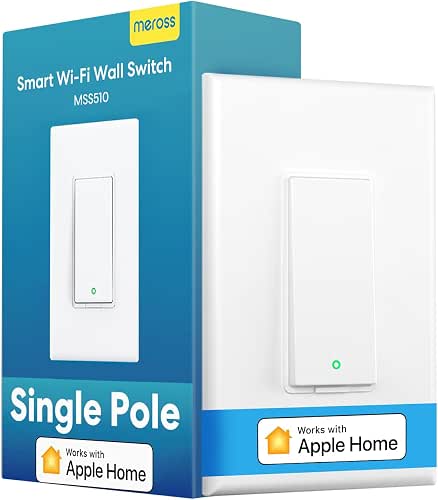
Should you want a straightforward, Hub-free way to add HomeKit and SmartThings-compatible smart control to a single light circuit, the meross Smart Wi‑Fi Light Switch is a great pick. You’ll get HomeKit, Siri, Apple Watch/CarPlay, Alexa, Google Assistant, and SmartThings support without a hub. It needs a neutral wire and works only in single-pole setups, not 3-way. It fits standard Decora faceplates, uses 2.4GHz Wi‑Fi, and installs in under 15 minutes. For HomeKit remote access you’ll need an Apple TV or HomePod as a bridge. Use scheduling, timers, and voice control to save energy.
Best For: homeowners or renters who want an easy, hub-free way to add HomeKit, Alexa, Google Assistant, and SmartThings control to a single light circuit that has a neutral wire.
Pros:
- Works with HomeKit, Siri, Apple Watch/CarPlay, Alexa, Google Assistant, and SmartThings without needing a hub for most integrations.
- Simple installation (fits Decora faceplates, single-pole only) and typically takes under 15 minutes.
- Scheduling, timers, and remote/HomeKit control (with Apple TV/HomePod bridge) help save energy and add convenience.
Cons:
- Requires a neutral wire and is incompatible with 3-way/multi-location switches.
- Only supports 2.4GHz Wi‑Fi (no 5GHz) which may limit some network setups.
- HomeKit remote access requires an always-online Apple TV or HomePod as a bridge.
TREATLIFE Wi‑Fi Smart Light Switch (Single‑Pole)
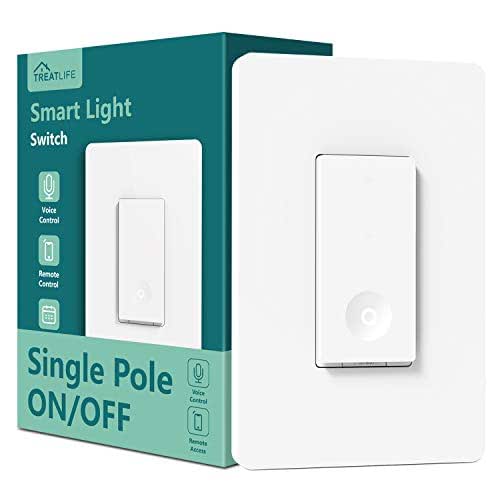
Should you want a straightforward, budget-friendly smart switch that works without a hub, the TREATLIFE Wi‑Fi Smart Light Switch is a solid pick for single‑pole circuits. You’ll need a neutral wire and 2.4GHz Wi‑Fi; it won’t work with HomeKit or 5GHz networks. It handles up to 1250W and 10A, fits standard openings with a screwless plate, and supports Alexa and Google Assistant for hands-free control. Use Smart Life app to control remotely, set schedules, share devices, group lights, monitor status, or simulate occupancy. It’s FCC certified, uses flame‑retardant materials, includes overheat protection and Treatlife support.
Best For: Budget-conscious homeowners or renters who want a hub-free, Alexa/Google‑compatible smart switch for single‑pole lighting or fans and have a neutral wire and 2.4GHz Wi‑Fi.
Pros:
- Affordable, hub-free operation with voice control via Alexa and Google Assistant.
- Remote control, scheduling, grouping, and device sharing through the Smart Life app for automation and occupancy simulation.
- Safety features and certifications (FCC, flame‑retardant materials, overheat protection) plus Treatlife support.
Cons:
- Requires a neutral wire and only supports 2.4GHz Wi‑Fi (no 5GHz or HomeKit support).
- Limited to single‑pole circuits and max output of 10A/1250W, so not suitable for multi‑way setups or very high‑load devices.
- No HomeKit compatibility and relies on the Smart Life ecosystem, which may concern some privacy‑minded users.
Factors to Consider When Choosing a Light Switch for SmartThings
Before you buy, I check a few key factors to make sure a switch will work smoothly with SmartThings. I look at native compatibility, wiring and installation requirements, whether you need a hub or specific network type, voice assistant support, and whether the switch handles dimming and your load type. Considering these points up front saves time and prevents incompatibility headaches.
Compatibility With SmartThings
Upon I pick a smart switch for my SmartThings setup, I make sure it explicitly lists SmartThings compatibility and the right wireless protocol (typically 2.4 GHz Wi‑Fi or Zigbee), since that determines whether it will integrate cleanly with my hub or connect directly; I then confirm the switch can be controlled from the SmartThings app and included in routines so it participates in my automations. I also check voice-assistant support via SmartThings—Alexa or Google Assistant—so voice control works across devices. Finally, I verify grouping and scene creation through SmartThings so the switch can join rooms, groups, or scenes for coordinated control with lights, sensors, and other smart devices, ensuring a seamless, unified smart-home experience.
Wiring And Installation Needs
During the period I pick a smart switch for my SmartThings setup, I check the wiring and installation requirements carefully because most models need a neutral wire and specific box space to work safely and reliably. I confirm whether the switch supports single‑pole or multi‑way (3‑way) configurations so it matches my existing wiring. I measure the wall box and compare it to the switch’s physical dimensions, since smart units can be bulkier than traditional toggles. I record the connection style—screw terminals versus push‑in—so I bring the right tools. Should any part of the circuit or box looks unfamiliar, I call a licensed electrician; safety and code compliance aren’t worth risking for a DIY save.
Hub And Network Requirements
While I don’t always need a separate hub for SmartThings, I do check a switch’s network requirements to avoid surprises during setup. Most compatible switches run on 2.4 GHz Wi‑Fi and can join SmartThings without a hub, but I confirm the product explicitly lists SmartThings compatibility so it groups and responds correctly. I also verify whether the switch supports direct integration or needs a bridge—direct integration is simpler. During installation I make sure a neutral wire is available, since it powers the radio and keeps the connection stable. Finally, I prioritize devices with reliable firmware updates and strong encryption, because secure data transmission and ongoing updates maintain network stability and reduce the chance of connectivity issues down the line.
Voice Assistant Integration
Because I want hands-free control to actually simplify daily life, I prioritize switches that integrate cleanly with the voice assistants I use—Alexa, Google Assistant, or Siri—and I check whether the switch needs a companion app or bridge for enabling full voice features. I value compatibility with multiple assistants so I can mix ecosystems without losing functionality. I confirm the switch supports the specific voice platform my SmartThings setup uses to avoid pairing headaches. I also look for switches that expose routine and scene controls through voice, not just basic on/off, since that enables automation and scheduling using voice. Finally, I verify whether advanced commands like dimming or scene activation require extra setup in the companion app or cloud services.
Dimming And Load Support
Should you want smooth, reliable lighting control, I look initially at a switch’s dimming range and load ratings to confirm it matches the fixtures and bulbs I’m using. I prefer switches that dim from about 1% to 100% for seamless transitions and accurate ambiance. I always verify the switch’s maximum wattage for incandescent, LED, and CFL loads so I don’t risk overloading circuits. I check that the switch supports dimmable bulbs specifically, since many smart switches can’t dim smart bulbs directly. In case the device will control a fan with integrated lighting, I value adjustable preset dim levels or multi-level fan speed support. Finally, I make certain the dimming behaves smoothly under remote and voice commands within SmartThings.
Scheduling And Automation Options
Upon evaluating switches for SmartThings, I prioritize flexible scheduling and automation so my lights behave reliably without constant tinkering; I look for customizable daily routines that trigger at set times or follow sunrise/sunset so lighting matches real life. I value countdown timers and preset schedules to cut wasted energy through ensuring lights don’t stay on. Local automation capability matters: in the event my internet drops, scenes and rules should still run. Security-focused options that simulate occupancy via randomly toggling lights add peace of mind. I also want grouping and scene integration so multiple switches act in sync with broader home automations—dawning routines, movie modes, or away profiles—keeping control simple, efficient, and resilient.
