

I love simple switches but hate complicated installs — and in 2026 you shouldn’t have to choose one over the other. I’ve tested seven top Alexa-ready smart switches that balance easy setup, reliable voice control, and practical features, so you can pick the one that fits your wiring and routines. I’ll walk you through the standouts and what really matters for a smooth smart‑home upgrade.
Kasa HS200 Smart Wi‑Fi Light Switch (Black)

Should you want a reliable, no‑hub smart switch that plays nicely with Alexa, the Kasa HS200 is a solid pick — it replaces a standard single‑pole switch, needs a neutral wire and 2.4 GHz Wi‑Fi, and gives you remote and voice control plus advanced scheduling through the Kasa app. You’ll install it using screw terminals and the app’s step‑by‑step guide; in case you’re unsure about wiring, call an electrician. It supports Alexa and Google Assistant, offers timers, countdowns and Away Mode, and handles 15 A/120 V loads (600 W). UL certified, no hub required, compatible with Android and iOS.
Best For: Homeowners or renters with a neutral‑wired single‑pole lighting circuit who want a reliable, no‑hub smart switch with Alexa/Google voice control and remote scheduling.
Pros:
- Easy app‑guided installation and screw‑terminal wiring for a secure connection.
- Remote control, voice control (Alexa/Google), and advanced scheduling modes including timers and Away Mode.
- UL certified, no hub required, compatible with common Android/iOS devices and 2.4 GHz Wi‑Fi.
Cons:
- Requires a neutral wire and 2.4 GHz Wi‑Fi (not compatible with 5 GHz networks).
- Supports only single‑pole (1‑way) circuits — not suitable for 3‑way setups.
- Rated for 15 A/120 V (600 W), which may limit use with high‑load fixtures.
MOES WiFi Smart Light Switch (No Neutral, Tuya)
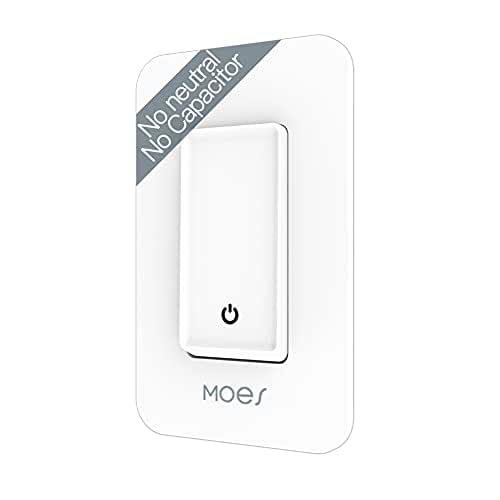
In case you’ve got older wiring without a neutral wire but still want Alexa control, the MOES WiFi Smart Light Switch (No Neutral, Tuya) is a strong pick because it installs without rewiring or a capacitor and works directly on a single live-wire 1‑way circuit. You’ll pair it via Smart Life on 2.4 GHz WiFi (no 5G), keeping the light on for 5–7 minutes during initial setup. It supports Alexa/Google Home, multi-control association, and remote/manual use. Safety features include fire‑retardant material, no‑arc tech, overload/overheat protection. Load range: 7W minimum, up to 1000W incandescent or 200W LED.
Best For: homeowners or renters with older 1‑way wiring lacking a neutral who want Alexa/Google Home control without rewiring or adding a capacitor.
Pros:
- Installs on a single live‑wire 1‑way circuit with no neutral or extra capacitor required, avoiding rewiring.
- Works with Smart Life/Tuya on 2.4 GHz Wi‑Fi and supports Alexa/Google Home, multi‑control association, and remote/manual control without a hub.
- Built‑in safety features (fire‑retardant material, no‑arc tech, overload/overheat protection) and quiet operation with no capacitor noise.
Cons:
- Only compatible with 2.4 GHz Wi‑Fi (no 5G support), which may limit some network setups.
- Minimum load of 7W and LED support limited to 200W may not suit very low‑load or high‑wattage LED configurations.
- Designed for 1‑way single pole use only—cannot be used for 2‑way (multi‑way) switching without additional changes.
MOES Smart Double WiFi Light Switches (2-Gang)

Should you want a space-saving, hub-free way to control two fixtures from one location, the MOES Smart Double WiFi Switch (2‑gang) is a strong pick. You’ll connect it to 2.4GHz WiFi and use Alexa or Google Assistant for hands-free voice control, or operate remotely via the app with timers. It fits shallow wall boxes and occupies a single gang space while controlling two circuits. It supports both no-neutral and neutral wiring—capacitors included for no-neutral setups—and offers ground and neutral outgoing wires plus a safety design. Reminder: it switches power but doesn’t dim or control smart bulbs.
Best For: homeowners or renters who want a space-saving, hub-free smart switch to control two separate fixtures from one gang location using 2.4GHz WiFi and voice assistants.
Pros:
- Fits shallow wall boxes and occupies only one gang while controlling two circuits, saving space.
- No hub required; works with Alexa and Google Assistant and offers remote app control with timers.
- Supports no-neutral and neutral wiring (capacitors included for no-neutral) and includes ground/neutral outgoing wires for easier installation and added safety.
Cons:
- Only supports 2.4GHz WiFi, not 5GHz networks.
- Does not support dimming or control of smart bulbs—switches power only.
- Requires proper wiring knowledge for no-neutral setups despite included capacitors; installation may still be tricky for some users.
GHome Wi‑Fi Smart Light Switch (Single‑Pole, Neutral)

Should you want a reliable, budget-friendly smart switch that works with Alexa and Google Assistant without needing a hub, the GHome Wi‑Fi Smart Light Switch is a solid pick because it supports 2.4GHz Wi‑Fi, offers scheduling and voice control, and requires a neutral wire for stable operation. You’ll get a single-pole, ON-OFF switch rated 120V/60Hz, 15A (1,800W), with push-button control, app and voice operation, and group management via the GHome App (SW5). It supports timers, sunrise/sunset automation, firmware updates (v1.1.3), UL/FCC certification, screw terminals, and includes four jumper wires. Compact, white, IP00.
Best For: Homeowners or renters with a neutral wire who want a budget-friendly, reliable smart ON‑OFF light switch that works with Alexa/Google Assistant over 2.4GHz Wi‑Fi without a hub.
Pros:
- Affordable, hub-free smart switch with voice control via Alexa and Google Assistant.
- Supports scheduling, timers, sunrise/sunset automation, group control, and firmware updates (v1.1.3).
- High electrical capacity (120V/60Hz, 15A/1,800W), UL and FCC certified, with screw terminals and included jumper wires.
Cons:
- Requires a neutral wire and is single-pole (not suitable for 3-way circuits).
- Only supports 2.4GHz Wi‑Fi (no 5GHz) and has IP00 protection (no moisture/dust rating).
- Push-button actuator and plastic contact material may be less durable than higher-end metal-contact switches.
Nexete Smart Wi‑Fi Double Light Switch (2‑in‑1)

Should you want to control two devices from one wall plate, the Nexete Smart Wi‑Fi Double Light Switch is ideal for households that need a compact, 2‑in‑1 solution—think controlling a light and a fan separately without adding extra switches. You’ll replace a 2‑gang switch with a single unit that operates two circuits independently. It works with Alexa and Google Assistant, no hub needed, and connects via Smart Life or Tuya apps for remote control, schedules, and scenes. Installation’s three easy steps fit standard single‑pole wiring. FCC approval and a satisfaction guarantee give added safety and purchase reassurance.
Best For: homeowners or renters who want a compact, single‑plate solution to independently control two devices (like a light and fan) with smart features and voice control.
Pros:
- Replaces a 2‑gang switch with one unit to control two circuits independently, saving wall space.
- Works with Alexa and Google Assistant and connects via Smart Life/Tuya apps for remote control, scheduling, and scenes without a hub.
- Simple three‑step installation for standard single‑pole wiring; FCC approved and backed by a satisfaction guarantee.
Cons:
- Requires compatible single‑pole wiring; not suitable for multi‑way (3‑way) switch setups without additional wiring or adapters.
- Relies on Wi‑Fi and cloud app services, so functionality may be limited during internet or service outages.
- May not fit all electrical boxes or faceplates—verify dimensions before replacing a 2‑gang switch.
Wi‑Fi Smart Double Light Switch, Alexa & Google Compatible

Should you want a straightforward, no-hub solution for controlling two circuits from one wall box, this Wi‑Fi Smart Double Light Switch is a solid pick—especially in case you use Alexa or Google Home. You’ll get hands-free voice control plus remote access via the Smart Life app on Android or iOS. It supports multi-control for 3-way circuits so two switches can manage one light once paired with other Wi‑Fi switches. Built‑in timers let you schedule seven-day routines or use 1/5/30/60-minute countdowns. It’s CE/FCC certified, includes a one‑year warranty, and doesn’t offer dimming or fan speed control.
Best For: homeowners or renters who want a simple, no-hub way to control two circuits from one wall box using Alexa/Google and the Smart Life app.
Pros:
- No hub required and remote control via Smart Life app (Android/iOS).
- Voice control compatibility with Amazon Alexa and Google Home for hands-free use.
- Supports 3-way multi-control and flexible 7-day scheduling plus 1/5/30/60-minute countdown timers.
Cons:
- No dimming or fan speed regulation — only on/off control.
- Requires neutral wiring and proper installation for two circuits (may not fit older homes).
- Limited to Wi‑Fi connectivity; performance depends on home network reliability.
meross Smart Light Switch 4-Pack (HomeKit, Wi‑Fi)

Should you want HomeKit compatibility plus dependable local control, the meross Smart Light Switch 4-pack is a solid pick—especially in case you have a neutral wire in your wall box. You’ll fit it into standard plates and use 2.4GHz Wi‑Fi to connect. The Meross app gives remote control, schedules, timers, countdowns, sunrise/sunset actions, and custom scenes. Local control responds in milliseconds and works offline so schedules and timers still run without internet. It integrates with Alexa, Siri/HomeKit, Google Assistant, and SmartThings for voice control. The app provides clear step‑by‑step installation guidance to get you up and running.
Best For: homeowners or renters with an existing neutral wire who want HomeKit compatibility, reliable local control, and easy app-based scheduling for their lights.
Pros:
- Supports HomeKit plus Alexa, Google Assistant, Siri, and SmartThings for flexible voice control.
- Fast local response (milliseconds) and offline schedules/timers that continue without internet.
- App-based schedules, sunrise/sunset automation, and clear step-by-step installation guidance.
Cons:
- Requires a neutral (white) wire in the wall box, which not all homes have.
- Only supports 2.4GHz Wi‑Fi, so it won’t work on 5GHz-only networks.
- Pack is limited to switches (4-pack) — may not cover larger homes without additional purchases.
Factors to Consider When Choosing a Smart Light Switch for Alexa
Before you pick a smart switch for Alexa, I check a few key things: whether it actually works with Alexa and your other assistants, what wiring and load requirements it needs, and whether it supports the bulbs you use. I also look at the app and ecosystem for ease of use and integration with other devices. Finally, I verify security features and certifications so I’m not trading convenience for risk.
Voice Assistant Compatibility
Once I pick a smart switch for Alexa, I make sure it explicitly lists Alexa support so pairing and voice commands work right away. I check that basic commands—on, off, dim, and scene activation—are confirmed through the manufacturer so I don’t hit unexpected limits. I also verify routine compatibility so scheduled or trigger-based automation integrates smoothly with my existing Alexa routines. Remote voice control matters too: I want to say “Alexa, turn the porch light on” whenever I’m away and have it respond over the internet. Finally, I prefer devices that carry Alexa certification or explicit compatibility remarks; that usually means fewer setup headaches and no extra hub required, making installation and everyday use more reliable.
Wiring Requirements Needed
How will the switch fit into your home’s wiring? I check whether a neutral wire is present initially—most Alexa-ready switches need it to complete the circuit and stay powered. Should your box lack neutral, some models work without one through using the live conductor plus capacitors, but compatibility varies. I also confirm whether the circuit is single-pole or multi-way, since many switches only support one-way setups. Installation style matters: screw terminals versus push-in connectors affect ease and reliability. Don’t forget Wi‑Fi band support—most switches require 2.4 GHz, not 5 GHz. In case you’re unsure about wiring, I recommend consulting a licensed electrician to avoid mistakes and guarantee safe, reliable operation.
Load And Bulb Support
Because the bulbs and fixtures are what actually draw power, I always check a smart switch’s load and bulb support before buying—look at the maximum and minimum wattage ratings, confirm compatibility with LED, incandescent, or halogen lamps, and verify whether the switch handles dimming or multi‑way setups you need. I verify the maximum wattage so the switch can handle all connected lights without overheating or tripping; higher caps (for example up to 1800W) give flexibility for multiple fixtures. I also check the minimum load, since many LEDs draw too little current for some switches. Finally, I confirm whether the model supports dimming and multi‑pole (multi‑way) circuits, because many cheaper switches only work in single‑pole installations.
App And Ecosystem Integration
While hardware determines what’s possible, I prioritize the app and ecosystem integration because it’s what actually lets Alexa control and automate the switch reliably; the app must link to Alexa easily so voice commands and routines work without hiccups. I look for remote control and scheduling that sync with Alexa routines, making scenes and timed events predictable. A clean, user-friendly interface with step-by-step setup cuts frustration and speeds Alexa skill linking. Compatibility across ecosystems—Google, Apple, Matter—gives me flexibility should I change hubs or expand devices. Finally, I check that the app pushes regular firmware updates to maintain stability and add new Alexa features. Good app integration turns capable hardware into a dependable smart-home experience.
Security And Certifications
Since safety and long-term reliability matter as much as features, I always check a smart switch’s security and certifications before buying for Alexa. I look for recognized marks like UL, FCC, or CE because they prove the device meets electrical and safety standards, reducing risks of fire, shocks, or malfunction. I also verify encryption protocols and protections against overloading or overheating so the switch resists cyber threats and electrical faults. Certified products typically undergo stricter quality control and integrate more reliably with Alexa. Firmware update support is another must — it lets manufacturers patch vulnerabilities and improve safety over time. In short, certifications plus ongoing updates give me confidence in both security and longevity.
