

You won’t get everything for nothing, but you can still score a seriously sensible Apple desktop in 2026. Should you want compact power, brilliant color, or the lowest possible entry price without needless extras, these four picks balance performance and value. I’ll walk you through who each one suits and the tradeoffs you’ll face, so you can pick the best fit for your workflow and budget.
| Apple 24-inch iMac (M4 16GB 256GB) – Purple |

| Best All-Rounder | Processor / Chip: Apple M4 (10‑core CPU, 10‑core GPU) | Memory (Unified RAM): 16 GB | Storage (SSD): 256 GB SSD | VIEW LATEST PRICE | Read Our Analysis |
| Apple Mac mini (2024) M4 16GB 512GB |

| Compact Powerhouse | Processor / Chip: Apple M4 (10‑core CPU, 10‑core GPU) | Memory (Unified RAM): 16 GB | Storage (SSD): 512 GB SSD | VIEW LATEST PRICE | Read Our Analysis |
| Apple 24″ iMac (M4 10‑core CPU/GPU 24GB,512GB) |

| Creative Pro Pick | Processor / Chip: Apple M4 (10‑core CPU, 10‑core GPU) | Memory (Unified RAM): 24 GB | Storage (SSD): 512 GB SSD | VIEW LATEST PRICE | Read Our Analysis |
| Apple 24-inch M1 iMac 8GB/256GB (Renewed) |
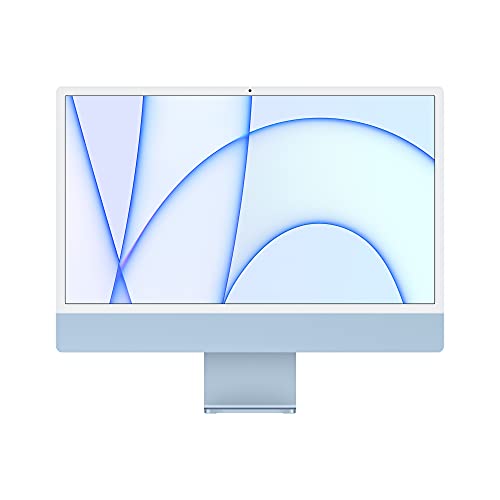
| Budget Refurb Deal | Processor / Chip: Apple M1 (8‑core CPU, 7‑core GPU) | Memory (Unified RAM): 8 GB | Storage (SSD): 256 GB SSD | VIEW LATEST PRICE | Read Our Analysis |
More Details on Our Top Picks
Apple 24-inch iMac (M4 16GB 256GB) – Purple
Should you want a compact, color‑forward all‑in‑one that handles creative work and everyday tasks smoothly, the 24‑inch iMac with M4 is a top pick—its 10‑core CPU/GPU and 16GB unified memory deliver snappy photo editing, multitasking, and native apps like Microsoft 365 and Adobe Creative Cloud, while the 4.5K Retina display and 12MP Center Stage camera make it ideal for visual work and video calls. You’ll get a strikingly thin design in Purple, 500‑nit brightness, Spatial Audio, three studio mics, Thunderbolt 4 connectivity, Wi‑Fi 6E, and Continuity with your iPhone, all on a 256GB SSD.
- Processor / Chip:Apple M4 (10‑core CPU, 10‑core GPU)
- Memory (Unified RAM):16 GB
- Storage (SSD):256 GB SSD
- Display (Built‑in):24‑inch 4.5K Retina (500 nits, up to 1B colors)
- Camera / Microphones:12 MP Center Stage camera; three studio mics
- Connectivity / Ports & Wireless:Up to four Thunderbolt 4 ports, Wi‑Fi 6E, Bluetooth 5.3; supports two external 6K displays
- Additional Feature:Seven vibrant colors
- Additional Feature:Six-speaker Spatial Audio
- Additional Feature:Up to two external 6K
Apple Mac mini (2024) M4 16GB 512GB
Who needs a compact, powerful desktop that fits on any cramped desk? You do, provided space matters. The 2024 Mac mini with M4 packs a 10‑core CPU and 10‑core GPU, 16GB unified memory, and a 512GB SSD into a 5×5‑inch chassis redesigned for Apple silicon and carbon neutral manufacture. macOS and Apple Intelligence run smoothly, and major apps like Microsoft 365 and Adobe Creative Cloud are optimized for M4. Rear Thunderbolt, HDMI, and Gigabit Ethernet plus front USB‑C and a headphone jack keep you connected. It also supports iPhone/iPad continuity features for seamless workflow.
- Processor / Chip:Apple M4 (10‑core CPU, 10‑core GPU)
- Memory (Unified RAM):16 GB
- Storage (SSD):512 GB SSD
- Display (Built‑in):None (Mac mini — requires external display)
- Camera / Microphones:No built‑in camera; continuity features with iPhone (uses external or iPhone camera)
- Connectivity / Ports & Wireless:Thunderbolt, HDMI, Gigabit Ethernet rear; front USB‑C, headphone jack; Wi‑Fi and Bluetooth (works with iPhone/iPad)
- Additional Feature:Compact 5×5 footprint
- Additional Feature:Carbon neutral design
- Additional Feature:Front USB‑C ports
Apple 24″ iMac (M4 10‑core CPU/GPU 24GB,512GB)
Provided you want a stylish, space-saving all‑in‑one that handles creative work and everyday tasks with ease, the 24″ iMac with M4 is a great pick. You get a striking thin design in seven colors and a 24″ 4.5K Retina display with 500 nits and support for a billion colors. The M4’s 10-core CPU/GPU, 24GB unified memory, and 512GB SSD deliver snappy performance for photo editing, Adobe Creative Cloud, Microsoft 365, gaming, and presentations. Apple Intelligence enhances productivity while protecting privacy. You’ll also benefit from Center Stage camera, studio mics, Spatial Audio, Thunderbolt 4, Wi‑Fi 6E, and continuity.
- Processor / Chip:Apple M4 (10‑core CPU, 10‑core GPU)
- Memory (Unified RAM):24 GB
- Storage (SSD):512 GB SSD
- Display (Built‑in):24‑inch 4.5K Retina (500 nits, up to 1B colors)
- Camera / Microphones:12 MP Center Stage camera; three studio mics
- Connectivity / Ports & Wireless:Up to four Thunderbolt 4 ports, Wi‑Fi 6E, Bluetooth 5.3; supports two external 6K displays
- Additional Feature:24GB unified memory
- Additional Feature:Supports up to four Thunderbolt
- Additional Feature:Six-speaker Spatial Audio
Apple 24-inch M1 iMac 8GB/256GB (Renewed)
Provided that you want a compact, colorful all-in-one that handles everyday creative work and video calls with ease, the renewed 24-inch M1 iMac is a smart pick. You get Apple’s 2021 M1 with an 8-core CPU and 7-core GPU, 8 GB RAM, and a 256 GB SSD—enough for photo editing, streaming, and productivity. The 24-inch 4.5K Retina display delivers P3 wide color and 500 nits brightness, while the 1080p FaceTime camera and six-speaker system improve calls and media. Its 11.5 mm profile and blue finish stand out. Ports include two Thunderbolt/USB 4 and up to two USB 3.
- Processor / Chip:Apple M1 (8‑core CPU, 7‑core GPU)
- Memory (Unified RAM):8 GB
- Storage (SSD):256 GB SSD
- Display (Built‑in):24‑inch 4.5K Retina (P3, 500 nits)
- Camera / Microphones:1080p FaceTime HD camera (with M1 ISP); mic array implied with six‑speaker system
- Connectivity / Ports & Wireless:Two Thunderbolt / USB 4 ports; additional USB 3 ports; typical Wi‑Fi/Bluetooth (model‑standard)
- Additional Feature:1080p FaceTime HD
- Additional Feature:Seven vibrant colors (blue)
- Additional Feature:Thin 11.5 mm profile
Factors to Consider When Choosing Price Apple Desktop Computer
Whenever you shop for an Apple desktop, balance budget versus performance so you don’t overspend on power you won’t use. Consider about memory and storage needs, plus display and peripheral costs that can quickly raise the total price. Also weigh long-term upgradeability and warranty/support options to protect your investment.
Budget Versus Performance
Because your needs and budget will shape every specification you pick, start using setting a clear performance target—light web/email, photo editing, or video rendering—and match RAM, CPU/GPU, and storage to that goal so you don’t overspend on unused power or bottleneck heavy workflows. Pick 8–16GB for basic productivity; choose 24GB+ and more CPU/GPU cores for sustained creative work. Check real‑world benchmarks and multitasking tests rather than clock speeds alone, since similar prices can behave very differently under export or render loads. Factor longevity: paying more now for stronger silicon and higher memory can beat replacing or upgrading sooner. Finally, balance ports and expandability with cost—include adapters or a dock in your total budget should you need extra I/O or displays.
Memory And Storage Needs
Provided you plan to run creative apps side-to-side or keep dozens of browser tabs open, aim for at least 16GB of unified memory so your system won’t thrash and slow down; for serious video editing, 3D work, or multiple VMs, bump that to 24GB or more. Pick SSD size according to workload: 256–512GB suits general use, while 1TB+ fits large media libraries, video projects, or heavy local caches. Because unified memory and internal SSDs are usually non-upgradeable, buy extra capacity now should you expect heavier future needs. Use external high-speed drives (Thunderbolt or USB‑C NVMe) or NAS for archives and backups to keep the internal drive focused on OS and active projects. Prioritize NVMe speed for faster loads, exports, and VM responsiveness.
Display And Peripheral Costs
Although you could buy a Mac with a great display, keep in mind the monitor and peripherals can add hundreds—or even thousands—of dollars to your final bill; bigger, brighter, and color‑accurate screens cost more, and quality keyboards, trackpads, speakers, cables, docks, and pro accessories like color calibrators or studio mics quickly drive up the total. You’ll pay extra for larger, higher‑resolution monitors versus standard sizes, and displays with higher brightness, P3-wide gamut, or one‑billion‑color support are pricier—worth it for photo/video work. Add a keyboard, mouse/trackpad, and speakers ($50–$500), and multiple monitors need high‑bandwidth cables/adapters and possibly a dock ($50–$300+). Professional tools like calibrators, external storage, or studio mics add several hundred more but deliver the reliability creatives need.
Long‑Term Upgradeability
After you’ve budgeted for displays and peripherals, consider how long the machine will meet your needs without costly replacements. Most modern Apple desktops use unified or soldered RAM and storage, so buy the maximum RAM and SSD you expect to need—post-purchase upgrades are often impossible. Check whether storage uses a removable NVMe/PCIe module or proprietary soldered flash; removable modules let you clone and expand capacity later. Verify expansion ports and PCIe/Thunderbolt lane availability for external GPUs, docks, or NVMe enclosures to extend I/O and performance. Confirm whether CPU/GPU are integrated or socketed, since integrated SoC designs block future swaps. Finally, assess chassis access, screw types, and the market for third‑party parts and repair guides to gauge real-world repairability.
Warranty And Support Options
Should you’re budgeting for an Apple desktop, don’t just count the upfront price—check the standard warranty and support options so you’re not surprised later. Verify length and coverage (commonly one year hardware, 90 days tech support), and whether repairs are on‑site or require mail‑in service. Confirm what’s covered—hardware defects, battery failures, included accessories—and what’s excluded, like accidental damage or unauthorized modifications. Compare extended plans for cost, duration, accidental damage protection, priority support, or express replacements. Check support channels (phone, chat, in‑store, authorized providers), typical response and turnaround times, and whether remote diagnostics or on‑device help are available. Finally, review transferability, registration or proof‑of‑purchase needs, deductibles, service fees, and geographic limits.
