

You’ll want address labels that print clearly, stick securely, and peel easily to stay organized in 2026. FungLam and the 900 Pack White offer durable matte finishes for smudge-free writing and compatibility with inkjet and laser printers. Avery’s Easy Peel lines feature patented Sure Feed technology to prevent jams and deliver crisp prints, with customizable templates for quick setup. For return addresses, Avery’s 18294 labels combine size and permanent hold. Keep exploring to find the perfect fit for your mailing needs.
| FungLam Shipping Address Labels 900 Pack Printable |

| Bulk Shipping Essential | Label Size: 1″ x 2-5/8″ | Quantity of Labels: 900 labels (30 sheets, 30 labels per sheet) | Printer Compatibility: Compatible with inkjet and laser printers | VIEW LATEST PRICE | Read Our Analysis |
| Avery Easy Peel Printable Address Labels (2-Pack) |

| High-Capacity Reliability | Label Size: 1″ x 2-5/8″ | Quantity of Labels: 1,500 labels (2-pack) | Printer Compatibility: Optimized for inkjet printers | VIEW LATEST PRICE | Read Our Analysis |
| Avery Easy Peel Printable Address Labels (8160) |
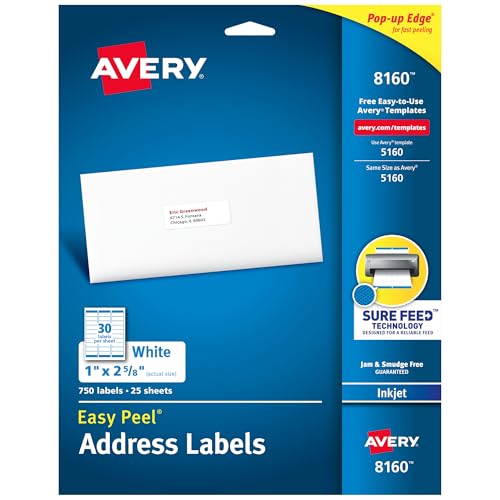
| Trusted Performance | Label Size: 1″ x 2-5/8″ | Quantity of Labels: 750 labels | Printer Compatibility: Optimized for inkjet printers | VIEW LATEST PRICE | Read Our Analysis |
| Avery Printable Return Address Labels 18294 (600) |

| Compact Return Labels | Label Size: 2/3″ x 1-3/4″ | Quantity of Labels: 600 labels | Printer Compatibility: Compatible with inkjet and laser printers | VIEW LATEST PRICE | Read Our Analysis |
| Avery Easy Peel Printable Address Labels (18260) |

| Versatile Printer Friendly | Label Size: 1″ x 2-5/8″ | Quantity of Labels: 750 labels | Printer Compatibility: Optimized for inkjet and laser printers | VIEW LATEST PRICE | Read Our Analysis |
| 1″ x 2-5/8″ Address Labels 900 Pack White |

| Large Quantity Matte | Label Size: 1″ x 2-5/8″ | Quantity of Labels: 900 labels (30 sheets) | Printer Compatibility: Compatible with inkjet and laser printers | VIEW LATEST PRICE | Read Our Analysis |
More Details on Our Top Picks
FungLam Shipping Address Labels 900 Pack Printable
In case you need a reliable solution to quickly label large shipments or organize supplies, the FungLam Shipping Address Labels 900 Pack Printable has got you covered. You get 900 labels, each 1″ x 2-5/8″, arranged on 30 sheets sized 8.5″ x 11″. These labels work seamlessly with inkjet and laser printers, providing clear, smudge-resistant prints without jamming your sheets. The self-adhesive, permanent backing sticks firmly to a variety of surfaces like cardboard, plastic, glass, and metal. Plus, their matte finish lets you write on them easily. Peeling and applying these labels is quick and hassle-free, perfect for bulk shipping or organizing supplies.
- Label Size:1″ x 2-5/8″
- Quantity of Labels:900 labels (30 sheets, 30 labels per sheet)
- Printer Compatibility:Compatible with inkjet and laser printers
- Adhesive Type:Self-adhesive, permanent adhesive
- Ease of Peeling:Easy peel by bending sheet corners
- Writable Surface:Matte surface, writable with pens, pencils, markers
- Additional Feature:Matte paper-like surface
- Additional Feature:Strong adhesion on various surfaces
- Additional Feature:Easy peel by bending sheet
Avery Easy Peel Printable Address Labels (2-Pack)
You’ll appreciate Avery Easy Peel Printable Address Labels (2-Pack) provided you want hassle-free, reliable printing and quick application. These white, rectangular labels (1″ x 2-5/8″) come in a pack of 1,500, ideal for mailing, product labeling, and organization. Thanks to patented Sure Feed technology, they reduce printer jams and misalignments, ensuring smooth printing. The Easy Peel feature pops up label edges, speeding up peeling and application. Compatible with Avery Design & Print Online, you can customize your labels with templates or handwrite them. Optimized for inkjet printers, these labels resist smudging, keeping your projects sharp and professional.
- Label Size:1″ x 2-5/8″
- Quantity of Labels:1,500 labels (2-pack)
- Printer Compatibility:Optimized for inkjet printers
- Adhesive Type:Permanent adhesive (implied)
- Ease of Peeling:Easy Peel with Pop-up Edge for quick peeling
- Writable Surface:Handwriteable for quick personalization
- Additional Feature:Patented Sure Feed technology
- Additional Feature:Pop-up Edge for peeling
- Additional Feature:Compatible with Avery Design & Print
Avery Easy Peel Printable Address Labels (8160)
Should you need reliable, easy-to-use address labels that print clearly without smudging, Avery Easy Peel Printable Address Labels (8160) will fit the bill perfectly. These white, 1″ x 2-5/8″ labels come in a pack of 750, ideal for mailing, product labeling, and general organization. Designed for inkjet printers, they deliver crisp text and graphics with minimal smearing. Thanks to patented Sure Feed technology, you’ll experience fewer jams and misalignments. The Easy Peel with Pop-up Edge guarantees quick label removal, and Avery’s Design & Print Online lets you customize effortlessly. You can also handwrite labels for fast personalization.
- Label Size:1″ x 2-5/8″
- Quantity of Labels:750 labels
- Printer Compatibility:Optimized for inkjet printers
- Adhesive Type:Permanent adhesive (implied)
- Ease of Peeling:Easy Peel with Pop-up Edge
- Writable Surface:Handwriteable option
- Additional Feature:Optimized for inkjet printers
- Additional Feature:Pop-up Edge for quick peeling
- Additional Feature:Supports Avery Design & Print Online
Avery Printable Return Address Labels 18294 (600)
In case you want to cut down on printing errors and paper jams, Avery Printable Return Address Labels 18294 with Sure Feed Technology have you covered. These 600 white labels, sized 2/3″ x 1-3/4″, fit standard 8.5″ x 11″ sheets and work smoothly with both laser and inkjet printers. You’ll enjoy sharp text and lively colors without smudges. The strong permanent adhesive keeps labels firmly in place on smooth surfaces. Plus, the Easy Peel with Pop-up Edge makes application simple. Use Avery Design & Print to personalize your labels or write on them via hand for a personal touch.
- Label Size:2/3″ x 1-3/4″
- Quantity of Labels:600 labels
- Printer Compatibility:Compatible with inkjet and laser printers
- Adhesive Type:Strong permanent adhesive
- Ease of Peeling:Easy Peel with Pop-up Edge
- Writable Surface:Suitable for printing or handwriting
- Additional Feature:Smaller label size (2/3″ x 1-3/4″)
- Additional Feature:Strong permanent adhesive
- Additional Feature:Optimized for sharp, smudge-free print
Avery Easy Peel Printable Address Labels (18260)
Whenever quick, hassle-free labeling is what you’re after, Avery Easy Peel Printable Address Labels (18260) have got you covered with their Easy Peel feature and Pop-up Edge. These 1″ x 2-5/8″ white rectangular labels come in a pack of 750, perfect for mailing, product labeling, or organizing. Optimized for laser and inkjet printers, they feature patented Sure Feed technology to reduce jams and misalignments while preventing smudges. You can easily customize labels using Avery’s Design & Print Online or handwrite for a personal touch. Reliable, versatile, and easy to use, these labels simplify your labeling tasks efficiently.
- Label Size:1″ x 2-5/8″
- Quantity of Labels:750 labels
- Printer Compatibility:Optimized for inkjet and laser printers
- Adhesive Type:Permanent adhesive (implied)
- Ease of Peeling:Easy Peel with Pop-up Edge
- Writable Surface:Handwrite or print
- Additional Feature:Works with inkjet & laser printers
- Additional Feature:Sure Feed reduces jams/misalignments
- Additional Feature:Pop-up Edge for fast peeling
1″ x 2-5/8″ Address Labels 900 Pack White
In the event you need a reliable solution for bulk mailing or organizing, the 1″ x 2-5/8″ Address Labels, 900 Pack White, will fit right into your workflow. You get 900 labels on 30 sheets, each measuring 8.5″ x 11″ with a matte surface that prevents ink smudges. These labels work with both laser and inkjet printers, and you can find print templates in PDF and Microsoft Word formats. They’re perfect for shipping, sorting files, classroom use, or labeling bottles. Plus, you can write on them easily with a pen, pencil, or Sharpie, making your organization hassle-free.
- Label Size:1″ x 2-5/8″
- Quantity of Labels:900 labels (30 sheets)
- Printer Compatibility:Compatible with inkjet and laser printers
- Adhesive Type:Permanent adhesive (implied)
- Ease of Peeling:Easy peel (method not specified)
- Writable Surface:Matte surface, writable with pencil, pen, Sharpie
- Additional Feature:PDF and Word print templates
- Additional Feature:Matte surface prevents smudging
- Additional Feature:Suitable for classroom organization
Factors to Consider When Choosing Address Labels
While selecting address labels, you’ll want to contemplate the size to guarantee they fit your envelopes perfectly. Make sure your printer supports the label type and check the adhesive strength for your mailing needs. Also, reflect about the surface finish and how easy the labels are to apply for a smooth process.
Label Size Importance
Although selecting the right label size could seem straightforward, it plays an essential role in ensuring your address labels look professional and function properly. You’ll want to choose a size that fits your text or graphics—small labels (about 1″ x 2-5/8″) work well for single-line addresses, while larger ones accommodate multi-line return addresses or logos. Make sure the label fits your mailing format without covering postage or folds. Also, consider the sheet layout; smaller labels mean more per sheet and lower cost, but the text can get harder to read. Check that your label dimensions match your printing template to avoid misalignment. Finally, contemplate handling—tiny labels can be tricky to peel, and very large ones could wrinkle or not stick well on curved surfaces.
Printer Compatibility Options
Choose address labels that work seamlessly with your printer to avoid jams, smudges, and misaligned prints. To start, confirm the label sheet size and layout—like 8.5″ x 11″ sheets with 30 labels—match your printer’s paper tray and margin settings. Next, check whether your printer is inkjet, laser, or both. Pick labels with coatings and adhesives designed for your printer type to prevent smearing or poor toner adhesion. Look for features like reinforced sheet edges or “sure feed” designs that improve feeding reliability and reduce jams, especially during large print runs. Also, make certain the label surface finish fits your needs: matte for writable labels or vivid color. In conclusion, verify printable templates match your label layout, so your addresses and graphics line up perfectly.
Adhesive Strength Types
Consider the adhesive strength carefully to make certain your address labels stick securely and perform well under various conditions. Permanent adhesives offer a strong, durable bond ideal for cardboard, plastic, glass, and metal, perfect for long-term indoor or outdoor use. In case you need temporary labels, removable adhesives peel off cleanly without residue but don’t hold well on textured or oily surfaces. Repositionable adhesives let you lift and reapply labels several times, great for layout tweaks but not for permanent sealing. For extreme temperatures, choose high-temperature or freezer-grade adhesives that prevent peeling in heat or cold. Adhesive strength is measured by peel adhesion and shear resistance, showing how well labels stick initially and resist sliding over time—key factors to make certain your labels stay put exactly where you need them.
Surface Finish Benefits
Once you choose an address label, the surface finish plays an essential role in how well your information stands out and holds up. Matte finishes reduce glare and resist fingerprints, making text easier to read under bright lights. They’re also more writable with standard pens and markers. Glossy finishes enhance color vibrancy and contrast, ideal should your labels include photos or colorful logos. However, glossy surfaces can reflect light, making text harder to read at certain angles, and often require permanent markers to write on. Glossy or coated finishes offer better moisture resistance, protecting your print from smudges. Specialty finishes like satin or linen add a premium feel and hide minor flaws but could slightly reduce image sharpness. Choosing the right finish depends on your priorities for readability, durability, and appearance.
Ease Of Application
Applying address labels quickly and accurately can save you precious time, especially while handling large batches. To make the process smoother, look for labels with an Easy Peel or pop-up edge design—they lift cleanly from the backing and reduce fingernail strain. Sheets with well-scored or micro-perforated backing let you peel entire rows at once, speeding up application. Should you apply labels by hand, choose matte, low-tack options that allow brief repositioning before sticking permanently. While using a dispenser or automated applicator, make certain label size, spacing, and liner treatment match your machine to avoid jams or misfeeds. Also, pick label sheets that stay flat and maintain consistent thickness to prevent interruptions during timed or machine-assisted application.
Customization And Design
Upon selecting address labels, you’ll want to match the size and shape to your design needs. Rectangular labels, like 1″ x 2‑5/8″, provide ample horizontal space for addresses, while smaller or square labels limit text and graphics. Choose a surface finish that fits your style—matte reduces glare and suits handwritten notes, whereas gloss improves vivid, photo-quality graphics. Make sure your design software’s label templates and margins align perfectly with the sheet layout to avoid printing errors. Use fonts sized between 8–10 pt for readability, paired with high-contrast colors for accessibility. For efficiency, consider preprinting logos or return addresses, leaving blank space for variable data. This approach saves time and keeps your branding consistent across large runs.
