

A thermostat earns its wall space when you can adjust the temperature from bed, set a routine around your workday, and avoid running heating or cooling longer than needed. Your home’s wiring and HVAC type matter just as much as app control, especially in older houses or homes with heat pumps. These nine options cover simple DIY-minded controls, occupancy-aware automation, room sensing, and display-focused choices for different routines.
The Lineup, Simplified

Sensi Lite Smart Thermostat ST25

Honeywell Home X7S Smart Wi-Fi Thermostat

ecobee Smart Thermostat Premium

ecobee Smart Thermostat Essential
Google Nest Thermostat Charcoal
ecobee Smart Thermostat Enhanced
Honeywell Home RTH9585WF Smart Color Thermostat Gray

Honeywell Home X2S Smart Wi-Fi Thermostat White

Sensi Smart Thermostat ST55
More Details On Our Top Picks
Sensi Lite Smart Thermostat ST25 keeps the focus on the practical parts of smart temperature control: scheduling, phone access, geofencing, and usage reports. Geofencing uses your phone location to adjust your routine around arrivals and departures, which may suit a weekday commute more than a fixed daily schedule.
The built-in level and guided installation steps make this a sensible starting point for a standard home HVAC replacement. Compared with the more feature-dense Honeywell Home X7S, it has a simpler control approach, which is often easier for your whole household to adopt.
Noteworthy Benefits
- Works without a common wire in many home systems.
- Built-in level helps keep the wall installation straight.
- Remote controls let you adjust settings during a commute or trip.
- Usage reports can help you spot routines worth changing.
Things To Consider
- Heating-only, cooling-only, and some heat-pump systems need a common wire or compatible power accessory.
A 4.3-inch customizable touchscreen gives Honeywell Home X7S a more display-forward feel than the Sensi Lite Smart Thermostat ST25. You can select its display color and style, a useful touch for a thermostat placed in an open kitchen or entryway.
Its Auto Away setting uses occupancy and presence detection to shift settings while you are out. That approach may make more sense for changing schedules than manual programming alone, though you need to enable the feature for it to work.
Strong Points
- 4.3-inch touchscreen makes settings easier to read at the wall.
- Display styling can better suit your room decor.
- Humidity monitoring adds another indoor condition to check.
- Supports both 2.4 GHz and 5 GHz Wi-Fi networks.
- Handles specified conventional, hot-water, and heat-pump system types.
Worth Noting
- A common wire is required, so inspect your existing thermostat wiring first.
- Electric baseboard systems in the stated voltage range are not compatible.
The included SmartSensor is the real draw here. A room sensor measures conditions away from the thermostat itself, which can help your schedule favor a bedroom, office, or family room rather than the hallway where the main unit sits.
Compared with ecobee Smart Thermostat Essential, Premium adds an indoor air-quality monitor and doorbell camera connection features. That fuller setup may suit a connected home, although those extras are not necessary for straightforward scheduling.
Everyday Perks
- Included SmartSensor supports temperature decisions in another room.
- Geofencing can align home and away settings with your phone location.
- Built-in air-quality monitor adds useful indoor-condition visibility.
Trade Offs
- Doorbell live-view features depend on a compatible wired ecobee doorbell camera.
- SmartSensor-led room control suits homes with a clear comfort problem more than a single small room.
- Check HVAC compatibility before replacing an existing control.
Who It Suits Best
Homes with a noticeably warmer or cooler room benefit most from the included SmartSensor.
Where Another Pick Suits Better
ecobee Smart Thermostat Enhanced suits households that want occupancy adjustment without a separate room sensor.
ecobee Smart Thermostat Essential trims the concept down to touchscreen temperature changes, app control, and schedule-based automation. For a home with predictable work hours, that straightforward format can be easier to live with than a thermostat loaded with extra integrations.
Its color touchscreen gives you a direct wall control alongside the app. The honest read is that it fits people who want ecobee scheduling without the room sensor and air-quality features found on ecobee Smart Thermostat Premium.
Notable Gains
- Color touchscreen makes at-wall temperature changes direct.
- App control lets you adjust your schedule away from home.
Minor Gripes
- System compatibility should be checked before you remove your existing thermostat.
- Homes needing room-by-room temperature input fit ecobee Smart Thermostat Premium more naturally.
- Schedule-based control needs a little initial setup to match your routine.
Made For
Routine-driven households that want straightforward scheduling and touchscreen control will get the most from this model.
Consider Something Else When
Sensi Lite Smart Thermostat ST25 suits DIY-focused homes where a common-wire-free setup may be possible.
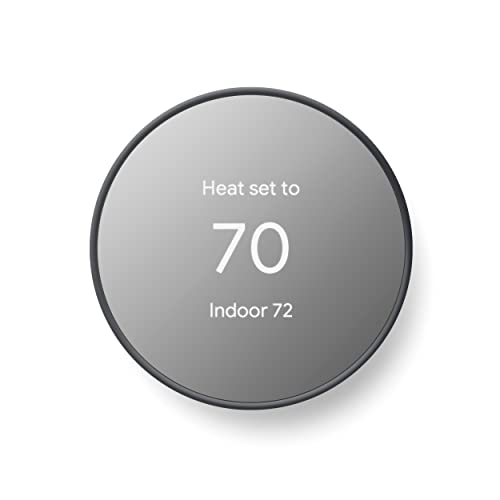
Google Nest Thermostat Charcoal is built around app-led adjustments and automatic temperature setbacks while you are away. Its charcoal finish gives you a quieter visual alternative to the display-heavy Honeywell Home X7S.
Installation is designed for a DIY approach, with a typical setup taking about 30 minutes according to the listing. That may appeal in an apartment or compact home where you want a clean wall control without a complicated routine.
A Strong Showing
- Automatic away adjustments can reduce needless heating or cooling during errands.
- Google Home app control supports changes from another room or away from home.
- Charcoal finish works well with darker wall hardware and decor.
- DIY-oriented installation suits many straightforward replacements.
Room For Improvement
- Remote control depends on working internet and Wi-Fi.
- Voice control needs a compatible separate device.
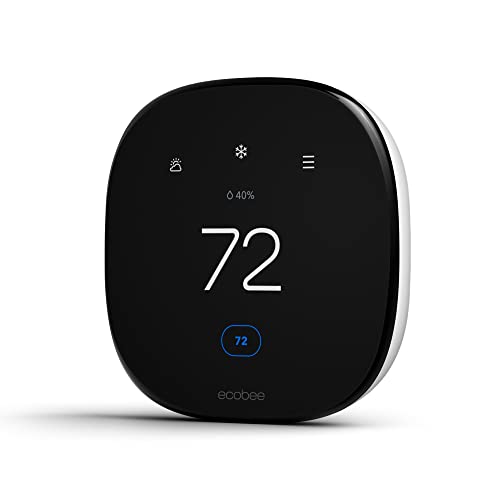
Built-in radar occupancy sensing separates ecobee Smart Thermostat Enhanced from schedule-only models. The sensor looks for presence, allowing the thermostat to adjust around an empty home and prepare temperatures before you return.
It also includes a Power Extender Kit, a wiring accessory that can help installations lacking a common wire. For households with changing office days or school runs, that combination may feel more adaptive than the ecobee Smart Thermostat Essential.
Where It Excels
- Radar occupancy sensing responds to whether somebody is home.
- Schedule suggestions can help refine a routine over time.
- Power Extender Kit is included for applicable wiring situations.
- Preheating or precooling can prepare your home before arrival.
- Connects with Apple HomeKit, Google Assistant, and SmartThings.
Points To Note
- Check the compatibility tool before installation, especially with older HVAC equipment.
- Occupancy automation suits irregular routines more than homes that prefer fixed manual settings.
- Setup takes more attention than a basic programmable thermostat.
- Phone and smart-home features depend on your home network.
The color touchscreen is the center of Honeywell Home RTH9585WF, with a background you can tailor to your paint color or preference. Unlike the charcoal Google Nest Thermostat, this model makes the display part of the room rather than trying to fade into it.
Seven-day programming gives you separate routines across the week, useful in a home where weekends look nothing like weekdays. On-screen weather and filter or humidifier-pad reminders add convenience, though they are secondary to getting your HVAC wiring right.
The Value In It
- Custom color touchscreen can coordinate with a prominent wall location.
- Seven-day programming handles different weekday and weekend routines.
- Filter and humidifier-pad reminders support regular home maintenance.
Softer Spots
- A common wire is required for installation.
Right Fit For
Households that prefer an information-rich wall display and separate daily schedules will appreciate this model.
Not Your Match When
Sensi Lite Smart Thermostat ST25 fits some homes that lack a common wire and prefer a plainer interface.
Honeywell Home X2S brings useful daily controls into a simpler body than the larger-screen X7S. Its interchangeable white and gray accent pieces are a small detail, but they can help around a freshly painted hallway or renovated kitchen.
Flexible scheduling and Auto Away support homes that are empty during work or school hours. You may find the system focus especially useful with a conventional setup or a heat pump within its stated stage limits.
Everyday Wins
- Interchangeable white and gray accents help match surrounding decor.
- Flexible schedules support regular weekday departures and returns.
- Indoor humidity monitoring gives you another home condition to view.
- Filter reminders can keep routine HVAC upkeep from slipping your mind.
- Remote First Alert app access supports temperature changes away from home.
- Specified conventional and heat-pump support covers common system formats.
Small Caveats
- Verify that your system stays within 2 heat/2 cool conventional or 2 heat/1 cool heat-pump limits.
Sensi Smart Thermostat ST55 is for homes that want app-based HVAC control without making the thermostat a centerpiece. Like Sensi Lite Smart Thermostat ST25, it uses a built-in level and guided app instructions to make a wall replacement feel less intimidating.
Its stated privacy policy does not involve selling your personal information to third parties. That may matter more to you than a large color display, particularly in a household that wants clear control over connected-home data.
Notable Upsides
- Built-in level supports a cleaner DIY installation.
- Step-by-step app instructions help organize the setup process.
- Remote app control lets you change temperature settings during travel.
- Privacy approach limits third-party sale of personal information.
Areas To Watch
- Confirm HVAC compatibility before beginning installation.
- Households wanting occupancy sensing may prefer ecobee Smart Thermostat Enhanced.
Built With In Mind
DIY-minded households that value app guidance and stated privacy practices are a strong fit here.
A Better Fit Elsewhere
Honeywell Home RTH9585WF Smart Color Thermostat Gray suits homes wanting a more customizable touchscreen display.
What Matters Before Bringing Home a Wi-Fi Thermostat
Start With Your HVAC Wiring
Look behind your existing thermostat before narrowing your options. A common wire, often called a C-wire, provides steady low-voltage power for many connected thermostats. Sensi Lite Smart Thermostat ST25 can work without one in many homes, while Honeywell Home X7S requires one.
Match the System Type
Your heating and cooling equipment determines whether a thermostat can run it correctly. Count heating and cooling stages, then identify whether you have conventional forced air, hot water heat, a heat pump, or electric baseboard equipment. Heat-pump homes need special attention because backup heat and stage limits vary by model.
Decide Between Schedules and Sensing
A fixed schedule fits regular workdays, school runs, and predictable weekends. Occupancy sensing is more useful for shifting routines, as found on ecobee Smart Thermostat Enhanced and Honeywell Home X7S. Room sensors make the most sense where your bedroom or office regularly feels different from the thermostat’s location.
Check Your Preferred Control Style
A large touchscreen can make at-wall adjustments easier for everyone in your home. Smaller, cleaner designs work well where you mostly use an app. Also consider your Wi-Fi band, since Honeywell Home X7S supports both 2.4 GHz and 5 GHz connections.
Details That Separate These Thermostats
Common Shopping Slip Ups
Skipping the wiring check is the usual problem. Confirm your system type, available wires, and stage count before removing the old thermostat.
Where the Extra Money Goes
Higher-tier options often add room sensors, occupancy detection, larger displays, and indoor-condition monitoring. Those additions make sense where your rooms vary in temperature or your schedule changes often.
Frequently Asked Questions
Do Wi-Fi thermostats need a common wire?
Some do, while others can work without one in many systems. Check your HVAC wiring and the thermostat’s installation requirements before purchase.
Can you control a Wi-Fi thermostat away from home?
Yes, supported models use a connected app for remote adjustments. Your thermostat and phone need an active internet connection for that control.
What does geofencing do on a thermostat?
Geofencing uses your phone’s location to recognize home and away patterns. It can adjust temperature settings around your arrivals and departures.
Are room sensors useful with a smart thermostat?
Room sensors are useful where the thermostat location does not reflect the room you use most. They give the system another temperature reference point.
Will a smart thermostat work with a heat pump?
Many models support heat pumps, but stage limits differ. Match the thermostat’s stated heat-pump support to your installed equipment.
