

Funny coincidence: you probably bumped into this guide while hunting for a faster home network. You want snappy coverage, low lag and a setup that actually scales with new devices. I’ll walk you through the top tri‑band mesh choices for 2026, what specs truly matter, and quick tips to avoid common pitfalls — so you can pick a system that keeps every corner of your house streaming and gaming smoothly.
| Amazon eero Pro 7 Tri‑Band Wi‑Fi 7 Router (3‑Pack) |

| Best for Smart Homes | Wi‑Fi Generation: Wi‑Fi 7 (802.11be) | Mesh Pack Size: 3‑pack | Tri‑Band Support: Tri‑band (2.4 / 5 / 6 GHz) | VIEW LATEST PRICE | Our Analysis |
| TP-Link Deco 7 Pro BE63 WiFi 7 Mesh System |

| Best for Coverage | Wi‑Fi Generation: Wi‑Fi 7 (802.11be) | Mesh Pack Size: 3‑pack | Tri‑Band Support: Tri‑band (2.4 / 5 / 6 GHz) | VIEW LATEST PRICE | Our Analysis |
| TP-Link Deco XE75 AXE5400 WiFi 6E Mesh (2-Pack) |

| Best for Cost‑Conscious 6E | Wi‑Fi Generation: Wi‑Fi 6E (802.11ax with 6 GHz) | Mesh Pack Size: 2‑pack | Tri‑Band Support: Tri‑band (2.4 / 5 / 6 GHz) | VIEW LATEST PRICE | Our Analysis |
| ASUS ZenWiFi AX XT8 Mesh WiFi 6 System |
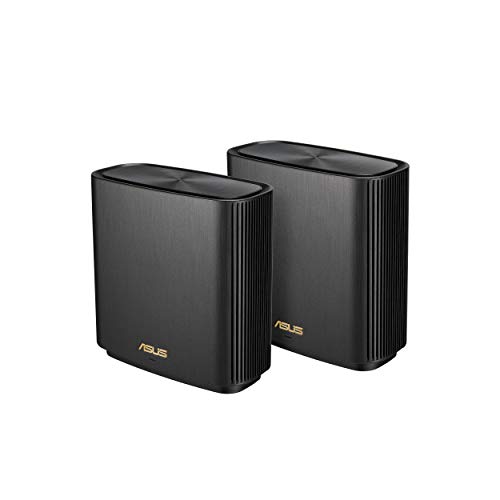
| Best for Security‑Focused Users | Wi‑Fi Generation: Wi‑Fi 6 (802.11ax) | Mesh Pack Size: 2‑pack | Tri‑Band Support: Tri‑band (2.4 / 5 / ? — Wi‑Fi 6 tri‑band design) | VIEW LATEST PRICE | Our Analysis |
| Amazon eero Pro 7 Wi‑Fi System 3-Pack (6,000 sq ft) |
| Best for Small Businesses | Wi‑Fi Generation: Wi‑Fi 7 (802.11be) | Mesh Pack Size: 3‑pack | Tri‑Band Support: Tri‑band (2.4 / 5 / 6 GHz) | VIEW LATEST PRICE | Our Analysis |
More Details on Our Top Picks
Amazon eero Pro 7 Tri‑Band Wi‑Fi 7 Router (3‑Pack)
Should you need whole‑home Wi‑Fi for a busy household or a small office that will handle hundreds of devices, the eero Pro 7 3‑pack is a smart pick—its tri‑band Wi‑Fi 7 radios and support for 600+ devices give you high concurrent capacity and up to 6,000 sq. ft. of coverage. You’ll get Wi‑Fi 7 speeds to 3.9 Gbps, 2×2 radios across 2.4/5/6 GHz, MLO support, and two auto‑sensing 5 GbE ports for multi‑Gbps internet. TrueMesh optimizes roaming, Thread/Zigbee/Matter handle smart home devices, and WPA3 plus subscription options secure and manage your network.
- Wi‑Fi Generation:Wi‑Fi 7 (802.11be)
- Mesh Pack Size:3‑pack
- Tri‑Band Support:Tri‑band (2.4 / 5 / 6 GHz)
- App‑Based Setup/Management:eero app (iOS/Android) required
- Security & Parental Controls:WPA2/WPA3, optional eero security subscriptions, parental controls
- Multi‑Gig Ethernet Ports:Two auto‑sensing 5 GbE ports (+ USB‑C)
- Additional Feature:TrueMesh optimization (TrueRoam)
- Additional Feature:Thread + Zigbee + Matter
- Additional Feature:Dual auto‑sensing 5GbE
TP-Link Deco 7 Pro BE63 WiFi 7 Mesh System
In case you need top-tier home Wi‑Fi for dense device environments and multi‑gadget streaming, the TP‑Link Deco 7 Pro BE63 is built for you. You’ll get tri‑band Wi‑Fi 7 with Multi‑Link Operation, Multi‑RUs, 4K‑QAM and 320 MHz channels providing 5188 Mbps (6 GHz), 4324 Mbps (5 GHz) and 574 Mbps (2.4 GHz) on a 6‑stream, 10 Gbps framework. A 3‑pack covers up to 7,600 sq. ft., supports 200+ devices, and uses AI‑Roaming for seamless handoffs. Hardware includes four 2.5G WAN/LAN ports, USB 3.0, dual backhaul and four smart antennas. HomeShield security, VPN client/server, Deco app and voice control complete the package.
- Wi‑Fi Generation:Wi‑Fi 7 (802.11be)
- Mesh Pack Size:3‑pack
- Tri‑Band Support:Tri‑band (2.4 / 5 / 6 GHz)
- App‑Based Setup/Management:Deco app (iOS/Android)
- Security & Parental Controls:TP‑Link HomeShield (network protection, parental controls)
- Multi‑Gig Ethernet Ports:Four 2.5 Gb WAN/LAN ports (per unit)
- Additional Feature:Four 2.5G ports
- Additional Feature:Built‑in VPN client/server
- Additional Feature:AI‑Roaming seamless handoff
TP-Link Deco XE75 AXE5400 WiFi 6E Mesh (2-Pack)
Should you need future‑proof coverage for a busy smart home, the TP‑Link Deco XE75 AXE5400 (2‑pack) is built to handle dozens of devices through using the 6 GHz band as a default backhaul to free up 2.4/5 GHz for clients. You’ll cover up to 5,500 sq. ft and replace a separate router and extenders. Wi‑Fi 6E tri‑band delivers up to 5,400 Mbps combined for around 200 devices, with HE160 on 6 GHz and 5 GHz. The Deco app simplifies setup and remote management, Alexa supports guest Wi‑Fi, and HomeShield provides basic security, parental controls, QoS, and IoT protection.
- Wi‑Fi Generation:Wi‑Fi 6E (802.11ax with 6 GHz)
- Mesh Pack Size:2‑pack
- Tri‑Band Support:Tri‑band (2.4 / 5 / 6 GHz)
- App‑Based Setup/Management:Deco app (iOS/Android)
- Security & Parental Controls:TP‑Link HomeShield (network/IoT protection, parental controls)
- Multi‑Gig Ethernet Ports:(Uses wired backhaul; specific port speeds not listed in summary) — supports wired backhaul (usual Deco XE75 includes Gigabit/2.5G ports)
- Additional Feature:6 GHz backhaul by default
- Additional Feature:HE160 6 GHz support
- Additional Feature:IoT device identification
ASUS ZenWiFi AX XT8 Mesh WiFi 6 System
Should you need seamless coverage across a large home with many simultaneous devices, the ASUS ZenWiFi AX XT8 delivers: a tri-band Wi‑Fi 6 mesh system that offers up to 6.6 Gbps total throughput and coverage for roughly 5,500 sq. ft., plus OFDMA and MU‑MIMO to keep multiple streams stable and responsive. You’ll get a 2-pack designed for six-plus rooms, unique antenna placement, and support for three SSIDs. Hardware includes a 2.5G Ethernet port and USB connector; power supports 110–240V AC with DC outputs at 19V/1.75A and 12V/3A. Setup is three steps via the ASUS Router App, with lifetime Trend Micro security.
- Wi‑Fi Generation:Wi‑Fi 6 (802.11ax)
- Mesh Pack Size:2‑pack
- Tri‑Band Support:Tri‑band (2.4 / 5 / ? — Wi‑Fi 6 tri‑band design)
- App‑Based Setup/Management:ASUS Router app
- Security & Parental Controls:Trend Micro lifetime network security & parental controls
- Multi‑Gig Ethernet Ports:2.5G Ethernet port
- Additional Feature:Lifetime Trend Micro security
- Additional Feature:3 SSID support
- Additional Feature:Unique antenna placement
Amazon eero Pro 7 Wi‑Fi System 3-Pack (6,000 sq ft)
Assuming you need future-proofed, multi-gig performance for a busy home or small office, the eero Pro 7 3‑pack is the right pick: it delivers Wi‑Fi 7 speeds with multi-link operation, two 5‑GbE ports per unit for wired backhaul up to 4.7 Gbps, and enough coverage for roughly 6,000 sq ft and 600+ devices so you can stream 8K video, run real‑time gaming, and keep IoT gear separate and reliable. You’ll get wireless throughput to 3.9 Gbps, tri‑band multi-gig backhaul, and TrueMesh intelligence (TrueRoam/TrueChannel) for stable connections. Configure four SSIDs, manage remotely with eero Intelligence, enable branded guest networks and bandwidth caps, and use VIP business support—all via a simple, IT-lite setup.
- Wi‑Fi Generation:Wi‑Fi 7 (802.11be)
- Mesh Pack Size:3‑pack
- Tri‑Band Support:Tri‑band (2.4 / 5 / 6 GHz)
- App‑Based Setup/Management:eero app (iOS/Android)
- Security & Parental Controls:WPA2/WPA3 and eero security/subscription options, guest controls
- Multi‑Gig Ethernet Ports:Two 5 GbE ports (multi‑gig)
- Additional Feature:eero Insight remote management
- Additional Feature:Branded guest network
- Additional Feature:Business‑oriented VIP support
Factors to Consider When Choosing Tri Band Mesh Wifi
Upon choosing a tri-band mesh system, you’ll want to match coverage and capacity to your home size and device load. Check wireless standards, backhaul options and available ports, and confirm strong security and privacy features. Also make sure it integrates with your smart home ecosystem so devices work reliably.
Coverage And Capacity
Because walls, floors, device count, and interference all chip away at real coverage and throughput, you should size a tri‑band mesh with at least a 20–30% margin over the raw square‑footage you need and pick a system rated for markedly more concurrent clients than you have today. Estimate peak simultaneous devices—50, 200, 600+—and choose gear whose client rating and sustained throughput won’t collapse under that load. Prefer systems with a dedicated or flexible backhaul (including 6 GHz where available) and multi‑gigabit wired ports to keep inter‑node links from bottlenecking. Match capacity to use: 4K/8K streaming, cloud gaming, and videoconferencing need much higher sustained uplink/downlink than browsing. Finally, enable automatic band steering, seamless roaming, MLO/multi‑link, and QoS so radios balance clients and congested bands are avoided.
Wireless Standards Support
Start via confirming the mesh supports the latest Wi‑Fi standards (Wi‑Fi 6/6E or Wi‑Fi 7), since they bring higher modulation (e.g., 4096‑QAM and beyond), wider channels (up to 320 MHz), OFDMA, MLO, and other improvements that materially raise throughput, capacity, and latency performance. You’ll want a true tri‑band design with a dedicated 6 GHz band unless you need cleaner, low‑latency links; otherwise check whether the system uses 5 GHz for backhaul. Verify multi‑user tech (OFDMA, MU‑MIMO) and the number of spatial streams (2×2, 4×4) to understand simultaneous device capacity and per‑client speeds. Look for advanced features like MLO and Multi‑RUs to aggregate bands and slice resources. Finally, confirm backward compatibility so older clients won’t drag down network performance.
Backhaul And Ports
Standards and radio features set the ceiling for performance, but backhaul and physical ports determine how much of that speed actually reaches every node and client. You should prefer a dedicated wireless backhaul so device traffic won’t compete with inter-node transfers, preserving client throughput. Should you be able, pick nodes with multi-gigabit Ethernet (2.5 GbE or 5 GbE) to avoid 1 GbE bottlenecks and to lower latency. Look for support of wired backhaul across multiple LAN/WAN ports and auto-sensing WAN/LAN to build daisy-chain, switch-based, or direct topologies. For wireless links, multi-link operation and wide channels (160/320 MHz) enhance aggregate capacity in busy RF environments. Extra USB or auxiliary ports give WAN failover, network storage, or cellular modem options for resilience.
Security And Privacy
Upon shopping for a tri‑band mesh, prioritize security and privacy features that stop attackers and contain breaches before they spread: strong encryption (WPA3 with WPA2 fallback), timely vendor‑signed firmware updates, and secure management (unique admin credentials, two‑factor authentication, and encrypted cloud or local‑only control) are musts. You should confirm automatic, vendor‑signed firmware updates so vulnerabilities get patched promptly. Enable guest networks and VLAN tagging to isolate IoT and visitor devices from your primary LAN. Use device‑level controls—per‑device pause, firewall rules, and DHCP reservations—to limit exposure and enforce least privilege. Require strong admin passwords and two‑factor authentication, and prefer systems that offer encrypted cloud management but let you opt for local‑only control whenever you need to minimize remote takeover risk.
Smart Home Compatibility
How will your tri‑band mesh handle the growing mix of hubs, sensors, and controllers in a modern home? Check protocol support initially: Thread, Zigbee, Z‑Wave, and Matter compatibility lets devices interoperate without extra bridges. Make sure nodes reserve low‑latency backhaul (a true tri‑band or 6 GHz band) so smart‑home traffic stays responsive even whenever streaming loads spike. Verify IPv6, UPnP, and solid multicast/IGMP snooping for reliable discovery and media delivery to cameras and speakers. Require fine‑grained segmentation—multiple SSIDs, VLANs, or guest networks—to isolate IoT from your work/personal devices and control bandwidth. Finally, pick a system with WPA3, automatic firmware updates, device profiling, and IoT threat detection so vulnerable devices don’t become network liabilities.
Management And Features
Because your mesh’s hardware is only half the story, you should pick a system with a strong management layer that makes setup, monitoring, and troubleshooting easy—whether through a polished mobile app, cloud web portal, or local controller. You’ll want centralized setup, guided firmware updates, and remote troubleshooting to simplify deployment and maintenance. Check for resilient security and parental controls—WPA3, malware/IoT scanning, guest network customization, and per‑device schedules. Verify VLAN, DHCP reservations, port forwarding, IPv6, and UPnP support provided you need segmentation or static services. Prefer built‑in QoS and traffic‑shaping, device pause, and bandwidth limits to prioritize gaming or conferencing. Finally, guarantee mesh‑specific features—automatic channel selection, band steering, seamless roaming, and analytics—so you can optimize performance and diagnose issues.
Cost And Scalability
While tri‑band mesh systems can deliver excellent coverage and performance, you should weigh both upfront and ongoing costs alongside how easily the network can grow. Initial prices vary widely: budget single‑node units are cheap, while multi‑node tri‑band kits for thousands of square feet can cost several hundred dollars. Include deployment extras—additional nodes, Ethernet cabling, and any multi‑gig switches or adapters in case you want wired backhaul or beyond‑1 Gbps LAN/WAN. Don’t forget subscription fees for advanced security, parental controls, or cloud management; those can add tens to hundreds annually. Check platform scalability: how many nodes it supports and whether added units preserve tri‑band performance (dedicated wireless backhaul vs shared bands). Plan for future bandwidth and device growth to avoid full replacements.
