

Funny coincidence: you’re looking for HomeKit plugs just as 2026 brought compact, Matter‑ready options that actually fit in a double outlet. You’ll want devices that keep local control, meet safety standards, and won’t block the other socket. I’ll walk you through seven top picks and what each does best so you can pick the right one for your setup — starting with the smallest, most reliable choices.
| TP-Link Tapo Matter Smart Plug Mini (3-Pack) |

| Best for Matter | HomeKit / Apple Home Compatibility: Matter-certified (works with Apple Home via Matter) | Voice Assistant Support: Siri, Amazon Alexa, Google Assistant, SmartThings | App Control / Remote Management: Tapo App (remote management) | VIEW LATEST PRICE | Read Our Analysis |
| SONOFF Matter Smart Plug S41s 4-Pack (15A) |

| Best for Automation | HomeKit / Apple Home Compatibility: Matter-compatible (works with Apple Home/HomeKit via Matter) | Voice Assistant Support: Alexa, Google Home, Apple Home (Siri/HomeKit), SmartThings | App Control / Remote Management: SONOFF app / remote control via app | VIEW LATEST PRICE | Read Our Analysis |
| SwitchBot Smart Plug Mini with Energy Monitoring |
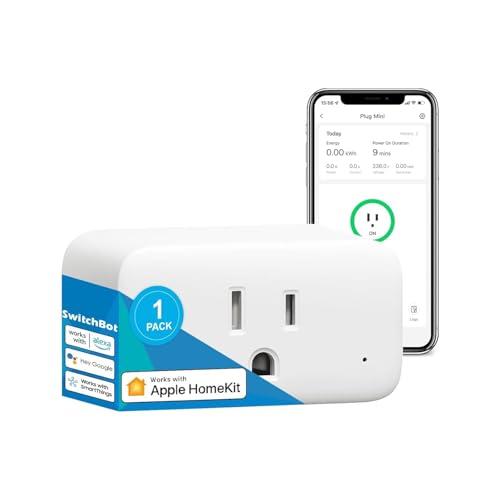
| Best for Energy Tracking | HomeKit / Apple Home Compatibility: Works with Siri / HomeKit-compatible integrations | Voice Assistant Support: Alexa, Google Assistant, Siri, SmartThings, Home Assistant | App Control / Remote Management: SwitchBot app (remote + automation) | VIEW LATEST PRICE | Read Our Analysis |
| meross Smart Plug Mini 15A (2-Pack) |

| Best for HomeKit Users | HomeKit / Apple Home Compatibility: Apple HomeKit compatible (requires Home hub for remote) | Voice Assistant Support: Siri (HomeKit), Alexa, Google Assistant, Nest Hub | App Control / Remote Management: meross app (scheduling & remote; HomeKit remote needs hub) | VIEW LATEST PRICE | Read Our Analysis |
| Govee Wi‑Fi Smart Plug 4-Pack (Alexa & Google) |

| Best Budget Multi-Pack | HomeKit / Apple Home Compatibility: Works with Google Assistant & Alexa (no explicit HomeKit listed) — NOTE: integrates with smart assistants but HomeKit not stated | Voice Assistant Support: Amazon Alexa, Google Assistant | App Control / Remote Management: Govee Home App (remote control & sharing) | VIEW LATEST PRICE | Read Our Analysis |
| TP-Link Tapo Smart Plug Outlet Extender P306 |

| Best Power Hub | HomeKit / Apple Home Compatibility: Apple HomeKit listed among supported ecosystems | Voice Assistant Support: Siri (Apple Home), Alexa, Google Assistant | App Control / Remote Management: Tapo app (centralized control of outlets/USB) | VIEW LATEST PRICE | Read Our Analysis |
| TP-Link Tapo P125 Mini Smart Plug (4-Pack) |

| Best Compact HomeKit Plug | HomeKit / Apple Home Compatibility: Apple HomeKit compatible (HomeKit / Siri support) | Voice Assistant Support: Siri (HomeKit), Alexa, Google Assistant, SmartThings | App Control / Remote Management: Tapo App (remote control + scheduling) | VIEW LATEST PRICE | Read Our Analysis |
More Details on Our Top Picks
TP-Link Tapo Matter Smart Plug Mini (3-Pack)
In case you want a compact, future-proof HomeKit-ready plug that keeps working even in the event your internet drops, the TP‑Link Tapo Matter Smart Plug Mini (3‑Pack) is a strong pick — it’s Matter‑certified for seamless cross-platform control, uses LAN‑based communication for local device actions, and packs a 15A/1800W rating into a slim, outlet‑friendly design. You’ll set it up via Bluetooth and connect over 2.4 GHz Wi‑Fi, then control devices locally or through the Tapo app, Siri, Alexa, Google, or SmartThings. It’s UL flame‑retardant, offers advanced scheduling, and includes a two‑year warranty.
- HomeKit / Apple Home Compatibility:Matter-certified (works with Apple Home via Matter)
- Voice Assistant Support:Siri, Amazon Alexa, Google Assistant, SmartThings
- App Control / Remote Management:Tapo App (remote management)
- Scheduling & Automation:Advanced scheduling, timers, routines
- Safety Certification / Materials:UL certified flame-retardant design
- Electrical Rating (Max Load):15 A / 1800 W max
- Additional Feature:Matter-certified unified control
- Additional Feature:Bluetooth onboarding setup
- Additional Feature:LAN-based local control
SONOFF Matter Smart Plug S41s 4-Pack (15A)
Should you want high‑capacity, HomeKit‑ready plugs that can handle heavy appliances, the SONOFF Matter S41s 4‑pack is a smart choice: each outlet supports up to 15A (1,800W), works with Apple Home via Matter, and lets you automate with presence sensors and flexible timers for reliable, hands‑off control. You’ll get Matter compatibility across Alexa, Google, SmartThings and IFTTT, plus app and voice control. The S41s suits lights, fans, coffee makers and other appliances, offers one‑time, repeat, random and countdown timers, and pairs with SONOFF presence sensors. ETL certified and housed in PC fireproof material, it self‑extinguishes during faults.
- HomeKit / Apple Home Compatibility:Matter-compatible (works with Apple Home/HomeKit via Matter)
- Voice Assistant Support:Alexa, Google Home, Apple Home (Siri/HomeKit), SmartThings
- App Control / Remote Management:SONOFF app / remote control via app
- Scheduling & Automation:One‑time, repeat, random, countdown timers; automations
- Safety Certification / Materials:ETL certified; PC fireproof housing (self-extinguishes)
- Electrical Rating (Max Load):15 A / 1800 W max
- Additional Feature:Works with IFTTT
- Additional Feature:Human-presence sensor integration
- Additional Feature:Flexible/random timers
SwitchBot Smart Plug Mini with Energy Monitoring
Provided that you want precise, local energy tracking without adding a hub, the SwitchBot Smart Plug Mini with Energy Monitoring is a compact pick that gives you real-time, per-second power readings and exports usage data for long-term analysis. You’ll set it up over Wi‑Fi and rely on Bluetooth whenever the network drops, so control stays reliable. It works with Alexa, Google Assistant, Siri, SmartThings, and Home Assistant, supports timers and automations, and helps spot appliance cycle completions. The mini form factor preserves adjacent outlets. ETL certification, overload protection, and a 15A rating make it safe for high-wattage devices.
- HomeKit / Apple Home Compatibility:Works with Siri / HomeKit-compatible integrations
- Voice Assistant Support:Alexa, Google Assistant, Siri, SmartThings, Home Assistant
- App Control / Remote Management:SwitchBot app (remote + automation)
- Scheduling & Automation:Timer function, automation support
- Safety Certification / Materials:ETL-certified; overload protection
- Electrical Rating (Max Load):Rated for 15 A operation
- Additional Feature:Real-time energy monitoring
- Additional Feature:Exportable consumption data
- Additional Feature:Bluetooth fallback control
meross Smart Plug Mini 15A (2-Pack)
Provided you want a compact, budget-friendly HomeKit plug that handles heavier appliances, the meross Smart Plug Mini 15A is a solid pick—it’s rated for up to 15 amps and still fits two plugs in one outlet without blocking the other. You’ll get HomeKit, Siri, Apple Watch, CarPlay, Alexa, Google Assistant and Nest Hub support, plus hands-free voice control. It uses 2.4 GHz Wi‑Fi with no hub for basic use; remote HomeKit control needs a HomePod, Apple TV, or iPad set up as a bridge and online. The app offers scheduling, timers, sunrise/sunset automations; device is ETL/FCC certified and flame-retardant.
- HomeKit / Apple Home Compatibility:Apple HomeKit compatible (requires Home hub for remote)
- Voice Assistant Support:Siri (HomeKit), Alexa, Google Assistant, Nest Hub
- App Control / Remote Management:meross app (scheduling & remote; HomeKit remote needs hub)
- Scheduling & Automation:Scheduling, sunrise/sunset schedules, timers
- Safety Certification / Materials:ETL and FCC certified; flame-retardant PC material
- Electrical Rating (Max Load):Supports up to 15 A
- Additional Feature:Sunrise/sunset scheduling
- Additional Feature:CarPlay/HomeKit watch support
- Additional Feature:Requires HomeKit bridge for remote
Govee Wi‑Fi Smart Plug 4-Pack (Alexa & Google)
Should you want a budget-friendly pack that gives reliable local control, the Govee Wi‑Fi Smart Plug 4‑Pack is a solid pick because it supports both Bluetooth and 2.4 GHz Wi‑Fi for faster, more stable connections than Wi‑Fi‑only plugs. You’ll get Alexa and Google Assistant voice control without a hub, plus ETL and FCC certification and multiple built-in safeguards. Set schedules, group outlets, and share access through the Govee Home App (search H5083) in minutes. The compact design fits tight spaces, and the 10A/1200W, 120V rating handles most appliances. It’s a practical, reliable choice for budget-conscious setups.
- HomeKit / Apple Home Compatibility:Works with Google Assistant & Alexa (no explicit HomeKit listed) — NOTE: integrates with smart assistants but HomeKit not stated
- Voice Assistant Support:Amazon Alexa, Google Assistant
- App Control / Remote Management:Govee Home App (remote control & sharing)
- Scheduling & Automation:Customized on/off schedules, grouping
- Safety Certification / Materials:ETL and FCC certified; multiple safeguards
- Electrical Rating (Max Load):10 A / 1200 W (120 V) — lower-rated than most others
- Additional Feature:Group controller feature
- Additional Feature:Bluetooth + Wi‑Fi pairing
- Additional Feature:10A / 1200W rating
TP-Link Tapo Smart Plug Outlet Extender P306
Should you want a compact power hub that turns one outlet into nine controllable ports, the TP‑Link Tapo P306 is a great choice for HomeKit users who need multiple smart AC outlets plus USB charging in a single unit. You get three individually controlled smart AC outlets, three always‑on AC outlets, and three smart USB ports (including USB‑C PD) plus a built‑in night light. It fits standard outlets securely with a mounting screw and stabilizer, offers 18W fast USB charging, surge and overheat protection, and works with Apple HomeKit, Alexa, and Google Assistant. A two‑year warranty covers the unit.
- HomeKit / Apple Home Compatibility:Apple HomeKit listed among supported ecosystems
- Voice Assistant Support:Siri (Apple Home), Alexa, Google Assistant
- App Control / Remote Management:Tapo app (centralized control of outlets/USB)
- Scheduling & Automation:App-controlled schedules and centralized automation
- Safety Certification / Materials:ETL, FCC, RoHS; flame-retardant PC casing; surge protection
- Electrical Rating (Max Load):(Outlet extender with multiple outputs) supports standard 127 V operation; USB PD 18W; includes surge protection (AC outlet specifics like per‑outlet amp rating not listed)
- Additional Feature:9-in-1 outlet hub
- Additional Feature:Built-in smart night light
- Additional Feature:USB-C PD fast charging
TP-Link Tapo P125 Mini Smart Plug (4-Pack)
Should you want compact, HomeKit‑compatible plugs that won’t block the second outlet, the TP‑Link Tapo P125 Mini (4‑pack) is a smart, budget‑friendly choice. You get four white P125 minis, a quick start guide, and Bluetooth onboarding for fast setup. They use 2.4 GHz Wi‑Fi for full remote control via the Tapo app, support Siri (require an Apple hub on your network), Alexa, Google Assistant, and SmartThings. Each plug handles 15 A/1800 W at 120 V, measures 2.36 × 1.5 × 1.3 inches, and carries UL flame‑retardant certification plus a two‑year warranty.
- HomeKit / Apple Home Compatibility:Apple HomeKit compatible (HomeKit / Siri support)
- Voice Assistant Support:Siri (HomeKit), Alexa, Google Assistant, SmartThings
- App Control / Remote Management:Tapo App (remote control + scheduling)
- Scheduling & Automation:Advanced scheduling, timers, presets
- Safety Certification / Materials:UL certified flame-retardant design
- Electrical Rating (Max Load):15 A / 1800 W
- Additional Feature:Compact non-blocking footprint
- Additional Feature:Bluetooth onboarding setup
- Additional Feature:2‑year warranty
Factors to Consider When Choosing a Smart Plug For Homekit
At the time of choosing a HomeKit smart plug, you’ll want to check the level of HomeKit compatibility and whether it supports local control versus cloud-only features. Also consider voice control reliability, the plug’s power and load rating for your devices, and whether its size will block neighboring outlets. These factors help you pick a plug that’s reliable, safe, and fits your setup.
HomeKit Compatibility Level
Because HomeKit handles device identity, security, and automation differently than generic smart ecosystems, you’ll want to check a few specific compatibility details before buying a plug. Confirm it’s fully HomeKit‑certified (not just “works with HomeKit”) so it appears natively in the Home app and uses HomeKit security and automation. Check whether remote access needs a Home hub (HomePod, Apple TV, or iPad) and plan to keep one on and on your 2.4 GHz network when you desire away control. Verify whether controls and automations run locally for faster, offline operation rather than relying on cloud services that add latency or fail without internet. Make sure the plug supports scenes, automations, timers, and status reporting, and offers firmware updates and future‑proofing assurances.
Local Versus Cloud
After checking certification and automation support, you’ll want to decide whether local or cloud operation matters for your setup. Should you prioritize resilience and privacy, choose plugs that support local LAN control or direct pairing to a HomeKit hub (HomePod, Apple TV, or iPad). Local operation keeps automations and manual commands working during internet outages and usually delivers faster response times because traffic stays on your network. Cloud-dependent plugs can introduce latency and stop working should the manufacturer’s servers or your internet fail. Keep in mind HomeKit itself needs a hub for remote access; devices that support Matter over LAN or explicit local HomeKit pairing reduce cloud reliance. Verify a plug’s local-protocol support before buying.
Voice Control Reliability
Often you’ll rely on voice control more than you reckon, so pick a HomeKit-certified plug that supports local LAN control and routes Siri through your Home hub for faster, more reliable responses. You’ll want LAN-based operation so commands don’t detour through cloud servers, which cuts latency and keeps voice actions working during internet outages. Confirm the plug exposes the specific Siri functions you need—on/off, timers, scenes, and dimming where applicable—because some models limit what Siri can do. Recall remote Siri access requires a continuously powered Home hub (HomePod, Apple TV, or iPad); losing that hub stops voice control from outside your house. Finally, consider Wi‑Fi behavior: many plugs use 2.4 GHz for better range and steadier voice-trigger reliability in larger homes.
Power And Load Rating
Check the plug’s maximum current and wattage ratings (typically 10–15 A and up to ~1800 W on 120 V systems) to make sure it can safely handle the appliance you plan to connect, and choose a model rated above the device’s maximum draw so you’ve got headroom for heat and longevity. Also confirm the plug handles continuous load and any high inrush currents—motors, heaters, and compressors can spike at startup. Verify regional safety certifications and built-in overload protection matched to your mains voltage. Should the smart plug offers multiple outlets or USB ports, account for the combined maximum load across all outputs to avoid exceeding total capacity. Leaving headroom reduces overheating risk and prolongs both plug and appliance life.
Size And Outlet Clearance
In case you’re picking a HomeKit smart plug, pay close attention to its physical size and how it will sit in your outlet — a bulky or thick plug can block the neighboring socket or hang awkwardly behind furniture. Check the plug’s dimensions and thickness so it won’t block the adjacent outlet in a standard duplex wall socket. Favor a “mini” or compact form (about 1–2 inches wide, 1–2.5 inches tall) in case you plan to stack two devices. Should you must use both sockets, pick an offset or narrow profile to preserve clearance. Also consider weight and how far it protrudes; heavy or long plugs can stress the receptacle. For strips or tight spaces, confirm plug-pin orientation and spacing so it won’t block nearby ports.
Automation And Scheduling
Because automations are where HomeKit smart plugs really earn their keep, you’ll want a plug that fully supports scenes, conditional automations, and a variety of timers so your devices behave exactly in the moment and how you want. Make sure it integrates with HomeKit scenes and automations so time-based schedules, sensors, or other accessories can trigger it. Prefer plugs offering sunrise/sunset and geofencing schedules to adapt lighting with daylight or arrival/departure. Check for multiple timer types — one‑time, repeating daily/weekly, countdown, and randomized — to cover routines and security lighting. Confirm participation in HomeKit shortcuts and conditional automations (for example, “if room temperature > X then turn off”) for situation-aware control. Finally, verify automations run locally via a Home hub for reliable, fast execution.
Security And Certifications
While shopping for a HomeKit smart plug, focus on safety certifications, secure communications, and clear privacy practices to protect your home and data. You should choose devices with recognized third‑party safety marks (UL, ETL, FCC, RoHS) so electrical safety and regulatory compliance aren’t guesswork. Confirm the plug uses end‑to‑end encryption—TLS/SSL for cloud traffic and secure local protocols for LAN control—to keep credentials and commands private. Pick products that push regular firmware updates and document their update mechanism to patch vulnerabilities promptly. Make sure authentication is strong: unique per‑device credentials or OAuth, never shared keys or default passwords. Finally, read privacy policies: prefer minimal telemetry, explicit data‑handling statements, and options for local control without mandatory cloud dependence.
Frequently Asked Questions
Do Smart Plugs Work During Power Outages With Battery Backups?
Yes — they can, but only provided the plug and its connected device get power from the backup. You’ll rely on the battery’s soothing support; plug stays smart while the backup supplies juice, otherwise it goes dark.
Can Smart Plugs Be Used Outdoors or in Garages Safely?
Yes — you can use smart plugs outdoors or in garages provided they’re rated for outdoor/weatherproof use (IP44 or higher), installed under cover, and you follow manufacturer instructions; don’t expose indoor-only plugs to moisture or extreme temperatures.
Do Smart Plugs Support Multiple Users and Family Account Sharing?
Yes — they do. You can share control through household accounts, invite family members, assign permissions, and sync scenes; you’ll manage devices together, access automations together, and troubleshoot together, though features vary across platform and manufacturer.
How Do Smart Plugs Handle Firmware Updates and Rollback Options?
They auto-download and install updates via the manufacturer’s cloud or HomeKit; you’ll get notifications and can schedule installs. Rollbacks aren’t always offered, but some vendors let you revert firmware through their app or support request.
Are There Privacy Concerns About Data Collected by Smart Plugs?
Like a window into your habits, yes — you’ll worry that smart plugs collect usage, timestamps, device IDs, possibly sharing with manufacturers or cloud services. You should review policies, minimize data, and prefer local-processing or encrypted options.
