

A front door that locks from your phone, garage access that can be shared by schedule, and lighting that follows your routine can remove small daily hassles. Your right setup depends on where you want control first, whether that means entry access, indoor monitoring, lighting, or a connected ceiling fan. These nine options cover distinct parts of a connected home, from a Matter-ready deadbolt to a wired multi-camera system.
A Snapshot Of The Selections

ULTRALOQ Bolt SE WiFi Smart Deadbolt Lock Matter

myQ Smart Garage Door Video Keypad 2K
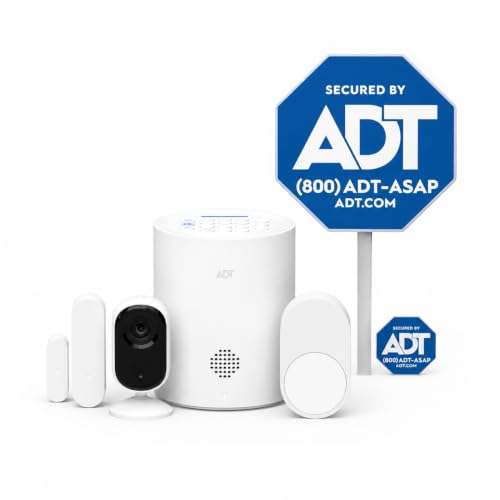
ADT Blu Indoor Camera Home Security System 2K

Lutron Caseta Diva Smart Dimmer Starter Kit

Smart Home Starter Kit
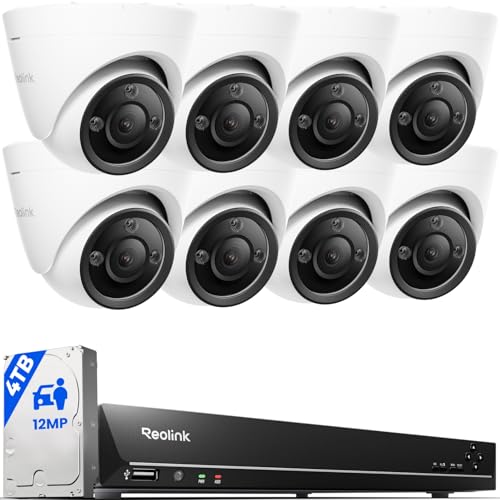
REOLINK 16CH 12MP PoE Security Camera System
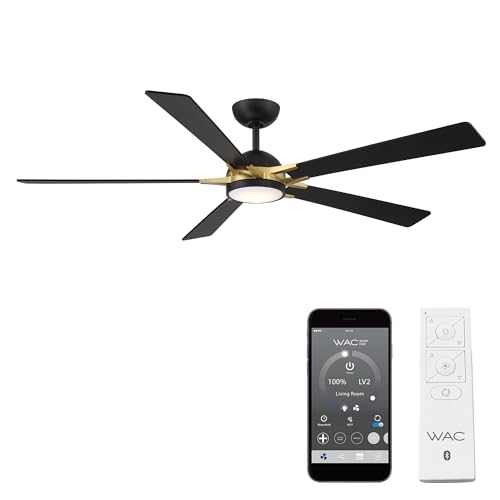
Rotary 65in Smart Home Ceiling Fan Matte Black
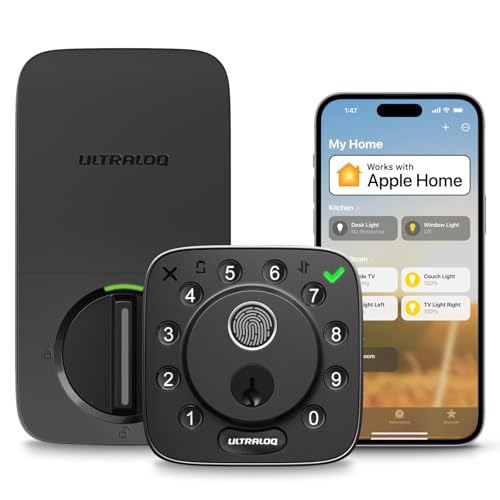
ULTRALOQ Bolt Fingerprint WiFi Smart Lock
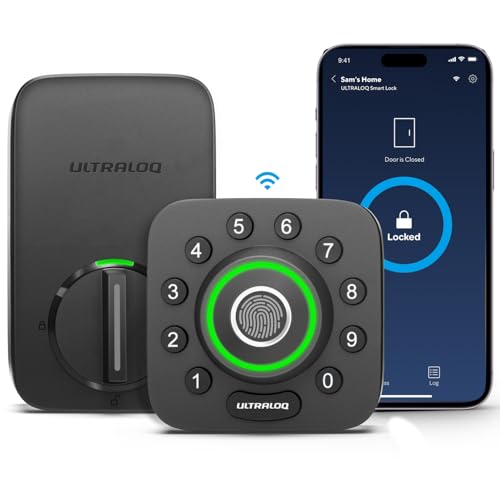
ULTRALOQ U-Bolt Pro WiFi Smart Lock
A Closer Look At Each Pick
The Bolt SE suits a front entrance where several people need different ways to get inside. Its Matter support, a smart-home interoperability standard, can connect the lock with compatible platforms through Thread, a low-power mesh network that routes signals among devices.
Built-in WiFi also handles remote access without a separate hub. For households using fingerprint, code, and app access side by side, that flexibility is genuinely useful.
Where It Helps
- Stores up to 50 fingerprints and 50 passcodes for shared household access.
- Scheduled and temporary access codes suit cleaners, guests, or recurring services.
- Zinc-alloy construction and IP65 weather protection suit exterior doors.
- Auto-lock timing can remove the need to double-check the door after leaving.
- Two mechanical keys provide a familiar backup option.
Things To Consider
- Built-in WiFi uses 2.4 GHz networks, and router placement within 70 feet matters.
- Matter-over-Thread remote features need a compatible Thread border router.
Garage access often needs more context than a basic keypad provides. The myQ Video Keypad combines personalized PIN entry with a wide-angle 2K camera, so you can see the garage approach and doorway from the app.
Compared with the Bolt SE, this pick focuses on vehicle-side entry rather than a front-door deadbolt. It makes particular sense for households that regularly share garage access with family or scheduled visitors.
Notable Gains
- Time-specific PINs help you set access around expected arrivals.
- The wide camera view covers the driveway-to-garage transition.
- Two-way audio supports a conversation at the keypad.
- Controls up to three compatible LiftMaster, Chamberlain, or Craftsman openers made after 1993.
Worth Noting
- Compatibility depends on the garage opener brand and production year.
- Recorded-video history and enhanced detection features require a subscription.
- A myQ-connected opener is needed for remote garage-door operation.
Indoor coverage needs a different approach from the outdoor-oriented myQ keypad. ADT Blu brings a base hub, camera, door or window sensor, and pet-friendly motion detector into one package for a primary room or entry area.
The physical privacy cover is a thoughtful detail for rooms where a camera should not remain exposed all day. Busy pet households may appreciate the camera’s 2K live view, night vision, and two-way audio.
Where It Excels
- Includes both video coverage and entry-point sensing from the start.
- The motion sensor is designed for homes with pets.
- Adhesive or screw mounting gives you two sensor-installation approaches.
- A physical camera cover blocks the lens between viewing sessions.
- Night vision keeps the indoor feed usable after dark.
- App-guided setup suits households adding their first room-level system.
Trade Offs
- The camera is intended for indoor placement rather than exterior coverage.
Lighting control is often the most immediately visible connected-home change. The Caseta Diva kit includes a dimmer, hub, Pico remote, pedestal, and wall plate, giving you both app-based control and a handheld physical control.
Unlike plug-in lighting, this option works with existing home wiring and does not need a neutral wire. That can make it a practical fit for older switch boxes, though the electrical installation still deserves careful attention.
The Practical Payoff
- The included remote can control lighting away from the wall box.
- LED+ dimming technology is designed for LED bulb performance.
- Three-way control can be created with a compatible accessory switch or Pico remote.
Minor Gripes
- You need to work inside a wall box, which may not suit every first-time installer.
- A compatible hub is part of the system rather than an optional extra.
Who It Suits Best
Homes updating a frequently used living-room, bedroom, or dining-room dimmer with a hub-based lighting system benefit most.
Where Another Pick Suits Better
Smart Home Starter Kit suits renters or newcomers who prefer plug-in lighting changes without opening a wall box.
For a home starting from zero, a hub, smart plug, and four smart bulbs cover several everyday routines without requiring wall wiring. The plug works with lamps, fans, coffee makers, and similar devices that use a physical on-off switch.
Compared with the Lutron kit, this setup takes a lighter-touch route to automation. You may find it especially approachable in apartments, dorms, or rooms where permanent electrical changes are off the table.
Features That Help
- Four bulbs let you spread scheduled lighting across more than one room.
- The compact plug leaves the neighboring outlet available.
- Routines can coordinate a lamp, plug-in appliance, or grouped lighting.
- The plug reconnects after a power or WiFi interruption.
Room For Improvement
- Plug control only works with devices that have a physical on-off switch.
- Wall-switched ceiling lights need a bulb or wired-control approach instead.
- The included bulbs and plug serve lighting and outlet tasks, not door or camera coverage.
Made For
Renters and first-time connected-home users who want lighting schedules and plug control without rewiring benefit most.
Consider Something Else When
Lutron Caseta Diva Smart Dimmer Starter Kit suits you better when a wall-mounted dimmer is your main priority.
The REOLINK system moves well beyond the compact ADT Blu indoor package. It uses Power over Ethernet, commonly called PoE, which sends power and data through one network cable to each camera.
That wired structure suits a workshop, larger house, or property where consistent camera placement matters more than quick plug-in setup. The honest read is that this is a project system, not a casual single-room camera.
Notable Upsides
- 12MP video supports detailed outdoor footage.
- The NVR includes 16 PoE ports and can expand to 24 channels.
- Human, vehicle, and pet shape detection can narrow motion alerts.
- Spotlights support color night viewing and scheduled operation.
- Built-in camera speakers support two-way conversations.
Points To Note
- PoE installation requires running Ethernet cable to camera locations.
- A 16-channel recorder occupies more space than a single indoor hub.
- Its scale may be excessive for a small apartment entrance.
- Lighting mode choices need setup around your preferred night coverage.
A 65-inch ceiling fan takes on a very different role from the lighting kits above. Rotary pairs five blades with an integrated LED light, Bluetooth remote, app control, and a quiet DC motor for large indoor rooms or covered outdoor areas.
The selectable light color ranges from 2700K through 5000K, letting you choose a warmer or cooler white tone. For most covered patios, its wet-location listing is a useful placement advantage.
What Works In Its Favor
- The 65-inch span suits broad seating areas and larger rooms.
- The included remote has a wall cradle for a dedicated storage spot.
- Continuous brightness control makes the integrated light more adaptable through the day.
- A six-inch downrod is included, and sloped-ceiling mounting is supported.
Softer Spots
- The large blade span needs adequate clearance before installation.
Right Fit For
Covered patios, great rooms, and large bedrooms with sufficient ceiling clearance benefit most from this 65-inch fan.
Not Your Match When
Smart Home Starter Kit is a better route for small rooms needing lighting automation without ceiling-fan installation.
The included door sensor gives this Bolt model a practical distinction from a standard deadbolt. You can check whether the door itself is open or closed, not only whether the lock has been activated.
Like the Bolt SE, it supports fingerprints, codes, app access, web access, voice control, and backup keys. Households managing a frequently used side door or front door may find the door-status alert especially helpful.
Practical Advantages
- The door sensor can alert you when the door remains open.
- Up to 50 fingerprints and 50 codes allow separate access for regular visitors.
- Built-in 2.4 GHz WiFi avoids adding a bridge for app control.
- Remote access sharing suits scheduled guests and household members.
- Apple Home integration supports compatible home automations with a home hub.
Small Caveats
- Reliable remote access depends on 2.4 GHz WiFi and router placement within 70 feet.
- Remote Apple Home functions need a compatible home hub.
Best Suited To
Households that want fingerprint entry plus a direct alert for an open exterior door benefit most.
A Better Fit Elsewhere
ULTRALOQ U-Bolt Pro WiFi Smart Lock suits high-traffic shared entrances needing fingerprint storage for more people.
For a busy shared entry, U-Bolt Pro stands out through its capacity for up to 100 fingerprints, with two fingerprints assigned per user. It also includes a door sensor, built-in WiFi, app controls, automatic locking, and automatic unlock as you approach with your phone.
Compared with the Bolt Fingerprint WiFi Smart Lock, this model is the better fit for a larger household or managed access arrangement. Its broad platform compatibility adds flexibility, though it remains a 2.4 GHz WiFi device.
The Value In It
- Stores up to 100 fingerprints for higher-traffic entries.
- Door sensor status helps you check whether the door remains open.
- Automatic locking after closure can simplify daily departures.
- Remote eKeys and passcodes help manage scheduled access from afar.
- Two physical keys remain available as backups.
- Works with several major smart-home platforms and automation services.
Areas To Watch
- WiFi connectivity requires a 2.4 GHz network.
- Automatic unlock works around your smartphone, so phone access needs to stay available.
- More access methods can take extra setup time for a large household.
What Matters Before Building Your Connected Home
Start With the Daily Friction
Begin with the task that creates the most repetition in your day. A smart lock suits households that share entry access, while a dimmer has more impact in rooms where lights are adjusted several times each evening. A garage keypad makes sense for a driveway-centered routine, not a home without a compatible opener.
Match the Connection Type
WiFi devices are often easy to place, but some use only 2.4 GHz networks and need a strong router connection nearby. Matter and Thread can support cross-platform automations, though remote operation needs compatible home-network equipment. PoE cameras trade simple placement for network cabling, which suits permanent multi-camera layouts.
Check Installation Before Committing
A smart plug and bulb setup avoids electrical work, while a wired dimmer goes inside a wall box. Ceiling fans require room clearance, ceiling support, and careful mounting. Door locks need compatibility with your existing door hardware and a practical WiFi path.
Build Around One Useful Routine
A smaller connected-home setup can be more useful than a collection of unrelated devices. Start with a routine such as lights before bed, scheduled garage access, or door-status alerts. Add devices that work toward that same routine rather than adding features you will rarely use.
Small Details That Shape the Setup
Common Shopping Slip Ups
Buying a garage keypad before checking opener compatibility can create an avoidable mismatch. Check network bands, hub needs, and installation location before settling on a device.
Where the Extra Money Goes
Higher-tier systems often add wired infrastructure, broader capacity, detailed video, or more access options. Spending more makes sense when your home needs those capabilities every day, not merely because they are available.
Frequently Asked Questions
What Should a Smart Home Starter Kit Include?
A useful starter setup should cover a task you perform often, such as lighting or outlet control. A hub can also help bring compatible devices into one control point.
Do Smart Locks Need a Hub?
Some smart locks connect directly to 2.4 GHz WiFi without a separate hub. Certain remote automations and Matter-over-Thread functions can require compatible hub hardware.
Can a Smart Plug Control Any Appliance?
A smart plug works best with appliances that return to operation through a physical on-off switch. It cannot add control to devices that need a manual button press after power returns.
Is a Wired Camera System Better for Large Properties?
A wired PoE system suits larger layouts because each camera receives data and power through Ethernet. It requires more installation planning than a single WiFi camera.
What Makes a Smart Dimmer Different From a Smart Bulb?
A smart dimmer controls the wired light circuit from the wall. A smart bulb adds control at the bulb itself and can be easier to use in rental spaces.
