

Most people don’t realize Xfinity still allows a lot of third‑party modem‑routers when they meet DOCSIS and provisioning rules, so you can save money and get better features than the ISP’s gateway. You’ll want gear that matches your plan’s channel counts and supports current Wi‑Fi standards, and I’ll point out which NETGEAR Nighthawk models fit different budgets and speeds — but initially, a quick look at what matters most.
| NETGEAR Nighthawk CAX30 WiFi 6 Cable Modem-Router |

| Best Overall | Cable compatibility (works with Xfinity): Compatible with Xfinity (certified up to 800 Mbps) | Combo vs standalone modem: Modem + WiFi router (combo) | DOCSIS standard: DOCSIS 3.1 | VIEW LATEST PRICE | Read Our Analysis |
| NETGEAR Nighthawk CAX30 Modem Router Combo (Renewed) |

| Best Value | Cable compatibility (works with Xfinity): Compatible with Xfinity | Combo vs standalone modem: Modem + WiFi router (combo) | DOCSIS standard: DOCSIS 3.1 | VIEW LATEST PRICE | Read Our Analysis |
| NETGEAR Nighthawk DOCSIS 3.1 Cable Modem (CM3000) |

| Multi-Gig Performance | Cable compatibility (works with Xfinity): Works with Xfinity | Combo vs standalone modem: Modem only (router sold separately) | DOCSIS standard: DOCSIS 3.1 | VIEW LATEST PRICE | Read Our Analysis |
| NETGEAR Nighthawk C7000 Cable Modem WiFi Router |

| Reliable Classic | Cable compatibility (works with Xfinity): Compatible with Xfinity | Combo vs standalone modem: Modem + WiFi router (combo) | DOCSIS standard: DOCSIS 3.0 | VIEW LATEST PRICE | Read Our Analysis |
| Netgear Nighthawk C7000 Cable Modem WiFi Router |
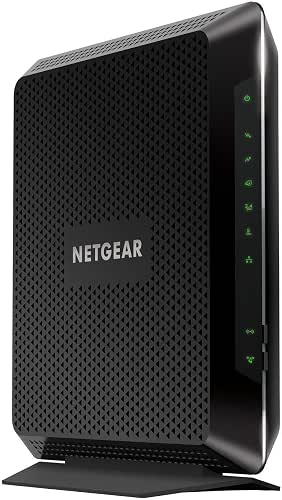
| Budget-Friendly Pick | Cable compatibility (works with Xfinity): Compatible with Xfinity | Combo vs standalone modem: Modem + WiFi router (combo, renewed) | DOCSIS standard: DOCSIS 3.0 | VIEW LATEST PRICE | Read Our Analysis |
More Details on Our Top Picks
NETGEAR Nighthawk CAX30 WiFi 6 Cable Modem-Router
Assuming you want a compact all-in-one that handles fast cable plans and modern Wi‑Fi, the NETGEAR Nighthawk CAX30 is a solid pick — it combines a DOCSIS 3.1 modem with Wi‑Fi 6 (AX2700) and link aggregation to support multi‑hundred‑Mbps to gigabit‑class Xfinity plans while covering up to ~2,500 sq ft and about 25 devices. You’ll get 32×8 channel bonding, dual‑band AX2700 throughput up to 2.7 Gbps, and four Gigabit LAN ports (with aggregation) plus a USB 3.0 port. It’s certified for Xfinity, Charter, Cox (limits apply), managed via the Nighthawk app, and supports WPA3 and NETGEAR Armor.
- Cable compatibility (works with Xfinity):Compatible with Xfinity (certified up to 800 Mbps)
- Combo vs standalone modem:Modem + WiFi router (combo)
- DOCSIS standard:DOCSIS 3.1
- Ethernet ports (wired LAN):4 × 1 Gigabit Ethernet (supports port aggregation)
- Wireless standard (WiFi):WiFi 6 (AX2700)
- Security software/support:NETGEAR Armor (WPA/WPA2/WPA3 support)
- Additional Feature:Link aggregation support
- Additional Feature:USB 3.0 port
- Additional Feature:NETGEAR Armor included
NETGEAR Nighthawk CAX30 Modem Router Combo (Renewed)
Should you want a compact all‑in‑one that handles multi‑gigabit cable plans and modern Wi‑Fi devices, the renewed NETGEAR Nighthawk CAX30 is a strong pick—its DOCSIS 3.1 modem plus AX2700 Wi‑Fi 6 router delivers link‑aggregation and up to 2.7 Gbps combined throughput, making it ideal for gaming, 4K streaming, and busy households on Xfinity and similar ISPs. You’ll get multi‑gig support, four Gigabit Ethernet ports, and doubled Wi‑Fi 6 device capacity for better simultaneous performance. NETGEAR Armor provides automatic device protection. As a renewed CAX30 (model CAX30, ASIN B0F1912VNK), it’s compatible with major cable providers and improves indoor coverage.
- Cable compatibility (works with Xfinity):Compatible with Xfinity
- Combo vs standalone modem:Modem + WiFi router (combo)
- DOCSIS standard:DOCSIS 3.1
- Ethernet ports (wired LAN):4 × Gigabit Ethernet ports
- Wireless standard (WiFi):WiFi 6 (AX2700)
- Security software/support:NETGEAR Armor
- Additional Feature:Renewed product listing
- Additional Feature:2× device capacity boost
- Additional Feature:Improved indoor/outdoor coverage
NETGEAR Nighthawk DOCSIS 3.1 Cable Modem (CM3000)
Should you want multi-gig performance for gaming, 4K streaming, or large uploads without renting equipment, the NETGEAR Nighthawk CM3000 is built for homes that need up to 2.5 Gbps download and a 1 Gbps upload—plus flexible connection options like a single 2.5 Gbps port or dual Gigabit ports with link aggregation. You’ll get DOCSIS 3.1 mid/high-split support for modern ISP tiers and compatibility with Xfinity, Spectrum, and Cox (U.S. use only). It connects to your existing WiFi or Orbi router (router sold separately), enhances camera/NAS responsiveness, and helps eliminate modem rental fees for long-term savings.
- Cable compatibility (works with Xfinity):Works with Xfinity
- Combo vs standalone modem:Modem only (router sold separately)
- DOCSIS standard:DOCSIS 3.1
- Ethernet ports (wired LAN):1 × 2.5 Gbps Ethernet + 2 × 1 Gbps (link aggregation)
- Wireless standard (WiFi):No built-in WiFi (modem only)
- Security software/support:(No router software) modem-focused — no NETGEAR Armor noted
- Additional Feature:Single 2.5 Gbps port
- Additional Feature:Mid/high‑split technology
- Additional Feature:Two-port link aggregation
NETGEAR Nighthawk C7000 Cable Modem WiFi Router
Should you want a simple, all-in-one solution for Xfinity plans up to 800 Mbps, the NETGEAR Nighthawk C7000 pairs a DOCSIS 3.0 cable modem with an AC1900 WiFi 5 router to deliver solid speeds and coverage for homes up to about 1,800 sq. ft.; it’s ideal should you’re replacing rented gear and want to cut monthly fees while managing everything from the Nighthawk app. You’ll get up to 1.9 Gbps theoretical WiFi, support for about 30 devices, four gigabit LAN ports and a USB 2.0 port. It’s compatible with major cable ISPs, includes NETGEAR Armor trial and automatic updates, but not for DSL or certain providers.
- Cable compatibility (works with Xfinity):Compatible with Xfinity
- Combo vs standalone modem:Modem + WiFi router (combo)
- DOCSIS standard:DOCSIS 3.0
- Ethernet ports (wired LAN):4 × 1 Gigabit Ethernet ports
- Wireless standard (WiFi):WiFi 5 (AC1900)
- Security software/support:NETGEAR Armor (trial; WPA/WPA2)
- Additional Feature:USB 2.0 port
- Additional Feature:WiFi 5 (AC1900)
- Additional Feature:30‑day Armor trial
Netgear Nighthawk C7000 Cable Modem WiFi Router
Should you want a straightforward, budget-friendly combo that handles cable plans up to 800 Mbps, the renewed Netgear Nighthawk C7000 is a solid pick—especially should you be on Xfinity or Cox and prefer a single device instead of separate modem and router gear. You’ll get a modem-router combo certified for major cable providers (Xfinity, Cox) that streamlines setup and saves space. Note it’s not compatible with Verizon, Spectrum, AT&T, CenturyLink, DSL providers, DirecTV, DISH, or any bundled voice service. As a renewed unit, it offers value but might show wear; expect dependable performance for households on plans up to 800 Mbps.
- Cable compatibility (works with Xfinity):Compatible with Xfinity
- Combo vs standalone modem:Modem + WiFi router (combo, renewed)
- DOCSIS standard:DOCSIS 3.0
- Ethernet ports (wired LAN):4 × 1 Gigabit Ethernet ports
- Wireless standard (WiFi):WiFi 5 (AC1900)
- Security software/support:NETGEAR Armor (renewed listing notes)
- Additional Feature:Renewed condition
- Additional Feature:Single‑device combo
- Additional Feature:Made for U.S. use only
Factors to Consider When Choosing a Modem Router for Xfinity
At the time of choosing a modem router for Xfinity, you’ll want to confirm compatibility with your specific Xfinity plan and the supported DOCSIS standard to get promised speeds. Check WiFi speed, coverage, and the number/type of Ethernet and USB ports so your devices and wired connections are supported. Also evaluate built-in security, firmware update policies, and software features like parental controls and QoS.
Compatibility With Xfinity Plans
Should you want your home network to match your Xfinity plan’s performance, pick a modem-router that’s rated for the plan’s maximum speed and officially supported through Xfinity—DOCSIS 3.1 or multi‑gig equipment for gig+ tiers, DOCSIS 3.0 for lower tiers. Verify the model is certified for your service level so it won’t be blocked or limited. Check downstream/upstream channel counts and whether link aggregation or a 2.5G/multi‑gig Ethernet port is available provided you need >1 Gbps. Confirm the router’s Wi‑Fi standard (Wi‑Fi 6/6E vs Wi‑Fi 5), claimed combined throughput, and coverage match your device count and concurrent usage. Finally, make certain the unit supports any bundled Xfinity features you use (voice, provider-specific functions) to avoid compatibility gaps.
Supported DOCSIS Standard
Should you plan to get the most from an Xfinity connection, pick a modem that supports the DOCSIS standard matching your service tier—DOCSIS 3.1 for multi‑gig or future‑proofing and DOCSIS 3.0 for many sub‑gig plans. DOCSIS 3.0 with 16×4 or 24×8 channel bonding handles most plans up to about 1 Gbps reliably. Should you subscribe above 1 Gbps or want lower latency and higher capacity, choose DOCSIS 3.1 with OFDM and low‑latency features. Verify the modem’s channel bonding counts and firmware compatibility with Xfinity provisioning for your specific speed tier. Keep in mind DOCSIS affects resale and longevity: 3.1 models retain value longer and deliver better performance and capacity over time.
WiFi Speed And Coverage
Because your modem router is also your home’s wireless gateway, pick one whose WiFi standard, bands, and capacity match your plan and devices so you actually get usable speeds and coverage. Match WiFi 6/AX or WiFi 5/AC to your plan and client devices: newer standards give higher peak throughput and handle many devices better. Check combined theoretical throughput (AX2700, AC1900) but expect 30–60% lower real-world rates due to overhead, distance, and interference. Consider your home’s square footage and layout—walls and materials cut range, so medium homes often need gear rated 2,000–2,500 sq. ft. Prioritize MU‑MIMO, OFDMA, channel width, and configurable dual‑ or tri‑band setups; use 2.4 GHz for range and 5 GHz for speed.
Ethernet And Port Options
Consider ports as your wired lifelines—pick a modem router with at least one gigabit Ethernet port so wired devices and a 1 Gbps Xfinity plan won’t get bottlenecked. Should you have a multi‑gig plan or plan to aggregate links, choose a model with a 2.5 Gbps port or multiple Gigabit ports that support link aggregation to reach ~2 Gbps. Count LAN ports: in case you connect consoles, NAS, or hubs directly, aim beyond the common 4×1 Gbps to avoid adding a switch. For external storage or printers, prefer USB 3.0 or native Ethernet-attached storage support for faster file access. Finally, verify Ethernet features like VLAN support and port‑based QoS so you may segment traffic and prioritize gaming or VoIP without compromising wired performance.
Security And Software Features
While speed and ports get the headlines, your modem‑router’s security and software are what keep your home network safe and manageable, so pick a device that supports WPA3 (with WPA2 fallback), automatic firmware updates, and built‑in threat protection. You should also want network‑level malware and intrusion blocking to stop emerging exploits. Use management apps or web GUIs that enforce strong admin passwords, offer role‑based access, and preferably multi‑factor authentication to prevent unauthorized changes. Look for guest networks, VLAN/SSID isolation, and per‑device controls so you can segment IoT and visitor devices. DNS filtering and parental controls help manage content, while the option to disable remote management and UPnP reduces exposure. These features keep performance useful and your network resilient.
