

I wanted to test whether a smart switch can really make Alexa more useful around the house, so I swapped out several models and tracked features, reliability, and setup time. What I found balances convenience, compatibility, and safety in ways that could surprise you—especially for homes using multiple assistants and smart platforms. Keep going in case you want a clear shortlist that skips hype and focuses on what actually works in 2026.
WiFi Smart Light Switch (MK36) — Alexa & Google

Should you want a straightforward, no-hub smart switch that works with Alexa and Google Assistant, the WiFi Smart Light Switch (MK36) is a solid pick: you’ll get voice and app control via Amazon Alexa, Google Assistant, and the Smart Life app for remote management. It fits 1/2/3/4 gang boxes, needs a neutral wire, and supports only 2.4 GHz WiFi. Installation’s simple for single-pole setups (not 3-way). Use grouping, schedules, timers, and sunrise/sunset automations to save energy. CE and FCC approvals back its safety and reliability, making it a practical, budget-friendly smart switch option.
Best For: Homeowners or renters who want an affordable, easy-to-install, no-hub smart switch for single-pole circuits that works with Alexa, Google Assistant, and the Smart Life app.
Pros:
- Compatible with Alexa and Google Assistant and controllable remotely via the Smart Life app for convenient voice and app control.
- Supports scheduling, timers, grouping, and sunrise/sunset automations to save energy and simplify lighting routines.
- Simple installation for standard single-pole setups, fits 1/2/3/4 gang boxes, and carries CE and FCC approvals.
Cons:
- Requires a neutral wire and is not compatible with 3-way switch setups, limiting installation locations.
- Only supports 2.4 GHz WiFi (no 5 GHz) which may be an issue on some networks.
- Relies on the Smart Life cloud/app for full functionality, which may raise privacy or dependency concerns for some users.
Kasa KS220 Apple HomeKit Smart Dimmer Switch
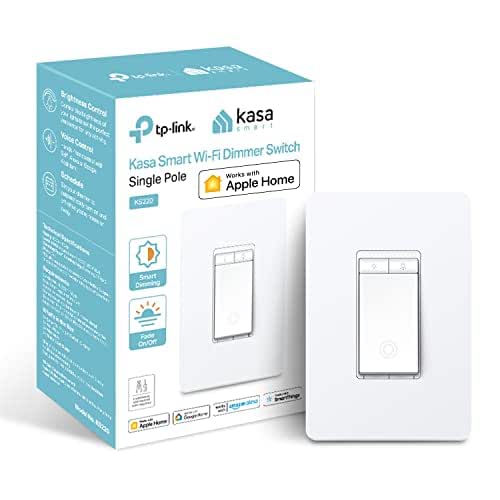
In case you want an Apple-friendly smart dimmer that still plays nicely with Alexa, the Kasa KS220 is a solid pick — especially for homes already invested in HomeKit. You’ll get Siri, Alexa, and Google Assistant voice control, though HomeKit remote access requires a HomePod or Apple TV on your network. The KS220 needs a neutral wire and 2.4GHz Wi‑Fi, fits a standard wall plate, and requires no hub. Kasa’s app walks you through installation, schedules, timers, and Away Mode. Gentle Off fades lights with a double-click; a single click fades them on. It’s UL certified and single-pole only.
Best For: homeowners invested in Apple HomeKit who want a HomeKit-compatible dimmer that also supports Alexa and Google Assistant.
Pros:
- Works natively with Apple HomeKit (plus Alexa and Google Assistant) for flexible voice control.
- Kasa app offers guided installation, scheduling, timers, and Away Mode without needing a hub.
- Gentle Off feature and smooth fade-on provide pleasant lighting transitions; UL certified.
Cons:
- Requires a neutral wire, which some older homes may not have.
- Needs 2.4 GHz Wi‑Fi and HomePod/Apple TV for HomeKit remote access.
- Single-pole only — not suitable for 3-way switch setups.
TREATLIFE Smart Wi‑Fi Light Switch 4-Pack (Alexa)

Should you want reliable, budget-friendly smart switches that work with Alexa and other assistants, the TREATLIFE 4-pack is a solid choice—especially for homes with neutral wiring and simple single-pole circuits. You’ll need a neutral wire and 2.4GHz Wi‑Fi; it won’t work on 5GHz or in 3‑way setups. Each switch handles 1250W/10A and fits standard bulbs behind a screwless snap‑on plate. Use the Smart Life app for remote control, status monitoring, scheduling, timers, and occupancy simulation. It integrates with Alexa, Google Assistant, and SmartThings, supports sharing and groups, and comes with FCC certification plus dedicated support.
Best For: homeowners with neutral‑wired, single‑pole circuits who want budget‑friendly, Alexa/Google/SmartThings‑compatible smart switches controlled via 2.4GHz Wi‑Fi and the Smart Life app.
Pros:
- Affordable 4‑pack that integrates with Alexa, Google Assistant, and SmartThings for voice control and automation.
- Remote control, real‑time status monitoring, scheduling, timers, and occupancy simulation through the Smart Life app.
- Includes standard screwless snap‑on wall plates, FCC certified, and backed by dedicated customer support.
Cons:
- Requires a neutral wire and only supports single‑pole setups (not compatible with 3‑way circuits).
- Connects only to 2.4GHz Wi‑Fi (no 5GHz support), limiting network options.
- Rated 1250W/10A per switch and supports standard (non‑smart) bulbs only, which may not suit all high‑load or advanced lighting setups.
Jinvoo WiFi Touch Wall Light Switch (3-Way)

In case you want a smart 3-way switch that plays well with Alexa and Google Home, the Jinvoo WiFi Touch Wall Switch is a strong choice—especially in case your home wiring includes a neutral. You’ll need 2.4 GHz Wi‑Fi and AC 120V, and the switch fits standard wall plates. Setup includes step‑by‑step wiring instructions; it’s ETL and CE certified. You can use voice commands to toggle lights, control them from anywhere via the mobile app, and set timers or countdowns for automation. Jinvoo backs the switch with a 12‑month warranty and responsive customer support, typically replying within 12 hours.
Best For: homeowners or renters with neutral-wire home wiring who want an affordable, Alexa/Google-compatible smart 3-way switch controllable via 2.4 GHz Wi‑Fi and mobile app.
Pros:
- Works with Amazon Alexa and Google Home for convenient voice control.
- Remote control and scheduling via mobile app for automation and away monitoring.
- ETL/CE certified, includes step-by-step wiring instructions, and comes with a 12‑month warranty plus responsive support.
Cons:
- Requires a neutral wire, which not all older homes have.
- Only supports 2.4 GHz Wi‑Fi (no 5 GHz support).
- Designed for AC 120V systems—unsuitable for regions with different mains voltages.
BSEED 2-Gang WiFi Smart Light Switch (Alexa/Google)

In case you want a straightforward, budget-friendly smart switch that works with Alexa and Google, the BSEED 2-Gang WiFi Smart Light Switch is a solid pick—especially in case you need hands-free control or remote access for family members with limited mobility. You’ll get voice control, phone-based remote access over 2.4GHz WiFi and mobile data, plus group control and device sharing via the Smart Life app. Set timers to cut standby waste, prevent overcharging, and extend device life. It’s a two-gang, single-pole switch requiring a neutral wire, finished in white with a black panel for simple app-based automation.
Best For: users seeking an affordable, voice-enabled smart light switch with remote access and simple automation—especially households needing hands-free control or easier access for family members with limited mobility.
Pros:
- Affordable, straightforward smart switch compatible with Amazon Alexa and Google Assistant for voice control.
- Remote app control (2.4GHz WiFi and mobile data), scheduling/timers, and group/device sharing via the Smart Life app for convenience and energy savings.
- Two-gang single-pole design with neutral-wire support, suitable for common residential installations.
Cons:
- Requires a neutral wire, which may not be available in older homes and can complicate installation.
- Only supports 2.4GHz WiFi (no 5GHz), limiting network options and potentially causing connectivity issues on crowded networks.
- Basic feature set and build may lack advanced integrations or enterprise-grade reliability for more complex smart-home setups.
Belkin WeMo Light Switch, Wi-Fi Enabled, Compatible with Amazon Echo

Should you want a straightforward, hub-free smart switch that works with Alexa and other assistants, the Belkin WeMo Light Switch delivers Wi‑Fi control, scheduling, and Away Mode for anyone who wants voice and remote access without extra gear. You’ll control lights with Alexa, Google Assistant, Nest integration, or the free WeMo app—no subscription required. Set schedules, sunrise/sunset rules, and simulate occupancy for security. It’s a 1-way, 120V, 15A switch (1800W) with screw terminals, copper/brass contacts, and push-button actuation. UL-listed and designed for standard replacement, model F7C030fc includes warranty docs and straightforward installation instructions.
Best For: homeowners or renters who want a hub-free, Alexa/Google-compatible smart light switch for simple voice, scheduling, and away-mode control with standard residential wiring.
Pros:
- Wi‑Fi connectivity with Alexa, Google Assistant, and Nest integration—no hub or subscription required.
- Scheduling, sunrise/sunset rules, and Away Mode for security and automated control.
- Standard 1-way, 120V/15A (1800W) design with screw terminals and UL listing for straightforward replacement and safety.
Cons:
- Requires a neutral or compatible wiring configuration for installation in some homes.
- Limited to 1-way circuits (no built-in multi-way support) without additional wiring or components.
- Uses a Lithium Ion battery (for internal memory/clock), which may require occasional replacement.
Kasa Matter Smart Dimmer Switch KS225

Should you want a Matter-certified dimmer that works seamlessly across Alexa, HomeKit, Google Home, and SmartThings, the Kasa Matter Smart Dimmer KS225 is a strong pick — especially should you need reliable remote and offline LAN control for lights in single-pole circuits. You’ll get 1–100% dimming via touch, app, or voice, plus timers, countdowns, and Away Mode for security. Installation needs a neutral wire and uses screw terminals; the app guides you step-by-step. It’s rated 2.5A, 120V, 150W, UL-certified, and supports multi-admin access so multiple ecosystems can control the same switch. Dimensions: 5.04×3.33×1.78 inches.
Best For: Homeowners or smart-home enthusiasts who want a Matter-certified, multi-platform dimmer for single-pole lighting circuits that supports remote and reliable offline LAN control plus voice and app dimming.
Pros:
- Matter-certified for seamless cross-platform compatibility with Apple Home, Alexa, Google Home, and SmartThings.
- Offline LAN control and remote access via Kasa App with 1–100% dimming, timers, countdowns, and Away Mode for security.
- Multi-admin feature allows simultaneous control from multiple ecosystems; UL-certified and app-guided installation.
Cons:
- Requires a neutral wire, which may complicate installation in older homes without neutral at the switch.
- Limited to single-pole circuits and a 2.5A/150W maximum, so not suitable for high-wattage or multi-location setups.
- Screw-type terminals and standard wall-plate size may require careful wiring and fitment in tight or nonstandard electrical boxes.
Factors to Consider When Choosing Light Switches For Amazon Echo
Before you buy, I’ll walk you through the key factors that matter for Amazon Echo integration: voice assistant compatibility, whether the switch needs a hub or works hubless, wiring requirements, which connectivity band it uses, and available dimming/features. Understanding whether a switch speaks Alexa natively and whether your home has neutral wiring or a compatible hub can save time and headaches. I’ll also explain how 2.4GHz vs 5GHz, and advanced dimming or scene options, affect reliability and user experience.
Voice Assistant Compatibility
Although you can usually set up basic Alexa control without fuss, I always check a switch’s Alexa compatibility before buying so I don’t run into surprises later. I make sure the switch explicitly supports Amazon Alexa for seamless voice commands with my Echo devices. I also prefer switches that work across platforms so I’m not locked into one ecosystem. Hands-free operation via Alexa is essential—I want simple on/off and dimming whenever my hands are full. Remote voice control through Alexa-enabled apps matters too, letting me manage lights away from home. Finally, I look for support for advanced Alexa features like voice-triggered scheduling and automation so routines and scenes respond reliably to voice prompts.
Hub Vs. Hubless
You’ve seen why Alexa compatibility matters, so now I weigh whether a hub is right for my setup or whether hubless switches will do the job. I like hubless switches for their direct 2.4 GHz Wi‑Fi connection — they’re simpler to install and pair with Echo, and they remove the extra box on my network. But in case I have many devices or flaky Wi‑Fi, a hub makes sense: it centralizes control, can stabilize communications, and often keeps local automations working whenever the internet drops. Choosing comes down to three things: how reliable my home Wi‑Fi is, how many smart devices I plan to run, and whether I prefer plug‑and‑play ease or advanced features and local control.
Wiring Requirements
During the moment I pick a smart switch for my Echo setup, the initial wiring question I ask is whether there’s a neutral wire in the box—most smart switches need it to complete the circuit and keep the internal electronics powered. I also confirm the circuit is standard 120V and that the switch’s voltage and current ratings match the circuit to avoid overloads. I prefer single-pole replacements since most smart switches support one-location control; in case I have a 3-way or multi-way run, I check for compatible models or add accessory switches. I observe the connection style—screw terminals or push-in ports—so installation matches my tools. Proper wiring and matching ratings keep the switch reliable and safe for Echo integration.
Connectivity Frequency Band
Curious which Wi‑Fi band matters most for your Echo-compatible smart switch? I recommend prioritizing 2.4 GHz compatibility. Most smart switches that work with Amazon Echo use 2.4 GHz because it penetrates walls better and covers larger homes, which reduces dead zones and connectivity drops. Keep in mind many of these devices won’t join a 5 GHz-only network, so verify your router broadcasts 2.4 GHz or offers a mixed mode. You’ll trade top speeds for reach, but these switches don’t need high bandwidth—stable reach matters more for voice control. Before buying, I always check the product specs and my home network settings to confirm frequency compatibility so setup is smooth and Echo integration stays reliable.
Dimming And Features
Now that your Echo and switches stay reliably connected on the right Wi‑Fi band, look at how the switch handles light levels—dimming changes the way you use rooms. I recommend dimmers that give 1%–100% control so you can fine‑tune ambiance through voice with Alexa. Look for smooth shifts and gentle fade on/off to avoid jarring changes, especially in bedrooms and inhabited areas. Customizable schedules, timers, and Away Modes let me automate scenes by time or presence. Confirm the dimmer supports your fixture’s wattage and load type—LEDs, incandescent, or CFL—so performance and longevity aren’t compromised. Finally, prioritize models with proven voice‑assistant compatibility for reliable hands‑free control and accessibility throughout your home.
Safety Certifications
Because a smart switch becomes part of your home’s electrical system, I always prioritize safety certifications like UL, CE, FCC, and ETL during the selection of models for Amazon Echo integration. These marks mean the switch has been tested for electrical reliability, fire resistance, and safe operation within rated voltage and current, which reduces electrical hazard risk. I look for recognized certifications to guarantee compliance with local electrical codes and insurance requirements, since uncertified devices can void coverage. Certified switches also tend to use better materials and construction, lowering malfunction and damage potential. Finally, verified certifications give me confidence in long-term durability and safe integration with my Echo-based smart home ecosystem.
Scheduling And Automation
Having picked switches with the right safety certifications, I also pay close attention to their scheduling and automation capabilities, since those features determine how hands-off your lighting can be. I look for dependable scheduling so lights turn on/off at set times to save energy and add convenience. Sunrise/sunset automation is a must for natural syncing and improved security without daily tweaks. Timers and countdowns give precise runtime control, cutting waste and extending bulb life. Away modes that randomize on/off patterns make an empty house look lived-in for better protection. Finally, group scheduling and device sharing let me manage whole rooms or hand control to family members easily. These features make smart switches genuinely smart.
