

Should you want reliable, wider Wi‑Fi coverage at home in 2026, you’ll want an access point that actually amplifies signal and handles modern devices. Pick dual‑ or multi‑band models with Wi‑Fi 6/6E or Wi‑Fi 7 features, external antennas, multi‑gig Ethernet or 2.5G ports, and PoE support. I’ll compare several TP‑Link options and explain which features matter most so you can pick the right AP for your layout and needs.
| TP-Link AC1200 Dual-Band Wireless Gigabit Access Point |

| Reliable Midrange Pick | Dual‑band support: Dual‑band (2.4 & 5 GHz) | PoE (Power over Ethernet) support: Passive PoE (adapter included) | Multiple operation modes: Client, Multi‑SSID, Range Extender, Access Point | VIEW LATEST PRICE | Our Analysis |
| TP-Link EAP720 WiFi 7 Wireless Access Point |

| Best for High-Density | Dual‑band support: Dual‑band (2.4 & 5 GHz) | PoE (Power over Ethernet) support: 802.3at PoE (also DC power; adapter included) | Multiple operation modes: Access point and mesh deployment (flexible installs, mesh + AP) | VIEW LATEST PRICE | Our Analysis |
| TP-Link TL-WA801N 2.4GHz 300Mbps WiFi Access Point |
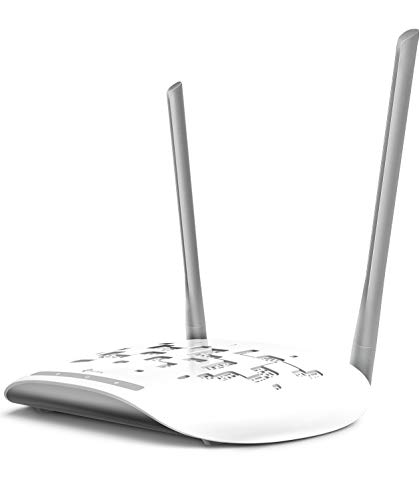
| Budget Coverage Solution | Dual‑band support: 2.4 GHz primary (single band) — supports multi‑SSID and bridge modes (note: not true dual‑band) | PoE (Power over Ethernet) support: Passive PoE (injector included) | Multiple operation modes: Access Point, Range Extender/Bridge, Client, Multi‑SSID | VIEW LATEST PRICE | Our Analysis |
| TP-Link Archer A54 AC1200 Dual-Band WiFi Router |

| Easy-Home Mesh Option | Dual‑band support: Dual‑band (2.4 & 5 GHz) | PoE (Power over Ethernet) support: Not specified as PoE in details (AP mode supported) — but supports typical powered router operation (no PoE adapter listed) | Multiple operation modes: Router with Access Point mode (can operate as AP and integrate into EasyMesh) | VIEW LATEST PRICE | Our Analysis |
More Details on Our Top Picks
TP-Link AC1200 Dual-Band Wireless Gigabit Access Point
Should you need a straightforward, budget-friendly access point that boosts home Wi‑Fi for multiple devices, the TP‑Link AC1200 is a solid pick — it uses 802.11ac Wave 2 MU‑MIMO and dual‑band speeds up to 1200 Mbps to serve several clients simultaneously while its four external antennas and beamforming improve reliable coverage for long‑distance links. You’ll switch among Client, Multi‑SSID, Range Extender, and Access Point modes to match setups, and run multiple SSIDs for guest or IoT separation. Passive PoE with an included adapter simplifies placement, it’s desk‑friendly as a bridge, and TP‑Link backs it with lifetime protection and 24/7 support.
- Dual‑band support:Dual‑band (2.4 & 5 GHz)
- PoE (Power over Ethernet) support:Passive PoE (adapter included)
- Multiple operation modes:Client, Multi‑SSID, Range Extender, Access Point
- External antennas / beamforming:Four external fixed antennas; beamforming
- Security features:Business/consumer WPA/WPA2 support implied; limited lifetime protection (support)
- Vendor support / warranty:Limited lifetime protection; 24/7 technical support
- Additional Feature:802.11ac Wave 2 MU‑MIMO
- Additional Feature:Desktop Wi‑Fi bridge
- Additional Feature:Passive PoE adapter included
TP-Link EAP720 WiFi 7 Wireless Access Point
Should you need a future‑proof home access point that handles multi‑gig internet and busy device loads, the TP‑Link EAP720 Wi‑Fi 7 is a strong pick—its 2.5 Gbps Ethernet port and dual‑band 4‑stream Wi‑Fi 7 (up to 5.0 Gbps combined) keep streaming, gaming, and large transfers flowing smoothly. You’ll get MLO, Multi‑RUs and 4K‑QAM for higher capacity, plus seamless roaming and airtime fairness for crowded homes. Deploy via PoE or DC, use mesh or AP mode, and manage remotely with Omada Cloud, ZTP and AI tools. It supports 250+ clients, includes a five‑year warranty and business‑grade controls.
- Dual‑band support:Dual‑band (2.4 & 5 GHz)
- PoE (Power over Ethernet) support:802.3at PoE (also DC power; adapter included)
- Multiple operation modes:Access point and mesh deployment (flexible installs, mesh + AP)
- External antennas / beamforming:Integrated advanced antenna design for Wi‑Fi 7 (multi‑RU/MLO) — supports extended coverage (external not specified)
- Security features:Business‑grade security (VLAN, PPSK, roaming, airtime fairness)
- Vendor support / warranty:5‑year warranty; free technical support (M–F, 6am–6pm PST); Omada cloud management
- Additional Feature:Wi‑Fi 7 4‑stream speeds
- Additional Feature:2.5 Gigabit Ethernet port
- Additional Feature:Omada Cloud management
TP-Link TL-WA801N 2.4GHz 300Mbps WiFi Access Point
Should you need a simple, cost-effective way to add or extend reliable 2.4 GHz coverage for basic home streaming and VoIP, the TP‑Link TL‑WA801N is a solid pick—its 300 Mbps throughput, dual fixed antennas, and multi-mode operation make it easy to deploy as an access point, extender, or client. You’ll appreciate passive PoE with the included injector letting you place the unit up to 30 meters from power. MIMO increases simultaneous throughput for smooth HD video and voice. WPA2 and WPS keep connections secure and quick. Multi-SSID supports segmentation, and TP‑Link backs it with two years and 24/7 support.
- Dual‑band support:2.4 GHz primary (single band) — supports multi‑SSID and bridge modes (note: not true dual‑band)
- PoE (Power over Ethernet) support:Passive PoE (injector included)
- Multiple operation modes:Access Point, Range Extender/Bridge, Client, Multi‑SSID
- External antennas / beamforming:Two fixed antennas
- Security features:WPA2 encryption, WPS quick connect
- Vendor support / warranty:2‑year warranty; 24/7 technical support
- Additional Feature:2.4 GHz 300 Mbps
- Additional Feature:WPS push‑button quick connect
- Additional Feature:100 ft PoE reach
TP-Link Archer A54 AC1200 Dual-Band WiFi Router
Should you want a budget-friendly router that covers small homes or apartments and handles basic streaming and web browsing, the TP‑Link Archer A54 (AC1200) is a solid pick; its dual-band setup (up to 867 Mbps on 5 GHz and 300 Mbps on 2.4 GHz) and four external antennas aim to keep connections stable across roughly 1,000 sq. ft. You’ll get WPA3 security, IPv6, guest WiFi, parental controls, and EasyMesh compatibility to expand coverage. Four 10/100 Mbps LAN ports and AP mode add flexibility, though you’ll need a separate modem for most ISPs. Manage updates and settings with the TP‑Link Tether app.
- Dual‑band support:Dual‑band (2.4 & 5 GHz)
- PoE (Power over Ethernet) support:Not specified as PoE in details (AP mode supported) — but supports typical powered router operation (no PoE adapter listed)
- Multiple operation modes:Router with Access Point mode (can operate as AP and integrate into EasyMesh)
- External antennas / beamforming:Four external antennas
- Security features:WPA3 support, guest Wi‑Fi, parental controls
- Vendor support / warranty:Manufacturer warranty (see documentation); TP‑Link Tether app and firmware update support
- Additional Feature:EasyMesh compatible
- Additional Feature:WPA3 security support
- Additional Feature:TP-Link Tether app management
Factors to Consider When Choosing a Home Wifi Access Point
Upon shopping for a home Wi‑Fi access point, check which wireless standards it supports and whether its rated speeds match your internet plan. Consider antenna design and coverage, how many clients it can handle, and whether the unit fits your power and installation needs. Balancing speed, range, capacity, and ease of setup will keep your network reliable as devices multiply.
Wireless Standard Support
Pick the newest Wi‑Fi standard your devices can use—Wi‑Fi 6, 6E, or 7—because newer standards give you higher throughput, lower latency, and features like OFDMA and MU‑MIMO that improve performance on multiple devices. Also insist on at least dual‑band (2.4 GHz and 5 GHz); 2.4 GHz reaches farther through walls, 5 GHz cuts interference. Should you need very low latency or dense deployments, get 6 GHz support (6E/7) for extra clean band. Check spatial streams (2×2, 4×4) and modulation (1024‑QAM, 4096‑QAM) to see how many simultaneous clients the AP can handle. Prefer APs with Multi‑Link Operation and Multi‑RU for better aggregation and spectral efficiency. Finally, make certain backward compatibility so older devices still connect reliably.
Speed And Throughput
Gauge the real-world speed you’ll get, not just the headline PHY rates manufacturers tout, because actual throughput is usually only 30–60% of the link speed once overhead and interference are factored in. Check maximum PHY rates per band (2.4 vs 5 GHz) but focus on usable Mbps, since channel width and range (20/40/80/160 MHz) and 4K‑QAM affect per‑client rates and interference sensitivity. Verify spatial streams and MU‑MIMO support so multiple devices get high throughput simultaneously. Confirm wired port and backhaul capacity—Gigabit vs multi‑gigabit uplinks can bottleneck wireless performance. Estimate aggregate throughput by expected client count and average Mbps per client to make certain the AP won’t saturate under load. Prioritize balanced features for your household demand.
Coverage And Antennas
Throughput means little provided your signal doesn’t reach the rooms where you actually use devices, so after checking speeds you should focus on coverage and antennas. Choose APs with external, multiple antennas and beamforming to push signal toward devices rather than radiating evenly. Match antenna gain (dBi) to layout: higher dBi extends reach but narrows the beam; lower dBi gives wider, shorter coverage. Prefer dual‑ or multi‑band APs so 2.4 GHz handles longer, penetrative links and 5 GHz delivers faster, shorter‑range connections. Place the AP centrally and raised, clear of metal and dense walls, to reduce dead zones. For large or complex homes, deploy multiple APs in a managed mesh or controller setup with overlapping, nonredundant coverage to guarantee seamless roaming.
Client Capacity Limits
Consider how many devices will actually be active at once and size your APs with headroom—verify the vendor’s stated concurrent‑client limit (50, 100, 250+), but plan to keep peak simultaneous devices well below that number because airtime contention, protocol overhead, and heavy users (like 4K streamers) will cut real‑world throughput per client. Count devices according to type and activity: IoT sensors use tiny bursts, while streaming or gaming hog airtime. Look for MU‑MIMO, multiple spatial streams, and channel bonding, but confirm how many simultaneous streams an AP truly supports. Choose models with 20–50% more capacity than current needs to handle peaks and growth, and distribute additional APs to high‑density spots rather than relying on a single unit to serve everyone.
Power And Installation
How will you power and place your access point for reliable coverage and minimal clutter? Check PoE support and the standard (passive, 802.3af, 802.3at) so you can feed power over Ethernet and avoid extra outlets. Take into account the device’s wattage under PoE to make certain your switch or injector and port budgets can supply it. Verify Ethernet speeds—Gigabit or 2.5 Gbps—and whether the unit offers PoE passthrough or multi‑gig uplinks to match broadband and backbone capacity. Consider included accessories and mounting options: wall or ceiling brackets, PoE injectors, desktop suitability, or in‑ceiling models for best coverage. Finally, confirm indoor/outdoor ratings, physical size, and PoE cable run limits (typically ~100 meters) for dependable installation.
Management And Features
Whenever you’re managing multiple APs or just want simpler day‑to‑day control, prioritize systems that offer cloud or controller‑based management for single‑pane visibility, one‑click provisioning, and zero‑touch deployment. You should also verify support for VLANs, per‑SSID bandwidth limits, and guest network segmentation so traffic isolation and policy enforcement are straightforward. Look for seamless roaming, airtime fairness, and client steering to keep connections stable in high‑density or multi‑device homes. Make certain flexible deployment options—802.3at/af PoE compatibility, wall/ceiling mounts—and remote reboot plus diagnostic tools to simplify installs and troubleshooting. Finally, choose APs that support modern access controls like WPA3, PPSK/temporary credentials, RADIUS integration, and scheduled access to make user management easier without compromising convenience.
Security And Segmentation
Good management and feature sets lay the groundwork, but you also need strong security and clear network segmentation to keep devices and data safe. Use WPA3 where available, and at minimum WPA2-AES, so traffic isn’t easily cracked or intercepted. Put guests and IoT on separate VLANs or SSIDs with client isolation to stop lateral movement and protect your main network. Assign strong, unique PSKs per network or, for better control, use WPA2/WPA3‑Enterprise with RADIUS for per-user credentials. Enforce network-level controls—firewall rules, bandwidth limits, and access schedules—to restrict services and times devices can communicate. Finally, monitor logs, enable alerts, and update firmware promptly so you can detect and respond quickly to suspicious activity.
Warranty And Support
Because hardware can fail long before you replace it, warranty length and the quality of support are as vital as raw features while picking an access point. You should check warranty length and type—1 year versus lifetime—so you know how long defects are covered. Verify what’s covered: parts, labor, and whether accidental damage counts or only manufacturing faults. Confirm support availability and channels—24/7 phone, chat, business hours, or email-only—and whether remote-assist is offered. Look for clear RMA and replacement policies: swap turnaround, prepaid shipping, and any restocking or handling fees. Finally, make certain the vendor promises firmware updates and security patches for a guaranteed period and offers spare parts or long‑term support options.
