

You want a smart home that just works with Apple devices, and the right gear makes that effortless. In the list below you’ll find compact plugs, reliable light switches, versatile hubs, and long‑range Bluetooth buttons that simplify setup and keep automations local and fast. I’ll walk you through what each device does and why it could suit your setup—so you can pick the parts that actually improve daily life.
| Wemo Smart Plug with Thread for Apple HomeKit |

| Best for HomeKit Users | Apple HomeKit Compatibility: Works with Apple HomeKit / Apple Home App / Siri | Remote Control / Automation Support: Remote control and automations via Home App & Siri | Wireless Connectivity: Thread primary; Bluetooth secondary; Wi‑Fi (used with Thread); NFC for pairing | VIEW LATEST PRICE | Read Our Analysis |
| meross Smart Light Switch (HomeKit Alexa Google) |
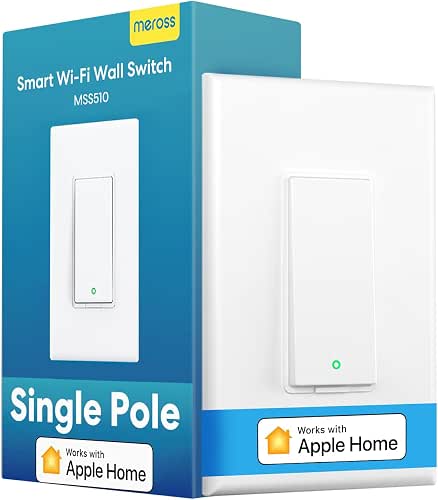
| Best for Whole‑Home Wiring | Apple HomeKit Compatibility: Compatible with Apple HomeKit / Siri / Apple Watch / CarPlay | Remote Control / Automation Support: Remote control via HomeKit bridge; schedules/timers/automations supported | Wireless Connectivity: 2.4 GHz Wi‑Fi (no hub required) | VIEW LATEST PRICE | Read Our Analysis |
| Aqara Wireless Mini Switch + M100 Hub Kit |

| Best for Advanced Automation | Apple HomeKit Compatibility: Integrates with Apple HomeKit (via Matter/Hub) | Remote Control / Automation Support: Programmable actions/scene triggers and automations via Hub/Matter/HomeKit | Wireless Connectivity: Zigbee, Thread, Matter (hub connectivity) | VIEW LATEST PRICE | Read Our Analysis |
| Wemo Thread Smart Plug 4-Pack for Apple HomeKit |

| Best Multi‑Outlet Bundle | Apple HomeKit Compatibility: Works with Apple HomeKit / Apple Home App / Siri (iPhone setup) | Remote Control / Automation Support: Remote control and HomeKit automations/scenes via Apple Home App | Wireless Connectivity: Thread primary; Bluetooth fallback (NFC setup with iPhone) | VIEW LATEST PRICE | Read Our Analysis |
| Smart Plug Mini HomeKit 2-Pack (No Hub) |

| Best Budget HomeKit Plug | Apple HomeKit Compatibility: Supports Apple HomeKit (MFi certified) | Remote Control / Automation Support: Remote control via Home app/CozyLife app; timers, schedules, group control | Wireless Connectivity: 2.4 GHz Wi‑Fi only (no hub required) | VIEW LATEST PRICE | Read Our Analysis |
| Flic Hub LR Long‑Range Smart Home Hub |

| Best for Physical Button Control | Apple HomeKit Compatibility: Apple HomeKit compatible (requires Home Hub like Apple TV/iPad/HomePod) | Remote Control / Automation Support: Trigger HomeKit routines via Flic Buttons; hub enables remote/HomeKit automations | Wireless Connectivity: Bluetooth 5.1 and dual‑band Wi‑Fi (2.4 & 5 GHz); Matter support | VIEW LATEST PRICE | Read Our Analysis |
More Details on Our Top Picks
Wemo Smart Plug with Thread for Apple HomeKit
Should you want a compact, HomeKit-ready outlet that gives you faster, more reliable smart-home networking, the Wemo Smart Plug with Thread is a great fit — it uses Thread for low-latency, resilient connections, pairs quickly with an NFC tap to your accessible iPhone, and lets you control lights, fans, or appliances via the Home app or Siri from anywhere. You’ll get Thread-first connectivity with Bluetooth and Wi‑Fi fallback, easy setup, and HomeKit automation support for schedules, scenes, and rules. The white, UL‑certified plug is compact to avoid blocking adjacent outlets, fits Type B sockets, and integrates seamlessly into Apple Home.
- Apple HomeKit Compatibility:Works with Apple HomeKit / Apple Home App / Siri
- Remote Control / Automation Support:Remote control and automations via Home App & Siri
- Wireless Connectivity:Thread primary; Bluetooth secondary; Wi‑Fi (used with Thread); NFC for pairing
- Voice Assistant Support:Siri (via HomeKit)
- Easy Setup / Hubless Option:NFC tap pairing with unlocked iPhone; no separate hub required (uses Thread/BT/Wi‑Fi)
- Designed for Home Control (Lights/Appliances/Scenes):Controls lights, fans, appliances, electronics via smart plug for HomeKit scenes
- Additional Feature:NFC tap pairing
- Additional Feature:Thread primary connectivity
- Additional Feature:Compact space-saving design
meross Smart Light Switch (HomeKit Alexa Google)
Choose the meross Smart Light Switch any time you want a budget‑friendly, HomeKit‑ready option that works with single‑pole lighting and your existing Decora faceplates—provided you have a neutral (white) wire and a 2.4 GHz Wi‑Fi network. You’ll install it in under 15 minutes, no hub required, and it fits 1/2/3/4-gang setups. It supports HomeKit (with HomePod/Apple TV bridge online for remote access), Siri, Apple Watch, CarPlay, Alexa, Google Assistant, and SmartThings. Use schedules, timers, and sunrise/sunset automations to save energy in closets, bathrooms, garages, and basements. Data transmits via AWS in the US.
- Apple HomeKit Compatibility:Compatible with Apple HomeKit / Siri / Apple Watch / CarPlay
- Remote Control / Automation Support:Remote control via HomeKit bridge; schedules/timers/automations supported
- Wireless Connectivity:2.4 GHz Wi‑Fi (no hub required)
- Voice Assistant Support:Siri, Amazon Alexa, Google Assistant
- Easy Setup / Hubless Option:No hub required; simple installation over 2.4 GHz Wi‑Fi
- Designed for Home Control (Lights/Appliances/Scenes):Controls lighting circuits (single‑pole light switch) and automations (schedules, sunrise/sunset)
- Additional Feature:Neutral wire required
- Additional Feature:Single-pole only
- Additional Feature:2.4 GHz Wi‑Fi only
Aqara Wireless Mini Switch + M100 Hub Kit
Perfect for smart-home enthusiasts who want a compact, programmable control point, the Aqara Wireless Mini Switch paired alongside the M100 Hub gives you three customizable actions—single, double, and long press—to trigger lights, scenes, or emergency alerts across Apple Home and other ecosystems. You’ll get Zigbee, Thread, and Matter support, with the M100 bridging Aqara Zigbee devices into Matter and HomeKit. It handles up to 20 Zigbee and 20 Thread devices, supports doorbell and emergency alerts, and integrates with Alexa, Home Assistant, and should. Setup is USB-powered, battery-activated, and backed through a 12-month service and return options.
- Apple HomeKit Compatibility:Integrates with Apple HomeKit (via Matter/Hub)
- Remote Control / Automation Support:Programmable actions/scene triggers and automations via Hub/Matter/HomeKit
- Wireless Connectivity:Zigbee, Thread, Matter (hub connectivity)
- Voice Assistant Support:Works with Apple HomeKit (Siri via HomeKit), Amazon Alexa, and other Matter-enabled assistants
- Easy Setup / Hubless Option:Sold as hub kit (M100 Hub + switch) — kit includes hub for setup (bridge functionality)
- Designed for Home Control (Lights/Appliances/Scenes):Controls lights/devices/scenes (programmable button for on/off, scenes, alerts, doorbell)
- Additional Feature:Programmable multi-press actions
- Additional Feature:Zigbee-to-Matter bridge
- Additional Feature:Emergency/doorbell function
Wemo Thread Smart Plug 4-Pack for Apple HomeKit
For anyone invested in Apple’s HomeKit, the Wemo Thread Smart Plug 4‑pack gives you fast, reliable device control thanks to Thread connectivity and seamless Apple-only setup. You’ll set each plug using your unlocked iPhone (NFC) and follow prompts in the Home app — setup’s iPhone-only. Thread provides faster, more dependable connections, with Bluetooth stepping in should Thread’s unavailable. The compact, space-saving design won’t block neighboring outlets, so you can place plugs anywhere. From the Home app or via Siri, you’ll control devices remotely, create automations, and add plugs to scenes for smooth, integrated smart-home management.
- Apple HomeKit Compatibility:Works with Apple HomeKit / Apple Home App / Siri (iPhone setup)
- Remote Control / Automation Support:Remote control and HomeKit automations/scenes via Apple Home App
- Wireless Connectivity:Thread primary; Bluetooth fallback (NFC setup with iPhone)
- Voice Assistant Support:Siri (via HomeKit)
- Easy Setup / Hubless Option:NFC tap pairing with iPhone; designed for quick HomeKit setup (no separate hub)
- Designed for Home Control (Lights/Appliances/Scenes):Controls lights/appliances via smart plug and HomeKit scenes/automations
- Additional Feature:iPhone-only setup
- Additional Feature:Thread with Bluetooth fallback
- Additional Feature:Multi-pack value bundle
Smart Plug Mini HomeKit 2-Pack (No Hub)
In case you want simple, reliable HomeKit-enabled plugs that won’t need a hub, the Smart Plug Mini HomeKit 2‑Pack is a great pick — it’s Apple MFi certified, pairs quickly via a HomeKit code or the CozyLife app over 2.4 GHz Wi‑Fi, and gives you Siri, Alexa, and Google Assistant voice control plus group and timer automation. You’ll plug them in, scan the code or use CozyLife, and claim a 5–10 second connection. They support groups, schedules (morning on, night off, auto-disconnect), and protect against overcharge and overheating. Compact, certified (FCC/CE/RoHS), Type A/B, made for DoHome.
- Apple HomeKit Compatibility:Supports Apple HomeKit (MFi certified)
- Remote Control / Automation Support:Remote control via Home app/CozyLife app; timers, schedules, group control
- Wireless Connectivity:2.4 GHz Wi‑Fi only (no hub required)
- Voice Assistant Support:Siri, Amazon Alexa, Google Assistant
- Easy Setup / Hubless Option:No hub required; HomeKit code scanning or CozyLife app over 2.4 GHz Wi‑Fi
- Designed for Home Control (Lights/Appliances/Scenes):Controls lamps/appliances via smart plug; supports groups and schedules for lighting/routines
- Additional Feature:Apple MFi certified
- Additional Feature:CozyLife app control
- Additional Feature:Overcharge/overheat protection
Flic Hub LR Long‑Range Smart Home Hub
Should you want reliable long‑range Bluetooth control across a small-to-medium home, the Flic Hub LR is a smart pick. You’ll get Bluetooth 5.1 and dual‑band Wi‑Fi to cover about a two‑room apartment, and you can pair up to 63 Flic Buttons or Twists. It natively supports Matter and connects with Alexa, Nanoleaf, Spotify, Philips Hue, and Sonos. You can trigger HomeKit routines should you have an Apple TV, iPad, or HomePod set as a Home Hub. Wi‑Fi handles compatible devices, and an optional IR blaster lets you control TVs and other IR gear.
- Apple HomeKit Compatibility:Apple HomeKit compatible (requires Home Hub like Apple TV/iPad/HomePod)
- Remote Control / Automation Support:Trigger HomeKit routines via Flic Buttons; hub enables remote/HomeKit automations
- Wireless Connectivity:Bluetooth 5.1 and dual‑band Wi‑Fi (2.4 & 5 GHz); Matter support
- Voice Assistant Support:Alexa native integration; HomeKit routines via Home Hub (Siri via HomeKit)
- Easy Setup / Hubless Option:Hub device (Flic Hub LR) — central hub included for buttons and integrations
- Designed for Home Control (Lights/Appliances/Scenes):Controls devices and triggers HomeKit routines via Flic Buttons; supports IR control (with IR blaster)
- Additional Feature:Supports 63 buttons
- Additional Feature:Dual-band Wi‑Fi
- Additional Feature:Infrared (IR) control option
Factors to Consider When Choosing Apple Home Devices
When choosing Apple Home devices, you’ll want to check a device compatibility matrix to make sure gadgets work with HomeKit and each other. Consider connectivity and protocols, privacy and security, and any power or wiring needs that could affect installation. Finally, consider about automation options and how well each device fits your broader ecosystem.
Device Compatibility Matrix
Because smart home ecosystems rely on multiple wireless standards and hardware constraints, you’ll need a clear compatibility checklist before buying: confirm protocol support (Thread, Zigbee, Bluetooth, Wi‑Fi, Matter), verify HomeKit or Matter certification for Home app and Siri integration, check network and hub requirements (2.4 vs 5 GHz, Thread border router/Home Hub, or a dedicated bridge), make certain electrical and form‑factor compatibility (neutral wire, single‑pole vs 3‑way, outlet size), and account for hub/device limits and mesh topology to avoid capacity or coverage issues.
Use a matrix to map each device against protocols, certifications, required hubs, and wiring. Mark maximum devices per bridge and expected mesh radius. Prioritize native HomeKit/Matter support to reduce latency and maintenance. Recheck firmware and vendor notes for exceptions before purchase.
Connectivity And Protocols
After you map devices against compatibility and wiring, the next step is to evaluate how they actually connect and communicate. Pick devices that support HomeKit and Matter so they interoperate across iPhone, iPad, HomePod, and Apple TV while keeping control local and encrypted. Prefer Thread or 2.4 GHz Wi‑Fi: Thread gives low‑latency, self‑healing mesh networking; 2.4 GHz Wi‑Fi offers broad compatibility (most devices skip 5 GHz). Look for multiple fallbacks — Thread with Bluetooth or Wi‑Fi — so devices stay reachable whether a border router or primary link fails. Confirm whether a hub or Home Hub (HomePod, Apple TV, iPad) or bridge is required for remote access and automations to avoid surprise hardware. Verify pairing methods like HomeKit codes or NFC and encrypted local control.
Privacy And Security
Although smart home convenience is tempting, you should prioritize privacy and security from the start: pick devices that use end‑to‑end encryption, get regular security patches, and support local control (Matter or HomeKit) so sensitive commands and sensor data stay on your network rather than someone else’s cloud. Check device specs and vendor statements to confirm e2e encryption for automation and remote access. Prefer hardware with a clear update policy and a history of timely patches. Enable multi‑factor authentication and use strong, unique passwords for device accounts and your Wi‑Fi. Favor devices that minimize cloud dependency or offer local-only modes. Before granting permissions, verify transparent data practices: what’s collected, how long it’s kept, and whether it’s shared with third parties.
Power And Wiring Needs
Initially you pick Apple Home devices, check the electrical and physical requirements up front so installations go smoothly: confirm whether switches need a neutral wire, whether they’re single‑pole or 3‑way compatible, the circuit amperage/voltage and load type, and whether the unit needs line power, batteries, or a separate hub (or supports Thread/Zigbee). Inspect the electrical box or wiring diagram to see if a neutral is present—many smart switches need it to power electronics whenever the load’s off. Verify 15 A vs 20 A and 120 V vs 240 V ratings and whether the load is LED, incandescent, or a motor, since inrush currents differ. Check box depth and device dimensions to avoid crowding conductors or exceeding box‑fill limits.
Automation And Ecosystem
Once the wiring and power needs are confirmed, consider how those devices will actually behave in your smart home: pick accessories that fully support HomeKit and work with a Home Hub (HomePod, Apple TV, or iPad) so automations run reliably whenever you’re away and triggers execute locally. Prioritize Thread or Matter‑capable gear for faster, lower‑latency mesh networking and broader interoperability as standards evolve. Choose devices that offer multiple trigger types—schedules, geofences, sensor events, buttons, and state changes—so you can build conditional routines. Verify hub capacity and device limits to avoid scale bottlenecks in larger setups. Finally, confirm local processing and privacy options so critical automations run without internet dependency and sensitive data stays on‑device.
Physical Size And Placement
Upon sizing and placing HomeKit gear, check the device dimensions against outlets, shelves, and enclosures so it won’t block adjacent sockets or stick into walkways. Measure height, width, and depth against outlet spacing and shelf depth so plugs and adapters sit flush and don’t obstruct. For wall or ceiling mounts, match the unit’s weight and footprint to anchors or bracket ratings to avoid sagging or outlet strain. Leave the manufacturer’s recommended clearance—usually a few centimeters—around hubs, plugs, and adapters for ventilation and to prevent overheating. Place hubs and Thread/mesh nodes centrally and away from metal or dense obstacles to maximize wireless range. Finally, position buttons, switches, and NFC pairing zones within comfortable reach and line of sight for everyday use.
Frequently Asked Questions
How Do These Devices Affect My Home Wi‑Fi Bandwidth?
They’ll use some bandwidth but won’t overwhelm it provided you manage devices smartly; prioritize critical traffic, enable 5GHz for high‑data gadgets, limit background streaming, and consider a mesh Wi‑Fi or upgraded router for many simultaneous connections.
Can These Devices Be Controlled Remotely Without Apple Home Hub?
Yes — many HomeKit devices support remote control only through an Apple Home Hub (HomePod, HomePod mini, Apple TV, or iPad set up at home); without one, you’ll usually be limited to local control while you’re on-site.
Are Any of These Products Compatible With Thread Border Router?
Yes — many modern Apple Home devices support Thread and can act as border routers once connected to a compatible hub like Apple TV 4K (2nd gen or later) or HomePod mini; you’ll get reliable low‑power mesh networking.
Do These Devices Support Multiple User Profiles and Permissions?
Yes — they support multiple user profiles and permissions. You’ll get shared convenience alongside private control; you’ll grant access to family while keeping settings restricted, and you’ll manage who controls devices, scenes, and automations from the Home app.
What Are the Privacy Implications of Linking Third‑Party Smart Accessories?
Linking third‑party accessories can expose data to external services, so you’ll face increased sharing, potential tracking, and varied encryption practices; you should review permissions, limit access, use trusted vendors, and regularly update firmware to reduce risks.
Final Thoughts
Consider your smart home as a garden: these six Apple-ready tools are the seeds, trellis, and watering can that help your ideas grow. Pick Thread-enabled plugs and compact minis for sturdy roots, meross switches for tidy trellises, Aqara and Flic for flexible vines, and a Home Hub as the sun that keeps everything thriving. Tend them well, and your home will bloom into a seamless, inhabited system you’ll love.
