

You want speed, you want reliability, and you want gear that won’t be obsolete next year. Choosing the right modem for Xfinity 1200 Mbps means balancing DOCSIS 3.1 future‑proofing, multi‑gig capability or link aggregation, and Xfinity compatibility—so you don’t get bottlenecked or surprised from firmware locks. I’ll walk you through six top picks and what each one actually gives you, so you can pick the best fit for your setup.
| NETGEAR Nighthawk C7000 Cable Modem WiFi Router Combo |

| Reliable All‑In‑One | Connection Type: Cable modem + Wi‑Fi router combo (coax in) | DOCSIS Version: DOCSIS 3.0 | ISP Compatibility (Cable): Compatible with Xfinity, Cox (major US cable providers) | VIEW LATEST PRICE | Read Our Analysis |
| ARRIS SURFboard SB8200 DOCSIS 3.1 Cable Modem |

| Multi‑Gig Modem | Connection Type: Cable modem only (coax in) | DOCSIS Version: DOCSIS 3.1 | ISP Compatibility (Cable): Certified for Xfinity, Cox, Spectrum | VIEW LATEST PRICE | Read Our Analysis |
| NETGEAR Nighthawk WiFi 6 Cable Modem Router (CAX30) |

| Wi‑Fi 6 Powerhouse | Connection Type: Cable modem + Wi‑Fi router combo (coax in) | DOCSIS Version: DOCSIS 3.1 | ISP Compatibility (Cable): Certified/compatible with Xfinity, Spectrum, Cox (varies by speed) | VIEW LATEST PRICE | Read Our Analysis |
| Hitron CODA DOCSIS 3.1 Cable Modem |
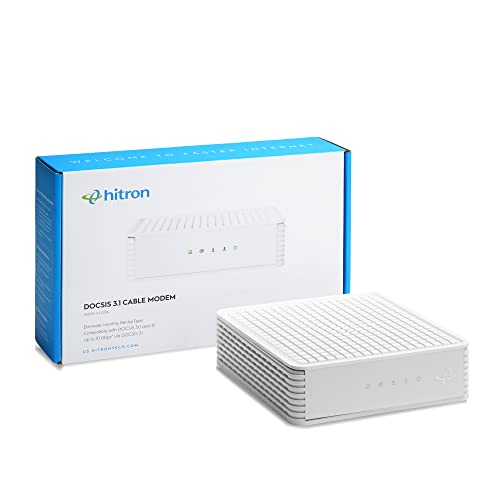
| Simple Modem Pick | Connection Type: Cable modem only (coax in) | DOCSIS Version: DOCSIS 3.1 | ISP Compatibility (Cable): Compatible with Xfinity, Spectrum, Cox (contact ISP to confirm) | VIEW LATEST PRICE | Read Our Analysis |
| Motorola MG8702 DOCSIS 3.1 Cable Modem Router |

| Performance Router Combo | Connection Type: Cable modem + Wi‑Fi router combo (coax in) | DOCSIS Version: DOCSIS 3.1 | ISP Compatibility (Cable): Approved for Xfinity, Cox, Spectrum | VIEW LATEST PRICE | Read Our Analysis |
| NETGEAR Nighthawk CM1200 DOCSIS 3.1 Cable Modem |

| Future‑Proof Speed | Connection Type: Cable modem only (coax in) | DOCSIS Version: DOCSIS 3.1 | ISP Compatibility (Cable): Compatible with Xfinity, Spectrum, Cox and major cable providers | VIEW LATEST PRICE | Read Our Analysis |
More Details on Our Top Picks
NETGEAR Nighthawk C7000 Cable Modem WiFi Router Combo
Should you want a simple all-in-one that replaces both modem and router and handles most home needs, the NETGEAR Nighthawk C7000 is a solid pick—its DOCSIS 3.0 24×8 modem and AC1900 dual-band WiFi deliver reliable performance for HD streaming and gaming across up to ~1,800 sq. ft., though it tops out around 800 Mbps on cable plans. You’ll appreciate compatibility with Xfinity and Cox, four Gigabit LAN ports, USB 2.0, WPA/WPA2 security, automatic firmware updates, and the Nighthawk app for easy management. It saves rental fees but won’t work with DSL or certain ISPs.
- Connection Type:Cable modem + Wi‑Fi router combo (coax in)
- DOCSIS Version:DOCSIS 3.0
- ISP Compatibility (Cable):Compatible with Xfinity, Cox (major US cable providers)
- Ethernet Ports:4 × Gigabit Ethernet LAN ports
- Wi‑Fi Included:Yes — Dual‑band Wi‑Fi 5 (AC1900)
- Security / Management:WPA/WPA2 support; NETGEAR Armor (30‑day trial); Nighthawk app management
- Additional Feature:24×8 channel bonding
- Additional Feature:NETGEAR Armor trial
- Additional Feature:USB 2.0 port
ARRIS SURFboard SB8200 DOCSIS 3.1 Cable Modem
Should you want multi‑gig performance for streaming and gaming without paying monthly rental fees, the ARRIS SURFboard SB8200 delivers DOCSIS 3.1 speeds up to 2 Gbps and two 1 Gbps Ethernet ports so you can pair it with your own Wi‑Fi router for whole‑home coverage. You’ll get a compact modem designed for ultra‑fast downloads and low latency. It’s modem‑only, so you must provide a separate router or mesh for wireless. CableLabs certified and tested with Xfinity, Cox, and the cable provider Spectrum, it’s simple to set up via coax and activation. Verify provider support and activation procedures before buying.
- Connection Type:Cable modem only (coax in)
- DOCSIS Version:DOCSIS 3.1
- ISP Compatibility (Cable):Certified for Xfinity, Cox, Spectrum
- Ethernet Ports:2 × 1 Gigabit Ethernet ports
- Wi‑Fi Included:No — modem only (router required)
- Security / Management:Basic modem LEDs; activation with ISP; no built‑in Wi‑Fi security (router handles Wi‑Fi security)
- Additional Feature:Dual 1Gb Ethernet
- Additional Feature:Compact LED indicators
- Additional Feature:Modem-only design
NETGEAR Nighthawk WiFi 6 Cable Modem Router (CAX30)
Should you want a single device that handles multi-gig modem duty and Wi‑Fi 6 routing for a mid‑sized home, the NETGEAR Nighthawk CAX30 is a strong pick, thanks to its DOCSIS 3.1 modem, AX2700 dual‑band Wi‑Fi, and port aggregation for higher wired speeds. You’ll get up to 2.7 Gbps combined Wi‑Fi throughput, coverage to about 2,500 sq. ft., and support for roughly 25 devices. It’s certified with Xfinity (up to 800 Mbps), Charter and Cox (to 1 Gbps), and supports 32×8 channel bonding, four gigabit LAN ports, a USB 3.0 port, WPA3, and NETGEAR Armor.
- Connection Type:Cable modem + Wi‑Fi router combo (coax in)
- DOCSIS Version:DOCSIS 3.1
- ISP Compatibility (Cable):Certified/compatible with Xfinity, Spectrum, Cox (varies by speed)
- Ethernet Ports:4 × 1 Gigabit Ethernet ports (supports port aggregation)
- Wi‑Fi Included:Yes — Dual‑band Wi‑Fi 6 (AX2700)
- Security / Management:WPA/WPA2/WPA3 support; NETGEAR Armor; Nighthawk app management
- Additional Feature:Wi‑Fi 6 (AX2700)
- Additional Feature:USB 3.0 port
- Additional Feature:Port aggregation support
Hitron CODA DOCSIS 3.1 Cable Modem
Should you want a reliable DOCSIS 3.1 modem that delivers up to gigabit-class speeds without paying monthly rental fees, the Hitron CODA is a solid pick for cable-only Xfinity 1200 Mbps plans. You’ll get a modem-only device that handles coax-to-Ethernet conversion—no WiFi or phone—so you must pair it with a separate router. It supports DOCSIS 3.1 for up to 1 Gbps performance, suitable for streaming, gaming, and many devices provided your router matches the load. Setup’s straightforward: coax, power, Ethernet to router, then call your ISP for activation and approval. Check provider rental policies initially.
- Connection Type:Cable modem only (coax in)
- DOCSIS Version:DOCSIS 3.1
- ISP Compatibility (Cable):Compatible with Xfinity, Spectrum, Cox (contact ISP to confirm)
- Ethernet Ports:1 × Ethernet (modem) — (requires router; typically 1 WAN port to router)
- Wi‑Fi Included:No — modem only (router required)
- Security / Management:No Wi‑Fi security (modem only); ISP activation required; router provides network security
- Additional Feature:ISP activation required
- Additional Feature:Modem-only compact design
- Additional Feature:Professional support available
Motorola MG8702 DOCSIS 3.1 Cable Modem Router
Should you want a single device that handles gigabit-class Xfinity plans and cuts your monthly modem rental, the Motorola MG8702 pairs DOCSIS 3.1 cable speeds with a built-in AC3200 router so you get future-proof throughput and strong Wi‑Fi without another box. You’ll find compatibility with Xfinity, Cox, and Spectrum, plus AnyBeam beamforming, Power Boost and Range Boost to focus signals and extend coverage. The app simplifies setup, guest networks, parental controls, usage monitoring, speed tests and security alerts. Choosing the MG8702 eliminates rental fees, includes two years of expert support, and employs Motorola’s reliable hardware for sustained performance.
- Connection Type:Cable modem + Wi‑Fi router combo (coax in)
- DOCSIS Version:DOCSIS 3.1
- ISP Compatibility (Cable):Approved for Xfinity, Cox, Spectrum
- Ethernet Ports:(Combo) multiple Gigabit Ethernet ports (AC3200 combo—includes LAN ports)
- Wi‑Fi Included:Yes — Built‑in Wi‑Fi (AC3200)
- Security / Management:App controls, parental controls, security alerts; built‑in management app and support
- Additional Feature:AC3200 Wi‑Fi
- Additional Feature:AnyBeam beamforming
- Additional Feature:2 years free support
NETGEAR Nighthawk CM1200 DOCSIS 3.1 Cable Modem
Provided you want a future-proof modem that handles Xfinity plans up to 2 Gbps, the NETGEAR Nighthawk CM1200 is a strong pick—its DOCSIS 3.1 chipset and 32×8 channel bonding give you reliable high-speed throughput, and the four gigabit Ethernet ports (with port aggregation) let you link devices for maximum wired performance. You’ll find compatibility with major cable providers like Xfinity, Charter, and Cox, but not with DSL or fiber ISPs. It offers a USB 3.0 port, optional dual-band WiFi 6 with AX2700 speeds, NETGEAR Armor security, automatic updates, and easy Nighthawk app management, saving rental fees.
- Connection Type:Cable modem only (coax in)
- DOCSIS Version:DOCSIS 3.1
- ISP Compatibility (Cable):Compatible with Xfinity, Spectrum, Cox and major cable providers
- Ethernet Ports:4 × 1 Gigabit Ethernet ports (supports port aggregation)
- Wi‑Fi Included:No — modem only (requires separate Wi‑Fi router)
- Security / Management:WPA/WPA2/WPA3 support; NETGEAR Armor (90‑day); Nighthawk app management
- Additional Feature:32×8 channel bonding
- Additional Feature:90-day Armor subscription
- Additional Feature:USB 3.0 port
Factors to Consider When Choosing a Modem For Xfinity 1200 Mbps
If you pick a modem for Xfinity 1200 Mbps, make sure it supports the right DOCSIS version and plenty of downstream channels to handle the speed. Check upstream channel count and that the Ethernet port is at least gigabit to avoid bottlenecks. Also decide whether you want a modem-router combo or a standalone modem paired with a separate router for more flexibility.
Compatible DOCSIS Version
Because Xfinity’s 1200 Mbps tiers rely on multi‑gig throughput and modern channel technology, you’ll want a modem that explicitly supports DOCSIS 3.1. Choose 3.1 because it enables OFDM/OFDMA and improved modulation, giving better spectral efficiency, lower congestion, and higher real‑world downstream and upstream capacity than DOCSIS 3.0. Although a DOCSIS 3.0 modem with heavy channel bonding can sometimes approach gigabit rates, it’s less future‑proof and more prone to slowdowns under load. Also look for firmware and hardware that implement DOCSIS 3.1 features like low‑latency modes and correct handling of ISP multi‑gig tiers. Before buying, verify with your ISP that the modem’s DOCSIS version is explicitly listed as 3.1 to guarantee compatibility and peak performance.
Maximum Downstream Channels
Several key specs determine whether a modem can handle a 1,200 Mbps Xfinity plan, but the number of downstream channels is one of the most critical: it shows how many DOCSIS downstream channels the modem can bond (e.g., 24, 32 or more), which directly affects its theoretical and real‑world download capacity. You should target at least a 32‑channel downstream modem or DOCSIS 3.1 with OFDM support so the unit can aggregate sufficient bandwidth without bottlenecking. DOCSIS 3.0 achieves this via discrete 24×8 or 32×8 bonding, while DOCSIS 3.1 adds high‑capacity OFDM channels that raise throughput efficiency. Fewer downstream channels can increase congestion and latency during peaks, so prioritize channel count and DOCSIS generation together.
Upstream Channel Count
While downstream channels grab most attention for raw download speed, upstream channel count matters a lot should you upload a lot or run latency‑sensitive apps: it shows how many DOCSIS upstream paths your modem can bond (4x, 8x, 16x, 32x, etc.), and higher counts or DOCSIS 3.1’s OFDMA allocation give you steadier, lower‑latency uploads under contention. You’ll want 16x–32x upstream bonding for a 1200 Mbps plan should your household do cloud backups, video calls, livestreaming, or multiplayer gaming concurrently. DOCSIS 3.1’s OFDMA improves efficiency, but raw bonded channels or larger OFDMA allocation still reduce latency and sustain throughput whenever neighbors compete. Keep in mind your ISP must provision and the modem firmware must support those upstream channels — the count alone won’t deliver benefits unless activated.
Ethernet Port Speed
Often you’ll find the single Gigabit Ethernet port on many modems becomes the weakest link for a 1200 Mbps Xfinity plan, so pick a modem with at least one true multi‑gig (2.5 Gbps or higher) port or support for link aggregation to avoid capping wired throughput. Also check the modem’s WAN‑to‑LAN throughput rating and that its Ethernet interfaces support full duplex and jumbo frames in the event you plan sustained multi‑hundred‑megabit transfers. Should a device only offer 1 Gbps LAN ports, you can use two‑port link aggregation (LACP) to form an ~2 Gbps trunk—provided both modem and router support it and you configure your network accordingly. Finally, match port count and placement to your wired devices (gaming consoles, NAS, media servers) so downstream gear doesn’t bottleneck the service.
Router Combo Vs Modem
Decide whether you want an all‑in‑one modem‑router combo or separate devices based on simplicity versus flexibility: combos cut clutter and make setup easier, but they create a single point of failure and force you to replace both functions as technology advances, whereas a separate DOCSIS 3.1 modem paired with a dedicated Wi‑Fi 6/6E router or mesh system lets you pick best‑in‑class components, upgrade pieces independently, and make certain you have multi‑gig WAN or link aggregation, QoS, and security features that match your 1,200 Mbps Xfinity plan. Should you value minimal fuss and one‑device management, a combo works. In the event you want performance, coverage, and futureproofing, choose a DOCSIS 3.1 modem plus a high‑performance router and verify needed ports and features.
ISP Certification Status
After you pick between a combo or separate modem and router, check the modem’s ISP certification so you don’t hit a compatibility wall during activating Xfinity’s 1,200 Mbps plan. You should confirm the modem is certified for that exact service tier—certification proves it supports the DOCSIS version and channel bonding required for high‑mid or multi‑gig speeds. ISPs publish approved modem lists; choosing one from that list lowers the chance of service denial or restricted throughput. Even certified models can have per‑model speed caps, so verify the listing explicitly mentions 1,200 Mbps support. Certification also determines whether the ISP will provision firmware updates and offer troubleshooting help; uncertified gear could be unsupported, harder to activate, or excluded from technical assistance.
Future‑Proof Features
While you can get past with a basic DOCSIS 3.0 modem today, choosing a DOCSIS 3.1 unit with OFDM/OFDMA, wide channel bonding (e.g., 32×8), and multi‑gig Ethernet or link aggregation gives you the headroom to actually use Xfinity’s 1.2 Gbps plan and handle future speed tiers without swapping hardware. Pick models with OFDM/OFDMA and ample upstream channels so your modem can absorb ISP upgrades, reduce contention, and lower latency. Prefer multi‑gig ports (2.5G/5G/10G) or link aggregation to break the 1 Gbps LAN ceiling for wired devices. Multiple gigabit ports with aggregation distribute throughput across clients. Check firmware update policies and automatic patches so protocol support and security fixes keep the modem compatible as standards evolve.
Security And Management
Because a 1.2 Gbps connection exposes more devices and traffic to risk, you should prioritize a modem or gateway that gets automatic, securely signed firmware updates and supports modern Wi‑Fi security (WPA3) so device authentication and encryption aren’t weak links. Also confirm built‑in protections like intrusion detection/prevention and malware blocking, or optional subscription threat services, to cut exposure on a high‑speed link. Make certain remote management uses HTTPS/SSH with strong authentication or app‑based MFA, and that you can disable remote access when you don’t need it. On the local side, pick a device with guest network isolation, per‑device access controls, parental controls, and detailed logs so you can monitor, segment, and limit risky traffic effectively.
