

Let’s call it sensible computing: you don’t need flashy bells to get a dependable home PC. You’ll want power for multitasking, space for upgrades, and features that make everyday life easier. I’ll walk you through six Dell desktops that balance performance, value, and manageability so you can pick the right fit for work, media, or light gaming—keep going to see which one suits your setup.
| Dell Tower Desktop ECT1250 — Intel Core Ultra 7 32GB |

| Best for Creatives | Processor: Intel Core Ultra 7-265 | Memory (RAM): 32 GB | Primary Storage: 1 TB M.2 SSD | VIEW LATEST PRICE | Read Our Analysis |
| Dell OptiPlex 5060 Desktop PC Core i5 16GB |

| Budget Refurb Pick | Processor: Intel Core i5-8500 | Memory (RAM): 16 GB | Primary Storage: 500 GB SSD (primary) | VIEW LATEST PRICE | Read Our Analysis |
| Dell Pro Tower PC i5-14500 vPro 16GB 1TB |

| Best for Business | Processor: Intel Core i5-14500 vPro (14th Gen) | Memory (RAM): 16 GB DDR5 | Primary Storage: 1 TB PCIe SSD | VIEW LATEST PRICE | Read Our Analysis |
| Dell OptiPlex 7050 Desktop PC i5 16GB 512GB |

| Refurbished Workhorse | Processor: Intel Core i5-7500 | Memory (RAM): 16 GB | Primary Storage: 512 GB SSD | VIEW LATEST PRICE | Read Our Analysis |
| Dell OptiPlex Tower Desktop — i5-14500 32GB 1TB |
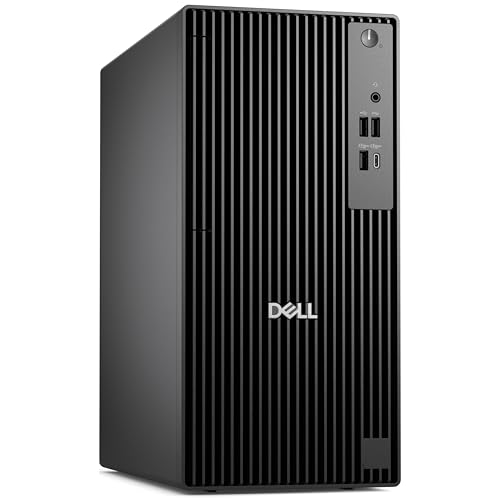
| Performance Value | Processor: Intel Core i5-14500 vPro (14th Gen) | Memory (RAM): 32 GB DDR5 | Primary Storage: 1 TB PCIe SSD | VIEW LATEST PRICE | Read Our Analysis |
| Dell Vostro Desktop PC – 14th Gen 16GB 1TB |

| Home Office Essential | Processor: Intel Core i3-14100 (14th Gen) | Memory (RAM): 16 GB DDR5 | Primary Storage: 1 TB PCIe SSD | VIEW LATEST PRICE | Read Our Analysis |
More Details on Our Top Picks
Dell Tower Desktop ECT1250 — Intel Core Ultra 7 32GB
In case you need a home desktop that handles heavy multitasking, creative work and emerging AI-assisted apps, the Dell Tower ECT1250 with an Intel Core Ultra 7 and 32GB of RAM delivers—its built-in AI acceleration, roomy 1TB M.2 SSD, and support for multiple high-resolution displays make it a solid choice for power users, content creators, and anyone who wants a future-ready, upgradeable machine. You’ll get integrated UHD graphics, support for up to four FHD or two 4K monitors, hardware TPM, and physical locks for security. Tool-less entry, an SD card reader, wired peripherals, Windows 11 Home, and one-year onsite service round it out.
- Processor:Intel Core Ultra 7-265
- Memory (RAM):32 GB
- Primary Storage:1 TB M.2 SSD
- Integrated Graphics:Intel UHD Graphics (integrated)
- Display Outputs / Multi‑monitor Support:Up to four FHD via DisplayPort (daisy chain); two 4K via HDMI 2.1 + DisplayPort
- Operating System / Windows:Windows 11 Home
- Additional Feature:Hardware TPM security chip
- Additional Feature:Tool-less internal access
- Additional Feature:1 Year Onsite Service
Dell OptiPlex 5060 Desktop PC Core i5 16GB
Provided that you need a reliable, space-saving desktop that handles everyday work and media smoothly, the renewed Dell OptiPlex 5060 with a six-core Intel Core i5 and 16 GB of RAM is a smart pick. You’ll get the Intel Core i5-8500 with Turbo up to 4.3 GHz in a slim black tower that fits tight desks. It pairs 16 GB DDR4 with a 500 GB SSD for fast boots and a 1 TB HDD for bulk storage. Integrated Intel UHD Graphics 630 handles video playback and light editing. Built-in WiFi, Bluetooth, and Ethernet keep you connected for home or office tasks.
- Processor:Intel Core i5-8500
- Memory (RAM):16 GB
- Primary Storage:500 GB SSD (primary)
- Integrated Graphics:Intel UHD Graphics 630 (integrated)
- Display Outputs / Multi‑monitor Support:Integrated graphics suitable for video playback (ports implied; general multi‑monitor support)
- Operating System / Windows:(Renewed—OS not explicitly stated; suited for home/office; likely Windows — listed as renewed desktop)
- Additional Feature:Renewed slim profile
- Additional Feature:Dual-storage (SSD+HDD)
- Additional Feature:Built-in Wi‑Fi/Bluetooth
Dell Pro Tower PC i5-14500 vPro 16GB 1TB
Choose the Dell Pro Tower provided you want business-grade security and manageability on a home workstation—its 14th Gen i5-14500 vPro and Intel vPro platform give you hardware-enhanced protections, remote management, and stable performance that small offices or power users at home will appreciate. You get 14 cores (6P/8E), 20 threads, up to 5.0 GHz bursts, 24 MB cache, 16 GB DDR5, and a 1 TB PCIe SSD for fast multitasking and storage. Integrated UHD 770 supports multiple displays via DisplayPort and HDMI. Front and rear USB options, Gigabit Ethernet, Windows 11 Pro, and durable, expandable business design complete the package.
- Processor:Intel Core i5-14500 vPro (14th Gen)
- Memory (RAM):16 GB DDR5
- Primary Storage:1 TB PCIe SSD
- Integrated Graphics:Intel UHD Graphics 770 (integrated)
- Display Outputs / Multi‑monitor Support:HDMI 2.1 + DisplayPort 1.4a (multi‑display support up to 4K@60Hz)
- Operating System / Windows:Windows 11 Professional (English, 64‑bit)
- Additional Feature:Intel vPro platform
- Additional Feature:Military-grade testing
- Additional Feature:Front USB-C port
Dell OptiPlex 7050 Desktop PC i5 16GB 512GB
Should you need a reliable, business-class desktop that handles multitasking and light creative work, the Dell OptiPlex 7050 with an i5-7500, 16GB RAM, and a 512GB SSD delivers responsive everyday performance and quick boot times. You get a renewed, Microsoft-authorized refurb unit that runs Windows 11 Pro 64-bit and supports Intel HD Graphics 630 with 4K output via two DisplayPort 1.2 and one HDMI 1.4. The i5’s 3.4–3.8 GHz range and 6 MB cache suit productivity, while TPM 1.2 is present (upgrade to TPM 2.0 for full Windows 11 security). Connectivity includes 802.11ac, Bluetooth, USB-C, and multiple USB-A ports.
- Processor:Intel Core i5-7500
- Memory (RAM):16 GB
- Primary Storage:512 GB SSD
- Integrated Graphics:Intel HD Graphics 630 (integrated)
- Display Outputs / Multi‑monitor Support:2× DisplayPort 1.2 + HDMI 1.4 (4K support)
- Operating System / Windows:Windows 11 Pro 64‑bit (preloaded)
- Additional Feature:Microsoft refurbished remanufacture
- Additional Feature:Built-in Intel 7260 Wi‑Fi
- Additional Feature:TPM 1.2 installed
Dell OptiPlex Tower Desktop — i5-14500 32GB 1TB
Should you need a reliable, business-class desktop that handles multitasking and productivity without hiccups, the OptiPlex Tower with a 14th Gen i5-14500, 32GB DDR5, and a 1TB PCIe SSD delivers responsive performance and fast storage for home office and power-user setups. You’ll get 14 cores (6P+8E), 20 threads, up to 5.0 GHz, and Intel vPro for security and manageability. Integrated UHD 770 and HDMI 2.1/DP1.4 support dual 4K displays. Windows 11 Pro with Copilot streamlines workflows. Please note: no built-in Wi‑Fi and no optical drive, but Ethernet and ample USB (including Type‑C) cover peripherals.
- Processor:Intel Core i5-14500 vPro (14th Gen)
- Memory (RAM):32 GB DDR5
- Primary Storage:1 TB PCIe SSD
- Integrated Graphics:Intel UHD Graphics 770 (integrated)
- Display Outputs / Multi‑monitor Support:HDMI 2.1 + DisplayPort 1.4a (up to 4K@60Hz)
- Operating System / Windows:Windows 11 Professional (English, 64‑bit)
- Additional Feature:Intel vPro platform
- Additional Feature:Windows 11 Pro (Copilot)
- Additional Feature:Smart Power On USB
Dell Vostro Desktop PC – 14th Gen 16GB 1TB
In case you need a reliable home or small‑office desktop that balances everyday multitasking and storage, the Dell Vostro with a 14th Gen Intel Core i3, 16 GB DDR5, and a 1 TB PCIe SSD delivers responsive performance and plenty of room for files and apps. You’ll get a 4-core/8-thread i3-14100 (3.5–4.7 GHz, 12 MB cache) that handles productivity and light content tasks. Integrated Intel UHD 730 supports up to four FHD or dual 4K displays via HDMI 2.1 and DisplayPort 1.4a. Wi‑Fi 6, Bluetooth, USB‑C, and Windows 11 Pro round out a compact, modern tower.
- Processor:Intel Core i3-14100 (14th Gen)
- Memory (RAM):16 GB DDR5
- Primary Storage:1 TB PCIe SSD
- Integrated Graphics:Intel UHD 730 (integrated)
- Display Outputs / Multi‑monitor Support:HDMI 2.1 + DisplayPort 1.4a; up to four FHD or dual 4K
- Operating System / Windows:Windows 11 Professional (English, 64‑bit)
- Additional Feature:Wi‑Fi 6 (MediaTek MT7920)
- Additional Feature:Compact refined tower
- Additional Feature:Type-C front port
Factors to Consider When Choosing a Dell Desktop Computer for Home Use
Whenever choosing a Dell desktop for home use, you’ll want to compare performance and speed to match your tasks, from web browsing to video editing. Check memory and storage options, look at graphics and display capabilities, and make sure the ports and connectivity fit your devices. Also factor in security features and build durability so your PC remains reliable over time.
Performance And Speed
Because your desktop handles everything from web browsing to video editing, pick components that keep tasks snappy: a multi‑core CPU with high surge clocks (think 6+ cores and ≥4.0 GHz), at least 16 GB of DDR4/DDR5 RAM (32 GB should you edit or juggle many tabs), and an NVMe PCIe SSD of 500 GB or more for fast boots and loads; also decide whether integrated graphics suffice for multi‑display media use or whether you need a dedicated GPU for gaming and GPU‑accelerated work. Match CPU cores/threads, RAM capacity and speed, and NVMe throughput (PCIe Gen3 vs Gen4) to your workload. For general use, prioritize higher turbo clocks and 16 GB RAM. For gaming or heavy creative apps, choose a stronger CPU plus a discrete GPU and 32 GB RAM to avoid bottlenecks.
Memory And Storage
Alongside CPU and GPU choices, memory and storage determine how smoothly your Dell desktop runs daily tasks and how much data you can keep handy. For general home use and multitasking, aim for at least 16 GB of RAM so multiple browser tabs, streaming, and office apps stay responsive without swapping. Pick DDR5 whenever available for better bandwidth and future-proofing, but prioritize 16–32 GB capacity for real-world performance. For storage, use a PCIe NVMe SSD (500 GB–1 TB) as your system/boot drive to cut boot and app load times dramatically versus HDDs. Add a secondary high-capacity drive (1 TB or larger HDD or separate SSD) for bulk media and backups. This combo balances speed, capacity, and cost effectively.
Graphics And Displays
Should you mostly browse, stream, and work in office apps, integrated UHD graphics will drive one or two Full HD displays smoothly and keep power use low; but in case you edit photos or video, game, or want multiple 4K screens, pick a system with a capable GPU (or integrated graphics that support dual 4K output and hardware acceleration) and confirm the exact video outputs, resolutions, refresh rates, and multi‑monitor limits you’ll need. Check that the GPU or IGP supports the resolutions and refresh rates of your monitors (e.g., 4K @ 60 Hz). Verify support for HDMI 2.1 or DisplayPort 1.4a and whether DisplayPort daisy‑chaining is available. Confirm how many simultaneous displays the graphics solution can drive so your planned workspace won’t exceed its limits.
Connectivity And Ports
Once you pick a Dell desktop, check the front and rear ports so you won’t be hunting for adapters later: make sure there’s at least one front USB‑A 3.2 Gen‑1 and a front USB‑C (or USB 3.2 Gen‑2) for fast drives and peripherals, multiple rear USB‑A ports (including both 5 Gbps and 480 Mbps types), a Gigabit RJ45 jack for wired networking, and video outputs like HDMI 2.1 or DisplayPort 1.4a that match your monitors’ resolutions and refresh rates. Also confirm built‑in Wi‑Fi 6 and Bluetooth for wireless devices. Should you move media often, an SD card reader saves time. Extra rear USBs and dedicated audio jacks help whenever you connect headsets, speakers, printers, webcams or other peripherals without constant swapping.
Security And Durability
Because your desktop holds both personal data and key system functions, pick models with hardware-backed protections like a TPM chip and secure-boot support, plus tamper‑resistant features (lock slots or chassis locks and tool‑less removable panels) so you can control physical access and upgrades. Also verify BIOS/firmware management: signed updates and automatic delivery reduce firmware attack risk. Choose chassis designs tested to MIL or equivalent standards for shock, vibration, and temperature to guarantee durability in varied home conditions. Check warranty and onsite support options that include hardware diagnostics and prompt repair windows to minimize downtime after failures or security incidents. Together these measures give you a resilient, manageable desktop that protects data and stays reliable over time.
