

In case you want a budget robot that really cleans, you’ll want more than flashy ads and empty claims. Look for models with decent suction, reliable mapping, washable filters, and easy-to-find parts. I’ll highlight five affordable picks—from LiDAR-enabled units to bagless and self-emptying combos—that balance price with performance, so you can pick what fits your home and maintenance style. Keep going to see which one suits your floors.
| Q20 Ultra Robot Vacuum & Mop with Self-Emptying |

| Best for Hands-Off Cleaning | Vacuum + Mop: Vacuum and mop simultaneously (2-in-1 dustbin/water tank) | Navigation / Mapping: 360° LiDAR mapping (multi-map support up to 5) | App / Smart Control: Honysmart App (schedules, no-go zones, suction/water control) | VIEW LATEST PRICE | Read Our Analysis |
| Robot Vacuum and Mop Combo MSF | Compact Budget Pick | Vacuum + Mop: Simultaneous vacuuming and mopping (wet/dry) | Navigation / Mapping: 360-degree swivel navigation (anti-fall) — basic 360° navigation | App / Smart Control: App control and voice control (scheduling supported) | VIEW LATEST PRICE | Read Our Analysis | |
| Bagotte Self-Emptying Robot Vacuum and Mop |

| Longest Low-Maintenance Run | Vacuum + Mop: Vacuuming while mopping (4-in-1) | Navigation / Mapping: 360° LiDAR mapping (precise map, efficient routes) | App / Smart Control: Wi‑Fi/App control (schedules, No-Go Zones, room selection) | VIEW LATEST PRICE | Read Our Analysis |
| Bagotte 3-in-1 Robot Vacuum & Mop (5000Pa) |
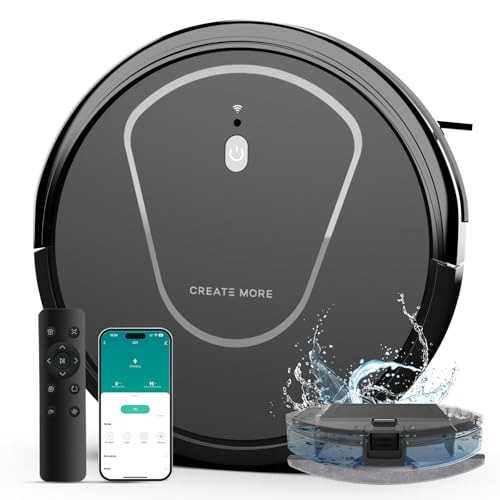
| Solid All-Rounder | Vacuum + Mop: Vacuum and mop (2-in-1; wet/dry) | Navigation / Mapping: (Implied) path modes with edge/spot/manual — app control/navigation features | App / Smart Control: 2.4 GHz WiFi app control (scheduling, mode/suction control) | VIEW LATEST PRICE | Read Our Analysis |
| MONSGA Robot Vacuum & Mop Combo with Lidar |

| Highest Performance Value | Vacuum + Mop: Sweep, vacuum, mop (3-in-1) | Navigation / Mapping: 360° LiDAR mapping (saves up to 5 maps, straight-line paths) | App / Smart Control: Smart Life / Tuya Smart app (scheduling, map editing, multi-user) | VIEW LATEST PRICE | Read Our Analysis |
More Details on Our Top Picks
Q20 Ultra Robot Vacuum & Mop with Self-Emptying
In case you want an affordable robot that handles both vacuuming and mopping with minimal fuss, the Q20 Ultra is a strong pick. You’ll get 4-in-1 cleaning: vacuum, sweep, mop, and self-empty. Its 2-in-1 dustbin and water tank lets you vacuum and mop simultaneously; remove the mop holder for carpets. With 6000 Pa and three suction levels, it tackles dust, pet hair, crumbs, and low-pile rugs. LiDAR mapping creates precise multi-floor maps, and sensors avoid stairs and obstacles. You’ll enjoy up to 150 minutes runtime, 45 days between emptying, app control, and Alexa/Google support.
- Vacuum + Mop:Vacuum and mop simultaneously (2-in-1 dustbin/water tank)
- Navigation / Mapping:360° LiDAR mapping (multi-map support up to 5)
- App / Smart Control:Honysmart App (schedules, no-go zones, suction/water control)
- Voice Assistant Compatible:Alexa and Google Assistant compatible
- Auto Return / Recharge:Auto recharge and resume after charging
- Pet-Friendly / Hair Handling:Marketed for pet-hair homes; 6000 Pa to pick up hair
- Additional Feature:6000 Pa high suction
- Additional Feature:Bagless reusable dustcup
- Additional Feature:150 min runtime (ECO)
Robot Vacuum and Mop Combo MSF
Compact Budget Pick
View Latest PriceIn case you want a budget-friendly robot that both vacuums and mops, the UMMUND T7S Robot Vacuum MSF delivers simultaneous wet/dry cleaning with app and voice control. You’ll appreciate its rectangular design and 360-degree swivel maneuvering that avoids falls while covering corners. It supports scheduling, uses a foam filter, and runs on a battery (one C cell included) with an advertised 1,000-hour life. At 11.8 x 11.8 x 2.8 inches and 8.07 pounds, it’s compact and easy to move. Reviews average 3.1 stars from 14 users, so temper expectations for durability and performance.
- Vacuum + Mop:Simultaneous vacuuming and mopping (wet/dry)
- Navigation / Mapping:360-degree swivel navigation (anti-fall) — basic 360° navigation
- App / Smart Control:App control and voice control (scheduling supported)
- Voice Assistant Compatible:Voice control compatible (unspecified assistants)
- Auto Return / Recharge:Battery powered (auto-return implied by typical robot behavior; basic navigation)
- Pet-Friendly / Hair Handling:General vacuum/mop suitable for debris (brand notes include pet use implicitly)
- Additional Feature:Rectangular low-profile form
- Additional Feature:Foam filter type
- Additional Feature:Extremely lightweight (8.07 lb)
Bagotte Self-Emptying Robot Vacuum and Mop
Should you want a budget-friendly robot that handles long stretches without fuss, the Bagotte self-emptying vacuum and mop is built for busy households and pet owners: its 5000Pa suction lifts embedded hair and debris while the self-emptying station holds up to 90 days of dirt so you don’t have to constantly empty the bin. You’ll get 4-in-1 sweeping, vacuuming, mopping and self-cleaning with return-to-station auto-emptying into sealed dustbags. LiDAR maps precisely and plans efficient routes, enhancing coverage versus random bots. Use the app or Alexa to schedule, set No-Go Zones, pick rooms and adjust suction. It includes a two-year warranty.
- Vacuum + Mop:Vacuuming while mopping (4-in-1)
- Navigation / Mapping:360° LiDAR mapping (precise map, efficient routes)
- App / Smart Control:Wi‑Fi/App control (schedules, No-Go Zones, room selection)
- Voice Assistant Compatible:Alexa compatible
- Auto Return / Recharge:Returns to station to self-empty (auto dock)
- Pet-Friendly / Hair Handling:5000 Pa suction highlighted for pet hair removal
- Additional Feature:5000 Pa suction power
- Additional Feature:90-day sealed dustbag
- Additional Feature:Boosts coverage ~70%
Bagotte 3-in-1 Robot Vacuum & Mop (5000Pa)
Should you live with pets or heavy foot traffic and want strong suction without a high price, the Bagotte 3-in-1 is a smart pick—its 5000Pa motor and high-efficiency roller brush make quick work of hair, crumbs, and larger debris while the 2-in-1 vacuum-and-mop system handles wet and dry messes. You’ll get four cleaning modes (Auto, Edge, Spot, Manual), a 230 ml water tank, and a 2600 mAh battery that runs up to 120 minutes in Quiet Mode. App control via 2.4 GHz Wi-Fi, Alexa/Google compatibility, scheduling, suction adjustment, and auto-resume charging round out solid value.
- Vacuum + Mop:Vacuum and mop (2-in-1; wet/dry)
- Navigation / Mapping:(Implied) path modes with edge/spot/manual — app control/navigation features
- App / Smart Control:2.4 GHz WiFi app control (scheduling, mode/suction control)
- Voice Assistant Compatible:Alexa and Google Assistant compatible
- Auto Return / Recharge:Auto-return to charging dock and resume from last position
- Pet-Friendly / Hair Handling:Designed for pet hair and high foot-traffic households (5000 Pa)
- Additional Feature:230 ml water tank
- Additional Feature:Four cleaning modes
- Additional Feature:2600 mAh battery
MONSGA Robot Vacuum & Mop Combo with Lidar
Should you want a budget-friendly robot that handles both vacuuming and mopping with precise routing, the MONSGA MS1 is a smart pick—its 360° LiDAR mapping and 7000Pa suction make it ideal for busy homes with pets and mixed floors. You’ll get a 550W brushless motor, V-shaped floating roller and tangle-resistant brushroll, plus three suction and three water-flow levels. It auto-boosts on carpets, climbs up to 1″ obstacles, and cleans ~2,000 sq ft per 180-minute charge. The app and remote let you save five editable maps, set no-go zones, schedule cleanings, and use voice commands. A two-year warranty backs it.
- Vacuum + Mop:Sweep, vacuum, mop (3-in-1)
- Navigation / Mapping:360° LiDAR mapping (saves up to 5 maps, straight-line paths)
- App / Smart Control:Smart Life / Tuya Smart app (scheduling, map editing, multi-user)
- Voice Assistant Compatible:Amazon Echo and Google Home compatible
- Auto Return / Recharge:Auto-return to dock and resume cleaning after recharge
- Pet-Friendly / Hair Handling:Tangle-resistant brushroll and carpet boost — marketed to handle pet hair
- Additional Feature:7000 Pa, 550W motor
- Additional Feature:180 min runtime
- Additional Feature:270 ml water tank
Factors to Consider When Choosing a Cheap Robotic Vacuum
At the time you shop for a cheap robotic vacuum, focus on key specs like suction power, guidance accuracy, and runtime so it actually cleans your space. Check whether it offers mopping options and what kind of dust management system it uses to keep maintenance simple. Balancing those features against battery life and price will help you pick the best value.
Suction Power Levels
Check a robot’s suction in Pascals (Pa) to compare raw power—budget models usually run from about 1,000 Pa for light dust up to 6,000–7,000 Pa for stronger pickup—since higher settings pull out embedded dirt and pet hair but can cut runtime approximately 20–50%. You should prefer models with multiple suction levels so you can choose low power for hard floors and high for rugs. Don’t assume Pa is everything: brush design and a clear airflow path affect real-world pickup, so read tests or reviews. Look for automatic carpet‑boost or suction‑adjust features that raise power on carpets and lower it on smooth surfaces to save battery. Finally, pair higher Pa with a good HEPA or fine filter to trap allergens rather than recirculating them.
Navigation Accuracy
Often you’ll want a robot that maps your home precisely rather than bumping around randomly, because accurate route-finding cuts missed spots, reduces collisions, and saves battery. Prefer models with LiDAR or structured optical mapping over random or basic infrared piloting; they create precise floor maps and reduce missed areas. Check for multi‑map support and real‑time SLAM so the robot handles multi‑level homes and adapts after furniture moves. Verify obstacle and cliff sensors and look for edge‑detection accuracy metrics from tests to minimize collisions and falls. Observe whether the robot recalculates routes whenever it hits an obstruction and supports resume‑after‑recharge. Finally, compare published coverage efficiency and claimed area per charge to gauge how closely it follows peak cleaning paths.
Runtime And Battery
Match the robot’s runtime to your home: budget models typically run 60–180 minutes, so a small apartment can work with the lower end while larger homes need closer to 120–180 minutes per charge. Check advertised runtime and battery capacity (commonly 2000–5000 mAh) to estimate real performance. Note mode-based differences: ECO/quiet modes approach max runtime, while high‑power or carpet‑boost modes can cut it around 30–60%. Make sure the vacuum supports auto‑recharge and resume so it can dock, recharge, then finish a job instead of leaving areas untouched. Finally, verify battery maintenance: expected lifespan, cycle decline, and whether the battery is user‑replaceable—those factors determine long‑term value and consistent suction over years.
Mopping Capability Options
Frequently, you’ll want to weigh whether a robot actually mops or just drags a damp pad: true 2-in-1/3-in-1 units that vacuum and mop in one pass save time and handle shifts better, while separate-mode models may need manual swaps. Check water tank capacity (200–300+ ml) and adjustable flow so you know how much area it covers and how wet floors get. Verify mop mechanism—static microfiber, vibrating, or rotating—since active agitation removes stains far better than a passive pad. Make sure the unit detects carpets or lets you lift/disable the mop to avoid wetting rugs and to allow carpet enhancement. Look for washable pads and easy-to-clean, refillable tanks to cut ongoing costs and hassle.
Dust Management System
Consider how the robot handles collected dirt: does it use a self-emptying base or a reusable dust cup, and how easy is the bin and filter to remove and clean? Self-emptying bases extend hands-free operation from weeks to months and cut down on manual emptying, while reusable bins save ongoing costs but need frequent attention. Check for sealed or bagged storage and HEPA or high-efficiency filters provided that you or anyone at home has allergies. Inspect dustbin capacity and how simply it detaches, rinses, or wipes clean to minimize maintenance time. Make sure suction power and brush design actually lift embedded dust and pet hair on your floors to avoid clogging filters. Finally, verify filter lifespan, availability, and whether filters are washable or disposable to estimate replacement costs.
App And Voice Control
How will you control and customize your robot while you’re not standing over it? Check for a dedicated mobile app that offers map editing, scheduling, suction and water‑level adjustments, and no‑go/virtual wall settings so you can block zones or avoid carpets whenever mopping. Verify network compatibility—many budget models need 2.4 GHz Wi‑Fi—and whether the app supports multi‑user access or remote control away from home. Look for voice‑assistant integration (Amazon Alexa, Google Assistant) in case you want hands‑free start/stop/return commands, and confirm which assistants are supported. Make certain the app gives real‑time status updates (battery, progress, errors) and resume‑after‑charge for interrupted jobs. Prioritize apps with room/zone targeting to enhance efficiency and cleaning precision.
Maintenance And Parts
Plan for upkeep before you buy: cheap robot vacuums can save you money up front but often need frequent consumable replacements and occasional part swaps, so check prices and availability for filters, brushes, mop pads, and replacement batteries. Inspect whether filters need replacing every 3–6 months and brushes every 6–12 months, and factor those costs in. Prefer models with removable, washable dustbins and water tanks to cut maintenance time and prolong parts. Should the robot have an auto-empty station, confirm reusable cups versus sealed bags—reusable is cheaper long-term, sealed bags might require replacement every 1–3 months. Make sure sensors and cliff/bumper areas are easy to access for cleaning to prevent guidance errors. Verify official replacement parts availability to avoid lengthy downtime.
Warranty And Support
Although cheap robot vacuums save money up front, you’ll want to confirm warranty length and exact coverage before buying so you’re not stuck with repair bills later. Check typical warranty durations (commonly 1–2 years) and which components—motor, battery, sensors, charging station—are covered so you know likely out-of-pocket repairs. Remember registration requirements, proof-of-purchase and serial-number rules that keep the warranty valid. Confirm whether replacements or labor are free and whether coverage includes accidental damage or only manufacturing defects and battery degradation. Evaluate customer support availability—phone, chat, email—and advertised response times to judge service speed. Finally, review the availability and cost of spare parts and consumables, and whether the maker or third parties promise long-term replacements.
