

Most people don’t realize many thermostat apps now do local LAN control and keep things working provided the cloud goes down. You’ll want an app that balances privacy, reliable geofencing, and Matter/HomeKit voice support without making setup a headache. I’ll compare seven top options and what each does best so you can pick one that fits your home and power‑user needs—starting with a surprisingly capable Honeywell option.
| Honeywell Home T5 WiFi Smart Thermostat (RTH8800WF) |

| Best for Compatibility | Connectivity: Wi‑Fi | Smart Home Integration: Alexa, Google Assistant, Apple HomeKit, Android, iOS | App Control / Remote Access: Yes — Honeywell Home app (remote control, reports) | VIEW LATEST PRICE | Read Our Analysis |
| meross Smart WiFi Thermostat (Matter Alexa HomeKit) |

| Best for Matter Integration | Connectivity: Wi‑Fi, Matter | Smart Home Integration: Apple Home, Alexa, Google Home, Home Assistant, SmartThings (via Matter) | App Control / Remote Access: Yes — meross app + Matter local control | VIEW LATEST PRICE | Read Our Analysis |
| Smart WiFi Touchscreen Thermostat with App & Voice | Budget-Friendly Pick | Connectivity: Wi‑Fi | Smart Home Integration: Smart home compatible (app & voice) | App Control / Remote Access: Yes — app control (generic) | VIEW LATEST PRICE | Read Our Analysis | |
| Govee Bluetooth Digital Hygrometer & Thermometer H5075 |
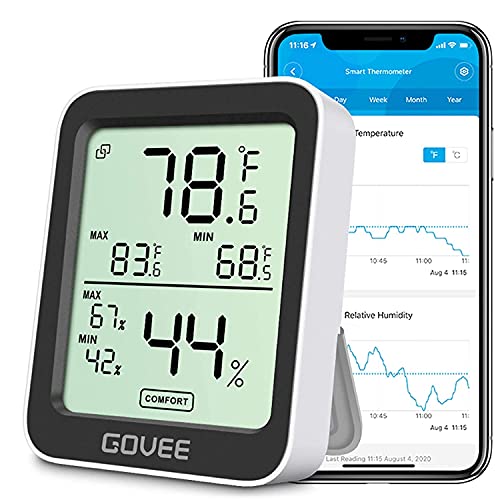
| Best for Monitoring | Connectivity: Bluetooth | Smart Home Integration: Govee app (Bluetooth monitoring) — app integration only | App Control / Remote Access: Yes — Govee app (Bluetooth remote within range) | VIEW LATEST PRICE | Read Our Analysis |
| Vine WiFi Smart Thermostat for Home (C-Wire Required) |

| Best for Scheduling | Connectivity: Wi‑Fi | Smart Home Integration: Alexa, Google Assistant (via Vine or Smart Life app) | App Control / Remote Access: Yes — Vine Thermostat App or Smart Life app | VIEW LATEST PRICE | Read Our Analysis |
| Smart WiFi Programmable Thermostat with Touchscreen |

| Best for Electric Heating | Connectivity: Wi‑Fi, Matter | Smart Home Integration: Google Assistant, Alexa, Apple HomeKit (via Matter/Tuya), Smart Life | App Control / Remote Access: Yes — Smart Life/Tuya app (remote control) | VIEW LATEST PRICE | Read Our Analysis |
| Wi‑Fi Smart Thermostat for Electric Baseboard Heaters |

| Best for Baseboards | Connectivity: Wi‑Fi (2.4 GHz) | Smart Home Integration: Alexa, Google Home, Smart Life, Tuya | App Control / Remote Access: Yes — App control via Smart Life/Tuya | VIEW LATEST PRICE | Read Our Analysis |
More Details on Our Top Picks
Honeywell Home T5 WiFi Smart Thermostat (RTH8800WF)
Should you want a straightforward, smart thermostat that saves energy without a steep learning curve, the Honeywell Home T5 (RTH8800WF) is a solid pick—its 7-day flexible scheduling, geofencing Auto Home/Away, and ENERGY STAR certification make it easy to cut heating and cooling costs while staying comfortable. You’ll mount the compact, touch-sensitive square on your wall using the included UWP system, power it with 24V (or add a C-wire adapter), and control it via Wi‑Fi alongside Alexa, Google, or HomeKit. Expect monthly energy reports, eligibility for utility rebates, and simple setup backed by a two-year warranty.
- Connectivity:Wi‑Fi
- Smart Home Integration:Alexa, Google Assistant, Apple HomeKit, Android, iOS
- App Control / Remote Access:Yes — Honeywell Home app (remote control, reports)
- Scheduling / Programmable:7-day flexible scheduling
- Temperature & Humidity Monitoring or Control:Temperature control (heating/cooling) — tracks usage
- Voice Control:Alexa, Google Assistant, Apple HomeKit voice support
- Additional Feature:ENERGY STAR certified
- Additional Feature:Geofencing Auto Home/Away
- Additional Feature:Monthly energy reports
meross Smart WiFi Thermostat (Matter Alexa HomeKit)
Should you want Matter-compatible, 24V smart control that works with HomeKit, Alexa, Google and Home Assistant, the meross MTS300 is a strong pick — especially should your system be a heat pump, furnace, boiler, AC or supports a C‑wire. You’ll get Wi‑Fi and Matter local integration, app and voice control, scheduling, energy-saving modes and HVAC usage tracking. It supports 95% of systems but not line-voltage baseboards, millivolt or simple two‑wire setups; a C‑wire might be required. The sleek glass panel shows temperature, locks and alerts for filters or faults. Installation uses the meross app; support and warranty are available.
- Connectivity:Wi‑Fi, Matter
- Smart Home Integration:Apple Home, Alexa, Google Home, Home Assistant, SmartThings (via Matter)
- App Control / Remote Access:Yes — meross app + Matter local control
- Scheduling / Programmable:24/7 flexible scheduling (home/away/sleep)
- Temperature & Humidity Monitoring or Control:Temperature control (heat/cool), HVAC monitoring; alerts (includes humidity for some systems)
- Voice Control:Alexa, Google Assistant, Siri (via Matter/HomeKit)
- Additional Feature:Matter protocol support
- Additional Feature:Smart alerts (filter/system)
- Additional Feature:Local Matter integration
Smart WiFi Touchscreen Thermostat with App & Voice
Budget-Friendly Pick
View Latest PriceShould you want simple, hands‑free climate control for a small space—home, RV, or hotel room—the Smart WiFi Touchscreen Thermostat with app and voice control is a strong fit. You’ll get a wall‑mount touchscreen, app and voice control via Wi‑Fi, and programmable schedules for heating and cooling with seasonal adjustments. It’s battery powered with a USB option, made from abrasion‑resistant ABS, and installs tool‑free with included screws and manual. Use it for dorms, retail, or travel units to save energy and keep comfort steady. First, customer feedback is mixed (2.7/5 from seven reviews), so check compatibility foremost.
- Connectivity:Wi‑Fi
- Smart Home Integration:Smart home compatible (app & voice)
- App Control / Remote Access:Yes — app control (generic)
- Scheduling / Programmable:Programmable schedules (touchscreen/app)
- Temperature & Humidity Monitoring or Control:Temperature control (heating & cooling) via touchscreen/app
- Voice Control:Voice control supported (generic voice assistants)
- Additional Feature:Battery + USB power
- Additional Feature:Tool-free installation
- Additional Feature:Portable for RVs/hotels
Govee Bluetooth Digital Hygrometer & Thermometer H5075
In case you want simple, local Bluetooth monitoring with fast refreshes and exportable logs, the Govee H5075 is a solid pick. You’ll get Swiss-made sensor accuracy (±0.54°F, ±3% RH), a bright 3-inch LCD with large numbers, and up-to-2-second refreshes for near-instant readings. The app shows temperature and humidity graphs, 20-day curves, alerts for out-of-range conditions, and local free storage with CSV export up to two years. It records max/min and comfort indicators, runs on two included AAA batteries, and fits on a tabletop (2.5″ x 3.1″, black). Bluetooth range is about 164 ft.
- Connectivity:Bluetooth
- Smart Home Integration:Govee app (Bluetooth monitoring) — app integration only
- App Control / Remote Access:Yes — Govee app (Bluetooth remote within range)
- Scheduling / Programmable:Yes — logging and alerts (schedules not primary but programmable alerts)
- Temperature & Humidity Monitoring or Control:Temperature and humidity monitoring (sensor)
- Voice Control:No direct native voice assistant listed (app notifications only)
- Additional Feature:Swiss-made sensor
- Additional Feature:2-year CSV export
- Additional Feature:3-inch bright LCD
Vine WiFi Smart Thermostat for Home (C-Wire Required)
Should you’ve got a home HVAC system with a C‑wire and want reliable app and voice control, the Vine WiFi Smart Thermostat is a strong match—its 7‑day, 8‑period scheduling and Energy Star features let you automate comfort and save energy without fuss. You’ll install the compact square unit in about 20 minutes using included plates, screws, and labels. It supports ~90% of 24V systems (conventional, heat pump, heat/ cool only), works with Alexa and Google Assistant, and connects via Wi‑Fi to the Vine or Smart Life app. You’ll get geofence, auto home/away, vacation mode, alerts, lockable controls, and filter notifications.
- Connectivity:Wi‑Fi
- Smart Home Integration:Alexa, Google Assistant (via Vine or Smart Life app)
- App Control / Remote Access:Yes — Vine Thermostat App or Smart Life app
- Scheduling / Programmable:7-day, 8-period programmable schedules
- Temperature & Humidity Monitoring or Control:Temperature control (heating/cooling) with alerts
- Voice Control:Alexa and Google Assistant voice support
- Additional Feature:8-period daily schedules
- Additional Feature:Child lock / lockable
- Additional Feature:Large trim plate included
Smart WiFi Programmable Thermostat with Touchscreen
Should you want precise, app-driven control over electric heating, the Bestechy Programmable Smart Thermostat (BHT-18GBLW-MT) gives you a touchscreen plus Wi‑Fi and Matter integration so you can schedule, voice-control, and monitor your system from anywhere. You’ll mount this compact black unit (1.95 x 3.46 x 3.46 inches) and connect 95–240V corded power to control up to 16A. Use the LED touch display, the Smart Life/Tuya app, or voice assistants via Matter for 5+1+1 weekly scheduling with six stages per day. Features include child lock, weather forecast, backlight control, multi-user sharing, and claimed 35% energy savings.
- Connectivity:Wi‑Fi, Matter
- Smart Home Integration:Google Assistant, Alexa, Apple HomeKit (via Matter/Tuya), Smart Life
- App Control / Remote Access:Yes — Smart Life/Tuya app (remote control)
- Scheduling / Programmable:7-day programmable (5+1+1), multiple stages per day
- Temperature & Humidity Monitoring or Control:Temperature control for electric heating systems (setpoints/forecast)
- Voice Control:Alexa and Google Assistant voice support (HomeKit via Matter/Tuya)
- Additional Feature:Supports 95–240V electric
- Additional Feature:Weather forecast display
- Additional Feature:Tuya + Matter integration
Wi‑Fi Smart Thermostat for Electric Baseboard Heaters
Should you manage electric baseboard heating in rentals, vacation homes, or any space without a 24V central system, this Wi‑Fi Smart Thermostat (KALOR TECH AC603H) gives you remote control and scheduling that actually saves energy and prevents frozen pipes. You’ll install the wall‑mount square unit (3.5 x 3.5 x 1.75 in) on standard US/Canadian boxes using included plate and wiring; it requires 120–240V and 2.4 GHz Wi‑Fi. The LCD shows temperature, time, target temp, and Wi‑Fi. Use app, voice (Alexa/Google), or touch to program schedules, set a minimum antifreeze temperature, and manage heaters remotely for convenience and efficiency.
- Connectivity:Wi‑Fi (2.4 GHz)
- Smart Home Integration:Alexa, Google Home, Smart Life, Tuya
- App Control / Remote Access:Yes — App control via Smart Life/Tuya
- Scheduling / Programmable:Programmable schedules from device or app
- Temperature & Humidity Monitoring or Control:Temperature control for baseboard heaters (setpoints, min temp); displays temperature
- Voice Control:Alexa and Google Home voice support
- Additional Feature:Designed for 120–240V baseboards
- Additional Feature:Minimum freeze protection
- Additional Feature:Proprietary wall plate included
Factors to Consider When Choosing a Thermostat App
If you pick a thermostat app, check that it’s compatible with your device and heater model so everything works smoothly. Look for flexible scheduling, accurate geo‑fencing, clear energy reports, and support for the other smart devices you use. Those features determine convenience, savings, and how well the app fits your ecosystem.
App Compatibility
Because your thermostat app is the bridge between you, your devices, and any automation rules, you’ll want to confirm it supports your phone’s OS and minimum versions, matches the communication protocols your thermostat and hub use (Wi‑Fi, Matter, or local), and provides the mix of local and cloud control, voice assistant integrations, and developer support that keeps everything working reliably and securely. Check OS compatibility initially—confirm iOS/Android support and minimum versions so updates don’t break control. Verify protocol support so routines run locally when feasible. Prefer apps offering both local network control for resilience and cloud access for remote use. Make sure integrations with HomeKit, Alexa, or Google Home provided you use voice control. Finally, review update cadence, developer support channels, and privacy policies to maintain long‑term reliability.
Scheduling Flexibility
At the time of wanting precise comfort and real savings, pick an app that gives true scheduling flexibility: 7‑day schedules with multiple periods per day, easy editing and copy-to-days/zones, temporary holds with selectable durations, geofencing that ties into your routines, and clear logs of upcoming and past setpoint changes so you can audit and fine‑tune timing. You’ll want separate wake/away/home/sleep scenes so temperatures match occupancy and activity. Make sure schedule editing is fast and supports bulk apply across days or zones to avoid repetitive setup. Confirm temporary hold options (until next period, set hours, or indefinite) so a manual override doesn’t disappear unexpectedly. Finally, verify the app shows upcoming events and history so you can spot mismatches and optimize schedules for comfort and energy savings.
Geo‑Fencing Accuracy
Scheduling controls how your thermostat behaves day to day, but geofencing decides whether those schedules actually kick in as you leave or come home. You should pick an app that uses high‑precision GPS whenever you need tight boundaries, since Wi‑Fi and cell positioning can be tens to hundreds of meters off. Pay attention to configurable radius sizes—small radii raise false triggers from GPS drift, large ones delay automation. Make sure the app explains how to enable “always” or high‑accuracy location, because OS battery modes can block responsiveness. Look for frequent sampling and motion integration options; aggressive sampling improves responsiveness but costs battery. Prefer apps that combine GPS, Wi‑Fi SSID and cell IDs and offer hysteresis timers (1–5 minutes) to cut false positives.
Energy Reporting
Viewpoint matters: pick an app that turns raw thermostat data into clear monthly reports with quantified savings (percent or kWh) so you can track trends and measure the impact of schedule or behavior changes. You’ll want device- or system-level breakdowns (heating vs cooling, runtime hours) to spot the biggest energy drivers and optimization opportunities. Choose apps with historical graphs and exportable CSV or PDF data so you can dig deeper or share findings with your utility or contractor. Prefer platforms that deliver automated, personalized energy-saving tips tied to your actual usage and local weather, not generic advice. Finally, confirm the app flags rebate or demand-response eligibility and peak pricing events so reported savings reflect available incentives.
Integration Ecosystem
Integration matters: pick a thermostat app that fits your existing smart‑home ecosystem and keeps you in control even should the internet drops. Check which platforms and voice assistants it supports—Matter, Alexa, Google, HomeKit, or cloud bridges—to guarantee seamless control and automation. Prefer apps offering local control or LAN APIs over cloud‑only operation to cut latency and keep basic functions working offline. Look for open APIs, Home Assistant compatibility, and webhook support provided you want custom automations. Confirm multi‑device and zone management: group thermostats, per‑room schedules, and shared accounts for household access. Finally, evaluate interoperability features like geofencing, presence detection, and cross‑device routines so your thermostat coordinates with locks, lights, and sensors.
Security & Privacy
Because your thermostat app handles sensitive data and controls home systems, you should prioritize strong security and clear privacy practices: verify end-to-end encryption (TLS 1.2+ in transit, AES‑256 at rest), MFA and strict password rules, and an explicit privacy policy that details what telemetry is collected, how long it’s kept, and whether it’s shared or sold. Also confirm the app supports multi-factor authentication and enforces strong passwords to prevent account takeover. Prefer apps offering local control or Matter/local API access so core functions work without the cloud and reduce exposure. Review privacy statements for specifics on temperature, occupancy, and location telemetry—ask whether data is anonymized, retained, or sold. Finally, make certain account tools let you export logs, deactivate accounts, and permanently purge stored data.
User Interface
Upon choosing a thermostat app, prioritize a clean home screen that shows current temperature, HVAC mode, and setpoint at a glance so you don’t have to hunt for basics; pair that with intuitive scheduling tools (drag‑and‑drop or stepwise inputs for 7‑day/multi‑period routines) and clear, real‑time feedback—like last‑command timestamps and connection status—to confirm changes took effect. You’ll want large tappable controls, readable fonts, and good color contrast so adjustments are quick and accessible. Look for optional lock or PIN protection to child‑proof settings. Useful visualizations—hourly/weekly temperature graphs, HVAC runtime summaries, and simple energy reports—help you spot trends and opportunities to save. Prefer apps that make common tasks obvious and errors easy to recover from, minimizing taps and confusion.
Remote Access Options
A great on-screen experience matters, but you also need reliable ways to reach your thermostat whenever you’re away from the couch. Make sure the app supports both local (LAN) and cloud access so you can control the unit on your home network and remotely through secure cloud services. Check multi-user accounts and granular permissions so each household member gets appropriate access while you retain admin control. Verify compatibility with 2.4 GHz—and 5 GHz provided applicable—Wi‑Fi, and that the app reports connection status and signal strength for troubleshooting. Prefer apps with real‑time push notifications, configurable alerts with timestamps and actionable links, plus scheduled automation, geofencing, and voice or smart‑home integrations for remote-triggered routines.
Frequently Asked Questions
How Do Thermostats Protect My Privacy and Data?
They protect your privacy through encrypting data, anonymizing usage patterns, storing minimal information, letting you control sharing and permissions, offering firmware updates, and using secure authentication; you should review settings and opt out of unnecessary data collection.
Can a Thermostat App Integrate With Solar Generation Systems?
Yes — many thermostat apps can integrate with solar systems, letting you shift HVAC loads to match generation, monitor solar output, and optimize storage use so you’ll reduce grid draws and maximize on-site renewable consumption.
What Happens to Scheduling During Prolonged Internet Outages?
Once the internet goes down, your thermostat usually keeps running local schedules, but remote control and cloud-based automations stop; you’ll have to manage settings locally until service’s back, so plan for offline fallback just in case.
Do Thermostat Apps Require Recurring Subscription Fees?
Some thermostat apps require recurring subscription fees for advanced features like learning, remote monitoring, or energy reports, but many let you use basic controls without a subscription; you’ll need to check each app’s pricing and feature list.
Are There Accessibility Features for Visually Impaired Users?
Yes — many thermostat apps include accessibility features for visually impaired users: you’ll find VoiceOver/TalkBack support, high-contrast themes, scalable text, screen-reader labels, and voice control; some manufacturers also offer spoken setup and tactile hardware cues.
