

Like swapping out the engine of your house, choosing the right SmartThings switches can change how your home runs—but it’s not just about smart bulbs. You’ll want switches that match your hub’s radio, handle your load, fit the box, and keep state accurate under local control. I’ll walk you through seven top options in 2026 and what matters for long‑term, low‑latency automation.
| UTEC Smart WiFi Dimmer Switch (Single-Pole) |

| Best Mesh Dimming | Connectivity Protocol: Wi‑Fi (2.4 GHz) + Bluetooth | Smart Home Compatibility: Alexa, Google Assistant, SmartThings | Neutral Wire Requirement: Requires neutral | VIEW LATEST PRICE | Read Our Analysis |
| Leviton Decora Smart Wi‑Fi Switch (D215S-1RW) |

| Best Matter-Ready | Connectivity Protocol: Wi‑Fi (2.4 GHz) + Matter (firmware enable) | Smart Home Compatibility: Alexa, Google Assistant, Apple Home/Siri, SmartThings, Matter (when enabled), Sonos, Resideo | Neutral Wire Requirement: Requires neutral | VIEW LATEST PRICE | Read Our Analysis |
| Legrand Wi‑Fi Matter Smart Switch (Single Pack) |
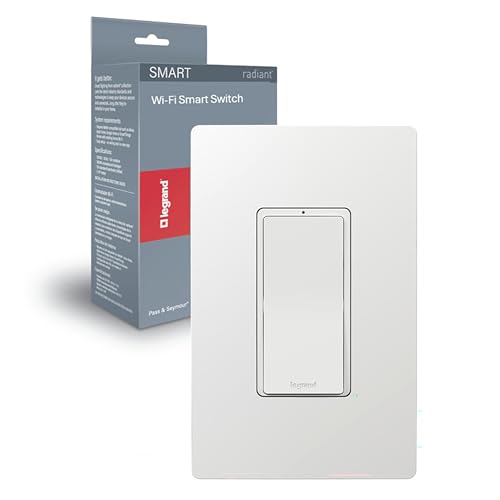
| Best Designer Match | Connectivity Protocol: Wi‑Fi (2.4 GHz) / Matter | Smart Home Compatibility: Apple HomeKit, Google Home, Alexa, SmartThings, Matter | Neutral Wire Requirement: Requires neutral | VIEW LATEST PRICE | Read Our Analysis |
| Kasa Matter Smart Dimmer Switch KS225 |

| Best Multi‑Platform Dimmer | Connectivity Protocol: Wi‑Fi (2.4 GHz) / Matter certified | Smart Home Compatibility: Apple Home, Alexa, Google Home, SmartThings (via Matter) | Neutral Wire Requirement: Requires neutral | VIEW LATEST PRICE | Read Our Analysis |
| Enbrighten Z-Wave In-Wall Smart Light Switch |

| Best Z‑Wave Powerhouse | Connectivity Protocol: Z‑Wave Plus (700 series) | Smart Home Compatibility: Alexa, Google Assistant, SmartThings, Ring, Wink, HomeSeer, Vera | Neutral Wire Requirement: Requires neutral (neutral present recommended) | VIEW LATEST PRICE | Read Our Analysis |
| Kasa HS200-2 2-Gang Smart Wi‑Fi Light Switch |

| Best Dual-Gang Option | Connectivity Protocol: Wi‑Fi (2.4 GHz) | Smart Home Compatibility: Alexa, Google Assistant, SmartThings | Neutral Wire Requirement: Requires neutral | VIEW LATEST PRICE | Read Our Analysis |
| Kasa Matter Smart Light Switch 3-Pack (Voice‑Control) |

| Best Multi-Pack Value | Connectivity Protocol: Wi‑Fi (2.4 GHz) / Matter certified | Smart Home Compatibility: Apple Home, Alexa, Google Home, SmartThings (Matter) | Neutral Wire Requirement: Requires neutral | VIEW LATEST PRICE | Read Our Analysis |
More Details on Our Top Picks
UTEC Smart WiFi Dimmer Switch (Single-Pole)
Assuming you want a simple, no-hub dimmer that plays nice with SmartThings and voice assistants, the UTEC Smart WiFi Dimmer Switch is a solid pick — it uses 2.4 GHz Wi‑Fi mesh so grouped switches stay connected, recalls your last brightness after power loss, and lets you dim from the physical switch, the U‑tec app, or Alexa/Google Assistant. You’ll install it in single‑pole setups with a required neutral wire; it’s FCC and ETL certified, handles 120V/3.5A (250W), and supports schedules, app/voice control, and mesh reliability. It’s compact, IP51 rated, and backed with an 18‑month warranty.
- Connectivity Protocol:Wi‑Fi (2.4 GHz) + Bluetooth
- Smart Home Compatibility:Alexa, Google Assistant, SmartThings
- Neutral Wire Requirement:Requires neutral
- Control Methods:App, Touch (physical), Voice, Remote
- Installation Type / Circuit:Single‑pole (1‑way)
- Scheduling / Automation:Scheduling (on/off with brightness)
- Additional Feature:Memory remembers last brightness
- Additional Feature:Wi‑Fi mesh grouping
- Additional Feature:FCC and ETL certified
Leviton Decora Smart Wi‑Fi Switch (D215S-1RW)
Should you want a full‑feature Wi‑Fi Decora switch that works with SmartThings and other ecosystems without a hub, the Leviton Decora Smart D215S‑1RW is a strong pick — it supports Matter (via firmware), Alexa, Google, Siri/HomeKit, and remote control through the My Leviton app, while offering 15 A capacity and wide load support (LED/CFL, incandescent, motors, fans). You’ll need a neutral wire and 2.4 GHz Wi‑Fi. Setup’s fast in My Leviton; you can schedule, create scenes, use randomized on/off, and enable Matter for local control. It fits Decora plates, handles multi‑way installs, and supports fans and small motors.
- Connectivity Protocol:Wi‑Fi (2.4 GHz) + Matter (firmware enable)
- Smart Home Compatibility:Alexa, Google Assistant, Apple Home/Siri, SmartThings, Matter (when enabled), Sonos, Resideo
- Neutral Wire Requirement:Requires neutral
- Control Methods:App, Voice, Local Matter control
- Installation Type / Circuit:Single‑pole or 3‑way (Decora rocker; companion options)
- Scheduling / Automation:Scheduling, scenes, auto‑shutoff, randomized on/off
- Additional Feature:Matter firmware upgradable
- Additional Feature:Supports 3‑way with companion
- Additional Feature:Vanishing LEDs/color plates
Legrand Wi‑Fi Matter Smart Switch (Single Pack)
In case you want a Matter‑ready wall switch that plays nicely with SmartThings and other major smart platforms, the Legrand Wi‑Fi Matter Smart Switch is a solid pick — it connects directly to your 2.4 GHz WPA2 Wi‑Fi, supports Apple HomeKit, Google Home, Amazon Alexa and Samsung SmartThings, and works in both single‑pole and 3‑way setups (neutral required). You’ll control lights from your phone or voice assistant, schedule on/off, create groups and scenes, and use any compatible 3‑way switch. It replaces an existing switch or dimmer, includes a screwless wall plate, and coordinates with Legrand Radiant designer outlets.
- Connectivity Protocol:Wi‑Fi (2.4 GHz) / Matter
- Smart Home Compatibility:Apple HomeKit, Google Home, Alexa, SmartThings, Matter
- Neutral Wire Requirement:Requires neutral
- Control Methods:App, Voice, Matter (scenes/groups)
- Installation Type / Circuit:Single‑pole and 3‑way compatible
- Scheduling / Automation:Scheduling, scenes, groups
- Additional Feature:Screwless wall plate included
- Additional Feature:Matches Radiant designer line
- Additional Feature:3‑way compatible (any companion)
Kasa Matter Smart Dimmer Switch KS225
Should you want reliable, cross-platform dimming that works even in case your cloud service is down, the Kasa Matter Smart Dimmer KS225 is a great pick because it supports Matter with LAN control and multi-admin access so you can control lights locally from SmartThings, HomeKit, Alexa, or Google. You’ll get 1–100% dimming via touch, voice, or the Kasa app over 2.4 GHz Wi‑Fi. It’s a single‑pole, neutral‑required switch rated 2.5 A/150 W, UL certified, and fits standard wall plates. App-guided setup, scheduling, timers, and Away Mode simplify automation. Dimensions: 5.04×3.33×1.78 in; 6.4 oz.
- Connectivity Protocol:Wi‑Fi (2.4 GHz) / Matter certified
- Smart Home Compatibility:Apple Home, Alexa, Google Home, SmartThings (via Matter)
- Neutral Wire Requirement:Requires neutral
- Control Methods:App, Touch, Voice
- Installation Type / Circuit:Single‑pole (1‑way)
- Scheduling / Automation:Scheduling, timers, Away Mode (randomized)
- Additional Feature:Dims 1%–100%
- Additional Feature:LAN control (offline)
- Additional Feature:UL certified
Enbrighten Z-Wave In-Wall Smart Light Switch
Pick the Enbrighten Z-Wave In-Wall Smart Light Switch provided you want a high-capacity, space-saving replacement that works seamlessly with SmartThings and other Z-Wave hubs. You get a 700-series Z-Wave Plus ON/OFF switch (Model 58433) rated 15A/120VAC, 1800W, and 3-way compatible. QuickFit shrinks housing depth for tight or multi-gang boxes; SimpleWire auto-detects line/load and eases wiring with dual ground ports. It supports S2 security, SmartStart QR pairing, OTA updates, doubled memory, and local control via compatible hubs and voice assistants. Install where a neutral exists to add reliable remote control, schedules, and scene integration.
- Connectivity Protocol:Z‑Wave Plus (700 series)
- Smart Home Compatibility:Alexa, Google Assistant, SmartThings, Ring, Wink, HomeSeer, Vera
- Neutral Wire Requirement:Requires neutral (neutral present recommended)
- Control Methods:Hub/app (Z‑Wave hub required) and local hub voice control
- Installation Type / Circuit:3‑way compatible (also replaces standard in‑wall)
- Scheduling / Automation:Scheduling and scenes via hub
- Additional Feature:SimpleWire auto line/load
- Additional Feature:S2 128‑bit security
- Additional Feature:QuickFit reduced depth
Kasa HS200-2 2-Gang Smart Wi‑Fi Light Switch
Should you want a simple, no-hub two-gang switch that plays nicely with SmartThings, the Kasa HS200-2 is a solid pick — it gives you independent control of two single-pole circuits over 2.4 GHz Wi‑Fi and works with Alexa and Google Assistant too. You’ll get app and voice control, scheduling, countdowns, away mode, and grouping via the Kasa app. Installation requires a neutral wire and basic wiring skills; follow app-guided steps or hire an electrician. It’s UL certified, rated 120V/15A (1800W), uses screw terminals, and has a refined flush look ideal for upgrading standard switches without a hub.
- Connectivity Protocol:Wi‑Fi (2.4 GHz)
- Smart Home Compatibility:Alexa, Google Assistant, SmartThings
- Neutral Wire Requirement:Requires neutral
- Control Methods:App, Voice, Touch (physical)
- Installation Type / Circuit:2‑gang single‑pole circuits (each is 1‑way)
- Scheduling / Automation:Scheduling, timers, Away Mode
- Additional Feature:Controls two circuits
- Additional Feature:Interchangeable terminals
- Additional Feature:Flush elegant design
Kasa Matter Smart Light Switch 3-Pack (Voice‑Control)
Provided you want straightforward, cross‑platform smart switch support for a SmartThings setup, the Kasa Matter KS205P3 delivers Matter compatibility and voice control in a three‑pack so you can upgrade multiple rooms at once. You’ll get Siri, Alexa and Google Assistant control, multi‑admin Matter support, and LAN control so basic functions work offline. The KS205P3 requires a neutral wire and fits standard wall plates for single‑pole circuits, handling 15A and 600W at 120V. Setup uses the Kasa app with guided steps; features include schedules, timers, Away Mode, and remote control over 2.4 GHz Wi‑Fi. It’s UL certified with a two‑year warranty.
- Connectivity Protocol:Wi‑Fi (2.4 GHz) / Matter certified
- Smart Home Compatibility:Apple Home, Alexa, Google Home, SmartThings (Matter)
- Neutral Wire Requirement:Requires neutral
- Control Methods:App, Touch, Voice
- Installation Type / Circuit:Single‑pole (1‑way)
- Scheduling / Automation:Scheduling, timer, Away Mode
- Additional Feature:3‑pack value bundle
- Additional Feature:Multi‑admin Matter support
- Additional Feature:Away Mode randomized on/off
Factors to Consider When Choosing Switches For Smartthings
Upon selecting switches for SmartThings, you’ll want to confirm compatibility with the platform and which hub or protocols (Zigbee, Z‑Wave, Wi‑Fi, Matter) are supported. Check wiring and installation requirements plus the switch’s load capacity and electrical ratings to match your circuits. Finally, consider how you’ll control them—voice assistants and the mobile app experience matter for daily use.
Compatibility With SmartThings
Because your SmartThings setup relies on specific protocols and wiring, pick switches that match your hub’s communication method (Z‑Wave, Zigbee, Wi‑Fi/Matter) and wiring requirements so they’ll operate locally, report status reliably, and support full automations. Also verify neutral‑wire needs or no‑neutral support; SmartThings integrations often perform best with neutral‑wired devices for stable power and accurate reporting. Check rated current and supported load types (15 A, motors/fans, LED/CFL dimming ranges) to avoid overloading circuits. Look for official SmartThings compatibility notes or community drivers for full feature access, multi‑way setups, and correct status reporting. Finally, prefer switches offering firmware updates and local LAN control or clear cloud/integration details to guarantee long‑term reliability and maintainability.
Hub And Protocol Support
Should you want reliable performance, start matching the switch’s protocol and version to your SmartThings hub—check whether it uses Z‑Wave (and which series), Zigbee (and whether it’s Zigbee 3.0), or Wi‑Fi/Matter—because mismatched radios or frequencies can prevent pairing or block advanced features. Confirm whether your hub supports the switch’s protocol and frequency (for example Z‑Wave 700 series) and whether the device needs a hub or can run cloud‑to‑cloud via Wi‑Fi. Note hubless Wi‑Fi devices often limit local automations and failover during internet outages. Also verify multi‑endpoint and 3‑way support if you’ll use auxiliary/master setups. Finally, check secure pairing (Z‑Wave S2, Zigbee keys, Matter commissioning) and OTA firmware update ability, since local Z‑Wave/Zigbee usually gives lower latency than cloud integrations.
Wiring And Installation Needs
Assuming you’re installing smart switches, start confirming the wiring and box space you actually have—most smart switches need a neutral, specific line/load wiring, and enough depth to fit the module. Initially verify a neutral is present; without it many smart switches won’t power or dim correctly. Confirm whether you need a single‑pole or 3‑way device and provided an auxiliary/companion is required for multi‑location circuits. Check line and load conductor gauge and circuit rating so the switch matches 14 AWG/15 A or 12 AWG/20 A standards. Make certain the device fits the box depth and gang count and that terminals accept your conductors. Always turn power off, use a voltage tester to identify line vs. load, and follow local codes or hire an electrician.
Load Capacity And Ratings
With the wiring and box checks out of the way, next focus on load capacity and ratings so your SmartThings switches handle whatever you attach to them. Confirm the switch’s current rating (amps) meets or exceeds the circuit demand: smart dimmers can be as low as 2.5 A, general switches up to 15 A. Match wattage limits to the load type—LED/CFL, incandescent, or motors—since LEDs often have lower min/max specs while motors need higher support. Verify compatibility with dimmable LEDs or fan/motor loads to avoid flicker or noise. Check voltage rating (typically 120 VAC) and single‑pole vs. 3‑way or multi‑pole constraints. Leave headroom—choose higher amp/watt ratings, make certain proper neutral/line/load wiring, and confirm safety certifications.
Voice And App Control
How do you want to control your lights—only through the SmartThings app, via voice, or both? Decide initially, then pick switches that support cloud or local APIs so SmartThings can reliably send on/off and dim commands. Verify compatibility with your voice platforms (Alexa, Google Assistant, Siri/HomeKit) and make certain SmartThings bridges those commands to the switch. Prefer native Wi‑Fi or hub protocols SmartThings supports (Z‑Wave, Zigbee, Matter) to cut latency and avoid third‑party cloud reliance. Check scene and schedule integration so app routines and voice shortcuts can trigger dim levels, groups, and timed actions. Finally, confirm the switch exposes device states (on/off, brightness) to SmartThings for accurate app feedback and dependable voice confirmations.
Frequently Asked Questions
Will These Switches Work With Smartthings Classic App?
Yes, most of those switches will work with the SmartThings Classic app, but you’ll need to check each model’s Zigbee/Z-Wave compatibility and device handler availability; some newer models might require the new SmartThings app or custom integrations.
Can Any Switch Be Used With Smartthings Hubs via Zigbee Repeaters?
Yes — but you’ll need more than optimism: you can’t just plug any switch into SmartThings via Zigbee repeaters, you’ll need compatible Zigbee-capable switches or mains-powered devices acting as repeaters, proper pairing, and correct device handlers.
Do These Switches Support Apple Homekit Through Smartthings?
Generally, no — SmartThings doesn’t natively bridge most Zigbee/Z-Wave switches to Apple HomeKit. You’ll need a HomeKit-compatible switch or a third-party bridge (like Homebridge) running on your network to expose SmartThings devices to HomeKit.
Are Firmware Updates Automatic or Manual for Each Switch?
Consider each switch as a ship: updates can be automatic or manual depending on model and hub settings. You’ll usually get automatic pushes via SmartThings for compatible switches, but you can force manual updates whenever needed.
Can These Switches Integrate With Samsung Smartthings Routines?
Yes — most of these switches integrate with Samsung SmartThings; you’ll pair them via the SmartThings app or a hub, enable device handlers or drivers provided they’re needed, and then include them directly in your routines and automations.
