

You’re after a compact smart plug that won’t block the other outlet and will actually play nice with your smart home. I’ll walk you through seven top mini options for 2026, focusing on safety, ecosystem support, and real‑world capacity so you can pick the right fit. Keep going—there’s a tradeoff or two you’ll want to know before you buy.
| EIGHTREE 15A Wi‑Fi & Bluetooth Smart Plug |
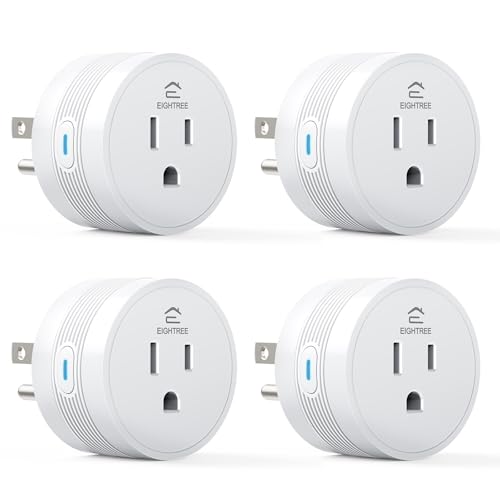
| Best for High Loads | Connectivity: 2.4 GHz Wi‑Fi + Bluetooth (setup) | Voice Assistant Support: Alexa, Google Assistant | App Control / Remote Control: Full control via vendor app (Wi‑Fi) + Bluetooth-assisted setup | VIEW LATEST PRICE | Read Our Analysis |
| Kasa Smart Plug Mini with Energy Monitoring (KP115) |

| Trusted Reliability | Connectivity: 2.4 GHz Wi‑Fi | Voice Assistant Support: Alexa, Google Assistant (works with IFTTT) | App Control / Remote Control: Kasa app remote control from anywhere | VIEW LATEST PRICE | Read Our Analysis |
| YNF Mini Smart Plug (Alexa Compatible 1 Pack) |

| Alexa-Optimized | Connectivity: Bluetooth LE mesh + requires Echo (Alexa) for network | Voice Assistant Support: Alexa only (optimized; requires Echo) | App Control / Remote Control: Remote control via Alexa app (no vendor app required) | VIEW LATEST PRICE | Read Our Analysis |
| TP-Link Tapo Smart Plug Mini (P110M) 4-Pack |

| Best for Energy Tracking | Connectivity: 2.4 GHz Wi‑Fi + Matter | Voice Assistant Support: Alexa, Google Assistant, Apple HomeKit, SmartThings (Matter-certified) | App Control / Remote Control: Tapo app control (remote, schedules, energy tracking) | VIEW LATEST PRICE | Read Our Analysis |
| Globe Electric Wi‑Fi Smart Plug Mini (1‑Pack) |

| Works Across Networks | Connectivity: 2.4 GHz Wi‑Fi (5 GHz compatible for network but setup via 2.4 GHz) | Voice Assistant Support: Alexa, Google Assistant, Siri | App Control / Remote Control: GLOBE SUITE app remote control | VIEW LATEST PRICE | Read Our Analysis |
| Lepro P1 Mini WiFi Smart Plug 15A (2-Pack) |

| App-Centric Control | Connectivity: 2.4 GHz Wi‑Fi + Bluetooth (setup/stability) | Voice Assistant Support: Alexa, Google Assistant (after Lepro app setup) | App Control / Remote Control: Lepro app required for remote control | VIEW LATEST PRICE | Read Our Analysis |
| Kasa Smart Plug Ultra Mini 15A (2-Pack) |

| Compact Powerhouse | Connectivity: 2.4 GHz Wi‑Fi | Voice Assistant Support: Alexa, Google Assistant | App Control / Remote Control: Kasa app remote control from anywhere | VIEW LATEST PRICE | Read Our Analysis |
More Details on Our Top Picks
EIGHTREE 15A Wi‑Fi & Bluetooth Smart Plug
Should you need a compact smart plug that handles heavy-duty appliances, the EIGHTREE 15A Wi‑Fi & Bluetooth Smart Plug is a solid pick — it’s rated for 15A/120V (up to 1100W), supports Bluetooth-assisted setup with stable 2.4GHz Wi‑Fi operation, and works with Alexa, Google Assistant, and SmartThings without a hub. You’ll plug this ET01 into tight spaces (1.9 x 1.9 x 1.2 in), then control coffee makers, heaters, or fans via app, voice, schedules, or timers. It’s ETL/FCC certified, flame-retardant, IP44-rated, includes overload protection and child shutters, and needs 2.4GHz Wi‑Fi.
- Connectivity:2.4 GHz Wi‑Fi + Bluetooth (setup)
- Voice Assistant Support:Alexa, Google Assistant
- App Control / Remote Control:Full control via vendor app (Wi‑Fi) + Bluetooth-assisted setup
- Safety / Certification:FCC, ETL; flame‑retardant housing; overload protection; child safety shutters
- Current / Power Capacity:15 A / 1100 W listed
- Scheduling & Automation:Schedules, timers, remote automation via app
- Additional Feature:Bluetooth-assisted instant setup
- Additional Feature:Child safety shutters
- Additional Feature:IP44 splash protection
Kasa Smart Plug Mini with Energy Monitoring (KP115)
Should you want compact, budget‑friendly smart outlets that also track energy use, the Kasa KP115 is a strong pick—its built‑in energy monitoring lets you see real-time and historical power data so you can cut waste and lower bills. You’ll control devices from anywhere via the Kasa app (2.4 GHz Wi‑Fi), and enjoy voice control with Alexa, Google Assistant, or PROVIDED THAT without a hub. It’s UL certified, has overheating protection, a fireproof shell, and a sliding safety cover for kids. Designed in Silicon Valley, it’s backed through over 5 million users, a PCMag Reader’s Choice nod, and a two‑year warranty.
- Connectivity:2.4 GHz Wi‑Fi
- Voice Assistant Support:Alexa, Google Assistant (works with IFTTT)
- App Control / Remote Control:Kasa app remote control from anywhere
- Safety / Certification:UL certified; overheating protection; fireproof shell; sliding safety cover
- Current / Power Capacity:(Common Kasa mini) rated for typical household outlets (model KP115 supports up to 15 A / 1800 W) — listing indicates Wi‑Fi smart outlet (UL, designed for household loads)
- Scheduling & Automation:Schedules, timers, remote automation via Kasa app
- Additional Feature:Energy monitoring capability
- Additional Feature:Sliding safety cover
- Additional Feature:2‑year warranty
YNF Mini Smart Plug (Alexa Compatible 1 Pack)
Should you want the simplest Alexa-first smart plug that skips app setup, the YNF Mini Smart Plug is a great pick — just power it on, tell an Echo to “discover devices,” and it pairs automatically. You’ll get reliable Alexa voice control for lights, fans, and appliances, plus remote control, groups, schedules, timers, and renaming via the Alexa app. It uses BLE Mesh so each plug can extend coverage and reduce dead zones, with plugs able to act as mesh hubs beyond the Echo. It’s optimized exclusively for Alexa (Echo required), comes in Type A format, meets FCC specs, and weighs 2.08 ounces.
- Connectivity:Bluetooth LE mesh + requires Echo (Alexa) for network
- Voice Assistant Support:Alexa only (optimized; requires Echo)
- App Control / Remote Control:Remote control via Alexa app (no vendor app required)
- Safety / Certification:FCC certified
- Current / Power Capacity:(Type A mini plug for home devices; intended for standard household loads; exact amp/watt not listed)
- Scheduling & Automation:Schedules, timers, grouping via Alexa app
- Additional Feature:Echo auto‑discovery setup
- Additional Feature:BLE Mesh plug‑to‑plug
- Additional Feature:Works exclusively with Alexa
TP-Link Tapo Smart Plug Mini (P110M) 4-Pack
Provided you want compact, Matter-certified smart plugs that play nicely with Alexa, HomeKit, Google Home, and SmartThings, the TP-Link Tapo Smart Plug Mini (P110M) 4-pack is a strong pick—especially for renters or anyone needing discreet outlets that won’t block neighboring sockets. You’ll get 2.4 GHz Wi‑Fi and Matter connectivity, app/voice control, scheduling, remote access, and SmartThings compatibility. Each plug handles 15 A (1,800 W), includes overcurrent and overcharge cutoffs, UL certification, and a smart charge guard. Energy monitoring provides clear stats and bill estimates, so you can automate off‑peak use and track savings. White, compact, four units.
- Connectivity:2.4 GHz Wi‑Fi + Matter
- Voice Assistant Support:Alexa, Google Assistant, Apple HomeKit, SmartThings (Matter-certified)
- App Control / Remote Control:Tapo app control (remote, schedules, energy tracking)
- Safety / Certification:UL certified; overcurrent/overcharge protection
- Current / Power Capacity:15 A / 1800 W
- Scheduling & Automation:Programmable scheduling, routines, power-management automation
- Additional Feature:Matter-certified compatibility
- Additional Feature:Smart charge guard
- Additional Feature:Pack of four units
Globe Electric Wi‑Fi Smart Plug Mini (1‑Pack)
Should you want a compact, no‑hub smart plug that works across Alexa, Google Assistant, and Siri, the Globe Electric Wi‑Fi Smart Plug Mini (50329‑U) is a solid pick — it slips into tight outlets, handles up to 15A/1800W, and lets you set schedules or control devices remotely through the free GLOBE SUITE app. You’ll get a single white, grounded outlet in a round, parallel‑mount housing (1.96 x 1.96 x 2.01 inches). It connects via 2.4 GHz Wi‑Fi for setup, supports 5 GHz networks for use, offers voice control, grouping, timers, and a two‑year limited warranty.
- Connectivity:2.4 GHz Wi‑Fi (5 GHz compatible for network but setup via 2.4 GHz)
- Voice Assistant Support:Alexa, Google Assistant, Siri
- App Control / Remote Control:GLOBE SUITE app remote control
- Safety / Certification:2‑year limited warranty; (certification implied by listing; fireproof materials noted)
- Current / Power Capacity:15 A / 1800 W (125 V)
- Scheduling & Automation:Timers and smart schedules via app
- Additional Feature:2.4 & 5 GHz compatible
- Additional Feature:Siri/HomeKit support
- Additional Feature:2‑year limited warranty
Lepro P1 Mini WiFi Smart Plug 15A (2-Pack)
Should you want a compact, high‑capacity plug that won’t block the socket, the Lepro P1 Mini 15A (2‑pack) delivers — it’s small enough to preserve adjacent outlets while handling up to 15A/1800W for heavier appliances, and it works with Alexa and Google once configured in the Lepro app. You’ll get two ETL/FCC‑certified white plugs (2.32 x 1.14 x 1.5 in, 3.52 oz) that use 2.4 GHz Wi‑Fi with Bluetooth setup. The Lepro app is required for scheduling, remote control, routines, and energy saving; Smart Life/Tuya won’t work. Safety lock, memory restore, and a dimmable indicator round out the feature set.
- Connectivity:2.4 GHz Wi‑Fi + Bluetooth (setup/stability)
- Voice Assistant Support:Alexa, Google Assistant (after Lepro app setup)
- App Control / Remote Control:Lepro app required for remote control
- Safety / Certification:ETL, FCC; safety lock; IP40
- Current / Power Capacity:15 A / 1800 W
- Scheduling & Automation:Timers, routines, scheduling and group controller via Lepro app
- Additional Feature:Indicator light off option
- Additional Feature:Memory after power outage
- Additional Feature:Physical safety lock
Kasa Smart Plug Ultra Mini 15A (2-Pack)
In case you need a compact, high‑capacity smart plug that won’t block the second outlet, the Kasa Smart Plug Ultra Mini 15A (2‑Pack) is a solid pick—its 15A/1800W rating handles heavier loads like space heaters and large fans while its ultra‑compact body keeps adjacent sockets usable. You’ll get two UL‑certified plugs, Kasa app control (Android 5.0+/iOS 10+), and voice control via Alexa or Google Assistant without a hub. Set schedules, timers, Away Mode, and use IFTTT or SmartThings for automation. It uses 2.4 GHz Wi‑Fi only, is flame‑retardant, covered through a 2‑year warranty, and measures 2.36×2.03×1.5 inches.
- Connectivity:2.4 GHz Wi‑Fi
- Voice Assistant Support:Alexa, Google Assistant
- App Control / Remote Control:Kasa app remote control from anywhere
- Safety / Certification:UL certified; flame‑retardant materials; RoHS/FCC/IC
- Current / Power Capacity:15 A / 1800 W (max wattage 1800 W)
- Scheduling & Automation:Scheduling, timers, countdowns, Away Mode via Kasa app
- Additional Feature:Ultra‑compact design
- Additional Feature:IFTTT & SmartThings support
- Additional Feature:Two‑pack convenience
Factors to Consider When Choosing a Mini Smart Plug
Upon selecting a mini smart plug, you’ll want to check that it works with your preferred voice assistants and fits your home network’s Wi‑Fi or hub requirements. Make sure its load capacity matches the devices you’ll plug in and that it carries recognized safety certifications. Finally, confirm the size and form factor won’t block adjacent outlets or clutter tight power strips.
Compatibility With Assistants
Because your smart plug lives in a bigger smart‑home ecosystem, you’ll want to confirm it actually works with the voice assistants and features you use—Alexa, Google Assistant, Siri Shortcuts, or others—so you can control devices hands‑free, include plugs in routines, and access the full set of capabilities. Check whether the assistant needs account linking or a specific hub for remote control and automation. Verify the plug exposes the ecosystem features you want—scheduling, scenes, energy reports, group control—not all do. Make sure the assistant can discover and name the plug for multi‑device grouping and room commands. Finally, confirm the plug operates over the network type your assistant uses so discovery, setup, and in‑home control work without surprises.
Network Requirements
Should your mini smart plug can’t talk to your router, it won’t do much—so check that it supports the common 2.4 GHz Wi‑Fi band (and whether Bluetooth is only used for setup), that your network uses a standard WPA/WPA2‑Personal SSID without captive portals or enterprise authentication, and that the outlet location has strong signal strength or a plan for mesh/extenders to avoid spotty control. You’ll also want to confirm whether Bluetooth is merely a provisioning step or a viable control path. Test signal at the intended outlet and consider moving the plug or adding an extender should coverage’s weak. In the event you’ll add many devices, verify your router’s device limit, use a mesh system or separate SSIDs, and avoid congestion for consistent responsiveness.
Load Capacity Limits
Should your plug can’t handle the current a device draws—especially the startup surge from motors or heaters—you’ll trip breakers or overheat the plug, so check the rated current (usually 10–15 A) and calculate the wattage at your line voltage to confirm it exceeds both steady‑state and inrush demands. You should verify the plug’s maximum wattage (e.g., 120 V × rated A) so space heaters, ACs, and similar loads don’t exceed limits. Account for motor and compressor inrush currents, which can be several times running current and could force you to use a higher‑rated plug or dedicated circuit. Respect derating for continuous loads—keep about a 20% safety margin—and confirm thermal/overload protections and maximum operating temperature for safe continuous use.
Safety Certifications Present
When you’re picking a mini smart plug, prioritize nationally recognized safety certifications like UL, ETL, and FCC—these show the device’s been independently tested for electrical safety and emissions and give you a baseline of trust before you dig into features. Beyond labels, check that the plug has overload and overcurrent protection with automatic cut-off or trip thresholds to stop overheating and fire risk. Confirm the housing uses flame‑retardant materials and includes child‑safety measures such as sliding shutters or locks to reduce burn and shock hazards. Match the plug’s rated current, voltage, and wattage to the appliances you’ll use so you don’t exceed certified limits. Also verify IP/environmental ratings and maximum operating temperature for safe indoor use.
Size And Form Factor
Size and form factor matter because a tiny difference in dimensions can decide whether a mini plug fits your outlet arrangement or blocks neighboring sockets. Check the physical width, height, and depth so the plug won’t obstruct adjacent outlets or fail to fit within tight vertical or horizontal spacing on wall plates or power strips. Choose a compact “mini” profile—typically 1.5–2.5 inches each way—if you plan to stack plugs or use strips. Match orientation and plug type (parallel vs. perpendicular, grounded vs. ungrounded) to your outlet layout and the cords you’ll attach. For power strips, measure clearance for transformer-style plugs and prefer slim, low-profile designs. Also observe front-facing protrusion to avoid interfering with furniture or wall-mounted TVs.
Energy Monitoring Options
Once you’ve confirmed a mini plug will physically fit your outlets without blocking neighbors or cords, you’ll want to check its energy-monitoring capabilities so you can track and control device power use. Prioritize plugs that report real-time watts, cumulative kWh and let you enter your electricity rate for cost estimates. Prefer devices that measure both voltage and current to separate real and reactive power—important for inductive loads. Check sampling frequency and resolution; per-second updates catch short duty cycles and peaks better than per-minute. Look for local logging and exportable history (CSV or API) so you can analyze long-term patterns or feed dashboards. Finally, compare accuracy specs and relevant measurement certifications should you need trustworthy kWh or billing-level data.
App Features And Controls
While the plug’s hardware matters, the app is where you actually control and automate devices, so pick one that gives you reliable remote access, flexible scheduling, and clear feedback on state and energy use. You’ll want cloud-based remote control so you can toggle plugs and check status from anywhere. Look for resilient scheduling and timers with flexible recurrence—daily, weekly, or sunrise/sunset—to automate routines and cut waste. Choose apps that let you group outlets and build scenes or multi-device automations for one-tap control. In case tracking consumption matters, prefer apps with energy monitoring: real-time watts, cumulative kWh, and estimated cost. Finally, verify voice-assistant linking, secure account authentication, and OTA firmware updates for integration, safety, and future improvements.
Frequently Asked Questions
Do Mini Smart Plugs Support Zigbee or Z‑Wave Protocols?
Like a crossroads, yes — some mini smart plugs support Zigbee or Z‑Wave, but not all. You’ll find models with those radios for local mesh control, while others use Wi‑Fi or Bluetooth, so check specs before buying.
Can I Use Smart Plugs Outdoors or in Wet Locations?
You generally shouldn’t; most smart plugs aren’t rated for outdoor or wet use unless they’ve an IP65+ rating and weatherproof enclosure. Should you proceed, use an outdoor-rated model, keep connections dry, and mount under protection to be safe.
Do Smart Plugs Work With Commercial/Industrial Electrical Systems?
Like a key fitting a lock, smart plugs can work with commercial/industrial systems, but you’ll need industrial-grade, higher-voltage models, proper wiring, and compliance with local codes; otherwise you’ll risk overloads, voided warranties, or safety violations.
Will a Smart Plug Interfere With My Home Wi‑Fi Network Speed?
Generally, no — a smart plug won’t noticeably slow your Wi‑Fi unless many devices flood bandwidth or the plug employs a weak, congested 2.4GHz channel; you’ll avoid issues through limiting concurrent heavy streams and using quality routers.
Are There Privacy Concerns With Voice Assistant Integrations?
Yes — you should worry, because convenience meets constant listening: once you enable voice assistants, they can collect voice recordings, usage patterns, and third‑party data, so you’ll want strict permissions, local processing, and regular privacy audits.
