

Picture your favorite movie scene wrapped in pulsing, perfectly matched light that actually makes it feel bigger. You’ll pick between camera-sync strips, mic-driven options, RGBIC/RGBWIC for truer colors, compact Wi‑Fi bars, or hybrid setups—each with tradeoffs in lag, accuracy, and install. You’ll want the right length, power, and app control to get it right, so keep going to see the top five picks and what fits your setup.
| RGB LED TV Backlight Strip 20ft with Music Sync |

| Versatile All-Rounder | Sync Method: Built-in microphone (music/sound sync) | Control Options: App (Mohuan Led) + 24-key remote | Mounting/Installation: Peel-and-stick double-sided adhesive; press gently; clips implied | VIEW LATEST PRICE | Our Analysis |
| Govee RGBWIC LED TV Backlight Strip (14.4ft) |
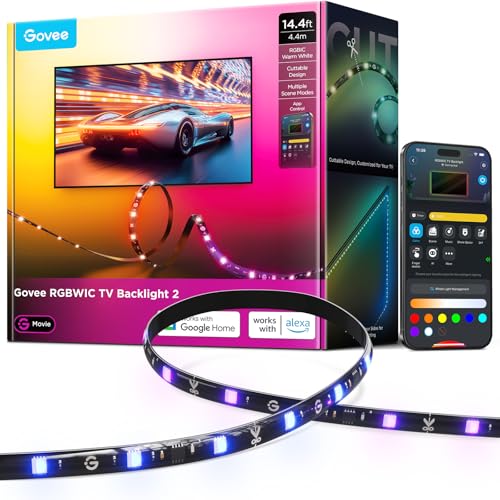
| Color Accuracy Champ | Sync Method: Sound-based real-time sync (music modes; no camera) | Control Options: Govee Home App + Matter; voice (Alexa/Google) | Mounting/Installation: One-piece peel-and-stick; clips for four-side coverage; cuttable at marks | VIEW LATEST PRICE | Our Analysis |
| Govee RGBIC 15″ WiFi TV Backlight Light Bars |

| Flexible Placement Pick | Sync Method: App music modes (audio/RGBIC music sync) | Control Options: Govee Home App; voice (Alexa/Google) | Mounting/Installation: Mount with brackets, stand, or place horizontally (multiple placement) | VIEW LATEST PRICE | Our Analysis |
| TV LED Backlight with Camera & App Music Sync |

| True Screen Sync | Sync Method: Camera-based on-screen color sync | Control Options: Smart app control (custom scenes/settings) | Mounting/Installation: Strong adhesive backing + mounting clips; connect camera | VIEW LATEST PRICE | Our Analysis |
| RGB LED TV Backlight Strip with App Music Sync |

| Premium Immersion | Sync Method: AR probe (camera-like) + music rhythm sync | Control Options: Mobile app + included controller | Mounting/Installation: Peel-and-stick adhesive; camera/buckles/adhesives for four-side mounting | VIEW LATEST PRICE | Our Analysis |
More Details on Our Top Picks
RGB LED TV Backlight Strip 20ft with Music Sync
Should you want an easy way to improve your TV’s atmosphere for movies or gaming, the 20 ft RGB LED backlight strip with music sync is a great fit — it’s USB-powered for simple hookup to a TV or power bank and reacts to sound with a built-in high-sensitivity mic so colors and flashing match the beat. You’ll get 20 beads per meter of 5050 LEDs for TVs 32–80 inches. Stick it to clean, smooth surfaces with double-sided tape, avoid pressing the LEDs, and use app or 24-key remote to adjust brightness, timing, and 21 lively modes for immersive effects. Technical support’s available.
- Sync Method:Built-in microphone (music/sound sync)
- Control Options:App (Mohuan Led) + 24-key remote
- Mounting/Installation:Peel-and-stick double-sided adhesive; press gently; clips implied
- TV Size Compatibility:Fits 32–80 inch TVs
- Lighting Modes / Effects:21 dynamic modes; brightness, timing
- Cuttable / Size Adjustment:Single roll (20 ft); implied cut/fit for TVs 32–80″ (no explicit cut instructions)
- Additional Feature:USB-powered flexibility
- Additional Feature:24-key remote included
- Additional Feature:High-sensitivity microphone
Govee RGBWIC LED TV Backlight Strip (14.4ft)
In case you want precise colors and a true white for movie nights or gaming, the Govee RGBWIC 14.4 ft strip delivers with its 4‑in‑1 RGBWIC LEDs and 30 LEDs per meter, so you get smoother color mixing and brighter, more accurate light than standard RGB strips. You can customize the 14.4 ft strip for 32–70 inch TVs, cutting only at marked scissors to avoid damage. Clips provide four-side coverage and suit curved or ultra-thin bezels. Setup takes about three minutes with no splicing. Use the Govee app or voice assistants, choose from 210+ scenes, music modes, and Matter support.
- Sync Method:Sound-based real-time sync (music modes; no camera)
- Control Options:Govee Home App + Matter; voice (Alexa/Google)
- Mounting/Installation:One-piece peel-and-stick; clips for four-side coverage; cuttable at marks
- TV Size Compatibility:Fits 32–70 inch TVs
- Lighting Modes / Effects:210+ preset scenes; 11 music modes; RGBIC animations
- Cuttable / Size Adjustment:14.4 ft; explicitly cuttable only at marked sections
- Additional Feature:RGBWIC (pure white)
- Additional Feature:Matter smart-home support
- Additional Feature:Four-side clip coverage
Govee RGBIC 15″ WiFi TV Backlight Light Bars
Should you want vivid, multi-color backlighting for a mid-to-large TV, the Govee RGBIC 15″ WiFi light bars are a strong pick—especially should you like segmented effects and flexible placement. You’ll get RGBIC multi-color segments, 15-inch bars that rotate up to 90° for broader spread, and three mounting options: bracket behind the TV, freestanding next to it, or horizontal placement without brackets. The Govee Home app gives remote control, preset scenes, and 8+ dynamic music modes. There’s Alexa and Google Assistant support for voice control, but take note there’s no automatic color-matching feature. They suit 45–70″ screens.
- Sync Method:App music modes (audio/RGBIC music sync)
- Control Options:Govee Home App; voice (Alexa/Google)
- Mounting/Installation:Mount with brackets, stand, or place horizontally (multiple placement)
- TV Size Compatibility:Designed for 45–70 inch TVs
- Lighting Modes / Effects:RGBIC multi-color effects; preset scene modes; 8+ music modes
- Cuttable / Size Adjustment:Fixed 15″ light bars (adjustable placement rather than cutting)
- Additional Feature:90° rotatable bars
- Additional Feature:Multiple placement options
- Additional Feature:Works over WiFi
TV LED Backlight with Camera & App Music Sync
Should you want cinematic, lag-free ambient lighting that mirrors what’s on screen, a TV LED backlight with a built-in camera and app music sync is a great pick—especially for gamers and movie lovers who crave real-time color matching and reactive sound-driven effects. You’ll get a camera that captures on-screen colors instantly, advanced recognition for perfect mirroring, and music-synced modes that pulse to audio. Choose from Movie, Game, Music, and Relax presets or build custom scenes in the app. Installation is tool-free: attach the 13.7 ft strip, mount the adjustable camera, plug in power, then tweak brightness and sensitivity remotely.
- Sync Method:Camera-based on-screen color sync
- Control Options:Smart app control (custom scenes/settings)
- Mounting/Installation:Strong adhesive backing + mounting clips; connect camera
- TV Size Compatibility:Designed for 45–65 inch TVs and monitors
- Lighting Modes / Effects:Multiple ambient modes (Movie, Game, Music, Relax); custom scenes
- Cuttable / Size Adjustment:13.7 ft strip; flexible and adjustable for edge coverage (cutting not specified)
- Additional Feature:Camera-based color capture
- Additional Feature:Lag-free color matching
- Additional Feature:Simple plug-and-play setup
RGB LED TV Backlight Strip with App Music Sync
Should you want immersive, room-filling bias lighting that reacts to what’s on screen and to your music, this RGB LED TV backlight strip is a great pick — it uses an AR probe camera to sync colors accurately and offers app control with DIY scenes and music rhythm modes so you can tailor effects on the fly. You get a 15.5 ft, cuttable drip-type strip (60 LEDs per 3.28 ft) that suits 55–100″ TVs, plus gravity-suspension AR probe design or adhesive mount for ultra-thin sets. IP64 waterproofing, peel-and-stick backing, buckles and presets make installation and daily use simple and reliable.
- Sync Method:AR probe (camera-like) + music rhythm sync
- Control Options:Mobile app + included controller
- Mounting/Installation:Peel-and-stick adhesive; camera/buckles/adhesives for four-side mounting
- TV Size Compatibility:Fits 55–100 inch TVs/displays
- Lighting Modes / Effects:Built-in scene presets + app DIY mode; music rhythm sync
- Cuttable / Size Adjustment:15.5 ft; cuttable strip (length adjustable)
- Additional Feature:AR probe technology
- Additional Feature:IP64 waterproof rating
- Additional Feature:Gravity-suspension probe design
Factors to Consider When Choosing Led Lights That Sync With Tv
Upon choosing LED lights that sync with your TV, you’ll want to check compatibility and whether the sync technology matches your set-up. Consider light quality and color accuracy, how the strips mount, and what control options you’ll use. Balancing those factors will help you pick a system that’s easy to install and gives the visual effect you want.
Compatibility With TV
In case you want LED lights that truly sync with your TV, check a few compatibility basics initially: strip length and cut points must match your screen and mounting layout, the power source (USB or adapter, voltage and wattage) has to supply steady current, and the chosen sync method (camera, mic, or HDMI/app pass-through) needs to work with your placement and AV setup. Next, confirm mounting options suit your TV’s bezel thickness, rear material, and curvature so strips won’t peel or misalign. Verify the TV-facing requirements of the sync system—whether it needs an unobstructed view or an audio feed—and make certain your TV’s USB or outlet can handle the draw. Finally, check smart-control compatibility (Wi‑Fi, Bluetooth, Matter) and voice assistant support for seamless pairing.
Sync Technology Type
You’ve checked fit, power, and mounting; now pick the sync technology that actually drives the lighting behavior. Choose camera-based sync when you want accurate, real-time color matching—cameras sample pixels around the screen edge and deliver minimal lag. Software/app or HDMI-capture solutions give precise frame-by-frame mapping and advanced scene effects through analyzing the video signal, ideal for fidelity and customization. Audio/microphone-based sync stresses rhythm and intensity, great for music but poor at reflecting on-screen colors. Hybrid systems blend camera, audio, and software inputs to balance color accuracy, latency, and lively music modes, but they raise setup complexity and processing needs. Weigh latency, installation effort, and whether the system samples screen colors directly or infers them from audio.
Light Quality And Color
Because LED density, color fidelity, and brightness directly determine how convincing ambient lighting will look, prioritize strips with high LED counts (30+ LEDs/m) and true-white capability (RGBW or RGBIC) so colors blend smoothly and whites don’t look muddy. You’ll want a wide color gamut and high color-rendering performance (or RGBIC/multi-segment control and good color depth) to reproduce richer, more accurate hues and fine animation detail. Check brightness ratings (lumens per meter or per LED) and choose adjustable output so colors stay vivid in different room lighting without washing out the screen. Finally, confirm fast color-sync responsiveness and refresh rates—low latency and quick sampling (mic/camera or real-time processing) keep ambient lighting aligned with on-screen action without stutter.
Installation And Mounting
Good mounting makes the color fidelity and responsiveness you picked actually look right in your room. Measure your TV perimeter and pick a strip length that covers all edges, allowing extra for corners—many sets need 10–20 ft. Follow the manufacturer’s recommended mounting: peel-and-stick for smooth surfaces or clips/brackets for uneven or removable installs to keep the strip secure long-term. Don’t press directly on the LED chips; press the backing and housing gently to avoid damage or uneven light. Plan cable routing for USB or power adapters so cords don’t pull on the strip or camera, and leave slack at connections to prevent strain. Should you employ a color-capture camera or probe, mount it centered and flush with the screen edge and secure it firmly.
Control Options Available
Consider which control methods matter most to you before buying LED lights that sync with your TV: apps give detailed scenes, timers, and firmware updates while physical remotes offer quick, phone-free control; voice-assistant compatibility (Alexa, Google) adds hands-free commands; and support for Wi‑Fi, Bluetooth, or USB determines reliability, local vs. cloud features, and how you power the strip. Check that a system offers both app control and a physical remote so you get advanced scheduling, brightness and multi‑zone color adjustments plus quick manual access. Confirm voice-assistant support in case you want hands‑free changes. Prefer Wi‑Fi for cloud features and Alexa/Google integration, Bluetooth for local pairing and lower latency, and USB if you’ll draw power from the TV.
Music And Camera Sync
Choosing between music- and camera-sync matters because they use different sensors and give different results: microphone-based systems pick up audio (either via a built-in or external mic) and excel at rhythm-driven effects, while camera-based systems sample on-screen colors and motion for more accurate, low-latency visual matching. You’ll favor mic-based sync provided you want real-time, beat-driven lighting for parties or ambient sound reactions, but bear in mind ambient noise, speaker placement, and distance can disrupt performance. Camera-sync delivers truer color reproduction and smoother cinematic immersion but needs correct placement and clear line-of-sight to avoid reflections or misreads. Check app-adjustable sensitivity and response settings so you can tune reaction speed and strength, balancing lag and smoothness for your room and viewing habits.
Cuttable And Length
Measure your TV perimeter and plan your mounting path before buying LED strips so you don’t end up short or with awkward gaps. Verify the total length and pick strips equal to or longer than that measurement to avoid splicing. Check cut intervals—most strips let you cut only at marked pads (every 3–5 cm or at scissor symbols); take note segment length so cuts keep LED groups and resistors intact. Only cut at designated points, otherwise segments won’t work. Should you’ll run strips around corners or all four sides, plan for connector pieces or corner clips to prevent dark corners. For very large or irregular layouts, choose strips that support extensions, connectors, or multiple synced segments so you can expand without losing sync or control.
