

Recall the last time your coffee shop Wi‑Fi dropped mid‑video call and you felt stranded — like a plane circling a dark airport? You want a pocketable hotspot that’s fast, private, and globally usable, not another slow dongle that burns battery and leaves you exposed. I’ll walk you through top 2026 options with real features—Wi‑Fi 7/6, multi‑gig ports, VPN-ready firmware, and roaming-friendly plans—so you can pick what actually keeps you online.
| GL.iNet Slate 7 (GL-BE3600) Portable Wi‑Fi 7 Router |

| Best for Power Users | Wireless Standard: Wi‑Fi 7 (dual‑band) | VPN Support: OpenVPN & WireGuard preinstalled | Portable / Travel‑Focused Design: Portable travel router with touchscreen; multi‑plug options | VIEW LATEST PRICE | Our Analysis |
| TP-Link BE3600 Wi‑Fi 7 Portable Travel Router |

| Best for High Throughput | Wireless Standard: Wi‑Fi 7 (dual‑band) | VPN Support: OpenVPN & WireGuard supported | Portable / Travel‑Focused Design: Compact travel router designed for hotels/airports/RVs | VIEW LATEST PRICE | Our Analysis |
| GL.iNet GL-MT3000 Beryl AX Portable Wi‑Fi 6 Router |

| Best for VPN Travelers | Wireless Standard: Wi‑Fi 6 (dual‑band) | VPN Support: OpenVPN & WireGuard preinstalled | Portable / Travel‑Focused Design: Compact travel‑friendly form factor; multi‑plug options | VIEW LATEST PRICE | Our Analysis |
| Solis Edge 5G Hotspot Device with Global Data |
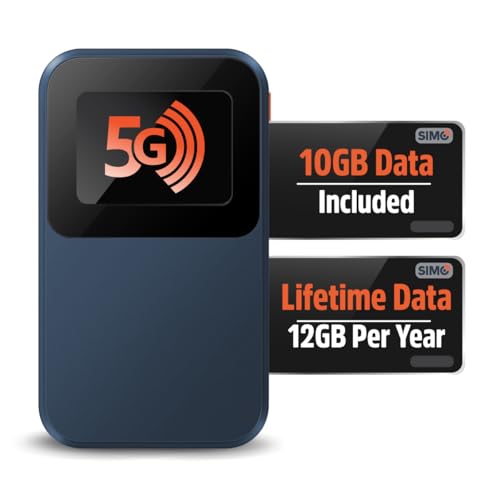
| Best for Global Coverage | Wireless Standard: Wi‑Fi 6 | VPN Support: (Not explicitly stated) — mobile carrier data hotspot (VPN not listed) | Portable / Travel‑Focused Design: Pocket‑sized 5G hotspot with built‑in battery | VIEW LATEST PRICE | Our Analysis |
| TP-Link AX1500 Ultra-Portable Wi‑Fi 6 Travel Router |

| Best Budget Wi‑Fi 6 | Wireless Standard: Wi‑Fi 6 (AX1500, dual‑band) | VPN Support: (Not OpenWrt; VPN not specified in summary) | Portable / Travel‑Focused Design: Ultra‑portable, pocket‑sized travel router (Type‑C powered) | VIEW LATEST PRICE | Our Analysis |
More Details on Our Top Picks
GL.iNet Slate 7 (GL-BE3600) Portable Wi‑Fi 7 Router
Should you need a compact, travel-ready router that prioritizes speed and privacy, the GL.iNet Slate 7 (GL-BE3600) is a strong pick—think of it as a portable VPN appliance with Wi‑Fi 7 and dual 2.5G Ethernet for wired throughput. You’ll get dual-band Wi‑Fi 7 (688 Mbps on 2.4 GHz, 2882 Mbps on 5 GHz), USB 3.0, a touchscreen, and tethering/repeater/cellular modes with color-coded status. It ships with OpenWrt 23.05, offers 512 MB storage for plugins, and supports OpenVPN and WireGuard (up to ~100/540 Mbps local). WPA3, DoH/DoT, IPv6, and VPN cascading keep your connections private.
- Wireless Standard:Wi‑Fi 7 (dual‑band)
- VPN Support:OpenVPN & WireGuard preinstalled
- Portable / Travel‑Focused Design:Portable travel router with touchscreen; multi‑plug options
- Ethernet Port(s):Dual 2.5G Ethernet (1 WAN, 1 LAN)
- USB Port / Power Options:USB 3.0 port
- Multi‑mode / Tethering Capability:Tethering, Repeater, Cellular modes
- Additional Feature:Touchscreen interface
- Additional Feature:OpenWrt full customization
- Additional Feature:Color-coded mode indicators
TP-Link BE3600 Wi‑Fi 7 Portable Travel Router
Should you need a compact travel router that squeezes desktop‑class speed into a pocketable box, the TP‑Link BE3600 (TL‑WR3602BE) is built for frequent travelers, remote workers, and gamers who want fast, reliable connections on the go. You’ll get dual‑band Wi‑Fi 7—up to 2882 Mbps on 5 GHz and 688 Mbps on 2.4 GHz—with MLO combining bands for higher throughput and lower latency. It supports up to 90 devices and offers router, hotspot, AP/RE/client modes for hotels, RVs, and planes. Ports include 2.5 Gbps WAN, 1 Gbps LAN, USB‑A and USB‑C power. OpenVPN, WireGuard, captive portal, and secure design complete the package.
- Wireless Standard:Wi‑Fi 7 (dual‑band)
- VPN Support:OpenVPN & WireGuard supported
- Portable / Travel‑Focused Design:Compact travel router designed for hotels/airports/RVs
- Ethernet Port(s):1 × 2.5 Gbps WAN, 1 × 1 Gbps LAN
- USB Port / Power Options:USB 3.0 + USB‑C power port (PD compatible)
- Multi‑mode / Tethering Capability:Router, Hotspot, AP/RE/Client; Ethernet or USB (phone) tethering
- Additional Feature:Multi-Link Operation (MLO)
- Additional Feature:Supports 90 devices
- Additional Feature:CISA secure-by-design participation
GL.iNet GL-MT3000 Beryl AX Portable Wi‑Fi 6 Router
Should you travel frequently and need a compact router that doubles as a fast, secure VPN gateway, the GL.iNet GL‑MT3000 Beryl AX is a smart pick — it packs Wi‑Fi 6 performance (574 Mbps on 2.4 GHz, 2402 Mbps on 5 GHz), a 2.5G WAN port, and preinstalled WireGuard/OpenVPN for up to 300 Mbps of encrypted throughput. You’ll appreciate the USB 3.0 port, gigabit LAN, and international plug options in a pocketable chassis. OpenWrt gives you 5,000+ packages and a no‑code Admin Panel. WPA3, DoH/DoT, IPv6, and VPN cascading keep your connections private on the road.
- Wireless Standard:Wi‑Fi 6 (dual‑band)
- VPN Support:OpenVPN & WireGuard preinstalled
- Portable / Travel‑Focused Design:Compact travel‑friendly form factor; multi‑plug options
- Ethernet Port(s):2.5G WAN, 1 Gbps LAN
- USB Port / Power Options:USB 3.0 port
- Multi‑mode / Tethering Capability:Router modes for travel; supports tethering (USB modem modes implied)
- Additional Feature:No-code admin panel
- Additional Feature:Access to 5,000+ packages
- Additional Feature:Physical configurable toggle
Solis Edge 5G Hotspot Device with Global Data
Should you travel frequently or manage a mobile lifestyle—RVing, road-tripping, or hopping between international business meetings—the Solis Edge 5G hotspot is built for you: it’s pocket-sized, runs for days on a single charge, and instantly connects to the best local network across 140+ countries without a SIM or contract. You’ll get 5G and Wi‑Fi 6 speeds from a 2.8‑ounce device that taps 300+ carriers via SignalScan to pick the strongest local signal. No SIM or lock-in plans mean flexibility; choose Global Data 10 GB or Lifetime Data 1 GB/month. It’s ideal for families, business travelers, and RVers on the go.
- Wireless Standard:Wi‑Fi 6
- VPN Support:(Not explicitly stated) — mobile carrier data hotspot (VPN not listed)
- Portable / Travel‑Focused Design:Pocket‑sized 5G hotspot with built‑in battery
- Ethernet Port(s):(No Ethernet ports listed; cellular hotspot)
- USB Port / Power Options:Internal battery (no USB listed in summary)
- Multi‑mode / Tethering Capability:Built‑in cellular hotspot (no tethering needed)
- Additional Feature:Built-in battery longevity
- Additional Feature:Global signal auto-scan
- Additional Feature:No SIM / contract required
TP-Link AX1500 Ultra-Portable Wi‑Fi 6 Travel Router
Should you need a pocketable Wi‑Fi 6 router that turns hotel Ethernet, USB‑tethered phone data, or a public captive‑portal connection into fast private Wi‑Fi, the TP‑Link AX1500 Travel Router (TL‑WR1502X) is a strong choice. You’ll get AX1500 dual‑band speeds (5 GHz up to 1201 Mbps, 2.4 GHz up to 300 Mbps), a powerful CPU, two gigabit LAN ports, USB‑2.0 for tethering or file sharing, and Type‑C power. It handles multiple modes—Router, AP, Extender, Hotspot, Client, 3/4G modem (with compatible USB modem)—and uses the Tether app for captive‑portal login and management. Pocketable and durable for travel.
- Wireless Standard:Wi‑Fi 6 (AX1500, dual‑band)
- VPN Support:(Not OpenWrt; VPN not specified in summary)
- Portable / Travel‑Focused Design:Ultra‑portable, pocket‑sized travel router (Type‑C powered)
- Ethernet Port(s):Two gigabit Ethernet ports
- USB Port / Power Options:USB 2.0 port; Type‑C power
- Multi‑mode / Tethering Capability:Router/AP/Range Extender/Hotspot/Client; USB tethering and 3/4G modem mode
- Additional Feature:External USB drive sharing
- Additional Feature:Type‑C PD power compatibility
- Additional Feature:Tether app management
Factors to Consider When Choosing a Hotspot Router
Provided that picking a hotspot router, you’ll want to weigh range and coverage so your devices stay connected where you need them. Check battery life, available ports and connectivity options, plus security features to protect your traffic. Also look at firmware support and customization in case you plan to tweak settings or keep the device updated.
Range And Coverage
In choosing a hotspot router, consider how antenna type and count, radio bands, transmit power, placement, and local interference will shape the range you actually get. You’ll want routers with multiple antennas and MIMO support for stronger signals and better multi-device reach; external antennas often outperform internal ones. Balance 2.4 GHz for longer range and wall penetration against 5 GHz whenever you need throughput but accept shorter coverage. Check transmit power (dBm) and receiver sensitivity—higher values extend usable distance. Place the unit centrally and raised, avoiding walls, metal, and bulky furniture to prevent tens-of-meters losses. Finally, watch for environmental interference from neighboring Wi‑Fi, Bluetooth, or microwaves; pick less congested channels or let band steering optimize connections to preserve effective coverage.
Battery Life Considerations
Considering battery life is essential because it determines how long your hotspot will actually keep devices online between charges. Check the battery capacity (mAh) and estimate runtime via dividing capacity via typical power draw; for example, 10,000 mAh at a 2.5A draw is roughly 4 hours. Compare advertised continuous Wi‑Fi runtimes at idle and heavy tethering, since multiple clients and high-throughput transfers cut life substantially. Prefer units with pass-through charging or Power Delivery/Quick Charge support so you can recharge without downtime. Choose routers with configurable power-saving modes—scheduled Wi‑Fi, lower transmit power, or client sleep—to extend run time in low-demand scenarios. Recall real-world overhead (screen, management tasks, VPN) usually reduces estimates at 20–40%.
Connectivity And Ports
Many routers give you a handful of ports, but you should prioritize the specific connectivity your setup needs: multi‑gig Ethernet for high‑bandwidth wired devices, at least one USB‑A or USB‑C for tethering or storage, and a clearly separated WAN and LAN port layout to keep uplinks distinct from your local network. Check for 1 Gbps or 2.5 Gbps Ethernet in case you’ll use the router as a wired gateway or connect multiple high‑bandwidth devices. Verify a USB port for smartphone tethering, external storage, or a cellular modem. Confirm whether ports are fixed WAN/LAN or configurable so you can reserve a dedicated uplink without reconfiguring. Also make certain supported power options—USB‑C PD, 5V adapter, or battery—match your travel and deployment needs.
Security And Privacy
While you’re choosing a hotspot router, prioritize strong, modern protections so your network and devices stay private and secure. Pick a model supporting WPA3 to guard against brute‑force and eavesdropping attacks. Prefer routers with built‑in VPN client/server options like OpenVPN or WireGuard so you can encrypt outbound traffic at the edge instead of on every device. Choose DNS privacy features—DoH or DoT—to stop ISPs or attackers from snooping or tampering with queries. Verify IPv6 support and resilient firewall/NAT controls, plus guest network and client‑isolation capabilities to limit lateral movement in the event a device is compromised. Finally, confirm firmware is upgradable and accepts third‑party or open‑source firmware/plugins so you can apply security patches and advanced privacy tools promptly.
Firmware And Customization
When you pick a hotspot router, its firmware determines how much you can customize and secure—open‑source platforms like OpenWrt enable packages, advanced VPN setups, and granular firewall/DNS controls, while stock firmware could limit features or require vendor updates. Check flash and RAM: a few hundred megabytes of storage constrains how many plugins you can add and how complex services can run. Verify whether the firmware supports alternative VPN clients, simultaneous client+server (VPN cascading), and whether the kernel/network stack can handle your expected throughput. Consider interface style: touchscreens or web/phone panels ease basic setup, but command‑line access could be necessary for advanced tweaks. Finally, favor routers with active update policies and lively community support for long‑term security and features.
