

You’re setting up whole‑home Wi‑Fi for work, streaming, and smart devices, so you need a mesh that’s fast, reliable, and simple to manage. You’ll want to weigh Wi‑Fi 6/6E/7 options, band counts, wired 2.5G backhaul, and smart‑home support while keeping security and updates automatic. I’ll compare top picks—from affordable eero packs to high‑end Orbi and TP‑Link systems—so you can match features to your home and budget.
| Amazon eero 6 Mesh WiFi System (3-Pack) |

| Reliable Everyday | Coverage: Up to 4,500 sq. ft. (3‑pack) | Mesh Pack Configuration: 3‑pack (1 router + 2 extenders) | App Setup & Management: Setup and remote management via eero app | VIEW LATEST PRICE | Our Analysis |
| Amazon eero 6+ Mesh WiFi System (3-Pack) |

| Smart Home Hub | Coverage: Up to 4,500 sq. ft. (3‑pack) | Mesh Pack Configuration: 3‑pack | App Setup & Management: Setup and remote management via eero app | VIEW LATEST PRICE | Our Analysis |
| TP-Link Deco XE70 Pro AXE4900 Mesh Wi‑Fi System (3-Pack) |

| High‑Capacity Powerhouse | Coverage: Up to 2,900 sq. ft. (3‑pack) [region note] | Mesh Pack Configuration: 3‑pack | App Setup & Management: Setup and remote management via Deco app | VIEW LATEST PRICE | Our Analysis |
| Amazon eero 6 Mesh WiFi System 3-Pack (4500 sq ft) |

| Family Friendly | Coverage: Up to 4,500 sq. ft. (3‑pack) | Mesh Pack Configuration: 3‑pack (1 router + 2 extenders) | App Setup & Management: Setup and remote management via eero app | VIEW LATEST PRICE | Our Analysis |
| NETGEAR Orbi 360 WiFi 7 Mesh System (RBE363) |
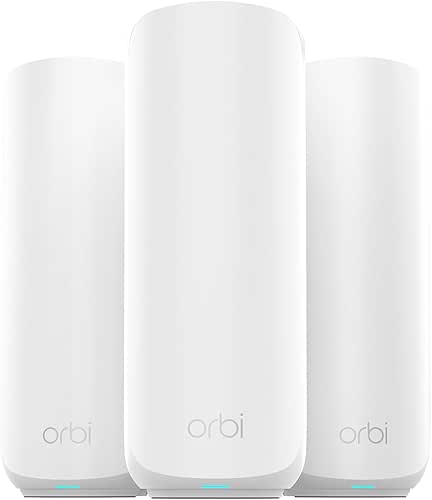
| Cutting‑Edge Speed | Coverage: Up to 6,000 sq. ft. (router + 2 extenders) | Mesh Pack Configuration: 3‑pack (router + 2 extenders) | App Setup & Management: App‑based setup/management (Orbi app implied) | VIEW LATEST PRICE | Our Analysis |
More Details on Our Top Picks
Amazon eero 6 Mesh WiFi System (3-Pack)
Should you need reliable whole‑home Wi‑Fi for a mid‑sized household, the Amazon eero 6 (3‑pack) is a smart pick. You’ll get up to 4,500 sq. ft. coverage with one router and two extenders, handling internet plans to 500 Mbps and reducing dead spots for 4K streaming, gaming, and video calls. It uses Wi‑Fi 6 to support 75+ devices, sets up in minutes via the eero app, and lets you manage the network remotely. It doubles as a Zigbee smart‑home hub, expands with other eero units, receives automatic updates, and offers seven‑day US support.
- Coverage:Up to 4,500 sq. ft. (3‑pack)
- Mesh Pack Configuration:3‑pack (1 router + 2 extenders)
- App Setup & Management:Setup and remote management via eero app
- Backward Compatibility:Backward compatible with prior Wi‑Fi standards/eero hardware
- Security & Automatic Updates:Automatic updates; free support; security improvements
- Smart‑Home Hub / IoT Support:Doubles as Zigbee smart home hub for Alexa devices
- Additional Feature:Supports 75+ devices
- Additional Feature:Zigbee smart‑home hub
- Additional Feature:Supports up to 500 Mbps
Amazon eero 6+ Mesh WiFi System (3-Pack)
Should you need reliable whole‑home Wi‑Fi for lots of devices, the Amazon eero 6+ 3‑pack delivers — covering up to 4,500 sq ft and handling 75+ connections with Wi‑Fi 6 and a 160 MHz channel for faster, less congested performance. You’ll get TrueMesh routing that cuts dead spots, backward compatibility with earlier eeros, and eero Built‑in on select Echo devices. The units act as a Thread and Zigbee smart‑home hub with Alexa, so you won’t need separate bridges. Setup and remote management happen in the eero app; optional eero Plus adds security, parental controls, ad/tracker blocking, and auto‑renewing subscription terms.
- Coverage:Up to 4,500 sq. ft. (3‑pack)
- Mesh Pack Configuration:3‑pack
- App Setup & Management:Setup and remote management via eero app
- Backward Compatibility:Backward compatible with previous eero generations
- Security & Automatic Updates:eero Plus security subscription (advanced security, parental controls); automatic updates implied
- Smart‑Home Hub / IoT Support:Built‑in Thread and Zigbee smart home hub (Alexa integration)
- Additional Feature:160 MHz channel support
- Additional Feature:Thread + Zigbee hub
- Additional Feature:eero Built‑in on Echo
TP-Link Deco XE70 Pro AXE4900 Mesh Wi‑Fi System (3-Pack)
Should you need a future‑proof mesh that prioritizes low latency and capacity for many devices, the TP‑Link Deco XE70 Pro AXE4900 (3‑pack) is built for that — it uses Wi‑Fi 6E with a dedicated 6 GHz band and tri‑band, 6‑stream design to deliver up to 4.9 Gbps and support roughly 200 devices while reducing congestion and interference. You’ll get coverage up to 2,900 sq. ft. per pack, unified SSID with AI‑roaming for seamless handoffs, and resilient backhaul options including simultaneous wireless and 2.5 Gbps wired backhaul. Each unit has a 2.5 Gbps WAN/LAN plus two Gigabit ports, HomeShield security, and easy Deco app management.
- Coverage:Up to 2,900 sq. ft. (3‑pack) [region note]
- Mesh Pack Configuration:3‑pack
- App Setup & Management:Setup and remote management via Deco app
- Backward Compatibility:Backward compatible with previous Wi‑Fi generations
- Security & Automatic Updates:HomeShield security (premium available); Secure‑by‑Design; app updates
- Smart‑Home Hub / IoT Support:Designed for smart homes; strong IoT/mesh support (no built‑in Zigbee/Thread hub explicitly)
- Additional Feature:Dedicated 6 GHz band
- Additional Feature:2.5 Gbps WAN/LAN port
- Additional Feature:Handles 200 devices
Amazon eero 6 Mesh WiFi System 3-Pack (4500 sq ft)
Should you need reliable whole‑home Wi‑Fi for a mid‑to‑large house, the Amazon eero 6 3‑pack delivers up to 4,500 sq ft of Wi‑Fi 6 coverage and handles internet plans up to 500 Mbps, making it a strong choice for 4K streaming, gaming, and video calls without frequent buffering. You get one router and two extenders that mesh to reduce dead spots, and you can expand with other eero devices. The eero app sets up and manages your network quickly. Optional eero Plus adds advanced digital security, ad/tracker blocking, parental controls, and schedules. Automatic updates and US support round out maintenance.
- Coverage:Up to 4,500 sq. ft. (3‑pack)
- Mesh Pack Configuration:3‑pack (1 router + 2 extenders)
- App Setup & Management:Setup and remote management via eero app
- Backward Compatibility:Cross‑compatible with other eero hardware
- Security & Automatic Updates:eero Plus security features; automatic updates
- Smart‑Home Hub / IoT Support:eero Plus / hub functionality—Zigbee smart home hub capability
- Additional Feature:Includes 1 router + 2 extenders
- Additional Feature:eero Plus parental controls
- Additional Feature:Ad and tracker blocking
NETGEAR Orbi 360 WiFi 7 Mesh System (RBE363)
In the event that you need blistering multi-room performance for 4K streaming, gaming, and video calls across a large home, the NETGEAR Orbi 360 WiFi 7 Mesh (RBE363) is built for that: its WiFi 7 BE5000 chipset and dual-band mesh with Improved Backhaul push up to 5 Gbps across 6,000 sq. ft. while supporting about 70 devices and seamless roaming between the router and two extenders. You’ll get a 2.5 Gbps internet port, backward compatibility with older clients, automatic firmware updates, and Advanced Router Protection for security. WiFi 7 enhances speeds roughly 1.7x over WiFi 6, reducing congestion for dense homes.
- Coverage:Up to 6,000 sq. ft. (router + 2 extenders)
- Mesh Pack Configuration:3‑pack (router + 2 extenders)
- App Setup & Management:App‑based setup/management (Orbi app implied)
- Backward Compatibility:Backward compatible with older Wi‑Fi devices
- Security & Automatic Updates:Built‑in security; automatic firmware updates; Advanced Router Protection
- Smart‑Home Hub / IoT Support:Supports smart home devices (compatibility implied; general IoT support)
- Additional Feature:WiFi 7 (BE5000 chipset)
- Additional Feature:Peak throughput ~5 Gbps
- Additional Feature:2.5 Gbps internet port
Factors to Consider When Choosing a Router Mesh System
While selecting a mesh system, you should match coverage area needs and device capacity limits to your home and usage. Consider the Wi‑Fi standard (like Wi‑Fi 6 vs 7), backhaul options and bandwidth to keep speeds consistent across nodes. Don’t forget security features and parental controls should you require device-level filtering and safe browsing.
Coverage Area Needs
Across different layouts and building types, pick a mesh system whose combined coverage comfortably exceeds your home’s square footage so walls, floors, and interference won’t leave you with dead zones. Measure your space, then add margin for signal loss from concrete, brick, or metal—multi‑story homes usually demand more nodes. Plan node placement around peak locations like home offices, media rooms, and patios so throughput stays high for 4K streaming and video calls. Choose a system that lets you add nodes easily to reach basements, garages, or outdoor areas. Don’t match only current minimums: allow capacity for extra devices and future layout changes. Prioritize flexible placement and scalable coverage rather than saving via undersizing your initial setup.
Device Capacity Limits
Coverage and node placement only solve where signal reaches; you also need to confirm how many devices the mesh can handle without bogging down. Check the maximum simultaneous device capacity—some systems list tens, others hundreds. Verify whether that number reflects sustained real‑world performance or a theoretical peak, since throughput per device can fall as counts rise. Match the expected device mix: many low‑bandwidth sensors plus a few 4K streams need different headroom than dozens of moderate‑use gadgets. Look for concurrent‑client specs per node and whether the mesh balances or offloads traffic to avoid overloading a single unit. Finally, factor in future growth—buying modest extra capacity lets you add smart devices without recurring congestion.
Wi‑Fi Standard Choice
Provided that you want a mesh that keeps pace with modern devices and heavy media use, pick the Wi‑Fi standard that matches your internet plan and client hardware. Higher standards like Wi‑Fi 6, 6E, and 7 deliver greater throughput, lower latency, and improved multi‑device handling for 4K streaming and gaming. 6E and newer add a 6 GHz band, easing congestion with cleaner band if your clients support it. Efficiency features—OFDMA, MU‑MIMO, and target wake time—help many simultaneous connections and extend IoT battery life. Balance future‑proofing against real needs: upgrades give diminishing returns provided your ISP speed or most devices can’t use the extra capacity. Make certain the mesh supports legacy devices, but expect full benefits only when matching client support.
Backhaul And Bandwidth
Whenever you want consistent speed and low latency across multiple nodes, the mesh backhaul matters as much as the radios that serve your devices. Choose tri‑band systems or those with a dedicated 5 GHz/6 GHz backhaul to keep mesh traffic off client bands, preserving throughput. Whenever possible, prefer wired backhaul—Ethernet or 2.5/10 Gbps links—for the most consistent throughput and lowest latency, especially with multi‑gig internet or heavy streaming and gaming. Should you rely on wireless backhaul, be cautious with 160 MHz (or wider) channels: they enhance capacity but cut range and invite interference. Keep in mind each wireless hop can halve effective bandwidth unless the mesh uses a dedicated backhaul or multi‑radio design. Match backhaul capacity to your peak aggregated device needs.
Security And Parental Controls
Because threats and family needs change constantly, your mesh should include strong built‑in security and flexible parental controls that you can manage from anywhere. Make certain automatic firmware updates, malware/IoT protection, and intrusion detection are standard so threats get blocked before they reach devices. Choose systems providing network‑level ad and tracker blocking to reduce tracking and speed browsing across the home. For kids, use parental controls that let you schedule access, pause Wi‑Fi per device or user, and apply age‑appropriate content filters to manage screen time and exposure. Verify which security and filtering features require a paid subscription and compare free versus premium options. Confirm remote management and granular user/device controls via a mobile app or web portal for alerts and rule changes.
Smart Home Compatibility
How will your mesh handle the growing number of smart devices in your home? Make sure it includes a built‑in hub or supports Zigbee, Z‑Wave, Thread, or Matter so sensors, lights, locks, and thermostats connect without extra bridges. Verify voice assistant and ecosystem compatibility so you’re able to pair devices, expose controls, and run routines. Check the maximum concurrent IoT devices and whether the system prioritizes IoT traffic or segments them on a separate SSID/VLAN to reduce congestion and improve security. Confirm support for local LAN control and standard APIs like MQTT, UPnP, or vendor SDKs in case you employ third‑party hubs or home servers. Finally, choose a mesh with ongoing firmware updates, device isolation, per‑device controls, and automatic patching.
Setup And Management
Start via picking a mesh that makes setup painless: look for guided mobile app installation with step‑by‑step instructions and QR or Bluetooth pairing so you can have the network up in minutes. After initial setup, choose a system with a centralized cloud or local dashboard so you can monitor health, create guest networks, prioritize devices, and push firmware from your phone or a web portal. Prefer automatic firmware updates and security patches so protection doesn’t depend on manual checks. Verify wired backhaul support and effortless node addition or replacement through the app, letting you expand or reconfigure without rewiring. Finally, confirm built‑in parental controls and scheduling that let you set access windows and apply content filters per device or group.
