

Let’s call it smart upgrading instead of a full overhaul — you’ll want gear that actually keeps pace with AT&T Fiber. You’ll get options from budget Wi‑Fi 6 to cutting‑edge Wi‑Fi 7, each with different port speeds, backhaul choices, and setup quirks. Keep an eye on multi‑gig ports, bridge/VLAN modes, and firmware security, and you’ll avoid common pitfalls that cut your speeds short.
| TP-Link Deco 7 BE23 Wi‑Fi 7 Mesh System (3-Pack) |

| Best for Future-Proofing | Wi‑Fi Standard: Wi‑Fi 7 | Mesh System: Yes (3‑pack mesh) | Coverage (listed): Up to 6,500 sq. ft. | VIEW LATEST PRICE | Our Analysis |
| NETGEAR Orbi 370 WiFi 7 Mesh System (RBE373) |
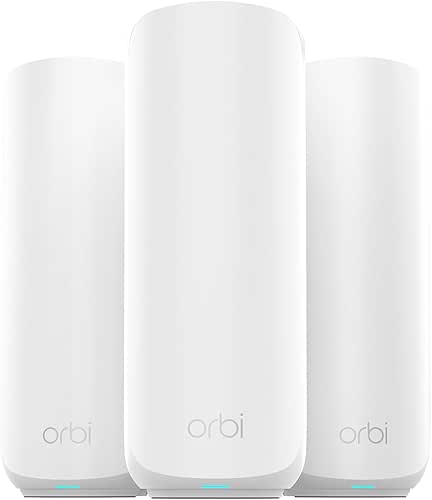
| High-Performance Home | Wi‑Fi Standard: Wi‑Fi 7 | Mesh System: Yes (router + 2 extenders) | Coverage (listed): Up to 6,000 sq. ft. | VIEW LATEST PRICE | Our Analysis |
| Amazon eero 6+ Mesh WiFi Router (1-Pack) |

| Smart Home Starter | Wi‑Fi Standard: Wi‑Fi 6 | Mesh System: Yes (scalable single‑node mesh) | Coverage (listed): Up to 1,500 sq. ft. | VIEW LATEST PRICE | Our Analysis |
| NETGEAR Orbi 360 WiFi 7 Mesh System (RBE363) |
| Streaming & Gaming Pro | Wi‑Fi Standard: Wi‑Fi 7 | Mesh System: Yes (router + 2 extenders) | Coverage (listed): Up to 6,000 sq. ft. | VIEW LATEST PRICE | Our Analysis |
| TP-Link Deco X20 WiFi 6 Mesh System (3-Pack) |

| Budget Whole-Home Coverage | Wi‑Fi Standard: Wi‑Fi 6 | Mesh System: Yes (3‑pack mesh) | Coverage (listed): Up to 5,800 sq. ft. | VIEW LATEST PRICE | Our Analysis |
More Details on Our Top Picks
TP-Link Deco 7 BE23 Wi‑Fi 7 Mesh System (3-Pack)
Should you need top-tier speed and futureproofing for an AT&T Fiber connection, the TP‑Link Deco 7 BE23 (3‑pack) is built for multi-gig homes that demand low latency and broad coverage; it combines Wi‑Fi 7 features like MLO and 160 MHz channels with dual 2.5 Gbps ports per unit so you can use wired backhaul or connect multi‑gig devices without bottlenecks. You’ll get 4‑stream Wi‑Fi 7 (3.6 Gbps aggregate), MLO, 4K‑QAM, AI‑Roaming, and simultaneous wireless/wired backhaul for dependable stability. The three nodes cover up to 6,500 sq. ft, support 150 devices, include VPN client/server, WPA3, HomeShield, and mesh compatibility.
- Wi‑Fi Standard:Wi‑Fi 7
- Mesh System:Yes (3‑pack mesh)
- Coverage (listed):Up to 6,500 sq. ft.
- Multi‑Gig Wired Port:Two 2.5 Gbps WAN/LAN ports per unit
- Security Features:TP‑Link HomeShield, WPA3, private IoT network, Secure‑by‑Design
- Backhaul Support:Simultaneous wireless & wired backhaul; MLO for enhanced stability
- Additional Feature:AI‑Roaming adaptive optimization
- Additional Feature:VPN client & server
- Additional Feature:4 high‑gain antennas
NETGEAR Orbi 370 WiFi 7 Mesh System (RBE373)
Looking for a fast, simple mesh that takes full advantage of AT&T Fiber? You’ll appreciate the NETGEAR Orbi 370 (RBE373): a WiFi 7 dual-band system with a router plus two BE5000 extenders covering up to 6,000 sq. ft. It delivers up to 5 Gbps throughput—about 1.7x faster than WiFi 6—and supports roughly 70 devices for simultaneous 4K streaming, gaming, and video calls. You get a 2.5 Gigabit Internet port, improved backhaul for reliable whole-home speeds, automatic firmware updates, and Advanced Router Protection. Units are compact, easy to set up, and backed through NETGEAR’s customer support warranty.
- Wi‑Fi Standard:Wi‑Fi 7
- Mesh System:Yes (router + 2 extenders)
- Coverage (listed):Up to 6,000 sq. ft.
- Multi‑Gig Wired Port:2.5 Gbps Internet port (system)
- Security Features:Advanced Router Protection, automatic firmware updates
- Backhaul Support:Enhanced backhaul for reliable mesh speeds (wireless mesh backhaul)
- Additional Feature:Includes two extenders
- Additional Feature:5 Gbps maximum throughput
- Additional Feature:Package/physical specs listed
Amazon eero 6+ Mesh WiFi Router (1-Pack)
Should you want a compact, future‑ready router that handles dozens of devices and fills about 1,500 sq. ft., the Amazon eero 6+ is a strong pick for AT&T Fiber users—its Wi‑Fi 6 with 160 MHz channel gives extra bandwidth for streaming and gaming, and TrueMesh helps cut dead spots as you add more eeros. You can connect 75+ devices, scale the system through adding units, and rely on backward compatibility with older eeros and select Echo devices. The eero app gets you running quickly, and remote management, Thread/Zigbee hub support, Alexa integration, and optional eero Plus security make it a versatile choice.
- Wi‑Fi Standard:Wi‑Fi 6
- Mesh System:Yes (scalable single‑node mesh)
- Coverage (listed):Up to 1,500 sq. ft.
- Multi‑Gig Wired Port:(Not explicitly multi‑gig) — standard gigabit Ethernet (no multi‑gig listed)
- Security Features:eero Plus (optional) with advanced digital security, ad/tracker blocking, parental controls
- Backhaul Support:TrueMesh intelligent routing (wireless mesh backhaul); scalable with additional eeros
- Additional Feature:Built‑in Thread & Zigbee
- Additional Feature:eero Built‑in Echo integration
- Additional Feature:TrueMesh intelligent routing
NETGEAR Orbi 360 WiFi 7 Mesh System (RBE363)
Supposing you want blistering whole-home Wi‑Fi for many devices, the NETGEAR Orbi 360 WiFi 7 Mesh System (RBE363) is built for households that stream 4K, game, and run video calls across a large space—its WiFi 7 BE5000 chipset and dual-band mesh design deliver up to 5 Gbps, cover about 6,000 sq. ft., and handle roughly 70 devices while using a 2.5 Gbps WAN port and improved backhaul for smoother roaming. You get a router plus two extenders, mesh topology for seamless handoffs, and backward compatibility with older gear. Built-in security, Automatic Firmware Updates, and Advanced Router Protection keep your network safe and current.
- Wi‑Fi Standard:Wi‑Fi 7
- Mesh System:Yes (router + 2 extenders)
- Coverage (listed):Up to 6,000 sq. ft.
- Multi‑Gig Wired Port:2.5 Gbps Internet port (system)
- Security Features:Advanced Router Protection, automatic firmware updates
- Backhaul Support:Enhanced backhaul for reliable mesh speeds (wireless mesh backhaul)
- Additional Feature:Includes two extenders
- Additional Feature:BE5000 chipset model
- Additional Feature:Enhanced Backhaul topology
TP-Link Deco X20 WiFi 6 Mesh System (3-Pack)
Should you need reliable whole‑home Wi‑Fi for an AT&T Fiber plan up to 1 Gbps, the TP‑Link Deco X20 (3‑pack) delivers fast Wi‑Fi 6 coverage across as much as 5,800 sq. ft. You’ll get AX1800 dual‑band mesh that kills dead zones, supports up to 150 devices, and cuts buffering for streaming and gaming. The three units replace routers/extenders, offer six total Ethernet ports, and support wired backhaul. Setup is quick via the Deco app with remote control and Alexa voice commands. HomeShield provides security and basic parental controls, letting you manage profiles, limit access, and monitor connected IoT devices.
- Wi‑Fi Standard:Wi‑Fi 6
- Mesh System:Yes (3‑pack mesh)
- Coverage (listed):Up to 5,800 sq. ft.
- Multi‑Gig Wired Port:Gigabit Ethernet ports (total 6 ports; no multi‑gig listed)
- Security Features:TP‑Link HomeShield (security scan, IoT ID, parental controls)
- Backhaul Support:Supports wired backhaul (mesh)
- Additional Feature:6 total Ethernet ports
- Additional Feature:Deco app visual setup
- Additional Feature:Alexa guest Wi‑Fi control
Factors to Consider When Choosing Mesh Wi‑Fi for AT&T Fiber
When choosing mesh Wi‑Fi for AT&T Fiber, you’ll want to match the system’s speed and bandwidth to your plan so you don’t bottleneck your connection. Check coverage and device capacity limits to make certain every room and every gadget gets reliable signal, and prefer systems that support wired backhaul for the best stability. Also evaluate security and privacy features so your network stays protected without sacrificing performance.
Speed And Bandwidth
Although a fast AT&T Fiber connection gives you big potential, your mesh Wi‑Fi has to match it — choose a system whose practical aggregate throughput meets or exceeds your plan (300 Mbps, 1 Gbps, or multi‑gig), or Wi‑Fi will be the bottleneck. Match aggregate wireless throughput to your WAN speed and favor nodes/backhaul that support multi‑gig wired links or high‑capacity wireless (160 MHz channels, multi‑link, or dedicated backhaul) for multi‑gig or heavy simultaneous streams. Check per‑device needs (4K/8K ~15–50 Mbps, cloud gaming ~10–50 Mbps) and make sure concurrent demand stays below practical throughput. Plan margin for real‑world losses (20–50%) from distance, walls, and congestion, and enable QoS to prioritize latency‑sensitive traffic.
Coverage And Range
Coverage planning matters as much as raw speed: pick a mesh layout that comfortably covers your home’s square footage plus extra for walls and dead zones, and position nodes closer where concrete, brick, or metal studs would otherwise cut range. Match the system’s rated coverage to your footprint (typical ranges: 2,500–6,500 sq ft) so nodes collectively exceed inhabited area. Favor units with multi-gig ports or wired backhaul support so you can place nodes for best coverage without relying solely on wireless hops. Choose hardware with higher-gain antennas, multiple spatial streams, or multi-link operation to extend effective range and stability across bands. Finally, consider device density while planning placement so routers serve every room, not just open areas.
Device Capacity Limits
Plan for more devices than you currently own, because AT&T Fiber’s high speeds will quickly reveal limits in a mesh system that’s undersized for your household. Check the mesh’s stated maximum concurrent device capacity and pick one rated above your current total—including phones, TVs, smart-home gear, and IoT—to avoid saturation during peak use. Keep in mind manufacturer counts are approximate and assume light use; several simultaneous 4K streams or heavy game/VR sessions will cut effective capacity. Factor growth: add 20–50% headroom for new devices, guests, and temporary high-bandwidth clients. Take into account whether capacity is per-node or for the whole mesh—multi-node load spreading scales better. Prefer systems with QoS and band-steering to prioritize latency-sensitive devices and increase usable device counts.
Wired Backhaul Support
Whenever you wire mesh nodes together, Ethernet backhaul frees the radios for clients and delivers steadier gigabit‑class speeds across the house, which is especially vital on AT&T Fiber plans that can push past 1 Gbps. You should pick mesh units with multi‑gig (1–2.5 Gbps or higher) LAN/WAN ports so the wired backbone doesn’t bottleneck your fiber. True dedicated wired backhaul — separate Ethernet links between nodes — lowers latency and packet loss, helping cloud gaming and video calls. Verify your home wiring or adapters and any intervening switches are full duplex and rated for multi‑gig speeds to preserve throughput. Also confirm the AT&T gateway can be bridged or that your downstream router handles NAT/VLANs properly to avoid routing surprises.
Security And Privacy
Because your AT&T Fiber connection moves so much data, you should pick a mesh that prioritizes strong encryption, timely updates, and network‑level protections to keep every device — from phones to smart bulbs — safe without extra apps on each gadget. Choose systems that support WPA3 to harden authentication and resist offline password‑guessing. Prefer mesh routers with built‑in network security—malware/IDS and automatic firmware updates—so protections apply to every client. Look for VLAN or guest‑network features to isolate IoT and visitor devices from your main LAN and sensitive data. Should you need encrypted site traffic, pick a system with a router‑level VPN client or site‑to‑site VPN capability so you don’t install apps per device. Verify vendor patching policies and automatic update frequency for long‑term safety.
Router Compatibility
Router compatibility matters whenever you’re pairing a mesh system with AT&T Fiber, because the right hardware and settings prevent speed bottlenecks, service interruptions, and tricky double‑NAT issues. You’ll want a mesh with a Gigabit or multi‑gig (≥1 Gbps or 2.5 Gbps) WAN port to match your plan. Confirm nodes can run in router or bridge/AP mode so you can replace or pair with the AT&T gateway. Check for WAN VLAN/PPPoE passthrough and VLAN tagging in case your service uses VLANs for internet or voice. Verify firmware supports dual‑WAN/failover or WAN reconfiguration provided you keep the gateway routing. Finally, make certain you can disable the mesh’s DHCP/DNS whenever it sits behind the provider device to avoid double NAT.
