

Around 70% of small businesses now rely on cellular links for backup or primary internet, so you’ll want an LTE router that actually delivers. You’ll see options that range from plug‑and‑play home units to rugged DIN‑rail devices with watchdogs and MQTT support. I’ll compare six top 2026 models via performance, resilience, VPN and manageability — and help you match one to your specific use case.
| GL-X750V2 Spitz 4G LTE VPN Router (North America) |
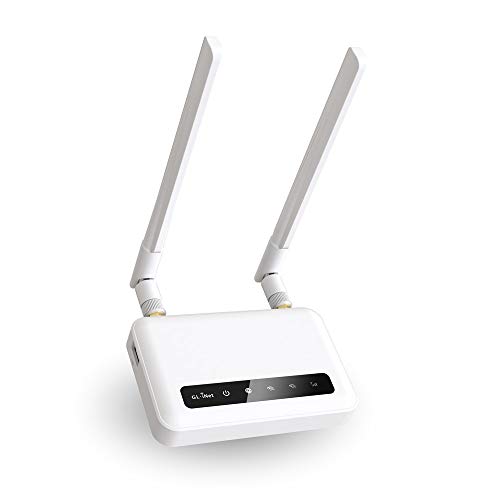
| Best for Privacy | Cellular type: 4G LTE (Cat4, Quectel EC25) | SIM support / slots: Single micro SIM slot | VPN support: OpenVPN, WireGuard (pre‑installed); Cloudflare DNS | VIEW LATEST PRICE | Read Our Analysis |
| Cudy AC1200 Dual-Band 4G LTE Modem Router (LT500) |

| Best Home Mesh | Cellular type: 4G LTE (unlocked modem) | SIM support / slots: Single SIM slot (user-inserted) | VPN support: PPTP, L2TP, OpenVPN, WireGuard | VIEW LATEST PRICE | Read Our Analysis |
| InHand IR302 Industrial 4G LTE VPN Cellular Router |

| Best for Reliability | Cellular type: 4G LTE (Cat4) | SIM support / slots: Dual SIM slots (automatic failover) | VPN support: OpenVPN, IPsec, WireGuard, ZeroTier | VIEW LATEST PRICE | Read Our Analysis |
| Yeacomm YF325 4G LTE Industrial VPN Router (Dual-SIM) |

| Best for Industrial Use | Cellular type: 4G LTE (Cat4) | SIM support / slots: Dual SIM slots (failover) | VPN support: PPTP, L2TP, IPsec, GRE (client/server) | VIEW LATEST PRICE | Read Our Analysis |
| LINOVISION 4G LTE Industrial Cellular Router with Wi-Fi |

| Best for IoT Integration | Cellular type: 4G LTE (Cat4) | SIM support / slots: Dual SIM slots (redundancy) | VPN support: DMVPN, IPsec, OpenVPN, PPTP, L2TP, GRE | VIEW LATEST PRICE | Read Our Analysis |
| 4G LTE Unlocked WiFi Router with SIM Slot |
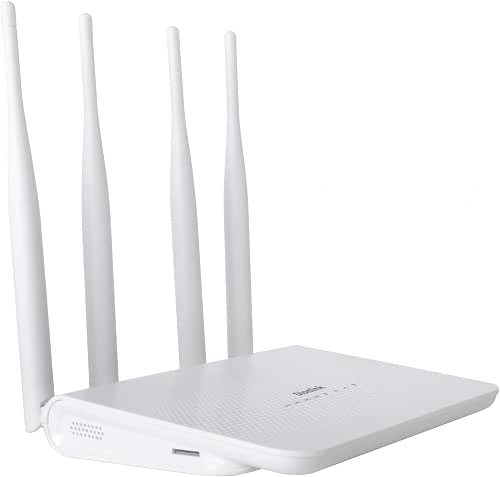
| Best Budget Plug-and-Play | Cellular type: 4G LTE (CPE, multiple bands) | SIM support / slots: Single standard SIM slot | VPN support: (Basic) router with SIM—VPN not explicitly listed (web/firmware may support standard VPNs) | VIEW LATEST PRICE | Read Our Analysis |
More Details on Our Top Picks
GL-X750V2 Spitz 4G LTE VPN Router (North America)
Should you need a compact, open‑source LTE router that’s tuned for North America—especially for RVs, offshore use, or emergency backups—the GL‑X750V2 Spitz delivers reliable 4G connectivity with built‑in OpenWrt, dual‑band Wi‑Fi, and preinstalled OpenVPN/WireGuard for secure remote access. You’ll get a Quectel EC25‑AFFA CAT4 modem that works with AT&T and T‑Mobile (AT&T IoT certified), typical 4G speeds of 15–20 Mbps, and Wi‑Fi throughput up to 300 Mbps (2.4 GHz) plus 433 Mbps (5 GHz). Two SMA antennas, USB and dual 10/100 Ethernet ports, microSD up to 128 GB, and a two‑year warranty round it out.
- Cellular type:4G LTE (Cat4, Quectel EC25)
- SIM support / slots:Single micro SIM slot
- VPN support:OpenVPN, WireGuard (pre‑installed); Cloudflare DNS
- Ethernet ports:2 × 10/100 Mbps Ethernet
- Wi‑Fi capability:Dual-band Wi‑Fi (2.4 GHz 300 Mbps, 5 GHz 433 Mbps)
- Designed for remote/mobility use cases:Targeted for RV, offshore, emergency backup (North America)
- Additional Feature:OpenWrt/LEDE unlocked
- Additional Feature:microSD storage up to128GB
- Additional Feature:AT&T IoT certified
Cudy AC1200 Dual-Band 4G LTE Modem Router (LT500)
Should you need a straightforward, carrier-unlocked 4G LTE router that doubles as a reliable home Wi‑Fi hub, the Cudy AC1200 (LT500) fits the bill — just pop in a SIM, enter your PIN in the web UI, and you’ll have up to 150 Mbps cellular backhaul alongside simultaneous 2.4/5 GHz Wi‑Fi (5 GHz up to 867 Mbps) with four external 5 dBi antennas to boost range. You’ll also get mesh support to extend coverage plus standard WAN/LAN ports for wired backhaul. DDNS and Cloudflare simplify remote access, and VPN clients (PPTP, L2TP, OpenVPN, WireGuard) secure your traffic. Setup is web-based and user-friendly.
- Cellular type:4G LTE (unlocked modem)
- SIM support / slots:Single SIM slot (user-inserted)
- VPN support:PPTP, L2TP, OpenVPN, WireGuard
- Ethernet ports:Wired WAN/LAN support (Ethernet ports implied)
- Wi‑Fi capability:Dual-band AC1200 (2.4 GHz + 5 GHz up to 867 Mbps)
- Designed for remote/mobility use cases:Whole‑home mesh and cellular backhaul (mobile/backup)
- Additional Feature:Four external 5dBi antennas
- Additional Feature:Mesh Wi‑Fi capability
- Additional Feature:150 Mbps 4G download
InHand IR302 Industrial 4G LTE VPN Cellular Router
Should you need a rugged, carrier‑redundant router for unattended sites, the InHand IR302 is built for that role. You’ll get LTE Cat 4 (FQ38) for North America with Verizon, AT&T, and T‑Mobile certification, dual SIMs with automatic failover, and 2x 10/100 Ethernet ports (WAN/LAN switchable) plus Wi‑Fi 802.11 b/g/n. It’s DIN‑rail mountable, runs −20°C to 70°C, and includes a hardware watchdog and multi‑layer link detection for self‑recovery. Security features include SPI firewall, DoS defenses, and OpenVPN/IPsec/WireGuard/ZeroTier support. Two DIO ports aid integration, DC 9–36V power and US plug are included, and it’s UL certified.
- Cellular type:4G LTE (Cat4)
- SIM support / slots:Dual SIM slots (automatic failover)
- VPN support:OpenVPN, IPsec, WireGuard, ZeroTier
- Ethernet ports:2 × 10/100 Mbps Ethernet (WAN/LAN switchable)
- Wi‑Fi capability:Built-in Wi‑Fi 802.11 b/g/n
- Designed for remote/mobility use cases:Industrial remote sites (EV chargers, ATMs); DIN‑rail
- Additional Feature:DIN‑rail mounting
- Additional Feature:Wide −20°C to70°C range
- Additional Feature:Hardware watchdog/self‑recovery
Yeacomm YF325 4G LTE Industrial VPN Router (Dual-SIM)
Should you need a tough, failover-ready router for remote or industrial sites, the Yeacomm YF325 delivers dual-SIM LTE redundancy with industrial-grade protection and wide-band cellular support so you’ll stay online even in harsh environments. You get LTE Cat4 (150/50 Mbps), HSPA+/GSM fallback, and broad band compatibility (FDD/TDD/WCDMA/GSM) — note it’s not Verizon/Sprint compatible. Built-in VPN (PPTP/L2TP/IPsec/GRE), flexible WAN modes, double-link backup and Yeacomm Device Manager simplify secure remote deployment. Rugged IP30 aluminum casing, -40–85°C range, DIN-rail, surge/ESD protection and wide input voltage suit industrial sites; antennas and SIM adapters are included.
- Cellular type:4G LTE (Cat4)
- SIM support / slots:Dual SIM slots (failover)
- VPN support:PPTP, L2TP, IPsec, GRE (client/server)
- Ethernet ports:1 × 10/100 WAN + 1 × 10/100 LAN
- Wi‑Fi capability:Wi‑Fi IEEE 802.11b/g/n (2.4 GHz)
- Designed for remote/mobility use cases:Industrial VPN router for remote/DIN‑rail deployments
- Additional Feature:IP30 aluminum casing
- Additional Feature:15 kV surge protection
- Additional Feature:RS232 serial port
LINOVISION 4G LTE Industrial Cellular Router with Wi-Fi
Should you need a rugged, easy-to-manage router that keeps remote equipment online, the LINOVISION 4G LTE Industrial Cellular Router with Wi‑Fi is a strong choice because it pairs Cat4 cellular speeds and dual SIM failover with industrial-grade power and temperature tolerance. You get up to 150/50 Mbps over broad band support (including B66/B71 for rural reach), three magnetic antennas, and Verizon compatibility (vzwinternet). It offers Wi‑Fi AP/client, Ethernet WAN/LAN, multiple VPNs, firewall, and prioritized failover among cellular, LAN, and Wi‑Fi. For IoT you’ll use RS485 DTU, digital I/O, MQTT/API, Embedded Python, and two years of RemoteMonit Cloud.
- Cellular type:4G LTE (Cat4)
- SIM support / slots:Dual SIM slots (redundancy)
- VPN support:DMVPN, IPsec, OpenVPN, PPTP, L2TP, GRE
- Ethernet ports:Ethernet WAN/LAN support (implied)
- Wi‑Fi capability:Wi‑Fi IEEE 802.11b/g/n (AP/client)
- Designed for remote/mobility use cases:Remote/mobile deployments (vehicles, solar CCTV, M2M)
- Additional Feature:Extended bands B66/B71
- Additional Feature:Embedded Python SDK
- Additional Feature:Free 2‑year cloud subscription
4G LTE Unlocked WiFi Router with SIM Slot
Should you need a simple, budget-friendly LTE-to-WiFi solution that works out of the box with AT&T and T‑Mobile, the Dionlink LT15F is a solid pick—just pop in a standard SIM and you’ll get up to 150 Mbps down, support for 32 devices, and broad indoor coverage thanks to its four-antenna design. You’ll appreciate plug-and-play setup, 300 Mbps wireless transfer rate, and compatibility across common LTE and WCDMA bands (B2/B3/B4/B5/B7/B8/B12/B13/B17/B25/B26/B41/B66). It covers roughly 300 m², weighs 6.8 ounces, and isn’t compatible with Verizon or Sprint. Check Dionlink for warranty and support.
- Cellular type:4G LTE (CPE, multiple bands)
- SIM support / slots:Single standard SIM slot
- VPN support:(Basic) router with SIM—VPN not explicitly listed (web/firmware may support standard VPNs)
- Ethernet ports:Ethernet LAN (CPE device with Ethernet ports implied)
- Wi‑Fi capability:Wi‑Fi hotspot (wireless transfer rate ~300 Mbps)
- Designed for remote/mobility use cases:Plug‑and‑play hotspot for mobile/home use
- Additional Feature:Supports up to 32 devices
- Additional Feature:4‑antenna design
- Additional Feature:300 m² coverage
Factors to Consider When Choosing an LTE Router
Upon choosing an LTE router, you’ll want to check cellular band support to make sure it works with your carrier and location. Consider VPN and security features, the deployment environment and mounting or power constraints, and whether the router offers the ports and expandability you’ll need. These factors will determine reliability, performance, and future-proofing.
Cellular Band Support
Compatibility matters: confirm the router supports the LTE bands your carrier and location use (for example B2/B4/B5/B12/B13/B66/B71), because a mismatch can stop you from connecting or cap your speeds. Check the router’s LTE category and carrier aggregation (CA) specs—Cat‑6 with CA will outpace Cat‑4 in theoretical throughput and real-world efficiency. Look for support of newer/extended bands like B66 and B71 for improved rural coverage and wider roaming. Consider dual‑SIM or multi‑SIM models with automatic failover so you can switch carriers or bands whenever congestion or outages hit. Finally, verify regional regulatory or firmware limits; some units ship with bands disabled for specific countries, which can reduce usable band support despite advertised specs.
VPN And Security
Band support and failover matter for keeping you connected, but protecting that connection is equally vital—especially in case you’re sending sensitive data over public cellular links. Choose routers that support modern VPN protocols like WireGuard, OpenVPN, and IPsec for stronger encryption and better performance than PPTP. Verify the device can act as both VPN client and server and handle multiple simultaneous tunnels so you can run site‑to‑site links and remote user access together.
Ensure DNS protection—DoH/DoT or DNS filtering—to prevent DNS MITM and leakage on cellular networks. Prefer hardware and firmware with regular security updates, a built‑in firewall offering stateful inspection and DoS protection, and auditability through open firmware or thorough logging. For mission‑critical use, pick dual‑SIM or automatic failover with VPN session persistence and auto‑reestablishment.
Deployment Environment Needs
Because your router will live in a specific physical and power environment, pick one that matches temperature, enclosure, and mounting requirements as well as available power and antenna options so it can stay reliable in the field. To begin with, match operating temperature and casing—consumer indoor units suit 0–40°C and plastic housings, while industrial sites need -40–+70°C ratings and metal, DIN‑rail, or IP30/IP65 enclosures. Check power input ranges (USB/12V, 5–36V, 9–48V DC or PoE) so the unit supports vehicle, solar, or industrial supplies and tolerates brownouts. Plan antenna type and placement—external SMA/TS‑9, magnetic, or integrated—based on mobile versus fixed installs. Confirm I/O and mounting (Ethernet, serial, digital I/O, rack/DIN/wall) and SIM/failover options for redundancy and backup connectivity.
Power And Mounting
Having picked a router that fits your operating temperature, enclosure, and antenna needs, next focus on how you’ll power and mount the unit so it stays online and secure. Check the router’s power input range (for example 9–36 V DC or 9–48 V DC) to match site or vehicle supply and avoid converters. For outdoor or industrial installs, pick units with wide temperature ratings (−40°C to +70°C) and surge/ESD protection on power lines. Verify available power options—AC adapter, DC barrel, or direct terminal block—and whether UPS or battery backup is supported for graceful shutdowns. Confirm mounting choices (desktop, wall, DIN‑rail), enclosure rating (IP30+) and physical size, antenna connector placement, and cable routing for vibration‑resistant, accessible installation.
Expandability And Ports
Whenever you plan for an LTE router, consider beyond basic connectivity and check the ports and expansion options that let the device grow with your needs—Ethernet speed and count determine wired throughput and network segregation, USB or microSD support adds local storage and extra services, and cellular features like multiple SIMs and external antenna connectors enable resilient, high‑gain links. You should choose Gigabit Ethernet over 10/100 for higher throughput and separate WAN/LAN or VLANs. Prefer USB 3.0 or microSD for logs, firmware, VPN or file services. Look for multiple SIMs for carrier failover and SMA/TS‑9 antenna jacks for external antennas. For M2M/IoT, verify GPIO, RS‑232/RS‑485 or digital I/O. Check power input range, mounting options and Ethernet surge/isolation for rugged installs.
