

Nearly 80% of office workers report back pain from sitting too long, so switching to a standing desk can really change your day. You’ll get practical choices that balance stability, quiet motors, and storage without gimmicks. Imagine a dual-monitor setup that won’t wobble, a compact option for tight rooms, and a corner desk that keeps power close at hand — and there’s one more setup that ties it all together.
| ErGear Height Adjustable Electric Standing Desk (Black) |

| Sturdy Performer | Height range: 28.35″ to 46.67″ | Electric adjustment: Electric motor-driven | Memory presets: 3 memory settings | VIEW LATEST PRICE | Read Our Analysis |
| TIQLAB Electric Height Adjustable Standing Desk (Maple) |
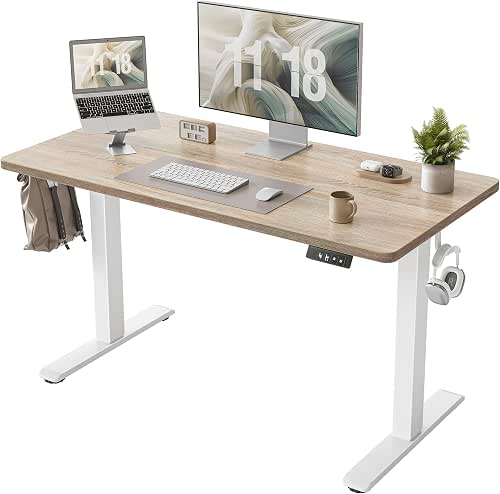
| Quiet & Reliable | Height range: 28.3″ to 45.6″ | Electric adjustment: Electric motor-driven | Memory presets: Memory controller for presets (unspecified count) | VIEW LATEST PRICE | Read Our Analysis |
| Veken 55″ Adjustable Electric Standing Desk White |

| Spacious Workhorse | Height range: 28.3″ to 46.5″ | Electric adjustment: Electric motor-driven | Memory presets: Multiple customizable presets (4 positions noted) | VIEW LATEST PRICE | Read Our Analysis |
| OffiGo 55″ Electric Height Adjustable Standing Desk |

| Feature-Packed Desk | Height range: 28.3″ to 46.5″ | Electric adjustment: Electric motor-driven | Memory presets: 3 preset buttons | VIEW LATEST PRICE | Read Our Analysis |
| HUANUO 48″ x 24″ Electric Height-Adjustable Standing Desk |

| Storage-Focused Choice | Height range: 27.5″ to 46.4″ | Electric adjustment: Electric motor-driven | Memory presets: Four preset buttons | VIEW LATEST PRICE | Read Our Analysis |
More Details on Our Top Picks
ErGear Height Adjustable Electric Standing Desk (Black)
Should you want a reliable, easy-to-use sit-stand solution for a home office, the ErGear Height Adjustable Electric Standing Desk delivers: its powerful uprated motor and aerospace-grade lifting column connectors let you smoothly raise and lower a 47.2″ x 23.6″ work surface between 28.35″ and 46.67″, and three memory presets mean you can switch to your favorite heights with a single press. You get a sturdy solid steel frame whose stability’s verified after 100,021 tests, plus motor durability proven in 50,021 operations. Low‑VOC materials reduce formaldehyde and other emissions to meet US air-safety standards.
- Height range:28.35″ to 46.67″
- Electric adjustment:Electric motor-driven
- Memory presets:3 memory settings
- Desktop size / large surface:47.2″ × 23.6″
- Steel frame / sturdy build:Sturdy solid steel frame
- Intended for home/office computer use:For computer, home, office
- Additional Feature:Low-VOC materials
- Additional Feature:Aerospace-grade connectors
- Additional Feature:Motor durability tested
TIQLAB Electric Height Adjustable Standing Desk (Maple)
Should you want a sturdy, easy-to-use sit‑stand solution for focused home work or gaming, the TIQLAB Electric Height Adjustable Desk delivers—its powerful motor lifts up to 176 lbs smoothly and quietly while a memory controller lets you jump between preset heights instantly. You get 28.3″–45.6″ adjustability, 25 mm/s lifting speed, and under-45 dB noise for distraction-free shifts. The 47.2″×23.6″ FSC-certified maple desktop resists scratches, has smooth edges, and uses a splice-board design for durability. Assembly takes about 30 minutes with labeled parts, step-by-step instructions, and an L-shaped allen wrench. It supports healthier posture and productive work habits.
- Height range:28.3″ to 45.6″
- Electric adjustment:Electric motor-driven
- Memory presets:Memory controller for presets (unspecified count)
- Desktop size / large surface:47.2″ × 23.6″
- Steel frame / sturdy build:Stable frame with powerful lift system (steel implied), supports 176 lb
- Intended for home/office computer use:Computer desk / home office / gaming / study
- Additional Feature:176 lb lift capacity
- Additional Feature:Quiet 45 dB operation
- Additional Feature:FSC-certified wood
Veken 55″ Adjustable Electric Standing Desk White
Should you want a compact electric standing desk that balances stability and tech-friendly features, the Veken 55″ Adjustable Electric Standing Desk is a solid choice for home offices and dorm rooms. You get a 55×23.6-inch laminated engineered wood top (shipped in two pieces) on a carbon steel frame with stainless elements. The motorized lift moves between 28.3 and 46.5 inches, supports up to 154 pounds, and stores multiple presets for quick sit-to-stand shifts. Assembly needs two people and a screwdriver; parts are pre-drilled and labeled. Included extras: headphone hooks, cable clip, feet pads, UL-listed with a limited warranty.
- Height range:28.3″ to 46.5″
- Electric adjustment:Electric motor-driven
- Memory presets:Multiple customizable presets (4 positions noted)
- Desktop size / large surface:55″ × 23.6″
- Steel frame / sturdy build:Carbon steel frame with stainless steel components
- Intended for home/office computer use:Work, home office, study, gaming
- Additional Feature:Includes cable clip
- Additional Feature:Two-piece desktop
- Additional Feature:UL listed warranty
OffiGo 55″ Electric Height Adjustable Standing Desk
Should you need a compact L-shaped setup that still fits multiple monitors and lots of gear, the OffiGo 55″ Electric Height Adjustable Standing Desk delivers: its U-shaped dual corner design expands usable workspace while a full-size monitor stand clears clutter and improves viewing ergonomics, and the electric lift (28.3–46.5 in) with three presets lets you switch positions quickly for long work, study, or gaming sessions. You’ll find integrated power (3 outlets, 2 USB), an LED strip with 10 colors and modes, a keyboard tray, two storage hooks, and a sturdy steel frame supporting up to 154 lb. Parts are labeled for easy assembly.
- Height range:28.3″ to 46.5″
- Electric adjustment:Electric motor-driven
- Memory presets:3 preset buttons
- Desktop size / large surface:55″ (U-shaped dual corner full workspace; exact full dimensions implied 55″)
- Steel frame / sturdy build:Sturdy steel frame engineered for stability
- Intended for home/office computer use:Studying, working, gaming (home/office)
- Additional Feature:Built-in outlets/USB
- Additional Feature:LED light strip
- Additional Feature:Full-size monitor stand
HUANUO 48″ x 24″ Electric Height-Adjustable Standing Desk
Should you need a compact, adjustable workspace that hides clutter, the HUANUO 48″ x 24″ electric standing desk delivers: its 27.5″–46.4″ height range and four one-touch presets make quick sit-stand shifts easy, while two drawers and an open cubicle keep peripherals out of sight so your top surface stays neat for monitors, décor, or extra workspace. You’ll appreciate the curved tabletop edges for comfort and fewer bumps, plus the extended 2.36″ rear platform edge for C-clamp monitor mounts or using a riser to raise screens. The electric lift supports ergonomic sit-stand workflows to improve circulation and reduce back strain.
- Height range:27.5″ to 46.4″
- Electric adjustment:Electric motor-driven
- Memory presets:Four preset buttons
- Desktop size / large surface:48″ × 24″
- Steel frame / sturdy build:(Implied sturdy construction) Electric lift frame supporting sit-stand; ergonomic design (supports monitor mounts) — built for stability
- Intended for home/office computer use:Work-from-home, sit-stand workflow; supports monitors and accessories
- Additional Feature:Two desktop drawers
- Additional Feature:Open storage cubicle
- Additional Feature:C-clamp monitor compatible
Factors to Consider When Choosing a Standing Desk Work From Home
Whenever choosing a standing desk for your home, consider the height range to make sure it fits your sitting and standing posture. Check motor power and speed, desktop size options, and load capacity limits so the desk runs smoothly and holds your equipment. Also evaluate build materials quality for long-term stability and durability.
Desk Height Range
Because your elbows need to sit roughly at a 90° angle in both seated and standing positions, pick a desk whose height range spans from about your seated elbow height (often 28–30 in) up to comfortable standing elbow height (commonly 44–47 in). Make sure the adjustability covers at least 16–18 inches so you and others can use sitting, intermediate, and full-standing setups. Confirm the minimum lets your thighs fit beneath the desk and the maximum positions your forearms parallel to the floor without shrugging shoulders. In the event multiple users or a treadmill desk are in play, opt for a wider range plus memory presets to save preferred heights. Finally, check the lifting mechanism stays stable and level across the full range to avoid wobble at higher extensions.
Motor Power & Speed
Consider the motor and lift speed the engine of your sit-stand setup: motor power determines how smoothly the desk handles heavy loads and how long the mechanism will last, while lift speed controls how quickly you can switch positions. Look for higher-watt motors when you plan heavy monitors or dual setups—more power means less strain and longer life. Check the rated lifting capacity in pounds or kilograms; running near capacity slows the motor and shortens durability. Take into account lift speed (typically ~20–40 mm/s) to match how fast you want transitions. Compare noise levels—quieter motors under ~45 dB keep distractions down. Finally, review duty cycle and endurance test results or cycle ratings to gauge real-world longevity before you buy.
Desktop Size Options
Now that you’ve weighed motor power, lift speed, and durability, it’s time to look at the surface you’ll be using. Choose a width that fits your workspace and gear: about 47–55 inches for dual monitors or larger setups, or a compact 48″ × 24″ (or smaller) for tight home offices. Depth affects ergonomics—roughly 23.6–24 inches gives proper monitor distance while leaving room for a keyboard. Should you plan to use accessories like keyboard trays, monitor stands, or walking pads, add clearance or pick a larger top to avoid crowding. Check desktop thickness and construction—around 1 inch is common and supports clamps and basic cable management. Finally, consider whether the top ships as one piece or modular sections for easier transport and installation.
Load Capacity Limits
Check the desk’s maximum load capacity (in pounds or kilograms) and tally the weights of your monitors, arms, laptop, docking station, and accessories—then add a 10–20% margin so you’re not pushing the limit. Don’t forget keyboard trays, monitor arms, under-desk storage and any accessories; their weight counts toward the total and reduces payload for primary gear. Prefer desks with higher rated lifting capacity (for example, 150–176 lb) to lower motor strain and keep motion smooth over time. Watch for variable or distributed load specs: some manufacturers list lower capacity for off-center weights, so place heavy items near the center and avoid cantilevered setups. Exceeding ratings can increase wobble, shorten component life, and might void warranties.
Build Materials Quality
Durability matters because the materials and construction determine how solid, quiet, and long-lasting your standing desk will be—choose steel or carbon-steel frames, engineered or FSC-certified solid wood tops with scratch-resistant finishes, and thicker (about 1″) single-piece tabletops to minimize flex. You should prioritize frames that resist bending and support higher loads versus cheaper alloys or particleboard. Inspect lifting columns and connectors for aerospace-grade or reinforced components and verify cycle-testing results (tens of thousands of operations) to guarantee motor and frame longevity. Pick low-VOC or formaldehyde-reduced materials and finishes to cut indoor air pollution and meet common safety standards. Finally, confirm tabletop construction (single-piece over spliced panels) and finish durability so your desk stays rigid, quiet, and healthy for years.
Assembly Ease & Tools
Assemble with confidence through prioritizing desks that come with clearly labeled parts, a step‑by‑step manual, and the right tools so you won’t hunt for hardware or improvise during setup. Before you buy, confirm which tools are required and whether the manufacturer supplies specialized items like an L‑shaped allen wrench; included tools often cut assembly to 20–30 minutes. Observe while tabletops or heavy pieces are multi‑part and recommend two people—teamwork prevents damage and speeds safe installation. Inspect frame complexity: lots of fasteners, motorized columns, or extra cable pieces usually mean more time and tweaks. Finally, prefer companies offering video guides, parts diagrams, and troubleshooting online, since visual resources reduce confusion compared to text‑only instructions.
Integrated Accessories Availability
Consider what accessories come built in before you buy, because integrated ports, cable management, and fitted trays can save you from extra purchases and a messy desktop. Check for built-in power outlets and USB ports so you can charge phones and laptops without extra power strips. Inspect cable-management options — clips, trays, or grommets — to keep cords off the desktop and prevent tangles as you change heights. Prefer desks that include keyboard trays, monitor stands, or hooks whenever you need ergonomic positioning and storage without hunting for add-ons. In case available, LED or under-desk lighting gives adjustable task light and reduces eye strain during long sessions. Finally, verify any accessory’s weight and size ratings (monitor load limits, drawer dimensions) to make certain safe, functional use.
