

You’ll want a cooling setup that actually lowers temps without turning your laptop into a jet engine, and these 2026 picks focus on high CFM, smart airflow, and quiet operation. I’ll walk you through compact turbofans, multi‑fan RGB pads, and durable aluminum platforms with passthroughs, height adjustment, and dust protection—so you can pick the right balance of power and noise for your rig.
| AmRunJe Dual 120mm USB 5V Cooling Fans |

| Portable Budget Pick | Cooling Type: External USB-driven dual fans (portable) | Power Source: USB 5V (any USB power bank/charger/port) | Adjustable Angles/Ergonomics: Not specified as adjustable (portable placement) | VIEW LATEST PRICE | Read Our Analysis |
| ChillCore RGB Laptop Cooling Pad with 9 Fans |

| RGB Multifan Powerhouse | Cooling Type: Multi-fan laptop cooling pad (9 fans) | Power Source: USB-powered (two USB ports for power/connection) | Adjustable Angles/Ergonomics: 8 height positions for angle adjustment | VIEW LATEST PRICE | Read Our Analysis |
| havit HV-F2056 Laptop Cooling Pad 15.6″-17 |

| Travel-Friendly Slim Stand | Cooling Type: Laptop cooling pad with 3 fans | Power Source: USB-powered (included USB-to-USB cable) | Adjustable Angles/Ergonomics: Two adjustable height settings | VIEW LATEST PRICE | Read Our Analysis |
| ChillCore RGB Laptop Cooling Pad K1 (15.6–19.3″) |

| Adjustable Gamer Favorite | Cooling Type: Laptop cooling pad with single turbofan (integrated) | Power Source: USB-A cable (host USB-A required) | Adjustable Angles/Ergonomics: 8 adjustable height settings | VIEW LATEST PRICE | Read Our Analysis |
| KLIM Turbofrost Gaming Laptop Cooling Pad (Up to 17″) |
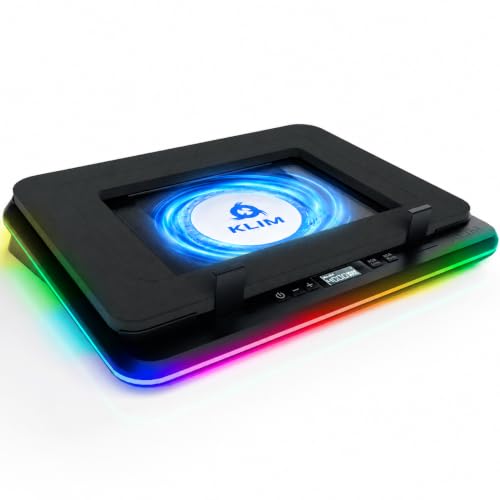
| High-Performance Pro | Cooling Type: Multi-fan high-speed pad (4 fans) | Power Source: Dual: DC wall plug or USB-C from laptop | Adjustable Angles/Ergonomics: Built-in ergonomic design (implied, fits up to 17″) | VIEW LATEST PRICE | Read Our Analysis |
More Details on Our Top Picks
AmRunJe Dual 120mm USB 5V Cooling Fans
Should you need a simple, portable cooling boost for consoles, routers, or cramped AV cabinets, the AmRunJe dual 120mm USB fans are a great choice— they plug into any USB power source and give you two 77 CFM fans with three-speed control while staying quiet at about 32 dBA. You’ll get a 2-pack of 120 x 120 x 25 mm brushless fans that draw 0.25A at 5V and spin up to 2000 RPM. The metal guard protects hands, and the plug-and-play USB compatibility means you can power them from chargers, power banks, consoles, or USB outlets for targeted airflow.
- Cooling Type:External USB-driven dual fans (portable)
- Power Source:USB 5V (any USB power bank/charger/port)
- Adjustable Angles/Ergonomics:Not specified as adjustable (portable placement)
- Noise Characteristics:32 dBA
- Compatibility / Supported Laptop Size:Generic small-space devices (computers, routers, etc.)
- Lighting / Visual Features:No RGB lighting (metal guard included)
- Additional Feature:Metal safety guard
- Additional Feature:Variable three-speed controller
- Additional Feature:Plug-and-play USB
ChillCore RGB Laptop Cooling Pad with 9 Fans
Should you need aggressive cooling for large gaming rigs, the ChillCore RGB with its nine fans delivers powerful airflow and customizable speeds to keep 15.6–19.3″ laptops running cool under sustained load. You’ll appreciate top-and-bottom vents and multiple fan speed modes that target hotspots during long sessions. Touch buttons and an LCD let you change fan speed and pick from 10 RGB light modes, with a 2–3 second press to toggle lighting. Eight height positions provide ergonomic tilt to reduce neck and back strain. Capacitor-equipped fans run whisper-quiet even at max, and two USB ports handle power and peripheral connections.
- Cooling Type:Multi-fan laptop cooling pad (9 fans)
- Power Source:USB-powered (two USB ports for power/connection)
- Adjustable Angles/Ergonomics:8 height positions for angle adjustment
- Noise Characteristics:Whisper-quiet; reduced-noise capacitors
- Compatibility / Supported Laptop Size:Compatible with 15.6–19.3″ laptops
- Lighting / Visual Features:10 RGB light modes; LCD display shows settings
- Additional Feature:Top/bottom vents
- Additional Feature:LCD mode display
- Additional Feature:Two USB ports
havit HV-F2056 Laptop Cooling Pad 15.6″-17
Should you travel with a 15.6″–17″ gaming laptop and need a slim, lightweight cooler that doubles as a stand, the havit HV-F2056 is a strong pick—its metal mesh surface gives stable support while three ultra-quiet fans keep underside temperatures down without adding distracting noise. You’ll appreciate the ultra-portable build and two angled height settings that raise your screen and improve typing comfort. It’s USB-powered and includes a USB-to-USB cable, plus an extra USB pass-through for peripherals. Take into account that Type-C laptops will need a Type-C-to-USB adapter (not included). It’s optimized for 15.6″–17″ machines and easy to pack.
- Cooling Type:Laptop cooling pad with 3 fans
- Power Source:USB-powered (included USB-to-USB cable)
- Adjustable Angles/Ergonomics:Two adjustable height settings
- Noise Characteristics:Ultra-quiet operation
- Compatibility / Supported Laptop Size:Optimized for 15.6″–17″ laptops
- Lighting / Visual Features:No RGB lighting mentioned (metal mesh surface)
- Additional Feature:Metal mesh surface
- Additional Feature:Ultra-portable slim design
- Additional Feature:Extra USB passthrough
ChillCore RGB Laptop Cooling Pad K1 (15.6–19.3″)
Should you want a compact, high-speed cooler for 15.6–19.3″ laptops, the ChillCore K1 delivers with a 5.5″ turbofan spinning 300–2,200 RPM to pull heat away quickly while staying light at 1.24 kg. You get rapid heat dissipation across 16.85 x 12.44 x 2.28 in, with fan noise between 25–70 dBA for quiet, efficient work or gaming. Eight height settings let you find ergonomic angles to reduce back and neck strain. Ten RGB modes are controlled via a button (hold 2–3 seconds to toggle), though the fan RGB can’t be turned off. A phone holder and USB-A cable are included.
- Cooling Type:Laptop cooling pad with single turbofan (integrated)
- Power Source:USB-A cable (host USB-A required)
- Adjustable Angles/Ergonomics:8 adjustable height settings
- Noise Characteristics:25–70 dBA (quiet to moderate)
- Compatibility / Supported Laptop Size:Compatible with 15.6–19.3″ laptops
- Lighting / Visual Features:10 RGB modes; fan RGB cannot be turned off
- Additional Feature:Built-in phone holder
- Additional Feature:Included USB-A cable
- Additional Feature:5.5″ turbofan
KLIM Turbofrost Gaming Laptop Cooling Pad (Up to 17″)
Should you run heavy games or creative apps on a 15–17″ laptop and desire near-silent, high-output cooling, the KLIM Turbofrost is built for you: four 4,000 RPM fans (16,000 RPM combined) and an aircraft‑grade aluminum surface push serious airflow while adaptive noise‑canceling foam keeps operation quiet, and you’ll get flexible power options plus RGB and USB passthrough for a fully featured setup. You’ll appreciate the anti-dust system and sealed foam that enhance longevity and fit up to 17.3″ machines. Dual power (DC or USB-C), three USB-A ports, 360° RGB with 64 effects, auto-save settings, German engineering, five-year assurance, and 24/7 support round it out.
- Cooling Type:Multi-fan high-speed pad (4 fans)
- Power Source:Dual: DC wall plug or USB-C from laptop
- Adjustable Angles/Ergonomics:Built-in ergonomic design (implied, fits up to 17″)
- Noise Characteristics:Adaptive noise-canceling foam for reduced noise
- Compatibility / Supported Laptop Size:Fits laptops up to 17.3″ (up to 17″)
- Lighting / Visual Features:360° RGB illumination with 64 effects
- Additional Feature:Dual power options
- Additional Feature:Anti-dust system
- Additional Feature:Five-year warranty
Factors to Consider When Choosing a Gaming Cooling Fan
Upon selecting a gaming cooling fan, you should check cooling performance metrics like airflow (CFM) and static pressure to match your system’s needs. Also weigh noise level, size/compatibility, power and connectivity options, and the build material quality for longevity. Those factors together determine whether a fan will actually keep your rig cool, quiet, and reliable.
Cooling Performance Metrics
Consider the core performance metrics before you pick a gaming cooling fan: airflow (CFM) tells you how much air the fan moves and directly affects heat removal. You’ll want higher CFM for high-heat systems. Fan speed (RPM) shows how fast air’s pushed; higher RPMs enhance cooling potential but increase power draw. Static pressure (mmH2O/Pascals) matters whenever you’re pushing air through dense fins or grills—choose higher static pressure for restrictive setups. Check power draw and efficiency (watts/voltage/current) to confirm the fan’s compatible with USB or needs a dedicated supply and won’t unduly raise system thermal load. Balance these metrics—CFM, RPM, static pressure, and power—based on your case layout and cooling targets for peak results.
Noise Level Considerations
Because noise can make or break your gaming experience, you’ll want to weigh sound level and character alongside raw cooling performance. Check dBA ratings: under ~30 dBA is very quiet; above ~50 dBA becomes fatiguing. Compare both idle and maximum noise figures, since peak RPM under load can push sound well beyond typical gaming levels. Recall RPM ties directly to noise—higher speeds enhance airflow but raise dBA, so balance needs matter. Listen for character, not just numbers: broadband white noise is less distracting than high‑pitched tones or rattles at the same dBA. Finally, choose fans with good bearings, rubber mounts, or vibration isolation to cut resonance and mechanical noise; these reduce perceived sound independently of the listed decibel rating.
Compatibility And Size
Should your cooler doesn’t physically fit or connect properly, even the best fan won’t help—so start measuring the available mount area and checking the exact fan dimensions, mounting hole pattern, and power connector type against your laptop or case. Measure length, width and thickness, and pick standard sizes like 120×120×25 mm or slim variants that match space constraints. Confirm mounting hole center-to-center distances or bracket compatibility so installation is secure and doesn’t block ports or components. Check the supported device range—e.g., 15.6–19.3″ laptops or specific chassis form factors—to make certain the cooler’s platform and airflow align with your footprint. Verify clearance for adjustable stands, hinges, vents and accessory slots so the fan assembly won’t obstruct use or storage.
Power And Connectivity
Once you’ve confirmed a cooler will physically fit, check its power and connectivity so it actually runs at the performance you expect. Look at rated voltage and current (for example, 5V at 0.25A versus higher-voltage adapters) to match your power source and estimate draw. Confirm connector type and host port—USB-A, USB-C, or DC barrel—and whether adapters or specific ports are required for your laptop, power bank, or wall outlet. Observe dual power options: plug-and-play USB for convenience or dedicated DC/AC adapters for higher performance. Verify included speed-control electronics and how they change power consumption and peak current at max settings. Finally, consider passthrough or extra USB ports so you can power peripherals while keeping a single host connection.
Build Material Quality
In case you assess build quality, prioritize materials and components that improve heat transfer, durability, and quiet operation: metal housings or high-grade ABS resist warping and conduct heat better, sealed or sleeve-bearing brushless motors and corrosion-resistant blades last longer, and rigid metal mesh or aluminum top plates pull heat away from your laptop more effectively than thin plastic. Also check for anti-vibration mounts, foam dampening, or rubber pads to cut chassis resonance and lower audible noise. Inspect connectors, wiring, and solder joints—thicker gauge wires, reinforced USB/plug housings, and solid soldering reduce heat buildup and failure risk. Favor corrosion-resistant fasteners and coatings in case you game in humid environments. Choosing sturdy materials and clean assembly means fewer failures and steadier thermal performance.
Lighting And Customization
Speculating how much control you need over your fan’s lighting? Decide whether you want addressable RGB with multiple modes—presets, color cycling, and 10+ effects lets you match system aesthetics and switch looks quickly. Check how you’ll control lighting: onboard buttons, a dedicated controller, or software with an LCD/readout—each affects convenience and precision. Verify whether lighting can be fully disabled or dimmed independently of fan speed for low-light setups. Confirm synchronization across multiple fans or components so effects stay unified. Count color options (single, multi, or extensive palettes) and the number of customizable effects. Finally, make certain your settings are saved after power-off; should they not be, you’ll reconfigure lighting at every startup.
