

Consider a cable modem router as the backbone of your home’s digital city, quietly routing traffic so everything runs smooth. You’ll want gear that handles multi-gig throughput, dense device loads, and future Wi‑Fi standards without fuss. This guide compares top 2026 picks—like Motorola’s MG8702 and NETGEAR’s CAX80—so you can match features and price to your needs and avoid costly upgrades down the line.
| Motorola MG8702 DOCSIS 3.1 Cable Modem Router |
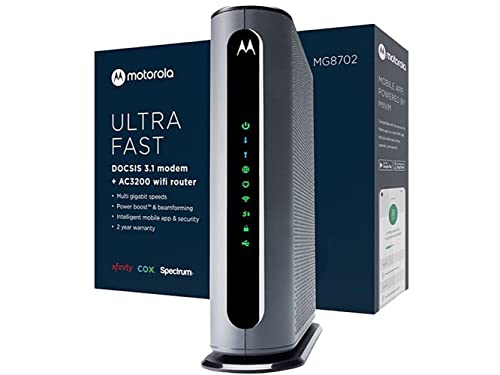
| Future-Proof Power | Modem Type: DOCSIS 3.1 | Router Wi‑Fi Standard: AC3200 (Wi‑Fi 5) | Provider Compatibility: Comcast Xfinity, Cox, Charter Spectrum | VIEW LATEST PRICE | Read Our Analysis |
| Motorola MG7550 Cable Modem + AC1900 Wi‑Fi Router |
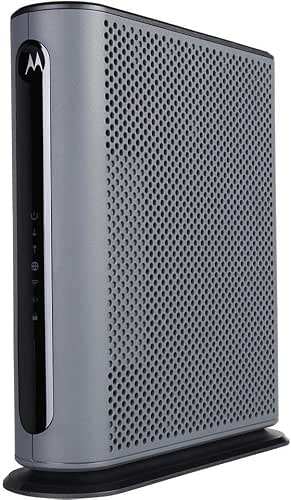
| Reliable Midrange Performer | Modem Type: DOCSIS 3.0 (16×4) | Router Wi‑Fi Standard: AC1900 (Wi‑Fi 5) | Provider Compatibility: Comcast Xfinity, Cox, Charter, Time Warner Cable, Suddenlink, WOW, CableOne, others (cable) | VIEW LATEST PRICE | Read Our Analysis |
| Netgear Nighthawk C7000 Cable Modem WiFi Router |
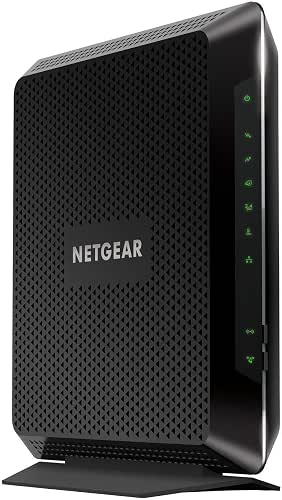
| Solid High-Speed Option | Modem Type: DOCSIS 3.0 (24×8) | Router Wi‑Fi Standard: AC1900 (Wi‑Fi 5) | Provider Compatibility: Xfinity by Comcast, Cox (major cable providers) | VIEW LATEST PRICE | Read Our Analysis |
| NETGEAR Nighthawk C7000 Cable Modem & WiFi Router |

| Easy All-in-One | Modem Type: DOCSIS 3.0 (24×8) | Router Wi‑Fi Standard: AC1900 (Wi‑Fi 5) | Provider Compatibility: Xfinity, Cox (major cable providers) | VIEW LATEST PRICE | Read Our Analysis |
| NETGEAR Nighthawk CAX80 Cable Modem WiFi 6 Router |

| Top-Speed WiFi 6 | Modem Type: DOCSIS 3.1 (32×8) | Router Wi‑Fi Standard: AX6000 (Wi‑Fi 6) | Provider Compatibility: Xfinity, Spectrum, Cox (major cable providers) | VIEW LATEST PRICE | Read Our Analysis |
More Details on Our Top Picks
Motorola MG8702 DOCSIS 3.1 Cable Modem Router
Should you want a future-proof combo that handles multi-gig cable plans and strong whole-home Wi‑Fi, the Motorola MG8702 is ideal: its DOCSIS 3.1 modem supports the fastest cable tiers while the built-in AC3200 router with Power Amplification, Range Improvement, and AnyBeam beamforming delivers reliable, high-speed wireless throughout your home. You’ll cut rental fees—saving up to $168 yearly—while enjoying Comcast Xfinity, Cox, and Charter approval. The mobile app gets you set up fast, manages guest access, monitors usage, runs speed tests, and applies parental controls. Backed by a global brand, it includes two years of free expert support.
- Modem Type:DOCSIS 3.1
- Router Wi‑Fi Standard:AC3200 (Wi‑Fi 5)
- Provider Compatibility:Comcast Xfinity, Cox, Charter Spectrum
- Integrated Combo Unit:Modem + built‑in Wi‑Fi router (combo)
- Ethernet Ports:Gigabit Ethernet ports (built‑in router — exact count not specified)
- App / Management:Intelligent mobile app for setup, guest network, monitoring, parental controls
- Additional Feature:Power Boost technology
- Additional Feature:AnyBeam beamforming
- Additional Feature:2 years expert support
Motorola MG7550 Cable Modem + AC1900 Wi‑Fi Router
Should you want a simple, space‑saving all‑in‑one that cuts rental fees and handles typical cable plans up to about 375 Mbps, the Motorola MG7550 is a solid pick because it combines a 16×4 DOCSIS 3.0 modem with an AC1900 dual‑band router and four Gigabit LAN ports. You’ll get up to 686 Mbps theoretical modem speed, Comcast/Cox/Charter and other major cable provider approvals, and no phone jack. Wireless Power Enhancement, AnyBeam beamforming and DFS reduce interference and extend range. Broadcom chipset, firewall, surge and lightning protection improve reliability. It’s compact, warranty-backed, and saves you rental costs.
- Modem Type:DOCSIS 3.0 (16×4)
- Router Wi‑Fi Standard:AC1900 (Wi‑Fi 5)
- Provider Compatibility:Comcast Xfinity, Cox, Charter, Time Warner Cable, Suddenlink, WOW, CableOne, others (cable)
- Integrated Combo Unit:Modem + built‑in Wi‑Fi router (combo)
- Ethernet Ports:4 × Gigabit Ethernet LAN ports
- App / Management:Router management features (AnyBeam/Power Boost) — setup and configuration supported (no specific app named)
- Additional Feature:DFS frequency support
- Additional Feature:4 Gigabit LAN ports
- Additional Feature:Lightning/power surge protection
Netgear Nighthawk C7000 Cable Modem WiFi Router
In case you want a simple, all-in-one setup that handles cable plans up to 800 Mbps, the Netgear Nighthawk C7000 is a solid choice for Xfinity and Cox customers. You’ll get a combined cable modem and WiFi router that cuts clutter and simplifies setup. It’s optimized for high-speed cable plans and delivers reliable performance for streaming, gaming, and everyday use. Take note of the compatibility limits: it won’t work with Verizon, Comcast, AT&T, CenturyLink, DSL, satellite providers, or services bundled with voice. Should your ISP matches, the C7000 gives straightforward, efficient connectivity without needing separate devices.
- Modem Type:DOCSIS 3.0 (24×8)
- Router Wi‑Fi Standard:AC1900 (Wi‑Fi 5)
- Provider Compatibility:Xfinity by Comcast, Cox (major cable providers)
- Integrated Combo Unit:Modem + built‑in Wi‑Fi router (combo)
- Ethernet Ports:4 × Gigabit Ethernet ports
- App / Management:Manageable via Nighthawk app (setup/management implied)
- Additional Feature:Optimized for 800 Mbps
- Additional Feature:All-in-one slim design
- Additional Feature:Cable-provider focused compatibility
NETGEAR Nighthawk C7000 Cable Modem & WiFi Router
Should you want a simple all-in-one solution that skips rental fees and handles gigabit-class home internet, the NETGEAR Nighthawk C7000 is a solid choice—its 24×8 DOCSIS 3.0 modem and AC1900 dual-band router combo supports up to 800 Mbps plans and covers about 1,800 sq. ft., so you’ll get reliable streaming and gaming without extra equipment. You’ll connect up to 30 devices, use four Gigabit Ethernet ports and a USB 2.0 port, and enjoy 24×8 channel bonding for smooth HD video. It works with Xfinity and Cox, includes NETGEAR Armor, automatic updates, Nighthawk app setup, and saves rental fees.
- Modem Type:DOCSIS 3.0 (24×8)
- Router Wi‑Fi Standard:AC1900 (Wi‑Fi 5)
- Provider Compatibility:Xfinity, Cox (major cable providers)
- Integrated Combo Unit:Modem + built‑in Wi‑Fi router (combo)
- Ethernet Ports:4 × Gigabit Ethernet ports
- App / Management:Setup and management via Nighthawk app
- Additional Feature:Supports 24×8 channel bonding
- Additional Feature:NETGEAR Armor trial
- Additional Feature:Up to 1,800 sq.ft. coverage
NETGEAR Nighthawk CAX80 Cable Modem WiFi 6 Router
In case you need a single device that replaces both your modem and router and handles multi-gig plans, the NETGEAR Nighthawk CAX80 is built for power users and busy households who stream, game, and work from home. You’ll get DOCSIS 3.1 with 32×8 channel bonding and dual-band WiFi 6 (AX6000) for up to 6Gbps and coverage around 2,500 sq. ft., supporting about 30 devices. It works with Xfinity, Charter, and Cox, and supports plans up to 6Gbps but not DSL or fiber ISPs. Ports include four 1GbE, one 2.5GbE (with aggregation), and USB 3.0. Setup and security use the Nighthawk app and NETGEAR Armor.
- Modem Type:DOCSIS 3.1 (32×8)
- Router Wi‑Fi Standard:AX6000 (Wi‑Fi 6)
- Provider Compatibility:Xfinity, Spectrum, Cox (major cable providers)
- Integrated Combo Unit:Modem + built‑in Wi‑Fi router (combo)
- Ethernet Ports:4 × 1 Gig Ethernet ports (+ 1 × 2.5Gb multi‑gig port)
- App / Management:Setup and management via Nighthawk app (includes speed test and usage monitoring)
- Additional Feature:WiFi 6 AX6000 speeds
- Additional Feature:2.5G multi-gig port
- Additional Feature:DOCSIS 3.1 with 32×8 bonding
Factors to Consider When Choosing a Cable Modem Wifi Router
At the time of picking a cable modem WiFi router, you’ll want to confirm ISP compatibility and DOCSIS version support so your device actually works with your service and speeds. Check the Wi‑Fi standard and channel bonding capacity to match your bandwidth needs and reduce congestion. Also evaluate wired port options for wired backups, gaming, or connecting a switch.
Compatibility With ISP
Any cable modem Wi‑Fi router you pick has to match your ISP’s tech and approvals, so check DOCSIS version, speed tiers, and official compatibility before buying. You should verify your ISP officially approves the model to prevent provisioning problems and meet network standards. Confirm the device can handle your maximum subscribed speed so you actually get the bandwidth you pay for. Keep in mind cable modems won’t work with DSL, fiber, or satellite connections, so match the modem to the service type. Also check whether the unit supports bundled services—some modems lack voice or TV passthrough, which could force you to keep ISP hardware. Do this homework once and you’ll avoid unnecessary returns, fees, and slowdowns.
DOCSIS Version Support
Because DOCSIS defines how your cable modem talks to the ISP, picking the right version is essential for speed and longevity: choose DOCSIS 3.1 should you want future-proofing and full use of multi-gig plans. DOCSIS 3.1 supports up to 10 Gbps downstream and improves network efficiency, so it handles high-demand households and ISP upgrades better than older standards. DOCSIS 3.0 modems with 16×4 or 24×8 channel bonding can serve typical gigabit or lower plans but might struggle with true multi-gig speeds. Older DOCSIS versions can bottleneck throughput and reliability, so verify compatibility with your ISP and plan. Opting for a 3.1 modem-router protects your investment and avoids premature replacement.
Wi‑Fi Standard And Speed
Want the fastest, most reliable wireless for your home? Choose the right Wi‑Fi standard and speed. Wi‑Fi 6 (AX) delivers higher data rates, greater capacity, and better performance in crowded environments than Wi‑Fi 5 (AC), so pick AX when you stream, game, or have many devices. Look at dual‑band routers: 2.4 GHz gives range and penetration, 5 GHz gives faster throughput at shorter distances. Router labels like AC1900 or AX6000 indicate combined maximum speeds across bands — use them to compare headroom, not guaranteed real‑world rates. Also check for features such as beamforming, which focuses signals to devices, and channel bonding, which increases throughput utilizing multiple channels. Match standards and features to your usage and ISP plan.
Channel Bonding Capacity
While shopping for a cable modem, pay close attention to its channel bonding capacity — the number of downstream and upstream channels it can use simultaneously — because that directly affects throughput and stability, especially under heavy network load. You’ll want higher bonding counts (like 24×8 or 32×8) should you stream 4K, game, or run multiple devices, since more channels raise peak speeds and reduce performance dips. Greater downstream bonding smooths download throughput during congestion, while upstream bonding enhances uploads and cuts latency for video calls and gaming. Match the modem’s bonding to your ISP plan so you don’t bottleneck available bandwidth. Choose a modem with room to grow: it keeps your connection reliable as usage and speeds increase over time.
Wired Port Options
Should you pick a cable modem Wi‑Fi router, check the wired ports to make sure they match how you actually connect devices: count Gigabit Ethernet ports so you can plug in PCs, consoles, and streamers without extra switches. Prefer models with multiple LAN ports to simplify setup and avoid clutter. Look for multi‑gig LAN or port aggregation when you need speeds above 1 Gbps for a NAS or high‑end workstation. Check for USB ports to attach network storage, printers, or media servers directly. Verify the router includes wired security features like a sturdy firewall to protect connected devices from local and internet threats. Match port types and features to your current and near‑future wired needs for a smoother network experience.
Security And Privacy Features
Because your router is the gateway between your home devices and the internet, prioritize strong security and privacy features as you select a cable modem Wi‑Fi router. Pick devices that support WPA3 (or at least WPA2) to keep strangers off your network. Confirm an integrated firewall is present to block common external attacks. Prefer models with built‑in VPN support and real‑time cybersecurity services to protect traffic and connected devices. Automatic firmware updates are mandatory — they patch vulnerabilities without you having to recall. Look for actionable network security alerts so you can respond quickly to threats. In case you have children or guests, use granular parental controls to limit sites, schedules, and app access while preserving your total network privacy.
Coverage And Device Capacity
Good security keeps intruders out, but you also need a router that reliably covers your home and handles all your gadgets. Coverage area tells you how much space a router can serve—typical ranges run from about 1,800 to 2,500 square feet—so match specs to your floorplan. Device capacity indicates simultaneous connections; expect 20 to 30+ devices on capable models. Choose dual-band or tri-band routers to spread traffic across frequencies and cut congestion. Look for beamforming and channel bonding to focus signals and enhance throughput, improving both range and multi-device performance. Keep in mind physical obstructions and neighboring WiFi will shrink real-world coverage, so place the router centrally and pick higher-spec models should you have thick walls or many active devices.
App And Management Tools
Curious how much control you’ll have over your home network? You’ll want a cable modem WiFi router with an effective app and management tools that make setup and configuration simple, so you can get online fast without tech headaches. Use the mobile app to create guest networks, keeping visitors off your main WiFi and protecting devices. Management apps also give real-time monitoring of usage and speeds, so you can spot congestion and troubleshoot quickly. Parental controls let you restrict content and schedule device access for kids, enforcing safe online habits. Finally, security alerts notify you of threats or unauthorized access, letting you respond promptly and maintain a secure, well-managed home network.
