

Managing multiple zones doesn’t have to be complicated—you can fine‑tune comfort room per room with the right smart thermostat and sensors. You’ll get clearer scheduling, better energy reports, and fewer hot or cold spots whenever devices like Vine, Emerson Sensi, and Nest work together with wireless sensors and app control. I’ll run through the top options, what to watch for, and how to pick the best fit for your HVAC setup.
| Vine Smart WiFi Thermostat with Nightlight (C-Wire) |
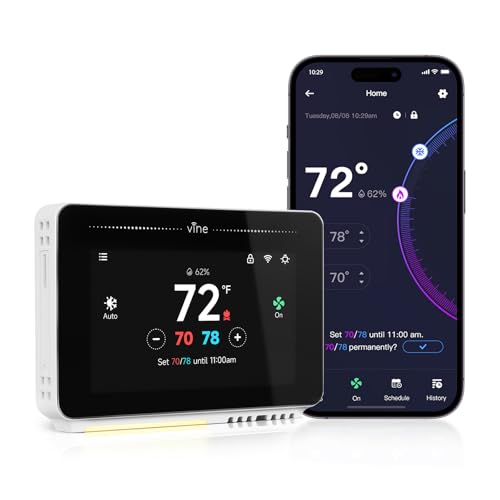
| Best for Ease of Use | Wi‑Fi / Remote Control: Remote access via Vine Thermostat app or Smart Life app (Wi‑Fi) | App Integration: Vine Thermostat app / Smart Life app | Scheduling / Automation: 7‑day, 8‑period programmable scheduling; Auto Home/Away | VIEW LATEST PRICE | Read Our Analysis |
| Emerson Sensi Touch Wi‑Fi Smart Thermostat (ST75) |

| Best Energy Saver | Wi‑Fi / Remote Control: Remote control via Sensi mobile app (Wi‑Fi) | App Integration: Sensi mobile app (Android/iOS) | Scheduling / Automation: Flexible scheduling with usage reports (ENERGY STAR) | VIEW LATEST PRICE | Read Our Analysis |
| Honeywell Smart Room Sensor for T9/T10 Thermostats |

| Best for Multi‑Room Sensing | Wi‑Fi / Remote Control: Remote control via Resideo app (uses with T9/T10 thermostats; sensor connects to thermostat ecosystem) | App Integration: Resideo app | Scheduling / Automation: Room‑focused schedules (e.g., bedrooms at night) | VIEW LATEST PRICE | Read Our Analysis |
| Nest T3016US – Programmable Thermostat |

| Best for Smart Automation | Wi‑Fi / Remote Control: Remote control via Nest app (Wi‑Fi) | App Integration: Google Nest app | Scheduling / Automation: Auto‑Schedule (learns routines) and Home/Away Assist | VIEW LATEST PRICE | Read Our Analysis |
| WiFi Single-Stage Smart Thermostat with App Control |

| Best Budget Simplicity | Wi‑Fi / Remote Control: Remote control via smartphone app (2.4 GHz Wi‑Fi) | App Integration: Proprietary smartphone app | Scheduling / Automation: 7‑day programmable, multi‑period daily scheduling | VIEW LATEST PRICE | Read Our Analysis |
More Details on Our Top Picks
Vine Smart WiFi Thermostat with Nightlight (C-Wire)
Should you need a straightforward, budget-friendly smart thermostat for multi-zone setups that still offers modern conveniences, the Vine Smart WiFi Thermostat with Nightlight is a solid pick—just make sure you have a C‑wire. You’ll get broad 24V system compatibility (about 90%) including conventional and heat pump systems, and a QR code to pre-check compatibility. The 4.3-inch touchscreen doubles as a gentle nightlight. Use the Vine or Smart Life app for remote control, or Alexa and Google Home for voice commands. Features include 7-day/8-period scheduling, Auto Home/Away, weather forecasts, fan control, OTA updates, encrypted data, and easy DIY install.
- Wi‑Fi / Remote Control:Remote access via Vine Thermostat app or Smart Life app (Wi‑Fi)
- App Integration:Vine Thermostat app / Smart Life app
- Scheduling / Automation:7‑day, 8‑period programmable scheduling; Auto Home/Away
- Compatibility Requirement (C‑wire):Common wire (C‑wire) required
- Energy / Efficiency Focus:Auto Home/Away mode and weather forecasting to save HVAC energy
- DIY Setup / Installation:Quick DIY install with wall plate, wire labels, guide and online videos (≈30 minutes)
- Additional Feature:4.3-inch touchscreen display
- Additional Feature:Built-in gentle nightlight
- Additional Feature:Weather forecasting functionality
Emerson Sensi Touch Wi‑Fi Smart Thermostat (ST75)
Should you want a touchscreen thermostat that’s easy to install and manage across multiple zones, the Emerson Sensi Touch ST75 fits the bill: it gives you a large color display, step-by-step app setup, and remote control so you can schedule and monitor each zone from your phone while benefiting from ENERGY STAR efficiency and usage reports. You’ll get a sleek touchscreen in black, white, or silver, illuminated easy-click terminals, and a built-in level for DIY setup—just make sure you have a common wire. The Sensi app gives usage reports, equipment alerts, and maintenance notifications, and Emerson does not sell your personal information.
- Wi‑Fi / Remote Control:Remote control via Sensi mobile app (Wi‑Fi)
- App Integration:Sensi mobile app (Android/iOS)
- Scheduling / Automation:Flexible scheduling with usage reports (ENERGY STAR)
- Compatibility Requirement (C‑wire):Common wire (C‑wire) required
- Energy / Efficiency Focus:ENERGY STAR certified; ~23% potential HVAC energy savings; usage reports
- DIY Setup / Installation:DIY install with built‑in level, illuminated terminals, step‑by‑step app instructions
- Additional Feature:ENERGY STAR certified
- Additional Feature:Usage reports & alerts
- Additional Feature:Illuminated easy-click terminals
Honeywell Smart Room Sensor for T9/T10 Thermostats
In case you want precise comfort across several rooms, the Honeywell Smart Room Sensor for T9/T10 thermostats is ideal — it measures temperature and humidity in multiple rooms and lets you prioritize which spaces the thermostat follows so occupied rooms stay comfortable as people move through the house. You’ll pair sensors with T9/T10 Series 3 or 4 thermostats (T9 sold separately) and position them without tools. Sensors average selected room readings, and motion detection tells the system whether someone’s just passing through or staying. Set schedules to focus sensing (bedrooms at night), and control everything remotely via the Resideo app.
- Wi‑Fi / Remote Control:Remote control via Resideo app (uses with T9/T10 thermostats; sensor connects to thermostat ecosystem)
- App Integration:Resideo app
- Scheduling / Automation:Room‑focused schedules (e.g., bedrooms at night)
- Compatibility Requirement (C‑wire):Designed to work with T9/T10 thermostats (thermostat compatibility required; sensor pairs—thermostat provides power)
- Energy / Efficiency Focus:Prioritizes occupied rooms to maintain targeted comfort (helps efficient heating/cooling)
- DIY Setup / Installation:Simple, tool‑free DIY setup (connect via app)
- Additional Feature:Multi-room temperature averaging
- Additional Feature:Motion-based occupancy sensing
- Additional Feature:Tool-free sensor setup
Nest T3016US – Programmable Thermostat
Provided that you want a thermostat that learns your routines and reduces hands-on programming, the Nest T3016US (Google Nest Learning Thermostat) is a strong pick — it auto-schedules temperature changes, uses Home/Away Assist to cut HVAC use whenever nobody’s home, and lets you adjust settings remotely via the Nest app. You’ll get Energy History to review usage and see why changes happened, plus the Nest Leaf to guide energy-saving temperatures. It can reduce manual programming and lower bills, but check system compatibility with Google’s Nest Compatibility Checker before buying to make certain proper installation and full feature support for your multi-zone setup.
- Wi‑Fi / Remote Control:Remote control via Nest app (Wi‑Fi)
- App Integration:Google Nest app
- Scheduling / Automation:Auto‑Schedule (learns routines) and Home/Away Assist
- Compatibility Requirement (C‑wire):Requires compatibility check (Nest compatibility checker; many systems require C‑wire or adapter)
- Energy / Efficiency Focus:Energy History, Nest Leaf, and Home/Away for energy savings
- DIY Setup / Installation:User-setup with compatibility check and guided installation via Nest resources
- Additional Feature:Auto‑Schedule learning feature
- Additional Feature:Nest Leaf energy cue
- Additional Feature:Energy History insights
WiFi Single-Stage Smart Thermostat with App Control
Should you want simple, app-driven control for a single-stage heating and cooling system, this WiFi smart thermostat is a great fit — it gives you remote temperature adjustments, 7-day programmable schedules, and real-time system monitoring via a smartphone app. You’ll use the app’s intuitive controls to set multi-period daily schedules, reduce unnecessary runtime, and keep indoor temperatures steady with ±1°F accuracy. The backlit LCD helps in low light. It requires 2.4 GHz WiFi and a 24V C-wire (no battery backup). Verify compatibility: single-stage gas/oil/electric furnaces only; incompatible with heat pumps, multi-stage systems, line-voltage, mini-splits, PTACs, or RV units.
- Wi‑Fi / Remote Control:Remote control via smartphone app (2.4 GHz Wi‑Fi)
- App Integration:Proprietary smartphone app
- Scheduling / Automation:7‑day programmable, multi‑period daily scheduling
- Compatibility Requirement (C‑wire):Requires 24V common (C‑wire); no battery backup
- Energy / Efficiency Focus:Scheduling to reduce unnecessary HVAC runtime and maintain steady temps
- DIY Setup / Installation:DIY install with wiring diagrams; requires verifying C‑wire and system compatibility
- Additional Feature:±1°F temperature accuracy
- Additional Feature:Backlit LCD display
- Additional Feature:Single-stage HVAC only compatibility
Factors to Consider When Choosing a Smart Thermostat For Multiple Zones
Upon selecting a smart thermostat for multiple zones, you’ll want to check zone compatibility and whether the system supports additional sensors. Consider sensor placement, wiring requirements, and how flexible the scheduling options are for different rooms. Also make sure remote access is reliable so you can adjust settings from anywhere.
Zone Compatibility
Because multi‑zone HVAC setups can vary widely, you’ll need to confirm your system actually supports zoning and that each zone accepts independent thermostat inputs rather than a single centralized control. Next, verify wiring and controls per zone—most smart thermostats require a 24V common (C‑wire) and won’t work with line‑voltage (120–240V) or proprietary control signals used by some panels. Make certain the thermostat ecosystem explicitly supports multi‑zone configurations, damper control, or coordination across multiple units to avoid conflicting setpoints. Check how many zones the system can manage and whether additional remote or wireless sensors are supported so you can prioritize occupied rooms or average readings. Finally, assess communication between thermostats and the zone controller (wired, wireless, or hub), making sure range, encryption, and reliability.
Sensor Placement
Good sensor placement makes a multi‑zone smart thermostat actually reflect how you live — put sensors in the rooms you use most (living room, primary bedroom) rather than near vents, windows, or direct sunlight so readings match real comfort; mount them about 4–5 feet (1.2–1.5 m) on interior walls away from doors, drafts, and heat‑generating appliances, use at least one sensor per major zone (add 1–2 more in large or multi‑activity areas), and, provided they track occupancy, space them so coverage overlaps slightly (roughly 30–40 ft / 9–12 m line‑of‑sight) to avoid false triggers while placing bedroom sensors away from fans and vents and prioritizing them in sleep schedules. Position sensors where you spend time, not where airflow is strongest, to get usable averages and reliable occupancy detection.
Wiring Requirements
In case you’re wiring multiple smart thermostats, start with confirming each location has a dedicated 24V common (C‑wire) and enough conductors for the system’s controls. Verify C‑wires initially because most Wi‑Fi units need continuous power. For zone valve or damper setups, wire thermostats to the zone controller or relay instead of the HVAC, following the zone panel’s terminal mapping. With heat pumps or multi‑stage systems, make certain provision for O/B, aux/emergency heat, Y2/W2 and other stage wires so sequencing works correctly. Label and map every conductor at both the thermostat and the furnace or zone controller to prevent cross‑wiring between zones. Use low‑voltage thermostat cable (18–22 AWG) and keep runs reasonably short to avoid voltage drop or signal issues.
Scheduling Flexibility
As you’re managing multiple zones, pick thermostats that let each zone run its own schedule with multiple daily periods and easy edits so rooms with different usage patterns get the right temperature at the right times. Choose devices that offer independent 7-day scheduling with 4–8 periods per day so you can set wake, leave, return, and sleep setpoints for each zone. Make sure you can create, edit, and apply recurring schedules quickly and add temporary holds or vacation overrides per zone without changing others. Prefer schedulers that integrate occupancy features—motion sensors or auto home/away—so unused zones reduce conditioning automatically. Also confirm you can view upcoming setpoints and receive alerts for every zone to stay informed and proactive.
Remote Access
After setting reliable schedules for each zone, you’ll want remote access that gives full control and visibility from anywhere. Make sure each zone’s thermostat supports independent remote access so you can monitor and adjust temps from one app or account. Verify cloud-based multi-zone control offers user permissions and strong encryption to protect HVAC credentials while allowing trusted remote adjustments. The app should show real-time status—current temperature, setpoint, system mode, and fan state—for every zone and push alerts for equipment faults or extreme conditions. Confirm remote scheduling and scene controls per zone (different 7-day/8-period schedules) so you can tailor occupancy. Also look for remote diagnostics and per-zone usage reports to spot inefficient zones and optimize setpoints.
Energy Reporting
While you’re evaluating smart thermostats for multi-zone systems, prioritize energy reporting that breaks consumption down per zone (kWh or BTU equivalents and runtime hours) so you can see which areas actually drive heating and cooling loads. You’ll want reports that correlate zone setpoints and schedules with energy use—daily and weekly graphs that show setpoint vs. energy consumed help judge savings from zone-specific scheduling. Verify measurement granularity (hourly, daily) and that reports use reliable zone sensors and stage-by-stage runtime tracking. Choose platforms that flag anomalies and equipment issues—excessive cycling, long runtimes, filter alerts—so you can act before efficiency drops. Finally, make sure cloud history retention and exportable CSV/JSON data so you can run custom analyses and compare seasonal zone performance over time.
Voice Integration
Consider about how voice control will actually work across your zones: you’ll want an assistant that recognizes named zones and accepts simultaneous, zone-specific commands (like “set upstairs to 72 and downstairs to 68”), authenticates users or uses voice profiles for personalized preferences, and can trigger routines or scenes that affect groups of zones. You should confirm the platform addresses zones individually, supports simultaneous commands, and exposes zone grouping in routines. Verify user authentication or voice profiles to prevent unauthorized changes and to apply per-zone preferences. Check that voice-triggered schedules or scenes can target specific zones. Make certain low latency and reliable cloud/local processing so dampers and vents respond in correct sequence to avoid short-cycling. Review privacy controls, local processing options, and how voice data ties to zone logs.
