

You want a router that keeps your kids safe without making your life harder, and in 2026 that means mesh-ready hardware, WPA3 security, and parental controls that actually work. I’ll compare top picks—from ASUS Wi‑Fi 7 to budget Wi‑Fi 6 models—and explain which features matter most for coverage, device limits, content filtering, and remote management so you can pick the right fit for your family.
| ASUS RT-BE55 WiFi 7 Dual-Band Smart AiMesh Router |
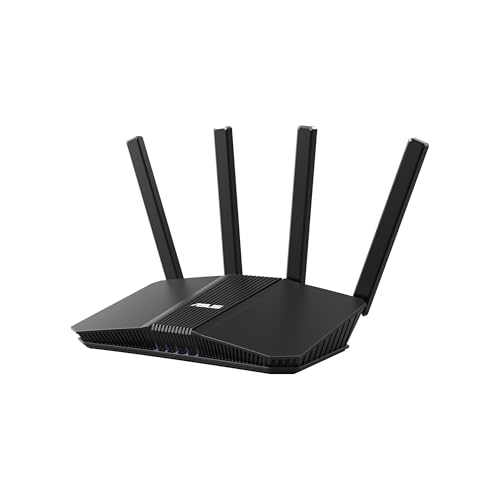
| Future-Proof Powerhouse | Wi‑Fi Standard: Wi‑Fi 7 (802.11be) | Dual‑Band Support: Dual‑band (2.4 & 5 GHz) | Parental Controls: Yes (SSID segmentation, parental controls) | VIEW LATEST PRICE | Our Analysis |
| TP-Link Archer A54 AC1200 Dual-Band WiFi Router |

| Budget Starter | Wi‑Fi Standard: Wi‑Fi 5 (802.11ac, AC1200) | Dual‑Band Support: Dual‑band (2.4 & 5 GHz) | Parental Controls: Yes (parental controls) | VIEW LATEST PRICE | Our Analysis |
| ASUS RT-AX3000S WiFi 6 Dual-Band Router |

| Best for Families | Wi‑Fi Standard: Wi‑Fi 6 (802.11ax) | Dual‑Band Support: Dual‑band (2.4 & 5 GHz) | Parental Controls: Yes (parental control scheduling) | VIEW LATEST PRICE | Our Analysis |
| TP-Link Archer AX10 WiFi 6 Router (Dual-Band) |

| Value Wi‑Fi 6 | Wi‑Fi Standard: Wi‑Fi 6 (802.11ax) | Dual‑Band Support: Dual‑band (2.4 & 5 GHz) | Parental Controls: Yes (parental controls) | VIEW LATEST PRICE | Our Analysis |
| ASUS RT-AX1800S WiFi 6 Dual-Band Router |

| Parental Control Focus | Wi‑Fi Standard: Wi‑Fi 6 (802.11ax) | Dual‑Band Support: Dual‑band (2.4 & 5 GHz) | Parental Controls: Yes (built‑in parental controls) | VIEW LATEST PRICE | Our Analysis |
More Details on Our Top Picks
ASUS RT-BE55 WiFi 7 Dual-Band Smart AiMesh Router
Should you want fast, future-ready home Wi‑Fi with built‑in parental controls and easy expandability, the ASUS RT‑BE55 is a strong pick: it delivers Wi‑Fi 7 speeds up to 3600 Mbps with Multi‑Link Operation and 4K‑QAM, supports segmented SSIDs for parents and IoT devices, and uses Smart AiMesh to extend coverage—so you can prioritize family devices, enforce rules, and scale whole‑home coverage without juggling complex setups. You’ll get dual-band performance, AI‑assisted Smart AiMesh for about 2,000 ft², four internal antennas with high‑power front‑end modules, a 2.5G Ethernet WAN for sturdy backhaul, commercial‑grade AiProtection, and advanced VPNs.
- Wi‑Fi Standard:Wi‑Fi 7 (802.11be)
- Dual‑Band Support:Dual‑band (2.4 & 5 GHz)
- Parental Controls:Yes (SSID segmentation, parental controls)
- Mesh/Extendability:Smart AiMesh (ASUS mesh)
- Wired Ethernet Ports:2.5G Ethernet WAN (plus LAN ports implied)
- Built‑in Security / VPN:AiProtection (commercial‑grade) and advanced VPNs
- Additional Feature:Multi-Link Operation (MLO)
- Additional Feature:4K‑QAM modulation
- Additional Feature:2.5G Ethernet WAN
TP-Link Archer A54 AC1200 Dual-Band WiFi Router
Should you want an affordable, family-friendly router that balances parental controls with reliable dual-band performance, the TP-Link Archer A54 is a solid pick. You’ll get AC1200 speeds (867 Mbps on 5 GHz, 300 Mbps on 2.4 GHz) and coverage up to about 1,000 sq. ft. with four external antennas. It works with all major ISPs (a modem is usually required), supports EasyMesh, WPA3 security, IPv6, guest Wi-Fi, and IPTV-friendly features like IGMP snooping. Manage settings and firmware via the Tether app. Physical ports include four 10/100 Mbps Ethernet jacks; check warranty details with TP-Link.
- Wi‑Fi Standard:Wi‑Fi 5 (802.11ac, AC1200)
- Dual‑Band Support:Dual‑band (2.4 & 5 GHz)
- Parental Controls:Yes (parental controls)
- Mesh/Extendability:EasyMesh compatible
- Wired Ethernet Ports:Four 10/100 Mbps Fast Ethernet ports
- Built‑in Security / VPN:WPA3 security (management via app) — supports standard router security features
- Additional Feature:EasyMesh compatible
- Additional Feature:Four external antennas
- Additional Feature:Four 10/100 Mbps ports
ASUS RT-AX3000S WiFi 6 Dual-Band Router
Should you need a fast, future-proof router that also makes managing kids’ online time simple, the ASUS RT-AX3000S is a solid pick. You’ll get WiFi 6 (802.11ax) with 1024-QAM, OFDMA and MU-MIMO for efficient connections and about 3000 Mbps total—574 Mbps on 2.4 GHz and 2402 Mbps on 5 GHz. It handles many devices well thanks to improved spectral efficiency. Use AiMesh to expand coverage and enjoy seamless roaming with compatible nodes. Security and controls include a built-in VPN, Instant Guard for remote access, and parental control scheduling so you can limit online time easily.
- Wi‑Fi Standard:Wi‑Fi 6 (802.11ax)
- Dual‑Band Support:Dual‑band (2.4 & 5 GHz)
- Parental Controls:Yes (parental control scheduling)
- Mesh/Extendability:AiMesh compatible
- Wired Ethernet Ports:Gigabit LAN/WAN capability (total networking ~3000 Mbps; includes WAN/LAN)
- Built‑in Security / VPN:Built‑in VPN and security features (Instant Guard)
- Additional Feature:1024‑QAM modulation
- Additional Feature:OFDMA support
- Additional Feature:Instant Guard remote access
TP-Link Archer AX10 WiFi 6 Router (Dual-Band)
Should you need an affordable Wi‑Fi 6 router that handles multiple kids’ devices and integrates parental controls, the TP‑Link Archer AX10 is a solid pick. You get AX1500 speeds across dual bands (2.4 GHz/5 GHz) with OFDMA, MU‑MIMO, and 1024‑QAM to reduce latency whenever several phones, tablets, or consoles stream simultaneously. Four high‑gain antennas and beamforming improve coverage; a dual‑core 900 MHz CPU and four Gigabit LAN ports keep wired and wireless traffic smooth. It’s OneMesh and Alexa compatible, backward compatible with older devices, and works with common ISPs (modem usually required). Manufacturer support and warranty are available.
- Wi‑Fi Standard:Wi‑Fi 6 (802.11ax)
- Dual‑Band Support:Dual‑band (2.4 & 5 GHz)
- Parental Controls:Yes (parental controls)
- Mesh/Extendability:OneMesh compatible
- Wired Ethernet Ports:Four Gigabit Ethernet LAN + Gigabit WAN
- Built‑in Security / VPN:WPA3 support and standard security features
- Additional Feature:Dual‑core 900 MHz CPU
- Additional Feature:Four Gigabit LAN ports
- Additional Feature:Alexa voice compatibility
ASUS RT-AX1800S WiFi 6 Dual-Band Router
Provided that you need a straightforward, budget-friendly WiFi 6 router that keeps kids and devices under control, the ASUS RT-AX1800S is a solid pick—its built-in parental controls and AiProtection let you set limits and block threats without extra subscriptions. You’ll get dual-band 802.11ax performance with 2×2 streams, 80 MHz channels, 1024-QAM, MU-MIMO and OFDMA for better multi-device efficiency. Four external antennas, a dual-core processor, one Gigabit WAN and four Gigabit LAN ports handle gaming, streaming and smart home gear. It supports AiMesh, Instant Guard VPN, and Trend Micro-powered security, all backed via ASUS warranty and updates.
- Wi‑Fi Standard:Wi‑Fi 6 (802.11ax)
- Dual‑Band Support:Dual‑band (2.4 & 5 GHz)
- Parental Controls:Yes (built‑in parental controls)
- Mesh/Extendability:AiMesh compatible
- Wired Ethernet Ports:One Gigabit WAN + four Gigabit LAN ports
- Built‑in Security / VPN:AiProtection Classic (Trend Micro) and built‑in VPN
- Additional Feature:4 external antennas
- Additional Feature:AiProtection Classic (Trend Micro)
- Additional Feature:Instant Guard one‑click VPN
Factors to Consider When Choosing a Wi‑Fi Router With Parental Controls
Upon choosing a router with parental controls, you’ll want clear device management options so you can see and control every connected gadget. Make sure it supports scheduling and time limits, strong content filtering, and flexible user/profile controls to match each family member’s needs. Also check for reliable remote monitoring access so you can manage settings from anywhere.
Device Management Options
Although some routers only offer basic on/off controls, you’ll want one that lets you manage each device individually—so you can set unique schedules, time limits, and access rules for a child’s phone, tablet, or console. Check for per-device management and confirm the router applies rules to specific MAC addresses or profiles, not just the whole network. Look for user accounts and role-based controls so guardians can adjust settings remotely while preventing kids from changing them. Verify content-filtering categories plus customizable block/allow lists to tailor access by age or activity. Make certain the router supports automated time-based rules for bedtimes and pauses. Prefer models with detailed per-device activity logs and reports showing usage, blocked attempts, and trends to refine policies.
Scheduling And Time Limits
Beyond per-device rules, you’ll want scheduling and time-limit controls that actually enforce your household routines. Look for per-device and per-SSID time windows so kids and IoT gear follow different bedtimes. Pick routers supporting recurring schedules (daily/weekday/weekend) plus one-off exceptions for holidays or special events. Use granular time limits that cap total daily screen time as well as fixed on/off blocks to manage cumulative usage. Make certain rules apply at the router level rather than relying solely on device apps, so kids can’t bypass limits by changing a phone’s settings. Finally, choose systems with remote schedule management and logging so caregivers can adjust limits and review whenever devices were online or blocked without needing physical access to the router.
Content Filtering Capabilities
Should you want reliable control over what’s accessible on your home network, pick a router with strong content-filtering that works at the DNS or gateway level and lets you tailor blocks per category (adult, violence, gambling, social media) per SSID, device, or user profile. You’ll want multiple, regularly updated filter categories so restrictions match age-appropriate needs and new sites. Prefer filters that block network-wide so devices without local apps stay covered. Look for granular rules and time-based exceptions so you can adjust limits for homework or bedtime. Real-time logging and reporting of blocked requests and attempted access help you spot gaps and tweak policies. Finally, choose a system that supports custom allow/block lists to fix false positives and keep essential sites reachable.
User And Profile Controls
Set up distinct user profiles so each child or device gets rules that match their age and habits: time limits, content filters, and schedules should be assignable per profile. You’ll want a router that supports multiple profiles and device grouping via MAC, IP, or name so phones, tablets, consoles, and IoT gear receive appropriate rules. Make sure profiles can enforce daily schedules, bedtime blocks, and total screen-time caps, plus offer temporary overrides through parent-approved passes. Prefer systems that log activity—visited sites, blocked attempts, and per-profile bandwidth—so you can tweak limits based on real behavior. Finally, verify profile management works smoothly in both mobile app and web interfaces, uses secure parental authentication, and lets you update rules remotely as needed.
Remote Monitoring Access
Profiles and schedules are only useful whenever you can manage them from wherever you are, so make sure the router offers secure remote monitoring and control. You’ll want encrypted access—VPN or an HTTPS cloud portal—so you can view and change settings off‑site without exposing your network. Verify multi‑factor authentication and strong password policies for remote admin accounts to block unauthorized changes. Check that logs show timestamped device activity and visited domains so you can audit behavior and tweak rules based on facts. Confirm you can apply and edit profiles, schedules, and content filters per device or user remotely, letting you respond in real time. Finally, enable audit and notification features like push or email alerts to stay informed of violations or new devices.
Ease Of Setup
Getting parental controls up and running should be quick and painless: look for routers with guided setup wizards or mobile apps that walk you through firmware checks, device detection, and profile assignment so you can enable protections in 10–15 minutes. You’ll want a clear device discovery interface showing names, IPs and MACs so you can assign profiles and rules to each child’s gadget without guessing. Prefer a single dashboard that supports granular rules—time limits, bedtimes, content filters, and app/category blocks—to reduce configuration errors. Choose models with secure remote management so you can tweak restrictions or pause internet from anywhere. Finally, verify the parental-control reporting is easy to understand so you can fine-tune settings quickly without technical know-how.
Reporting And Usage Logs
While it’s easy to focus on time limits and filters, the value of parental controls really shows up in clear reporting and logs you can act on. You want per-device usage logs that show bytes/GB and timestamps so you can spot which device hogs bandwidth and at what point. Look for website and app histories or category summaries (social, streaming, gaming) to identify content types quickly. Prefer reports that distinguish real-time activity from historical aggregates (daily/weekly/monthly) and highlight peak-usage periods to guide rule tweaks. Choose systems that export CSV or PDF and send scheduled email summaries for long-term review. Also make sure security events—blocked sites or attempts during restricted hours—appear alongside usage so you can correlate enforcement with behavior.
Compatibility With Mesh
Provided you plan to use range extenders or a multi-node system, make sure the router and any satellites speak the same mesh protocol so parental rules follow devices wherever they connect. You should confirm the router supports the mesh standard you’ll use (proprietary, EasyMesh, or vendor-neutral) so settings propagate. Check that parental policies—profiles, schedules, filters, usage limits—are centrally managed and synchronized across nodes, not stored only on the primary unit. Make certain the system offers segmented SSIDs or device-grouping across nodes so kids’ devices and IoT gear keep distinct restrictions everywhere. Verify firmware updates and remote-management for parental controls apply automatically to all satellites. Finally, confirm the mesh backhaul preserves QoS and inspection functions required for reliable time-based access and content filtering.
