

Picture your upstairs office keeps a steady 300 Mbps from a basement router after you swapped to a TP‑Link AX21—your video calls stop stuttering. You’ll want routers with strong antennas, beamforming, and efficient multi‑client tech to get that kind of range. I’ll compare five models from budget AX1500s to high‑end AXE6600s, explain placement and channel tips, and show which fits your home so you can pick confidently.
| Tenda RX2 Pro AX1500 WiFi 6 Dual-Band Router |

| Best for Coverage | Wi‑Fi Standard: Wi‑Fi 6 (802.11ax) | Bands: Dual‑band (2.4 GHz + 5 GHz) | Security (Encryption): WPA3 support | VIEW LATEST PRICE | Read Our Analysis |
| TP-Link Archer AX21 AX1800 WiFi 6 Router |

| Best Value | Wi‑Fi Standard: Wi‑Fi 6 (802.11ax) | Bands: Dual‑band (2.4 GHz + 5 GHz) | Security (Encryption): Advanced security (vendor claims; WPA3 implied/modern) | VIEW LATEST PRICE | Read Our Analysis |
| H3C AX5400 WiFi 6 Whole-Home Gaming Router |
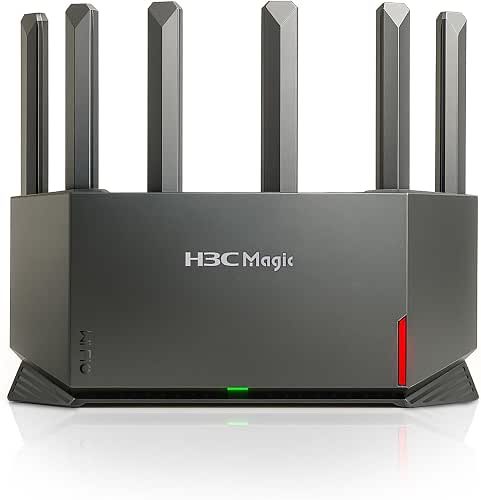
| Best for Gaming | Wi‑Fi Standard: Wi‑Fi 6 (802.11ax) | Bands: Dual‑band (2.4 GHz + 5 GHz) | Security (Encryption): WPA3 support | VIEW LATEST PRICE | Read Our Analysis |
| MSI Radix AXE6600 WiFi 6E Tri-Band Gaming Router |

| Premium Performance | Wi‑Fi Standard: Wi‑Fi 6E (Wi‑Fi 6 extended to 6 GHz) | Bands: Tri‑band (2.4 GHz + 5 GHz + 6 GHz) | Security (Encryption): WPA3 (Wi‑Fi 6E device — modern security) | VIEW LATEST PRICE | Read Our Analysis |
| TP-Link Archer AXE75 AXE5400 WiFi 6E Router |

| Best Tri-Band Choice | Wi‑Fi Standard: Wi‑Fi 6E (Wi‑Fi 6 extended to 6 GHz) | Bands: Tri‑band (2.4 GHz + 5 GHz + 6 GHz) | Security (Encryption): WPA3 support | VIEW LATEST PRICE | Read Our Analysis |
More Details on Our Top Picks
Tenda RX2 Pro AX1500 WiFi 6 Dual-Band Router
Should you need long-range Wi‑Fi for a medium to large home without breaking the bank, the Tenda RX2 Pro AX1500 is a smart pick: its Wi‑Fi 6 tech plus five 6 dBi external antennas and a high‑performance signal module push coverage and stability while MU‑MIMO, OFDMA, and automatic band steering keep multiple devices responsive. You’ll get combined theoretical speeds up to 1501 Mbps (300 Mbps on 2.4 GHz, 1201 Mbps on 5 GHz) and four gigabit Ethernet ports for wired devices. WPA3 and IPv6 support secure modern networks, while the Tenda app lets you manage remotely and set parental controls.
- Wi‑Fi Standard:Wi‑Fi 6 (802.11ax)
- Bands:Dual‑band (2.4 GHz + 5 GHz)
- Security (Encryption):WPA3 support
- Parental Controls:Parental controls via Tenda App (time/behavior management)
- App/Remote Management:Remote management via Tenda APP
- Gigabit Wired Ports:Four gigabit Ethernet ports
- Additional Feature:Five 6 dBi antennas
- Additional Feature:Automatic band steering
- Additional Feature:Real-time router monitoring
TP-Link Archer AX21 AX1800 WiFi 6 Router
Provided that you need reliable long-range Wi‑Fi on a budget, the TP‑Link Archer AX21 (AX1800) delivers Wi‑Fi 6 speeds, beamforming, and four high‑gain antennas to reach distant devices and cut congestion on busy networks. You’ll get dual-band AX performance (up to 1.8 Gbps total: 1200 Mbps on 5 GHz, 574 Mbps on 2.4 GHz) with OFDMA for simultaneous device communication. It includes gigabit wired ports, EasyMesh, OpenVPN/PPTP server support, Alexa compatibility, and broad ISP support but needs a separate modem. TP‑Link underscores security (CISA pledge) and offers free expert support; keep firmware current via the Tether app.
- Wi‑Fi Standard:Wi‑Fi 6 (802.11ax)
- Bands:Dual‑band (2.4 GHz + 5 GHz)
- Security (Encryption):Advanced security (vendor claims; WPA3 implied/modern)
- Parental Controls:Parental controls (app/management implied; Tether/firmware)
- App/Remote Management:App management (Tether/App and EasyMesh support)
- Gigabit Wired Ports:Gigabit wired connectivity (multiple ports)
- Additional Feature:EasyMesh support
- Additional Feature:OpenVPN & PPTP server
- Additional Feature:Alexa voice compatibility
H3C AX5400 WiFi 6 Whole-Home Gaming Router
Should you need long-range, low-latency Wi‑Fi for heavy gaming and 4K/8K streaming across a whole house, the H3C AX5400 delivers with Wi‑Fi 6 speeds up to 4804 Mbps on the 5 GHz band, 4K QAM and 160 MHz channels to boost throughput, plus a dedicated NPU and 4T4R/true MU‑MIMO antenna design to keep dozens of devices responsive without dropping frames. You’ll get six high-gain external antennas for balanced coverage, WPA3 security, IPv6 and VPN support, and lifetime parental controls with URL filtering. The mobile app makes setup fast; bear in mind it needs to connect to your ISP modem.
- Wi‑Fi Standard:Wi‑Fi 6 (802.11ax)
- Bands:Dual‑band (2.4 GHz + 5 GHz)
- Security (Encryption):WPA3 support
- Parental Controls:Lifetime subscription‑free parental controls (scheduling, URL filter)
- App/Remote Management:Mobile app for setup and management
- Gigabit Wired Ports:Gigabit wired connectivity (multiple ports)
- Additional Feature:4T4R antenna structure
- Additional Feature:Dedicated NPU processor
- Additional Feature:Lifetime parental controls
MSI Radix AXE6600 WiFi 6E Tri-Band Gaming Router
Provided that you want a long-range gaming router that keeps multiple devices fully fed with low-latency bandwidth, the MSI Radix AXE6600 is built for that—its Wi‑Fi 6E tri‑band design (2.4/5/6 GHz) and 8-stream, 6.6 Gbps throughput let you run immersive games, 4K streams, and heavy downloads simultaneously without bottlenecks. You get a 1.8 GHz quad-core CPU, MU‑MIMO, and tri‑band Gigabit ports for reliable wired backhaul. AI QoS and a game accelerator prioritize packets so latency stays low across users. Mystic Light RGB lets you sync aesthetics with compatible gear, while the long‑range framework supports dense client environments.
- Wi‑Fi Standard:Wi‑Fi 6E (Wi‑Fi 6 extended to 6 GHz)
- Bands:Tri‑band (2.4 GHz + 5 GHz + 6 GHz)
- Security (Encryption):WPA3 (Wi‑Fi 6E device — modern security)
- Parental Controls:Parental/traffic prioritization features (AI QoS/game focus—management likely)
- App/Remote Management:Router management features (vendor software/GUI for AI QoS and settings)
- Gigabit Wired Ports:Gigabit wired connectivity / tri‑band Gigabit wireless ports
- Additional Feature:1.8 GHz quad-core CPU
- Additional Feature:AI QoS traffic prioritization
- Additional Feature:Mystic Light RGB lighting
TP-Link Archer AXE75 AXE5400 WiFi 6E Router
Should you need wider, low‑latency coverage for gaming and 4K streaming across many devices, the TP‑Link Archer AXE75 (AXE5400) is a strong choice because its new 6 GHz band plus true tri‑band design and 160 MHz channel support let you push gigabit speeds and reduce congestion for multiple simultaneous users. You’ll get up to 5400 Mbps total throughput (2402/2402/574), WiFi 6E with OFDMA for greater device capacity, and a 1.7 GHz quad‑core CPU with 512 MB RAM to handle heavy loads. It supports VPNs, OneMesh, WPA3, HomeShield basic security, and works with gigabit ISPs.
- Wi‑Fi Standard:Wi‑Fi 6E (Wi‑Fi 6 extended to 6 GHz)
- Bands:Tri‑band (2.4 GHz + 5 GHz + 6 GHz)
- Security (Encryption):WPA3 support
- Parental Controls:HomeShield basic parental controls (schedules, reports)
- App/Remote Management:TP‑Link app/HomeShield for setup and management
- Gigabit Wired Ports:Gigabit wired connectivity (suitable for gigabit internet)
- Additional Feature:512 MB high-speed RAM
- Additional Feature:OneMesh compatibility
- Additional Feature:TP-Link HomeShield security
Factors to Consider When Choosing a Wifi 6 Router for Long Range
When choosing a Wi‑Fi 6 router for long range, you should check antenna quantity and gain to make certain strong signal reach and stability. Compare wireless band options and processor throughput so you don’t bottleneck high‑speed devices, and look for advanced Wi‑Fi features like MU‑MIMO and OFDMA for efficient multi‑device performance. Also prioritize routers with coverage optimization tools—mesh support, beamforming, and easy tuning—to tailor range to your home.
Antenna Quantity And Gain
A few key antenna choices will have the biggest impact on long‑range Wi‑Fi performance: more external antennas (typically 4–8) let modern Wi‑Fi 6 routers use 3T3R or 4T4R configurations for better spatial streams and coverage, while higher gain (around 5–8 dBi) pushes signal farther at the cost of a narrower beamwidth. You should favor routers with multiple external antennas plus MU‑MIMO and beamforming to maintain throughput and serve several distant clients simultaneously. Pay attention to antenna placement and orientation—well‑separated, externally mounted antennas reduce interference and multipath fading. Should you need to target a remote client, choose a model with removable antenna connectors so you can swap in higher‑gain or directional (yagi/panel) antennas without replacing the router.
Wireless Bandwidth Options
Because long‑range Wi‑Fi forces tradeoffs, you’ll need to balance frequency, channel width, and MIMO to get the best real‑world performance. Choose 2.4 GHz whenever you need penetration and range; pick 5 GHz for higher speed but expect reduced reach. Wi‑Fi 6 features like 160 MHz channels and 1024‑QAM can enhance single‑device throughput, but they require strong signals and drop off faster over distance. OFDMA and MU‑MIMO help whenever many devices share the network, raising effective capacity even assuming individual links aren’t blazing. Prefer 80 MHz or narrower channels in crowded areas to avoid interference and preserve range. Finally, match antenna count and spatial streams to your clients: more streams (4×4 vs 2×2) increase aggregate long‑range throughput whenever devices can use them.
Processor And Throughput
You’ve already balanced frequency, channel width, and MIMO to favor range; now look at the router’s brains and bandwidth to see whether those choices will actually perform under load. Pick a dual‑ or quad‑core CPU with higher GHz so the router won’t bottleneck whenever you enable QoS, VPN, or DPI while serving distant clients. Check advertised aggregate throughput and support for 160 MHz channels and higher QAM—these translate to better effective speeds at range provided SNR allows. Routers with NPUs or hardware offload keep latency and CPU usage down, sustaining throughput for gaming and streaming. Finally, verify the platform handles many concurrent connections (OFDMA/MU‑MIMO plus processing headroom) so per‑device speeds don’t collapse as distance and obstacles increase.
Advanced Wi‑Fi Features
Whenever you’re targeting long‑range performance, prioritize advanced Wi‑Fi 6 features like OFDMA, MU‑MIMO, beamforming, and wide‑channel/4K QAM support because they directly affect how efficiently and reliably signals reach distant clients. OFDMA and MU‑MIMO let the router serve multiple devices simultaneously, cutting airtime contention and raising effective throughput at distance. Beamforming and multi‑antenna designs (4T4R+) concentrate energy toward clients, improving SNR and usable range. 160 MHz channels and 4K QAM can enhance peak speeds on 5/6 GHz, but wider channels are more interference‑prone and might hurt real‑world long‑range reliability in crowded environments. Look for an NPU or beefy CPU to offload scheduling and keep latency low under load. Features like automatic band steering, tri‑band operation, and OFDMA scheduling assist distribute clients to sustain distant connections.
Coverage Optimization Tools
To squeeze maximum coverage from a Wi‑Fi 6 router, focus on tools that shape where and how RF energy travels: high‑gain external antennas and proper placement, tuned beamforming, smart band steering, mesh nodes with 802.11r/k/v roaming, and careful transmit‑power/channel‑width settings all matter. Choose routers or APs with multiple high‑gain external antennas (6 dBi+), position them for ideal lobes, and close gaps. Enable and tune beamforming to concentrate RF toward distant clients, enhancing throughput. Use band steering: push nearby devices to 5/6 GHz for speed while keeping distant devices on 2.4 GHz for reach. Deploy mesh nodes or extra APs supporting 802.11r/k/v for seamless roaming. Finally, lower channel widths on long or congested links and pick quieter channels to reduce interference and increase effective range.
Security And Encryption
Because long-range links extend your network’s reach beyond the immediate home, you need strong, modern encryption and hardened management to keep them secure. Choose routers with WPA3 and SAE key management to stop offline password-guessing and strengthen handshakes versus WPA2. Confirm the vendor provides regular firmware updates and mandatory firmware signing so attackers can’t push malicious images to remote access points. Make sure secure management protocols like HTTPS, SSH, and secure TR-069 are available to protect admin access. Use network isolation features—guest networks and client isolation—so distant IoT or visitor devices can’t reach your primary LAN. Prefer units with built-in VPN server/client support and strong cipher suites (AES-256-GCM, ChaCha20-Poly1305) to guarantee end-to-end encryption across extended wireless coverage.
Management And Parental Controls
Although long-range coverage brings more devices into your network, you still need straightforward, remotely accessible management and parental controls so you can monitor usage and enforce rules from anywhere. Look for routers with mobile apps or web portals for remote management so you can adjust settings and device access on the go. Prioritize granular parental controls: per-device schedules, time limits, and URL/category filtering to enforce bedtimes and homework periods. Choose devices offering real-time monitoring and per-device usage reports to spot heavy users and manage caps. Prefer profile-based rules (e.g., “Kids” vs “Guests”) and automatic traffic prioritization to restrict streaming or gaming during study hours. Finally, make certain strong built-in security (WPA3, guest isolation) and core parental features without mandatory subscriptions.
