

You’ll believe a router can single‑handedly shave milliseconds off your ping and make every match a win. But choosing the right Wi‑Fi 6 box actually means balancing low latency tech, multi‑core CPUs, and multi‑gig ports so your console and PC stay prioritized under load. I’ll walk through top models and the key specs that matter most — so you can spot which router will actually keep your connection steady at the moment it counts.
| TP-Link BE9300 WiFi 7 Tri-Band Router |

| Future-Proof Performance | Wi‑Fi Generation: Wi‑Fi 7 | Bands: Tri‑band (2.4 / 5 / 6 GHz) | Multi‑Gig / WAN‑LAN Port: 2.5G WAN + four 2.5G LAN ports | VIEW LATEST PRICE | Our Analysis |
| TP-Link Archer AX10 WiFi 6 Smart Router |

| Budget-Friendly Pick | Wi‑Fi Generation: Wi‑Fi 6 (802.11ax) | Bands: Dual‑band (2.4 / 5 GHz) | Multi‑Gig / WAN‑LAN Port: Gigabit WAN (no multi‑gig reported) | VIEW LATEST PRICE | Our Analysis |
| TP-Link Archer GXE75 AXE5400 Wi‑Fi 6E Gaming Router |

| Best for Gamers | Wi‑Fi Generation: Wi‑Fi 6E (802.11ax with 6 GHz) | Bands: Tri‑band (including 6 GHz) | Multi‑Gig / WAN‑LAN Port: 1× 2.5G multi‑gig WAN/LAN port | VIEW LATEST PRICE | Our Analysis |
| ASUS RT-AX82U AX5400 WiFi 6 Gaming Router |
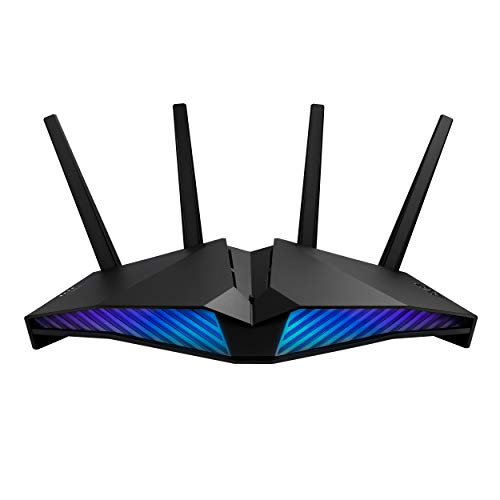
| Best for Customization | Wi‑Fi Generation: Wi‑Fi 6 (802.11ax) | Bands: Dual‑band (2.4 / 5 GHz) | Multi‑Gig / WAN‑LAN Port: Gigabit WAN (no multi‑gig reported) | VIEW LATEST PRICE | Our Analysis |
| GL.iNet Flint 3 GL-BE9300 Tri-Band WiFi 7 Router |

| Privacy & Power | Wi‑Fi Generation: Wi‑Fi 7 | Bands: Tri‑band (2.4 / 5 / 6 GHz) | Multi‑Gig / WAN‑LAN Port: Five 2.5G Ethernet ports | VIEW LATEST PRICE | Our Analysis |
More Details on Our Top Picks
TP-Link BE9300 WiFi 7 Tri-Band Router
Should you want the fastest, lowest‑latency home network for 4K/8K streaming and AR/VR gaming, the TP‑Link BE9300 delivers: its Wi‑Fi 7 tri‑band design with Multi‑Link Operation, 4K‑QAM and 320 MHz channels plus a 6‑stream layout pushes massive throughput (5760/2880/574 Mbps) and supports multiple simultaneous high‑bandwidth devices without bottlenecks. You’ll get six beamforming antennas, 2.5G WAN plus four 2.5G LAN ports, and coverage up to 2,000 sq. ft. EasyMesh expands range, WPA3 and HomeShield protect devices, and a built‑in VPN handles remote connections. Setup’s simple via the Tether app, and it’s backward compatible with older Wi‑Fi.
- Wi‑Fi Generation:Wi‑Fi 7
- Bands:Tri‑band (2.4 / 5 / 6 GHz)
- Multi‑Gig / WAN‑LAN Port:2.5G WAN + four 2.5G LAN ports
- Mesh Compatibility / Expandability:EasyMesh support
- Security & VPN:HomeShield, WPA3, built‑in VPN client/server
- Management App / Setup:TP‑Link Tether app (Android/iOS)
- Additional Feature:Six internal antennas
- Additional Feature:2.5G WAN + LAN ports
- Additional Feature:Voice assistant control
TP-Link Archer AX10 WiFi 6 Smart Router
Should you want an affordable Wi‑Fi 6 router that boosts multiplayer stability for a crowded home network, the TP‑Link Archer AX10 delivers: AX1500 speeds with OFDMA and MU‑MIMO help reduce lag across multiple devices, and four high‑gain antennas plus beamforming improve reliable coverage for gaming consoles, PCs, and streaming gear. You’ll get dual‑band 2.4/5 GHz performance (up to 300/1201 Mbps), 1024‑QAM, and a 900 MHz dual‑core CPU that manages concurrent streams. Four Gigabit LAN ports and Gigabit WAN support wired rigs. It’s OneMesh and Alexa compatible, backward compatible with older devices, and suits smart homes needing stable, budget‑friendly Wi‑Fi 6.
- Wi‑Fi Generation:Wi‑Fi 6 (802.11ax)
- Bands:Dual‑band (2.4 / 5 GHz)
- Multi‑Gig / WAN‑LAN Port:Gigabit WAN (no multi‑gig reported)
- Mesh Compatibility / Expandability:OneMesh compatible
- Security & VPN:Basic WPA3/backward security features (implicit), works with Alexa (no dedicated VPN noted)
- Management App / Setup:TP‑Link app / standard setup (OneMesh)
- Additional Feature:900 MHz dual-core CPU
- Additional Feature:Four Gigabit LANs
- Additional Feature:AX1500 class speeds
TP-Link Archer GXE75 AXE5400 Wi‑Fi 6E Gaming Router
Should you want blistering low-latency performance for PC and console gaming, the TP‑Link Archer GXE75 puts tri-band Wi‑Fi 6E and a 2.5G multi‑gig port to work so you can prioritize games, peripherals, and servers with minimal jitter. You’ll get up to 5.4 Gbps combined throughput across 2.4, 5, and congestion-free 6 GHz bands, six-stream handling for many devices, plus a 2.5G WAN/LAN and four 1G LAN ports for wired reliability. Game acceleration, a dedicated gaming port and panel, USB 3.0 storage, EasyMesh expandability, Tether management, HomeShield security, and CISA-aligned secure design make it a focused, future-ready gaming hub.
- Wi‑Fi Generation:Wi‑Fi 6E (802.11ax with 6 GHz)
- Bands:Tri‑band (including 6 GHz)
- Multi‑Gig / WAN‑LAN Port:1× 2.5G multi‑gig WAN/LAN port
- Mesh Compatibility / Expandability:EasyMesh compatible
- Security & VPN:HomeShield, built‑in antivirus protection
- Management App / Setup:Tether app or web interface (Android/iOS)
- Additional Feature:Dedicated gaming port
- Additional Feature:USB 3.0 storage
- Additional Feature:Game acceleration suite
ASUS RT-AX82U AX5400 WiFi 6 Gaming Router
Should you want a gamer-focused router that prioritizes low latency for both wired and wireless play, the ASUS RT-AX82U delivers with its dedicated Gaming Port, Mobile Game Mode, and Wi-Fi 6 speeds up to 5400 Mbps. You’ll get a 1.5 GHz tri-core CPU that handles multiple streams, 160 MHz channel support, and AiMesh compatibility to extend coverage without performance loss. Use Mobile Game Mode or port prioritization to cut lag for competitive matches. AiProtection Pro and Instant Guard secure your sessions and remote access. The ASUS Router app and customizable Aura RGB make setup and tuning straightforward.
- Wi‑Fi Generation:Wi‑Fi 6 (802.11ax)
- Bands:Dual‑band (2.4 / 5 GHz)
- Multi‑Gig / WAN‑LAN Port:Gigabit WAN (no multi‑gig reported)
- Mesh Compatibility / Expandability:AiMesh compatible
- Security & VPN:AiProtection Pro (Trend Micro), Instant Guard VPN
- Management App / Setup:ASUS Router app (one‑tap features)
- Additional Feature:1.5 GHz tri-core CPU
- Additional Feature:ASUS Aura RGB lighting
- Additional Feature:Mobile Game Mode
GL.iNet Flint 3 GL-BE9300 Tri-Band WiFi 7 Router
Should you want ultra-low latency and future-proof throughput for competitive gaming and 4K streaming, the GL.iNet Flint 3 (GL‑BE9300) delivers Wi‑Fi 7 speeds up to 9 Gbps with a dedicated 6 GHz band and five 2.5G Ethernet ports. You’ll get MLO, improved OFDMA, 4K QAM and preamble puncturing to cut latency and improve high-density performance across roughly 2,000 sq ft. Hardware (DDR4 1 GB, eMMC 8 GB) supports 100+ devices and plugins. WireGuard/OpenVPN hit up to 680 Mbps; AdGuard Home and Bark handle ad-blocking and parental controls. Set up via web admin, then update firmware for best results.
- Wi‑Fi Generation:Wi‑Fi 7
- Bands:Tri‑band (2.4 / 5 / 6 GHz)
- Multi‑Gig / WAN‑LAN Port:Five 2.5G Ethernet ports
- Mesh Compatibility / Expandability:(Expandable) supports mesh / plugins / multi‑device setups (EasyMesh-compatible style)
- Security & VPN:WireGuard/OpenVPN support, AdGuard Home, parental controls
- Management App / Setup:Web admin panel (initial), video tutorial; firmware updates recommended
- Additional Feature:1 GB DDR4 + 8 GB eMMC
- Additional Feature:WireGuard/OpenVPN speeds
- Additional Feature:AdGuard Home support
Factors to Consider When Choosing Wifi 6 Router For Gaming
Upon picking a WiFi 6 router for gaming, focus on factors that actually affect play: latency and ping stability, wireless bandwidth, and how well it handles multiple devices. Don’t forget wired port performance and the router’s CPU and RAM, since those determine packet handling and QoS effectiveness. I’ll walk through each point so you can match specs to your gaming needs.
Latency And Ping Stability
Because every millisecond matters in multiplayer matches, pick a Wi‑Fi 6 router that prioritizes low, stable ping under real‑world loads. You’ll want OFDMA and MU‑MIMO to cut contention whenever many devices transmit, which keeps jitter down and ping predictable. Choose dual‑ or tri‑band models with 160 MHz channel support so your console or PC can use less congested frequency band and avoid packet delays. Check for firmware with configurable QoS or gaming packet prioritization to maintain low latency during bandwidth spikes. Prefer hardware with a low‑latency CPU and ample RAM to prevent queuing under heavy NAT, firewall, or VPN workloads. Whenever possible, test latency over wired Gigabit links to remove wireless retransmissions and reveal true ping stability.
Wireless Bandwidth Capacity
Low, stable ping matters, but you also need enough raw wireless bandwidth so multiple devices and high‑bitrate game streams don’t starve your console or PC. Check a router’s aggregate throughput across its bands (Mbps/Gbps) and pick one that exceeds your peak combined demands; theoretical numbers are shared and fall short due to signal, interference, client limits, and ISP speed. Favor routers with wider channel widths (160 MHz) and higher‑order QAM (1024‑QAM) to enhance per‑client peak rates and reduce packetization delays for latency‑sensitive traffic. Inspect spatial streams and MU‑MIMO/OFDMA support, since more streams and efficient scheduling raise per‑device throughput and cut contention under load. Multi‑band capacity (2.4/5/6 GHz) helps isolate gaming traffic onto less congested bands.
Multi‑Device Handling
In case you expect multiple consoles, PCs, phones, and smart gadgets to be active at once, pick a Wi‑Fi 6 router that handles concurrent clients efficiently: look for OFDMA and MU‑MIMO support, higher spatial‑stream counts and wide channel options (160/320 MHz), tri‑ or dual‑band operation with band steering, and resilient QoS so gaming devices keep priority while background traffic is throttled. You’ll want a 4‑ or 6‑stream radio to raise aggregate throughput so many devices don’t bottleneck. Band steering moves less latency‑sensitive gadgets to 2.4 GHz or lower 5/6 GHz channels, cutting contention. Sturdy QoS and per‑device bandwidth caps guarantee uploads or backups don’t ruin gaming. Finally, choose a router with a beefy CPU and ample RAM so it can manage large connection tables, NAT sessions and real‑time scheduling for dozens of active clients.
Wired Port Performance
Wireless tuning helps whenever many clients share airtime, but wired connections still matter a lot for serious gamers: a single latency spike on a USB‑Ethernet adapter or a saturated gigabit LAN link can cost you a match. You should pick a router with at least one multi‑gig (2.5G/5G/10G) WAN or LAN port to avoid bottlenecking fast internet and to speed LAN transfers. Make certain enough Gigabit+ LAN ports for each wired PC, console, or NAS so devices don’t share a single link. Verify hardware‑accelerated NAT and full line‑rate VPN/WireGuard in case you use encrypted tunnels. Check low switching latency specs and wired QoS with per‑port prioritization so you can guarantee low ping for gaming even under heavy background traffic.
Router CPU And RAM
Consider the router’s CPU and RAM your networking backbone: a multi‑core processor (ideally 1.0–1.5 GHz or higher) and at least 256–512 MB of RAM keep NAT, QoS, VPN, and game‑acceleration tasks from becoming bottlenecks. You want a faster multi‑core CPU to handle concurrent packet processing, reducing packet handling latency and minimizing jitter whenever multiple services run. Aim for 1 GB+ RAM should you host many devices or run heavy multitasking; more memory enlarges routing tables, buffers, and connection tracking to prevent dropped sessions. Check specs for clock speeds and memory size, and favor models with dedicated hardware acceleration provided you plan to enable DPI or VPN. Prioritize CPU/RAM over bells in case stability and low ping matter.
Gaming‑Focused Features
Pick a router with gaming‑focused features that actually reduce latency and keep your packets moving as the house gets busy. You’ll want QoS or traffic‑prioritization that assigns a dedicated gaming queue or port to consoles and PCs, cutting jitter and ping during peak use. Check for hardware offloading—multi‑core CPUs and hardware NAT—so packet handling stays fast whenever many devices stream. Make sure the router supports OFDMA and MU‑MIMO to serve multiple clients simultaneously and avoid contention. Look for built‑in game acceleration or packet‑level prioritization that targets game servers to reduce loss and stabilize ping. Finally, low‑latency tech like 160 MHz channels, reduced beacon intervals, and smarter scheduling (TWT tuning) enhance responsiveness in fast multiplayer matches.
