

You want a thermostat that just works—easy to install, adapts to your schedule, and trims energy use without constant tweaks. In this guide you’ll see five reliable options—from learning thermostats to models with remote sensors and built‑in video—so you can match features to your home and HVAC setup. Keep going to find which one fits your needs and wiring constraints.
| Smart WiFi Thermostat for Heat Pump & Conventional Systems |

| Best for Heat Pumps | Connectivity: Wi‑Fi | Smart Assistant / Voice: Google Home, Alexa (via Tuya/Smart Life) | App Control: Tuya Smart / Smart Life app | VIEW LATEST PRICE | Read Our Analysis |
| Google Nest Learning Thermostat (3rd Gen) – Renewed |

| Best Learning Thermostat | Connectivity: Wi‑Fi | Smart Assistant / Voice: Google Assistant, Alexa | App Control: Nest app (Google) / app control | VIEW LATEST PRICE | Read Our Analysis |
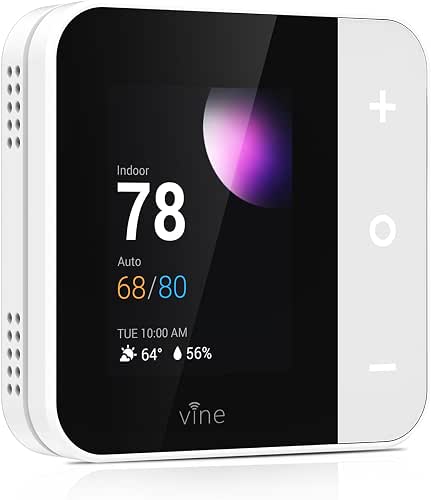
| Vine Wi‑Fi Touchscreen Smart Thermostat (2.8″) |
| Easy DIY Upgrade | Connectivity: Wi‑Fi | Smart Assistant / Voice: Google Home, Alexa | App Control: Vine Thermostat App / Smart Life app | VIEW LATEST PRICE | Read Our Analysis |
| Honeywell Home X8S Smart WiFi Thermostat with Video Doorbell |

| Best Smart Ecosystem | Connectivity: Wi‑Fi (2.4/5 GHz, 802.11ax/ac/a/b/g/n) | Smart Assistant / Voice: Amazon Alexa, Google Assistant, Apple Home (Matter) | App Control: First Alert / Honeywell Home app | VIEW LATEST PRICE | Read Our Analysis |
| Lux TQX Wi‑Fi Smart Thermostat with Remote Sensor |

| Best for Whole‑Home Sensing | Connectivity: Wi‑Fi | Smart Assistant / Voice: Alexa, Google, Apple Home (Matter via speaker) | App Control: Manufacturer app / smart‑home speaker integration | VIEW LATEST PRICE | Read Our Analysis |
More Details on Our Top Picks
Smart WiFi Thermostat for Heat Pump & Conventional Systems
In case you’ve got a heat pump or a multi‑stage conventional HVAC system and want a smart, budget‑friendly upgrade, the SASWELL T18BUTW‑7‑WIFI(TY) is built for you — it supports 3 heat/2 cool configurations, connects over Wi‑Fi, and works with Tuya/Smart Life, Google Home, and Alexa so you can control it from your phone or with your voice. You’ll get a glossy black, rectangular thermostat with a bright LED color touchscreen, 7‑day programmable scheduling, and touch, app, or voice control. It’s DIY‑friendly, wall‑mounted, requires a C‑wire for best results, and ships with an installation kit.
- Connectivity:Wi‑Fi
- Smart Assistant / Voice:Google Home, Alexa (via Tuya/Smart Life)
- App Control:Tuya Smart / Smart Life app
- Programmable Scheduling:7‑day scheduling (weekday/weekend)
- Wall‑Mounted Design:Wall mount
- HVAC Compatibility (Heating & Cooling):Heat pump and conventional multi‑stage systems (3H/2C)
- Additional Feature:Bright LED touchscreen
- Additional Feature:3H/2C multi-stage support
- Additional Feature:Tuya/Smart Life compatible
Google Nest Learning Thermostat (3rd Gen) – Renewed
In case you want a smart thermostat that learns your schedule and trims energy waste without constant tinkering, the renewed Google Nest Learning Thermostat (3rd Gen) is a strong pick. You’ll get a stainless steel, wall‑mount unit with a bright LCD backlight and automatic temperature control that programs itself as you use it. It connects via Wi‑Fi and works with Alexa, Google Assistant, and common smart home platforms for app, voice, or button control. Battery powered (2×AA), Energy Star certified, compact (3.3 in diameter, 1.21 in thick) and sold renewed under ASIN B0BC2FQ91H.
- Connectivity:Wi‑Fi
- Smart Assistant / Voice:Google Assistant, Alexa
- App Control:Nest app (Google) / app control
- Programmable Scheduling:Learning / programmable schedules
- Wall‑Mounted Design:Wall mount
- HVAC Compatibility (Heating & Cooling):Works with common HVAC systems (heat/cool control; Nest auto‑detects)
- Additional Feature:Auto‑learning schedules
- Additional Feature:Stainless steel finish
- Additional Feature:Battery powered (AA)
Vine Wi‑Fi Touchscreen Smart Thermostat (2.8″)
In case you want a compact, budget‑friendly smart thermostat that pairs with Alexa and Google Home, the Vine TJ550 delivers a clear 2.8″ color touchscreen, app and voice control, and 7‑day/8‑period scheduling—perfect for renters or homeowners who want quick smart upgrades without rewiring (it does require a C‑wire). You’ll get a square white glass/plastic display, Wi‑Fi connectivity, and compatibility with about 90% of HVAC systems including conventional, heat pump, and dual‑fuel setups. Features include geofence Auto‑Away, temperature alerts, filter notifications, child lock, and Energy Star certification. Installation is straightforward with trim plate, labels, guides, and videos.
- Connectivity:Wi‑Fi
- Smart Assistant / Voice:Google Home, Alexa
- App Control:Vine Thermostat App / Smart Life app
- Programmable Scheduling:7‑day, 8‑period schedules
- Wall‑Mounted Design:Wall mount (includes trim/mounting plate)
- HVAC Compatibility (Heating & Cooling):Conventional (2H/2C), Heat Pump (4H/2C), dual fuel
- Additional Feature:Geofence Auto‑Away
- Additional Feature:8‑period daily scheduling
- Additional Feature:Filter change reminders
Honeywell Home X8S Smart WiFi Thermostat with Video Doorbell
Should you want a smart thermostat that doubles as a home hub for video doorbell interactions, the Honeywell Home X8S is made for connected households—its 5″ touchscreen puts doorbell video and two-way talk right on your thermostat while managing up to 3 heat/2 cool heat-pump or 2 heat/2 cool conventional systems. You’ll get Wi‑Fi (2.4/5 GHz, 802.11ax/ac/etc.), Matter and Alexa/Google/Home compatibility, and Initial Alert or Ring doorbell integration. It senses occupancy, controls humidity/ventilation, and supports room sensors. ENERGY STAR certified, it requires a C‑wire (adapter voucher included should that be necessary) and fits most forced‑air and hot‑water setups.
- Connectivity:Wi‑Fi (2.4/5 GHz, 802.11ax/ac/a/b/g/n)
- Smart Assistant / Voice:Amazon Alexa, Google Assistant, Apple Home (Matter)
- App Control:First Alert / Honeywell Home app
- Programmable Scheduling:Programmable schedules / presence‑based adjustments
- Wall‑Mounted Design:Wall mount (UWP mounting plate included)
- HVAC Compatibility (Heating & Cooling):Up to 3H/2C heat pump or 2H/2C conventional (specified compatibility)
- Additional Feature:Built‑in video doorbell integration
- Additional Feature:5″ customizable touchscreen
- Additional Feature:Matter certified compatibility
Lux TQX Wi‑Fi Smart Thermostat with Remote Sensor
In case you want a thermostat that blends room-by-room sensing with smart‑home integration, the Lux TQX is built for homes that need accurate whole‑house comfort without rewiring. You’ll get a sleek black square unit with an occupancy sensor and one remote sensor included, plus support for four more. It connects via Wi‑Fi, works with Matter through a compatible speaker, and supports Alexa, Apple Home, and Google for app and voice control. Auto‑scheduling, occupancy learning, and combined sensor averaging optimize whole‑home temperature. It supports conventional and heat‑pump systems, includes a Lux Power Bridge, and runs on two CR2 batteries.
- Connectivity:Wi‑Fi
- Smart Assistant / Voice:Alexa, Google, Apple Home (Matter via speaker)
- App Control:Manufacturer app / smart‑home speaker integration
- Programmable Scheduling:Programmable scheduling / auto‑scheduling
- Wall‑Mounted Design:Wall mount (trim plate included)
- HVAC Compatibility (Heating & Cooling):Conventional (up to 2H/2C), Heat pump (up to 4H/2C), PTAC, fan coil
- Additional Feature:Millimetre‑wave occupancy sensor
- Additional Feature:Includes remote sensor
- Additional Feature:Lux Power Bridge included
Factors to Consider When Choosing a Smart Thermostat for Home
Before you pick a smart thermostat, check that it’s compatible with your HVAC system and that your home has the necessary power and wiring. You’ll also want to confirm it integrates with your smart-home ecosystem, supports the scheduling and automation you need, and works with sensors or remote sensing for accurate temperature control. Keep these points in mind to match features to your home and lifestyle.
Compatibility With HVAC
Should you pick a smart thermostat, make certain it actually talks to your HVAC: systems differ (conventional 2H/2C, multi‑stage heat pumps, dual‑fuel setups, and hydronic systems all behave differently), and incompatible control logic will keep your equipment from running correctly. Start by verifying the thermostat explicitly supports your system type and the correct staging, reversing valve, and fan configurations. Confirm it can manage any auxiliary devices—humidifiers, dehumidifiers, mechanical ventilation, or electric backup heat—so you won’t lose control of comfort features. Make sure the thermostat is designed for low‑voltage (24V) systems; it won’t work with 120/240V line‑voltage baseboard units. Finally, check required wiring and whether a C‑wire or power‑bridge/adapter is necessary to supply continuous power for Wi‑Fi and sensors.
Power And Wiring
After confirming system compatibility, you’ll want to check power and wiring so your new thermostat can actually run and control everything it should. Many smart thermostats need a C‑wire (24 VAC common); should you not have one you’ll either use a power adapter or pick a model that substitutes with batteries. Verify whether the unit is battery‑powered (and which battery type) or hardwired to a 24 VAC transformer. Confirm voltage compatibility—most expect 24 VAC and won’t work with 120/240V line‑voltage heaters. In the case you have a heat pump, multi‑stage system, or auxiliary heat, make certain wires like Y2, W2/Aux, and O/B are present. For DIY installs, check wire count, labeling at the wall box, and terminal matches at the furnace to avoid errors.
Smart Home Integration
While choosing a smart thermostat, make certain it actually works with your smart‑home setup and voice assistants so you can control and automate temperature from the apps and devices you already use. Verify compatibility with Matter, Apple Home, Google Assistant, or Alexa so integrations are seamless. Check connection requirements: does it use 2.4 GHz Wi‑Fi, need a Matter‑enabled speaker, or require a proprietary hub or bridge? Confirm support for remote sensors and multi‑room averaging when you want occupancy‑based or room‑specific comfort. Make sure the thermostat exposes local APIs or cloud integrations for third‑party platforms, utility energy programs, and custom scenes. Finally, review presence/occupancy features like geofencing, auto‑away, and learning behaviors to tie into your existing smart‑home routines.
Scheduling And Automation
Because your daily routines—and the people in your home—change from hour to hour, pick a thermostat that makes scheduling flexible and automation reliable. Look for 7‑day scheduling with weekday/weekend customization and multiple time periods per day (4–8 periods) so you can match temperatures to varied routines. Use geo‑fencing or presence detection to switch between home and away modes automatically and cut wasted energy. Should you prefer less hands‑on control, choose adaptive or auto‑scheduling that learns from your manual adjustments and suggests optimized programs. Make sure the app lets you create temperature holds, temporary overrides, and vacation schedules without disrupting long‑term programming. Finally, favor systems that integrate occupancy and remote room sensors so schedules reflect actual room use.
Sensors And Remote Sensing
How will your thermostat know which rooms actually need heating or cooling? Check whether it supports additional remote sensors and how many—common ranges are 1–5—so you can monitor multiple rooms and average temperatures for whole‑home comfort. Verify sensor types (temperature, humidity, occupancy/motion, light); occupancy and humidity sensing let you enable presence‑based control and tweak indoor air quality. Confirm communication method and indoor range (radio protocol and typical distance) to guarantee reliable readings from distant rooms or floors. Look at how the thermostat uses sensor data—room‑level control, weighted averaging, or prioritizing the warmest/coolest sensor—since that determines which space is optimized. Finally, consider sensor power: battery type, expected life, and whether sensors are wireless or wired for placement and maintenance planning.
Energy Savings Features
Remote sensors help the thermostat know where to heat or cool, but energy‑saving features decide how efficiently it runs. You’ll want learning or adaptive scheduling so the thermostat auto-adjusts setpoints based on occupancy patterns and trims runtime without constant tinkering. Make sure it supports multiple programmable setpoint periods and full 7‑day scheduling to lower usage during known away or sleep times. Choose presence detection or geofencing so the system auto‑away whenever no one’s home, cutting standby energy. Prioritize integration with remote sensors or multi‑zone averaging so HVAC runs only long enough to reach comfort across rooms. Finally, pick a model that reports energy use and sends actionable alerts—runtime summaries, filter notifications, and temperature extremes—to spot waste and optimize settings.
