

You want reliable smart plugs that play nice with your Alexa Echo, keep devices safe, and don’t waste time on flaky apps. I’ll highlight seven top choices for 2026—covering compact designs, high‑wattage options, energy monitoring, and UL/ETL safety—so you can pick what fits your home and habits. Keep going to see which plug matches your Echo setup and power needs.
| GHome Mini WiFi Smart Plug for Alexa & Google |

| Compact & Affordable | Voice Assistant Compatibility: Alexa, Google Home Assistant | Wi‑Fi Frequency: 2.4 GHz only | No Hub Required: No hub required | VIEW LATEST PRICE | Read Our Analysis |
| Smart Wi‑Fi Smart Plug 2-Pack for Alexa & Google |

| Great 2‑Pack Value | Voice Assistant Compatibility: Amazon Alexa, Google Assistant | Wi‑Fi Frequency: 2.4 GHz only | No Hub Required: No hub required | VIEW LATEST PRICE | Read Our Analysis |
| Amazon Smart Plug Works with Alexa Simple Setup Endless Possibilities |
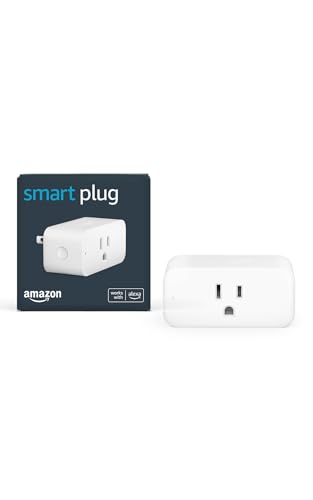
| Best Alexa Integration | Voice Assistant Compatibility: Alexa (optimized for Alexa) | Wi‑Fi Frequency: 2.4 GHz only (802.11 b/g/n) | No Hub Required: No hub required | VIEW LATEST PRICE | Read Our Analysis |
| Kasa HS103P4 Smart Plug 4-Pack (Works with Alexa) |

| Reliable Multi‑Pack | Voice Assistant Compatibility: Amazon Alexa, Google Assistant (and IFTTT) | Wi‑Fi Frequency: 2.4 GHz only | No Hub Required: No hub required | VIEW LATEST PRICE | Read Our Analysis |
| EIGHTREE WiFi Smart Plug 4-Pack (Alexa Google) |

| Feature‑Rich Automation | Voice Assistant Compatibility: Alexa, Google Assistant (via Smart Life app) | Wi‑Fi Frequency: 2.4 GHz only | No Hub Required: No hub required (Smart Life app required) | VIEW LATEST PRICE | Read Our Analysis |
| Kasa HS300 Smart Power Strip with 6 Outlets |

| Power & Protection | Voice Assistant Compatibility: Amazon Alexa, Google Assistant, Microsoft Cortana | Wi‑Fi Frequency: 2.4 GHz (standard for Kasa devices) | No Hub Required: No hub required | VIEW LATEST PRICE | Read Our Analysis |
| TP-Link Tapo Mini Smart Plug 15A (4-Pack) |

| Best for Ease‑of‑Use | Voice Assistant Compatibility: Amazon Alexa, Google Assistant | Wi‑Fi Frequency: 2.4 GHz only (with Bluetooth onboarding) | No Hub Required: No hub required | VIEW LATEST PRICE | Read Our Analysis |
More Details on Our Top Picks
GHome Mini WiFi Smart Plug for Alexa & Google
Should you want a compact, budget-friendly smart plug that works with Alexa and Google Home, the GHome Mini WiFi Smart Plug is a strong choice — especially should you need simple remote control and scheduling without buying a hub. You’ll set it up via the GHome app (required) to enable Alexa/Google voice control. It uses 2.4 GHz WiFi with improved WiFi + Bluetooth for stable connections, supports groups, timers, circular and random schedules, and remote on/off. Rated 10 A, 1200 W at 120 V, ETL and FCC listed, it’s a space-saving Type B plug (2 x 2 x 1.1 in, 3.2 oz).
- Voice Assistant Compatibility:Alexa, Google Home Assistant
- Wi‑Fi Frequency:2.4 GHz only
- No Hub Required:No hub required
- App Control / Smartphone App:GHome app (required for setup & remote control)
- Scheduling / Timers:Timers, circular/random schedules, auto-off/on
- Compact / Space‑Saving Design:Compact, mini design (2 x 2 x 1.1 in)
- Additional Feature:ETL and FCC listed
- Additional Feature:Enhanced WiFi + Bluetooth
- Additional Feature:10 A, 1200 W rating
Smart Wi‑Fi Smart Plug 2-Pack for Alexa & Google
Provided that you want simple, hands‑free control for lamps, fans, or holiday lights without adding a hub, the Smart Wi‑Fi Smart Plug 2‑Pack is a great pick — it’s designed for Alexa and Google Home users who value easy setup, reliable 2.4 GHz connectivity, and scheduling features for energy savings and convenience. You’ll plug these compact units into outlets, pair via the app, and control devices remotely or with voice. Create timers, routines, groups, and custom scenes to automate arrival lighting or shut off forgotten appliances. With 1,875W capacity, copper contacts, and stable Wi‑Fi, they’re dependable for daily smart home tasks.
- Voice Assistant Compatibility:Amazon Alexa, Google Assistant
- Wi‑Fi Frequency:2.4 GHz only
- No Hub Required:No hub required
- App Control / Smartphone App:Manufacturer app (required for setup & remote control)
- Scheduling / Timers:Timers, personalized schedules, auto-off timer
- Compact / Space‑Saving Design:Plug‑in compact dimensions (2.76 x 1.46 x 2.05 in)
- Additional Feature:Copper contact material
- Additional Feature:1875 W maximum
- Additional Feature:Push-button actuator
Amazon Smart Plug Works with Alexa Simple Setup Endless Possibilities
Should you want a fuss-free way to add voice control to lamps, fans, or coffee makers, the Amazon Smart Plug is your best choice because it’s optimized for Alexa and needs no extra hub—just plug it in, finish setup in the Alexa app, and you’re ready to control devices or create Routines via voice. You’ll use 2.4 GHz Wi‑Fi (802.11 b/g/n), and setup supports Amazon Wi‑Fi simple setup. It’s compact (3.2” x 1.5” x 2.2”), rated 120 VAC, 60 Hz, 15 A, for indoor use. Alexa-only compatibility limits other assistants, but Alexa+ lets you manage routines, reconnects automatically, and includes a one-year warranty.
- Voice Assistant Compatibility:Alexa (optimized for Alexa)
- Wi‑Fi Frequency:2.4 GHz only (802.11 b/g/n)
- No Hub Required:No hub required
- App Control / Smartphone App:Alexa app (setup & routines)
- Scheduling / Timers:Routines via Alexa app (scheduling automation)
- Compact / Space‑Saving Design:Compact design to keep second outlet free (3.2 x 1.5 x 2.2 in)
- Additional Feature:Alexa-optimized only
- Additional Feature:Reconnects after outages
- Additional Feature:15 A max output
Kasa HS103P4 Smart Plug 4-Pack (Works with Alexa)
Should you want a simple, budget-friendly way to add voice control to lamps and small appliances, the Kasa HS103P4 4-pack is a great fit — it plugs in, pairs with your 2.4 GHz Wi‑Fi, and lets you turn devices on/off via Alexa, Google Assistant, or the Kasa app. Each compact white plug handles 15A and up to 1800W, UL certified and designed in Silicon Valley. You’ll setup quickly with the Kasa app (no hub), schedule timers, use voice or remote control, and integrate with IFTTT or Vera. At four units per pack, it’s ideal for whole-room upgrades without breaking the bank.
- Voice Assistant Compatibility:Amazon Alexa, Google Assistant (and IFTTT)
- Wi‑Fi Frequency:2.4 GHz only
- No Hub Required:No hub required
- App Control / Smartphone App:Kasa app (remote control & scheduling)
- Scheduling / Timers:Timer and countdown schedules; automatic on/off
- Compact / Space‑Saving Design:Mini plug dimensions (1.57 x 1.5 x 2.62 in)
- Additional Feature:UL certified safety
- Additional Feature:Works with IFTTT
- Additional Feature:Kasa app energy monitoring (via other models) [Kasa ecosystem]
EIGHTREE WiFi Smart Plug 4-Pack (Alexa Google)
Should you want a compact, budget-friendly way to add voice and remote control to multiple devices, the EIGHTREE WiFi Smart Plug 4-pack is a solid pick — its mini round design fits tight spaces without blocking the second outlet and it works with Alexa and Google Assistant via the Smart Life app. You get four ET01 plugs (1.96 x 1.96 x 2.03 inches, 1.92 oz each) rated 120V/15A/1800W, with 2.4 GHz Wi‑Fi, timers, countdowns, cycles and random schedules. Setup uses Smart Life with Bluetooth-assisted detection; voice linking requires the app. ETL and FCC certified for safe, reliable operation.
- Voice Assistant Compatibility:Alexa, Google Assistant (via Smart Life app)
- Wi‑Fi Frequency:2.4 GHz only
- No Hub Required:No hub required (Smart Life app required)
- App Control / Smartphone App:Smart Life app (setup & remote control)
- Scheduling / Timers:Timers, countdowns, cycles, random schedules
- Compact / Space‑Saving Design:Mini round design to avoid blocking adjacent sockets (1.96 x 1.96 x 2.03 in)
- Additional Feature:Bronze contact material
- Additional Feature:Smart Life app required
- Additional Feature:Bluetooth-assisted discovery
Kasa HS300 Smart Power Strip with 6 Outlets
In the event that you need granular control over multiple devices from one spot, the Kasa HS300 smart power strip is ideal — it gives you six independently controlled outlets, per-outlet energy monitoring, and voice control via Alexa so you can manage lights, office gear, or entertainment systems hands-free. You’ll get three USB ports (5V/2.4A each, shared), ETL-certified surge protection (Type 3 SPD, 500V Vpr), and a 15A/1875W total load. No hub’s required; control remotely with the Kasa app (iOS 10+/Android 4.4+). It’s compact (14.17 x 2.49 x 1.48 in), works with Google Assistant and Cortana, and remains supported.
- Voice Assistant Compatibility:Amazon Alexa, Google Assistant, Microsoft Cortana
- Wi‑Fi Frequency:2.4 GHz (standard for Kasa devices)
- No Hub Required:No hub required
- App Control / Smartphone App:Kasa Smart app (remote control & energy monitoring)
- Scheduling / Timers:Scheduling and individual outlet control via app
- Compact / Space‑Saving Design:Power strip optimized layout; individual slim outlets (14.17 x 2.49 x 1.48 in overall)
- Additional Feature:Six independently controlled outlets
- Additional Feature:Built-in USB charging ports
- Additional Feature:Per-outlet energy monitoring
TP-Link Tapo Mini Smart Plug 15A (4-Pack)
In case you want compact, high‑capacity smart plugs that work seamlessly with Alexa, the TP‑Link Tapo Mini 15A (4‑pack) is a great pick — its 15A/1800W rating and space‑saving design make it ideal for powering heavier appliances and filling crowded outlets without a hub. You’ll set them up quickly via Bluetooth onboarding and control them with the Tapo app or Alexa/Google Assistant over 2.4 GHz Wi‑Fi. Each white plug is UL certified, flame‑retardant, and backed with a 2‑year warranty plus 24/7 support. Use scheduling and timers for lamps, fans, humidifiers, or holiday lights.
- Voice Assistant Compatibility:Amazon Alexa, Google Assistant
- Wi‑Fi Frequency:2.4 GHz only (with Bluetooth onboarding)
- No Hub Required:No hub required
- App Control / Smartphone App:Tapo app (Bluetooth onboarding + remote control)
- Scheduling / Timers:Advanced scheduling and timer routines
- Compact / Space‑Saving Design:Space‑saving mini design (2.36 x 1.5 x 2.11 in)
- Additional Feature:Bluetooth onboarding setup
- Additional Feature:UL94‑V0 flame‑retardant housing
- Additional Feature:2‑year manufacturer warranty
Factors to Consider When Choosing Smart Plug For Alexa Echo
Upon selecting a smart plug for your Alexa Echo, check that it explicitly supports Alexa and works with the app ecosystem you prefer. Make sure the plug meets your Wi‑Fi band (2.4GHz vs 5GHz) and power/load ratings for the devices you’ll connect. Also confirm it offers the scheduling and automation features you need for reliable routines.
Voice Assistant Compatibility
Although smart plugs often look interchangeable, you should confirm Alexa compatibility and onboarding details before buying so voice control, routines, and multi‑device scenes work reliably. Check the product explicitly lists “Works with Alexa” to make certain full voice-control features and routine integration. Find out whether the plug needs its own app or a hub for initial linking—some require setup in their app before Alexa can detect them. Verify it supports Alexa routines and can be added as an Alexa-enabled device so you can trigger automations and multi-device scenes through voice. Make sure the plug uses a network/onboarding method your Echo supports (for example, 2.4 GHz Wi‑Fi or Bluetooth). Observe whether a plug is Alexa‑only versus multi‑assistant, since that affects available voice features.
App Ecosystem Support
After you confirm Alexa compatibility and onboarding methods, check the smart plug’s companion app—it’s the bridge that keeps voice control reliable and gives you features beyond simple on/off. You’ll want seamless linking with Alexa for device discovery, routine creation, and full voice control. Make sure the app offers dependable remote access (cloud or account-based) so Alexa integrations survive when you’re away or in case your network changes. Prefer apps with advanced scheduling, timers, and scene/group management so Alexa routines can trigger or complement those automations. Verify onboarding guidance is clear to avoid pairing hiccups, and review update frequency, stability feedback, and support channels—app reliability directly affects Alexa interoperability and the plug’s ongoing performance.
Wi‑Fi Band Requirements
Since most smart plugs depend on 2.4 GHz Wi‑Fi for setup and operation, make sure your router broadcasts a 2.4 GHz network (or a distinct dual‑band SSID) so the plug can pair and stay connected; a 5 GHz‑only network will block pairing. Check your router settings and, should it’s dual‑band, give each band a distinct SSID to prevent accidental connection to 5 GHz during onboarding. Some plugs use Bluetooth or Bluetooth‑assisted onboarding to hand off credentials, but they still run on 2.4 GHz afterward. Because 2.4 GHz is more crowded, locate plugs within reliable range of the router or add 2.4 GHz–compatible extenders to reduce interference and improve responsiveness.
Power And Load Ratings
Now that you’ve confirmed your plug can join your 2.4 GHz network, check its power and load ratings so you don’t overload it or the circuit. Look for maximum current and wattage (common ranges: 10–15 A, 1200–1875 W) and make certain the combined load of connected devices stays below those limits. Verify operating voltage—typically 120 VAC in North America—and never exceed the rated voltage. For inductive loads like motors, compressors, or pumps, pick a plug with a higher surge/current rating or derate the connected device because starting currents can be several times running current. Confirm the continuous load rating and avoid sustained loads near maximum to reduce heat and extend life. Provided multiple high-draw devices share a circuit, calculate total amps × volts to prevent tripping the breaker.
Scheduling And Automation
When you’re picking a smart plug for your Alexa Echo, prioritize resilient scheduling and automation so your devices behave reliably without constant input from you; make sure the plug’s app supports one‑time timers, repeating daily/weekly schedules, countdowns, and random/away modes to cover routines and mimic occupancy. Also prefer timezone and daylight‑saving awareness and reliable resume after power or Wi‑Fi outages so schedules stay accurate. Check for local scheduling as well as cloud options — local rules run without internet and cut latency. Confirm you can group schedules or add plugs to scenes so multiple outlets trigger together. Finally, verify integration with Alexa routines and third‑party platforms for conditional triggers and richer automations across your smart home.
Safety Certifications And Warranty
Because a smart plug sits between your home wiring and the devices you rely on, you should prioritize verified safety certifications (UL, ETL, FCC or local equivalents), clear current/wattage ratings, and built‑in protections like surge suppression, over‑current cutoff, and thermal shutdown to minimize fire and equipment risks. Check the plug’s maximum ratings—15 A / 1800–1875 W is common—and make certain they meet or exceed any appliance you’ll connect. Confirm intended use (indoor vs outdoor) and IP/ingress ratings for safe installation. Review the manufacturer’s warranty for length and coverage (parts, defects, electrical-failure damage) and whether repairs or replacements are straightforward. Finally, corroborate compliance with local electrical codes so your smart plug performs safely and your home insurance won’t be jeopardized.
Frequently Asked Questions
Do Smart Plugs Support Alexa Routines With Multiple Device Triggers?
Yes — you can. Alexa routines can trigger from multiple smart plugs and devices, so you’ll combine plug states, motion sensors, or schedules as triggers. You’ll set conditions and actions in the Alexa app to coordinate them.
Can Smart Plugs Work With Echo Devices Offline?
They generally won’t: you can’t control most smart plugs through Echo while it’s offline because the plugs rely on cloud or hub connections; however local-control models or Zigbee/Z-Wave hubs can let you keep basic functionality.
What Security Risks Come From Using Smart Plugs?
You face risks like data breaches, device hijacking, and network exposure; attackers can eavesdrop, control power, or pivot to other devices, and insecure firmware or weak passwords let attackers exploit your smart plugs unless you update and secure them.
Do Smart Plugs Consume Power When Devices Are Off?
Like a tiny night light, yes — smart plugs draw a small standby current even while devices are off. You’ll usually see fractions of a watt to a few watts; it’s minimal but can add up over time.
Are Firmware Updates Automatic for All Smart Plugs?
No — not all smart plugs update automatically. You’ll find some auto-update via cloud or app settings, but others need manual updates through the manufacturer’s app or local hub. Check device settings and enable auto-update whenever available.
