

Should you need Wi‑Fi that actually reaches the far corners of your home or property, you’ll want gear built for range and real‑world performance. You’ll care about Wi‑Fi 6/7, multiple high‑gain antennas, MIMO and beamforming, plus mesh or wired backhaul options to keep speeds steady. I’ll walk you through top models and what to prioritize so you can pick a setup that won’t leave dead zones — and why some choices work better than others.
| NETGEAR Nighthawk WiFi 7 Router RS180 (Router Only) |

| Best High-Performance | Wi‑Fi Generation: Wi‑Fi 7 | Bands (Dual/Triple): Dual‑band | Multi‑gig / WAN Port Capability: 2.5 Gig internet port (multi‑gig) | VIEW LATEST PRICE | Our Analysis |
| TP-Link Archer AX21 AX1800 WiFi 6 Router |

| Budget-Friendly Range | Wi‑Fi Generation: Wi‑Fi 6 (802.11ax) | Bands (Dual/Triple): Dual‑band (2.4 GHz + 5 GHz) | Multi‑gig / WAN Port Capability: Standard Gigabit WAN (no multi‑gig mentioned) | VIEW LATEST PRICE | Our Analysis |
| TP-Link Archer BE230 Wi‑Fi 7 Dual‑Band Router |

| Best for Multi‑Device Homes | Wi‑Fi Generation: Wi‑Fi 7 | Bands (Dual/Triple): Dual‑band (2.4 GHz + 5 GHz) | Multi‑gig / WAN Port Capability: Dual 2.5 Gbps ports (one configurable WAN/LAN) | VIEW LATEST PRICE | Our Analysis |
| TP-Link Archer A6 AC1200 Gigabit Dual-Band Router |

| Best Value Coverage | Wi‑Fi Generation: Wi‑Fi 5 (AC) — marketed as AC1200 | Bands (Dual/Triple): Dual‑band (2.4 GHz + 5 GHz) | Multi‑gig / WAN Port Capability: Gigabit WAN/LAN ports (no multi‑gig) | VIEW LATEST PRICE | Our Analysis |
| TP-Link Archer AX80 AX6000 Wi‑Fi 6 Router |
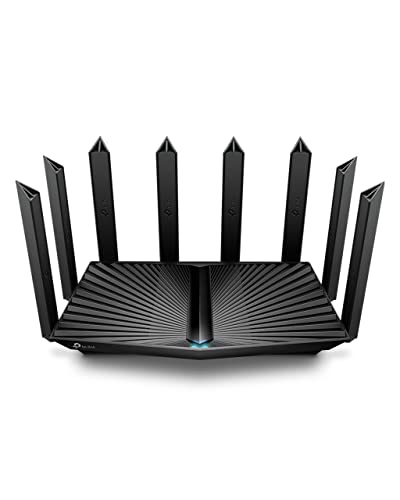
| Best for Long‑Range Power | Wi‑Fi Generation: Wi‑Fi 6 | Bands (Dual/Triple): Dual‑band | Multi‑gig / WAN Port Capability: 2.5 Gbps multi‑gig WAN/LAN port | VIEW LATEST PRICE | Our Analysis |
More Details on Our Top Picks
NETGEAR Nighthawk WiFi 7 Router RS180 (Router Only)
Should you need long-range, high-speed Wi‑Fi for a busy home or small office, the NETGEAR Nighthawk RS180 delivers. You’ll get WiFi 7 (BE5500) performance up to 5.5 Gbps—about 1.2x faster than WiFi 6—so gaming, 4K streaming, and video calls stay smooth. It covers roughly 2,500 sq. ft. and handles up to 80 devices with a compact body and high-performance antennas. Bear in mind it’s router-only: you’ll need a separate modem for cable or fiber and can plug into its 2.5 Gig internet port for multi-gig service. Free expert help is available should you require setup support.
- Wi‑Fi Generation:Wi‑Fi 7
- Bands (Dual/Triple):Dual‑band
- Multi‑gig / WAN Port Capability:2.5 Gig internet port (multi‑gig)
- Mesh / Whole‑Home Support:Not specified as mesh (router only)
- Security / Management Features:Free expert help (support); standard router security implied
- Coverage / Device Capacity:Coverage up to ~2,500 sq. ft.; supports up to 80 devices
- Additional Feature:Sleek compact footprint
- Additional Feature:High-performance external antennas
- Additional Feature:Free expert help
TP-Link Archer AX21 AX1800 WiFi 6 Router
Should you need long-range Wi‑Fi without breaking the bank, the TP‑Link Archer AX21 is built to push a reliable signal across larger homes with its four high‑gain antennas, beamforming, and FEM chipset. You get AX1800 speeds (up to 1.8 Gbps total: 1200 Mbps on 5 GHz, 574 Mbps on 2.4 GHz) and Wi‑Fi 6 features like OFDMA for more simultaneous devices and reduced congestion. It’s a dual‑band router that needs a separate modem and doesn’t support 6 GHz. TP‑Link includes OpenVPN and PPTP server support, broad ISP compatibility, regular firmware updates, and phone support for setup.
- Wi‑Fi Generation:Wi‑Fi 6 (802.11ax)
- Bands (Dual/Triple):Dual‑band (2.4 GHz + 5 GHz)
- Multi‑gig / WAN Port Capability:Standard Gigabit WAN (no multi‑gig mentioned)
- Mesh / Whole‑Home Support:Not stated as OneMesh/EasyMesh but compatible with extenders (typical router use)
- Security / Management Features:Advanced security design; OpenVPN and PPTP VPN server support
- Coverage / Device Capacity:Coverage extended via 4 high‑gain antennas; device capacity not explicitly quantified
- Additional Feature:Four high-gain antennas
- Additional Feature:Advanced FEM chipset
- Additional Feature:OpenVPN & PPTP support
TP-Link Archer BE230 Wi‑Fi 7 Dual‑Band Router
Should you need top-tier long‑range performance for multiple high‑bandwidth devices, the TP‑Link Archer BE230 is built for that — its Wi‑Fi 7 features (MLO, Multi‑RUs, 4K‑QAM) and dual 2.5 Gbps ports deliver sustained throughput across larger homes, while beamforming and four internal antennas help reach distant rooms without a mesh. You’ll get dual‑band speeds (5 GHz up to 2882 Mbps, 2.4 GHz up to 688 Mbps), coverage to about 2,000 sq. ft., and support for roughly 60 devices. The 2.0 GHz quad‑core CPU keeps latency low, EasyMesh expands coverage, and HomeShield secures your network.
- Wi‑Fi Generation:Wi‑Fi 7
- Bands (Dual/Triple):Dual‑band (2.4 GHz + 5 GHz)
- Multi‑gig / WAN Port Capability:Dual 2.5 Gbps ports (one configurable WAN/LAN)
- Mesh / Whole‑Home Support:EasyMesh compatible
- Security / Management Features:TP‑Link HomeShield (network protection, parental controls, IoT security)
- Coverage / Device Capacity:Coverage up to ~2,000 sq. ft.; supports up to 60 devices
- Additional Feature:2.0 GHz quad-core CPU
- Additional Feature:USB 3.0 port
- Additional Feature:EasyMesh compatible
TP-Link Archer A6 AC1200 Gigabit Dual-Band Router
Should you need reliable long-range Wi‑Fi without breaking the bank, the TP‑Link Archer A6 is a strong pick thanks to its four external antennas and beamforming, which amplify and focus signals toward distant devices. You’ll get dual-band AC1200 speeds (300 Mbps on 2.4 GHz, 900 Mbps on 5 GHz) with MU-MIMO on 5 GHz to handle multiple streams. Four Gigabit LAN ports cover wired needs, and AP mode turns a wired link into Wi‑Fi. OneMesh support lets you extend coverage seamlessly, WPA3 enhances security, and compatibility with major ISPs makes it a practical choice for 4K streaming and large homes.
- Wi‑Fi Generation:Wi‑Fi 5 (AC) — marketed as AC1200
- Bands (Dual/Triple):Dual‑band (2.4 GHz + 5 GHz)
- Multi‑gig / WAN Port Capability:Gigabit WAN/LAN ports (no multi‑gig)
- Mesh / Whole‑Home Support:TP‑Link OneMesh support
- Security / Management Features:WPA3 support
- Coverage / Device Capacity:Extended coverage with four antennas; specific sq. ft./device count not listed
- Additional Feature:Four external antennas
- Additional Feature:AP Mode available
- Additional Feature:TP-Link OneMesh support
TP-Link Archer AX80 AX6000 Wi‑Fi 6 Router
Provided that you need long, reliable coverage for a busy household—especially where many devices stream or game at once—the TP‑Link Archer AX80 delivers, thanks to Wi‑Fi 6 speeds (up to 4804 Mbps on 5 GHz and 1148 Mbps on 2.4 GHz) plus eight high‑gain antennas with beamforming that push a focused signal farther into every room. You’ll get MU‑MIMO and OFDMA for lower latency and more simultaneous connections, a 2.5 Gbps multi‑gig WAN/LAN port to avoid wired bottlenecks, WPA3 security, VPN client support, and TP‑Link HomeShield basics. OneMesh, AP mode, and Alexa compatibility make it flexible for large, device‑dense homes.
- Wi‑Fi Generation:Wi‑Fi 6
- Bands (Dual/Triple):Dual‑band
- Multi‑gig / WAN Port Capability:2.5 Gbps multi‑gig WAN/LAN port
- Mesh / Whole‑Home Support:OneMesh support
- Security / Management Features:WPA3 + TP‑Link HomeShield (security and parental controls)
- Coverage / Device Capacity:Long‑range/home coverage; designed for high device density (explicit device count not listed)
- Additional Feature:Eight high-gain antennas
- Additional Feature:VPN client support
- Additional Feature:TP-Link HomeShield features
Factors to Consider When Choosing a Router for Distance
Whenever you’re picking a router for long-range coverage, focus on the coverage area you need and whether the antenna design and placement support that range. Check the wireless standard generation, multiband support and channel options to reduce interference and extend usable distance. Also verify throughput and available ports so your wired devices and high-bandwidth tasks aren’t bottlenecked.
Coverage Area Needed
Start via measuring your home’s square footage and adding 20–30% to account for signal loss through walls and floors so you know the real coverage area your router must handle. Then factor in building materials: thick concrete, brick, metal studs and tile can cut range 30–90% versus open space, so increase planned coverage for dense construction. Map high‑use areas—living room, office, bedrooms—and confirm the router’s stated radius reaches them with usable signal. For multi‑story or irregular layouts, plan overlapping coverage zones or extra access points instead of relying on one central router to avoid dead spots. Finally, account for device density per zone; more connected devices demand stronger signals or closer access points to maintain performance at distance.
Antenna Design Type
After you’ve mapped coverage needs and trouble spots, look at the router’s antenna design—it’s a major factor in how far and how well Wi‑Fi actually reaches. You’ll usually choose between external high‑gain antennas, which you can angle and position to enhance long‑range directionality, and internal antennas, which look cleaner but often sacrifice adjustable reach. Decide whether omnidirectional antennas suit your layout—they radiate 360° horizontally and work well across a single floor—or whether directional panels or Yagi types will better focus energy toward a distant building or yard. Check antenna gain (dBi): higher values extend distance but narrow vertical beamwidth, risking dead zones above or below the router. Finally, prefer MIMO and beamforming systems to steer signals, combine paths, and improve effective range and throughput.
Wireless Standard Generation
Although newer Wi‑Fi generations don’t magically increase raw distance, they give you smarter tools—OFDMA, MU‑MIMO, advanced modulation, and features like MLO—that make connections more reliable and efficient at longer ranges than older standards. You should prefer Wi‑Fi 6 or 7 for distance-focused setups because OFDMA and MU‑MIMO reduce contention and keep links usable farther out. Higher QAM (1024/4096‑QAM) raises throughput but only provided signal quality is excellent, so expect limited range gains from modulation alone. MLO can meaningfully improve reach and resilience through aggregating or switching bands in the event one link degrades. Bear in mind backward compatibility: mixed-generation clients will force the network to compromise, so to maximize distance performance, you’ll want mostly modern devices on a modern router.
Multiband And Channels
Now that you know how modern Wi‑Fi generations improve reliability at range, consider how bands and channel choices shape actual reach and speed. You’ll use 2.4 GHz for devices farther from the router because its lower frequency penetrates walls and travels farther, despite narrower channels and more congestion. Reserve 5 GHz and 6 GHz for nearby, high‑bandwidth devices: they offer wider channels and higher peak throughput but shorter range and poorer penetration. Don’t assume wider channels always help—80 or 160 MHz increase speed at short range but shrink usable coverage and invite interference. Prefer multiband routers that steer devices to the best band automatically, and look for MLO or band‑aggregation features to combine links across bands for steadier throughput and reliability over mixed distances.
Throughput And Ports
Reflect on throughput and ports as the router’s plumbing: more capacity and faster connectors keep long‑range links from clogging up. You want high throughput (Gbps/Mbps) so signal loss and interference don’t ruin usable speeds at distance. Multi‑gig WAN/LAN ports (2.5 Gbps+) prevent wired backhaul from becoming the slow link whenever wireless aggregate speeds exceed 1 Gbps. Dual‑ or multi‑band radios let you push devices to lower frequencies for range and to higher frequencies for peak throughput nearby. Check port count and gigabit capability once you’ll attach wired extenders or access points—slow ports cap end‑to‑end performance. Prefer routers that support link aggregation or multiple high‑speed ports to combine bandwidth for resilient, high‑capacity extended networks.
Mesh And Extenders
Should you need coverage that stretches through every room, look to mesh systems and extenders: mesh uses multiple nodes to create one seamless network with far less throughput loss than single extenders, while extenders can be a cheaper fix should you accept some performance tradeoffs. Place mesh nodes about every 30–50 feet or where signal drops below −65 dBm to keep strong backhaul and steady client speeds. Prefer mesh systems that offer wired backhaul (Ethernet or multi‑gig) to preserve bandwidth and lower latency versus wireless links. In case you choose extenders, pick models with dedicated or multi‑band repeating to avoid halving throughput on a single radio. Finally, make certain your setup supports fast roaming (802.11k/v/r) and consistent SSID/security so devices switch without drops.
