

You’ll want a projection clock with a sharp, autofocus display that swivels for perfect wall or ceiling placement and offers multiple brightness levels to avoid glare at night. Look for dual alarms with adjustable volume, battery backup to keep settings during outages, and USB charging for convenience. Large digits in your preferred 12- or 24-hour format make time checking effortless. Keep these features in mind, and you’ll find options that fit your bedtime needs perfectly. Investigate further to see top picks and detailed features.
| La Crosse Pop-Up Bar Projection Alarm Clock |
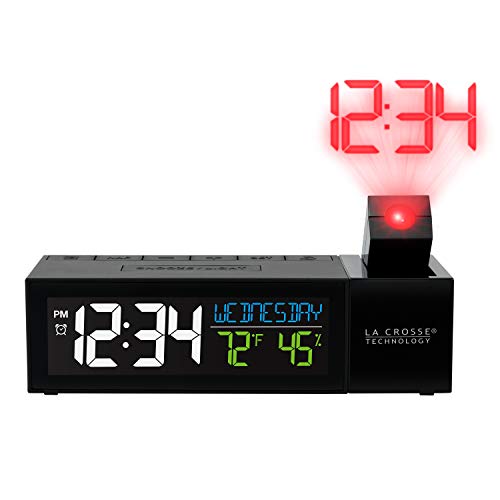
| Compact & Versatile | Projection Rotation: Rotatable projection direction up to 90° | Projection Distance: Not specified explicitly | Display Brightness Levels: 4 brightness levels (adjustable) | VIEW LATEST PRICE | Read Our Analysis |
| GOLOZA Projection Alarm Clock with USB Charger |
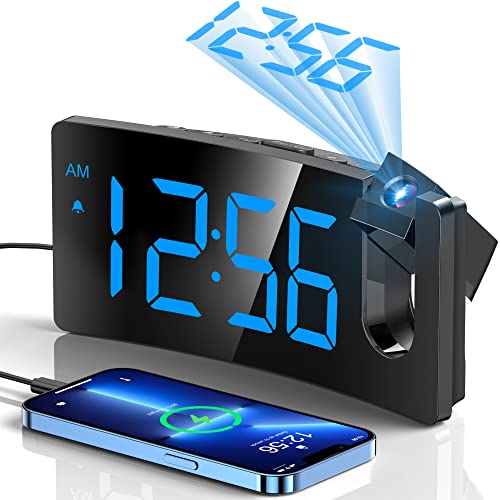
| Stylish & User-Friendly | Projection Rotation: 180° rotatable projector arm | Projection Distance: Recommended 1.64–11.4 ft (0.5–3 m) | Display Brightness Levels: Separate brightness adjustment for display and projector; 3 brightness levels | VIEW LATEST PRICE | Read Our Analysis |
| JXTZ Projection Alarm Clock with Large LED Display |

| Large Display Focus | Projection Rotation: Projects only toward back of clock (no rotation) | Projection Distance: 0.5 to 5 m (1.6 to 16 ft) | Display Brightness Levels: 4 adjustable brightness levels + night mode dimming | VIEW LATEST PRICE | Read Our Analysis |
| Mesqool Projection Alarm Clock with USB Charger |

| Elder-Friendly Brightness | Projection Rotation: 180° rotatable swivel projector | Projection Distance: 1.6–9.8 ft (0.5–3 m) | Display Brightness Levels: 5-level dimmer for display brightness | VIEW LATEST PRICE | Read Our Analysis |
| Projection Alarm Clock with Rotatable Projector and Dual Alarms |

| Feature-Packed Powerhouse | Projection Rotation: Upgraded 350° swivel projector | Projection Distance: 1.64–11.4 ft (0.5–3 m) | Display Brightness Levels: 5-level adjustable display brightness | VIEW LATEST PRICE | Read Our Analysis |
More Details on Our Top Picks
La Crosse Pop-Up Bar Projection Alarm Clock
Should you want a projection clock that adapts easily to your room, the La Crosse Pop-Up Bar Projection Alarm Clock is a smart pick. It projects time clearly on your wall or ceiling, with autofocus and a rotatable direction up to 90 degrees. You can adjust brightness across four levels to suit your preference. The manual 12-hour time set pairs well with a quick-set nap timer and an alarm featuring adjustable snooze. The LCD screen shows temperature and humidity, keeping you informed. Plus, it charges via a USB port, though you’ll need your own cable.
- Projection Rotation:Rotatable projection direction up to 90°
- Projection Distance:Not specified explicitly
- Display Brightness Levels:4 brightness levels (adjustable)
- Alarm and Snooze:Alarm with adjustable snooze duration
- USB Charging Port:USB charge port (1 AMP output), no cable included
- Time Format Options:Manual 12-hour time set
- Additional Feature:Temperature and humidity display
- Additional Feature:Quick-set nap timer
- Additional Feature:Adjustable snooze duration
GOLOZA Projection Alarm Clock with USB Charger
In case you’re looking for a projection clock that’s easy to read from anywhere in the room, the GOLOZA Projection Alarm Clock with USB Charger fits the bill perfectly. Its 180° rotatable projector arm lets you position sharp, clear numerals without fuss. You can adjust brightness separately for the display and projector, choosing from three levels to suit day or night. The large curved LED reduces eye strain, enhancing focus. Plus, it charges your phone via a USB port, keeps settings with a backup battery, and features a progressive alarm with a big snooze button-ideal for all ages.
- Projection Rotation:180° rotatable projector arm
- Projection Distance:Recommended 1.64–11.4 ft (0.5–3 m)
- Display Brightness Levels:Separate brightness adjustment for display and projector; 3 brightness levels
- Alarm and Snooze:Progressive buzzer alarm, 9-minute snooze
- USB Charging Port:5V/1A USB output port, Micro USB cable included
- Time Format Options:12/24-hour selectable format
- Additional Feature:Progressive buzzer alarm
- Additional Feature:Large top snooze button
- Additional Feature:Curved-screen design reduces eyestrain
JXTZ Projection Alarm Clock with Large LED Display
You’ll appreciate the JXTZ Projection Alarm Clock with Large LED Display provided you often need to check the time in the dark without fumbling for your phone. Its 7.9″ screen shows large-font time, temperature, and date with four brightness levels and an automatic night mode you can customize. The ultra-clear projector displays time on your ceiling or wall up to 16 feet away, with three brightness options-just avoid projecting forward to prevent upside-down numbers. It offers three alarm modes with adjustable snooze, USB power with battery backup, and includes a USB cable and user guide for easy setup.
- Projection Rotation:Projects only toward back of clock (no rotation)
- Projection Distance:0.5 to 5 m (1.6 to 16 ft)
- Display Brightness Levels:4 adjustable brightness levels + night mode dimming
- Alarm and Snooze:Three alarm modes, adjustable snooze 1–60 min
- USB Charging Port:USB-powered only, cable included (adapter not included)
- Time Format Options:12/24-hour time display
- Additional Feature:Three weekday alarm modes
- Additional Feature:Night mode with automatic dimming
- Additional Feature:Battery backup preserves settings
Mesqool Projection Alarm Clock with USB Charger
The Mesqool Projection Alarm Clock with USB Charger stands out should you want easy nighttime time checks without straining your eyes. Its 180° swivel projector displays ultra-clear time on your ceiling or wall, adjustable within 1.6 to 9.8 feet, with a focus ring and orientation flip for perfect clarity. The 7″ large LED display offers five brightness levels, protecting your night vision. You get dual alarms with adjustable volume and a 9-minute snooze, plus a USB port to charge your devices. Power outages aren’t a worry-backup batteries save your settings. It’s simple, stylish, and perfect for any bedroom.
- Projection Rotation:180° rotatable swivel projector
- Projection Distance:1.6–9.8 ft (0.5–3 m)
- Display Brightness Levels:5-level dimmer for display brightness
- Alarm and Snooze:Dual alarms, 9-minute snooze, adjustable volume
- USB Charging Port:Built-in 5V/1.0A USB output for device charging
- Time Format Options:12/24-hour format switchable via long press
- Additional Feature:Dual independent alarms
- Additional Feature:Adjustable alarm volume levels
- Additional Feature:DST function activation
Projection Alarm Clock with Rotatable Projector and Dual Alarms
Should you struggle to read your alarm clock at night, this projection alarm clock with a rotatable projector is designed to shine right where you need it-on your ceiling or wall. Its 350° swivel projector and rotating focus ring deliver crystal-clear time projection up to 11.4 feet away. You can set two independent alarms with multiple modes and adjust the volume up to 116 dB, perfect for heavy sleepers. The LED display brightness is adjustable, and it supports 12/24-hour formats. Plus, it features USB charging ports and a backup memory to keep your settings secure during outages.
- Projection Rotation:Upgraded 350° swivel projector
- Projection Distance:1.64–11.4 ft (0.5–3 m)
- Display Brightness Levels:5-level adjustable display brightness
- Alarm and Snooze:Dual alarms, 9-minute snooze, progressive buzzer volume
- USB Charging Port:1 USB and 1 USB Type-C charging port
- Time Format Options:12/24-hour format selectable
- Additional Feature:High-precision temperature/humidity monitor
- Additional Feature:Dual USB charging ports (Type-A and Type-C)
- Additional Feature:Progressive buzzer with 7 volume levels
Factors to Consider When Choosing Projection Clocks
While choosing a projection clock, you’ll want to check how clear the projection is and how far it can reach. Consider whether the display brightness can be adjusted and provided that the alarm settings fit your needs. Don’t forget to look at the power source options, backup capabilities, and provided that it supports charging devices.
Projection Clarity And Distance
Because projection clarity hinges on both focus and resolution, you’ll want a clock with adjustable or autofocus to keep numerals sharp at various distances. Aim for an ideal projection distance between 0.5 and 3.0 meters (1.6 to 11.4 feet), where numbers stay clear and readable. Beyond that range, digits might blur or shrink, reducing legibility. Also, consider projection angle and rotation features-swivels or rotatable arms let you direct the image onto walls or ceilings without distortion. Without proper angle adjustment or image flip, projections can appear skewed or upside down. Keep in mind, as distance grows, the image size increases but sharpness and contrast can drop, so balance distance with focus and resolution to maintain crisp numerals.
Display Brightness Options
In selecting a projection clock, you’ll want to prioritize display brightness options that suit various lighting conditions and times of day. Look for models offering multiple brightness levels-usually 3 to 5- so you can choose a bright setting for daytime and a dimmer one at night to avoid sleep disruption. Clocks with separate controls for the main display and projector let you dim one without affecting the other. Adjustable projector brightness or intensity settings boost readability at different distances and room lighting. An automatic night mode or scheduled dimming reduces blue light exposure during evening hours. Be cautious with very high brightness, as it can cause glare or wash out numbers at short distances. A focusable projector combined with lower brightness guarantees clear projection in smaller bedrooms.
Alarm Features And Settings
Although projection clocks offer impressive display features, their alarm settings are equally vital to guarantee you wake up on time and comfortably. Initially, check whether the clock supports single or dual independent alarms, perfect for partners or different schedules. Adjustable alarm volume and progressive tones let you tailor the sound to your sleep style, whether light or heavy sleeper. Don’t overlook snooze options-look for a large snooze button and customizable snooze durations, sometimes up to an hour. Multiple alarm modes, like weekday-only or weekend-only, prevent unnecessary wake-ups. Finally, confirm your alarm settings stay saved during power interruptions, so you won’t lose your wake times after outages. These features make your mornings smoother and more reliable every day.
Power Source And Backup
When selecting a projection clock, you’ll want to take into account its power source and backup options carefully to make certain uninterrupted functionality. Most projection clocks rely on AC power, so check the input voltage to confirm compatibility, especially when you travel internationally. Many models offer USB outputs for charging devices, but charging speed depends on the amperage provided. Battery backup, often using CR2032 or AAA cells, preserves time and alarms during outages but usually won’t power the display or projection. Should you require projection without mains power, look for clocks with battery-powered projection or internal rechargeable batteries, and observe backup runtime details. Also, verify whether a USB cable or AC adapter is included to avoid extra purchases, especially for USB-powered models requiring adapters.
Charging Capabilities Included
Inspect the charging capabilities included with your projection clock to guarantee it meets your device power needs. Initially, check whether the clock has an integrated USB port and remark its output current-1.0 A is common, affecting how quickly it charges your phone. Consider whether it offers just USB or also USB-C and multiple ports, so you can charge more devices or faster-charge compatible gadgets. Make certain the package includes the necessary charging cable and AC adapter, or be prepared to buy them separately. Look for battery backup options like CR2032 or AAA cells that keep time and alarm settings during outages, and verify whether the display or projector stays functional on backup power. Lastly, confirm power options-AC, USB, or battery-to match your setup and guarantee reliable charging.
Time Format And DST
Besides charging features, you’ll want to take into account how a projection clock displays time and handles Daylight Saving Time (DST). To begin, check whether the clock supports your preferred 12-hour or 24-hour format, so you won’t have to convert AM/PM while glancing at the projection. Should you use 24-hour time, make sure the numerals are clear and bright enough at typical projection distances, especially at night. Many clocks automatically adjust for DST, but verify whether they follow your region’s rules or just toggle an hour, since DST dates vary worldwide. Also, look for battery backup that preserves time and DST settings during outages-though some clocks won’t project time on backup power, only retain settings for easy restoration.
Ease Of Use And Design
Whenever choosing a projection clock, you’ll want to focus on ease of use and thoughtful design to make certain it fits seamlessly into your daily routine. Look for large, clearly labeled buttons-especially a top snooze-that simplify setting alarms and time, which helps seniors, kids, or anyone with low vision. Opt for clocks with separate brightness controls for display and projection, so you can reduce glare at night without sacrificing readability. A projection arm or swivel head with 90–180° rotation and focus adjustment lets you easily position the image from your bed. Also, pick models powered via mains with battery memory backup to keep settings during outages without frequent resets. Finally, guarantee the digits are large, clear, and high-contrast to reduce eyestrain and improve distant reading.
