

A thermostat can be a home’s compass, quietly steering comfort and costs, and I want to help you pick the right one for 2026. I’ll compare models from the familiar Nest Learning Thermostat to trim kits and hubless options, flagging compatibility, energy smarts, and real‑world usability. In case you care about seamless smart‑home integration and long‑term savings, keep going — I’ve narrowed the practical choices for different setups.
Sensi ST55 Smart Wi‑Fi Thermostat (Energy Star)

In case you want a straightforward, budget‑friendly smart thermostat that’s easy to install yourself, the Sensi ST55 is a great choice — it’s ENERGY STAR certified, doesn’t usually need a common wire, and guides you through setup with a built‑in level and step‑by‑step app instructions. You’ll fit it where your old thermostat sat, avoiding drywall work, and it’s compatible with most home HVAC systems. The app and buttons let you schedule and control remotely, saving about 23% on HVAC energy. It monitors performance, sends alerts and maintenance notifications, works with Alexa, and Sensi doesn’t sell your personal information.
Best For: Budget-conscious homeowners who want an easy DIY smart thermostat with ENERGY STAR savings, simple app-guided setup, and basic smart controls.
Pros:
- ENERGY STAR certified and can save about 23% on HVAC energy through scheduling and remote control.
- Easy DIY installation with built-in level, step-by-step app instructions, and typically no common wire required.
- Monitors HVAC performance, provides usage reports, alerts/maintenance reminders, and works with Alexa.
Cons:
- Offers basic smart features and may lack advanced integrations or controls found in higher-end thermostats.
- Relies on the mobile app for many functions, which may be limiting for users who prefer more on-device functionality.
- Compatibility with some HVAC setups could still require professional help or a c-wire in certain cases.
Google Nest Learning Thermostat 3rd Gen (Renewed)

Should you want a thermostat that learns your habits and takes over scheduling, the renewed Google Nest Learning Thermostat 3rd Gen is an excellent pick for busy households looking to cut energy bills without fiddling with settings. You’ll get Auto-Schedule that programs itself and Auto-Tune that tweaks settings to lower costs while keeping comfort. The Nest Leaf nudges you toward efficient temperatures, and Rush Hour Rewards plus Seasonal Savings further trim bills. System Match adapts features to your specific heating or cooling setup, and Sunblock prevents false readings from direct sunlight. It also works with Alexa for simple voice control.
Best For: Busy households and energy-conscious users who want a self-programming thermostat that reduces energy bills with minimal manual setup.
Pros:
- Auto-Schedule and Auto-Tune learn preferences and continuously optimize settings for increased comfort and lower energy costs.
- Energy-saving features like Nest Leaf, Rush Hour Rewards, and Seasonal Savings help reduce utility bills.
- System Match and Sunblock improve compatibility and accuracy across different HVAC setups and environmental conditions.
Cons:
- Renewed unit may have limited warranty compared to new models and could show cosmetic wear.
- Advanced features may require time and initial usage for learning and optimization to reach full effectiveness.
- Limited native compatibility with some smart home ecosystems (works with Alexa but may have fuller integration with Google Assistant).
Nest Thermostat Trim Kit Wall Plate (White)
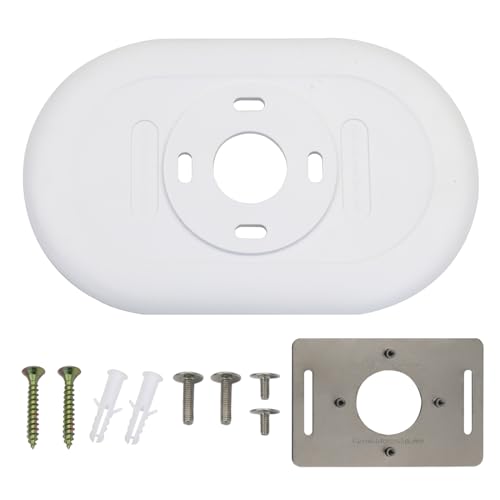
In case you’ve got a 2020 Google Nest Thermostat (models GA01334-US, GA02082-US, GA02081-US, GA02083-US), this white trim kit is the easiest way to achieve a clean, finished look while hiding imperfect paint or oversized wall cutouts. You’ll get a 7.1″ x 4.41″ x 0.3″ plate made from double-reinforced, aluminum oxide materials with a double coating for durability. Installation’s simple: snap the thermostat base to the plate, route wires through the holes, level it, and secure with the included screws. The package includes the trim plate, steel plate, and eight screws; thermostat not included. Customer support handles replacements.
Best For: Homeowners or renters with a 2020 Google Nest Thermostat (models GA01334-US, GA02082-US, GA02081-US, GA02083-US) who want a clean, finished look that hides imperfect wall cutouts.
Pros:
- Matches 2020 Nest thermostat models exactly for a seamless fit and appearance.
- Durable construction with double reinforcement, aluminum oxide, and double coating for long-term use.
- Includes trim plate, steel plate, and eight mounting screws for straightforward installation.
Cons:
- Only compatible with specific 2020 Nest thermostat models, not universal.
- Thermostat is not included—must be purchased separately if needed.
- Plain white design may not match all decor preferences.
Nest 9750016 T3016US Thermostat 3.3 x 1.2 x 3.3 Black

Should you want a smart thermostat that learns your schedule and trims energy use without constant tinkering, the Nest 9750016 T3016US is a strong pick. You’ll get adaptive learning that programs itself, Home/Away Assist that drops to Eco Temperature whenever you leave, and Energy History plus the Nest Leaf to guide savings. Remote control works from phone, tablet, or laptop, and HVAC monitoring sends alerts and notifications. The polished metal finish and bright Farsight display look sharp. Installation takes about 30 minutes and supports 95% of systems. Nest Renew compatibility helps prioritize cleaner, cheaper energy automatically.
Best For: homeowners or renters who want a low-maintenance, learning smart thermostat that reduces energy use, provides remote control and HVAC alerts, and integrates with clean-energy features.
Pros:
- Learns your schedule and auto-programs to save energy with Home/Away Assist and Nest Leaf guidance.
- Remote control and monitoring from phone, tablet, or laptop, plus HVAC alerts and compatibility with Nest Temperature Sensor.
- Sleek polished metal finish with bright Farsight display and easy ~30-minute installation for ~95% of systems.
Cons:
- Some advanced integrations or sensors (like Nest Temperature Sensor) are sold separately, adding extra cost.
- May require a C-wire or adapter for certain older HVAC systems despite broad compatibility.
- Privacy or cloud-dependence concerns for users who prefer fully local control and data storage.
ecobee Smart Thermostat Essential — Wi‑Fi, Voice Assistants

Should you want a budget‑minded smart thermostat that still plays well with Apple, Google, and Alexa, the ecobee Smart Thermostat Essential is a strong pick. You’ll save up to 23% yearly through letting eco+ auto‑adjust temperatures, manage humidity, and preheat or precool during lower‑cost periods. It works with about 85% of HVAC systems; check compatibility online. DIY installation is straightforward and no C‑wire is required (use the PEK when needed). Control it via the color touchscreen, the ecobee app, or voice assistants. Add SmartSensors for room‑level temp and motion sensing to enhance comfort and efficiency.
Best For: budget‑minded homeowners or renters who want a compatible, easy‑install smart thermostat that works with Apple HomeKit, Google Assistant, and Alexa while delivering energy savings.
Pros:
- Affordable smart thermostat that supports major voice assistants and smart home ecosystems.
- Up to 23% estimated annual savings via eco+ features (schedule assistant, humidity control, time‑of‑use preheat/precool).
- Easy DIY installation with no C‑wire required (PEK available) and app/touchscreen controls.
Cons:
- Not compatible with about 15% of HVAC systems; must verify compatibility online.
- SmartSensor accessories are sold separately to get room‑level sensing and motion detection.
- Lacks some advanced features found on higher‑end ecobee models (fewer built‑in sensors and accessories).
Nest T4000ES E Hubless Smart Thermostat

Should you want a simple, energy-focused smart thermostat that adapts to your routine, the Nest T4000ES E Hubless is a strong pick. It learns your preferred temperatures, programs itself, and shows a Leaf whenever you pick energy-saving settings. Use the Nest app or log in from a phone, tablet, or laptop to adjust remotely; it works with Alexa, Google Assistant, and smart speakers for voice control. Home/Away Assist sets Eco Temperature whenever no one’s home, and Energy History helps you track use. It monitors HVAC health, sends maintenance alerts, installs in under 60 minutes, and fits most systems.
Best For: homeowners or renters seeking an easy-to-install, energy-saving smart thermostat that learns routines and offers remote and voice control.
Pros:
- Learns preferences and auto-programs for comfort and energy savings, with Nest Leaf guidance.
- Remote control via app and compatibility with Alexa/Google Assistant for convenient voice and off-site adjustments.
- HVAC monitoring and maintenance alerts plus Home/Away Assist and Energy History for efficiency and system health tracking.
Cons:
- Requires Wi-Fi and a compatible smartphone or tablet for full functionality.
- Nest Temperature Sensor sold separately for more precise multi-room control.
- May not support the uncommon 5% of heating/cooling systems that are incompatible.
Google Nest Learning Thermostat (3rd Gen)

Perfect for homeowners who want a thermostat that learns and adapts, the Google Nest Learning Thermostat (3rd Gen) studies your schedule and preferences to cut heating and cooling costs without you having to micromanage settings. You’ll get smart temperature control that automatically adjusts for comfort and energy savings, plus remote access through the Nest app and Alexa voice control. It’s compatible with most heating and cooling systems, including heat pumps, and can help save up to 12% on heating and 15% on cooling. The polished steel finish and high-resolution display give it a sleek look, and bulk packaging is available.
Best For: Homeowners who want a smart, self-learning thermostat that reduces heating and cooling costs while offering remote and voice control.
Pros:
- Learns your schedule and preferences to automate comfort and energy savings.
- Remote access via the Nest app and Alexa voice control for convenient management.
- Compatible with most heating/cooling systems (including heat pumps) and offers a sleek polished steel design with a high-resolution display.
Cons:
- Savings (up to 12% heating, 15% cooling) may vary and aren’t guaranteed for every household.
- May require professional installation or wiring checks for some HVAC systems.
- Advanced features and compatibility may be limited without a stable Wi‑Fi connection or updated smart-home ecosystem.
Factors to Consider When Choosing a Nest Thermostat to Buy
Before you pick a Nest thermostat, I look at a few key factors that affect performance and convenience. You’ll want to check compatibility with your HVAC system, energy-saving features and smart scheduling, installation and wiring needs, and whether it works with your preferred voice assistant. Those points will help you choose a model that fits your home and habits.
Compatibility With HVAC Systems
Because HVAC setups vary so much from home to home, I always check compatibility initially upon selecting a Nest thermostat to buy. I confirm the thermostat supports my system type—forced air, heat pump, radiant, or boiler—and common residential configurations like gas, oil, electric, dual fuel, and 2H/1C or 1H/2C. I inspect the control wiring: presence or absence of a c-wire can determine whether I need an adapter or professional wiring to keep the Nest powered. I also look for models that adapt to specific equipment so the thermostat can optimize control for that system. Before buying, I use official compatibility checkers or consult manufacturer resources to avoid installation surprises and guarantee full functionality with my HVAC.
Energy Saving Features
At the moment I’m choosing a Nest thermostat, I prioritize features that actually cut energy use without making my life harder: adaptive learning that tailors schedules to how I live, clear energy cues like the leaf icon so I know at which point I’m saving, and automatic Home/Away or Eco modes that drop HVAC activity when no one’s home. I also look for weather and sunlight integration so the thermostat won’t respond to misleading heat from sun-facing rooms, keeping settings accurate and efficient. Remote monitoring and real-time usage reports matter too — they let me spot wasteful patterns and tweak behavior. Together, these features reduce heating and cooling costs while staying mostly hands-off, which is exactly the balance I want in a Nest thermostat.
Smart Scheduling Capabilities
At the moment I pick a Nest thermostat, smart scheduling is one of the initial features I vet because it determines how much time I’ll actually spend fiddling with temperatures; I value thermostats that learn my preferences and automatically adjust without constant input. Adaptive scheduling that maps occupancy patterns and daily routines can noticeably cut energy use while keeping comfort whenever I’m home. I also look for models that use sensors and my phone’s location to switch between comfort and savings modes, so the schedule adapts should plans change. Continuous optimization that fine-tunes settings over weeks is a plus, balancing comfort with efficiency. Finally, remote app access to tweak schedules anytime gives me control without being tethered to the wall.
Installation And Wiring Needs
Upon choosing a Nest thermostat, I start with confirming compatibility with my heating and cooling system and whether I’ll need a common wire (c-wire) or an adapter, since that one detail can make installation simple or require pro help. I check manufacturer compatibility lists because models vary in supported systems. In case my old thermostat lacks a c-wire, I decide between an adapter kit or a model that runs without one. I prefer units with clear DIY features—built-in leveling, straightforward wiring labels, and step-by-step app guidance— so I can avoid hiring a technician. I also measure the wall plate area to make certain the new unit fits without patching. Finally, I confirm reliable Wi‑Fi setup and that my phone will work for initial configuration.
Voice Assistant Integration
After sorting wiring and fit, I also look closely at voice assistant integration because it often determines how smoothly a Nest will slip into my smart-home routine. I value the ability to change temperature, switch modes, or ask the current indoor temperature without touching anything—voice control makes those small adjustments painless. I check which platforms a Nest supports; compatibility with major assistants means I can use whichever hub my household prefers. I also prefer models that handle multiple assistants simultaneously, so guests or other devices won’t break the flow. Beyond convenience, I find voice commands help me nudge settings for efficiency on the fly, which adds up to real energy savings over time.
Remote Control And App
Because I control my Nest from anywhere, the remote app becomes the hub of daily comfort and savings. I use it on my phone, tablet, or computer to adjust temps instantly, set schedules, and check energy reports without walking to the thermostat. The app’s scheduling and remote temperature control let me preheat or cool before I arrive, cutting waste. I rely on real-time alerts and maintenance notifications to catch issues promptly, keeping the system efficient. Shared access means family members can make adjustments as necessary, reducing calls and confusion. I also value compatibility with voice assistants so I can issue hands-free commands through smart speakers while still managing finer details in the app.
Build Quality And Design
When I pick a Nest thermostat, I look for solid build quality and a design that fits my home—durable materials and thoughtful finishes mean the unit will stay looking and working well for years. I favor reinforced metals and protective coatings that resist scratches and wear, so the unit endures daily use. A slim profile and sleek finish help the thermostat blend with modern décor, and available wall plates or trim kits tidy installation marks for a cleaner look. I check screen quality—high resolution and adaptive brightness make temps readable in bright or dim rooms. Finally, ergonomic touches matter: responsive touchscreens, intuitive buttons, and voice-control compatibility make interaction quick and frustration-free.
Maintenance And Alerts
Whenever I’m choosing a Nest thermostat, I prioritize how it helps me stay on top of maintenance and alerts so small problems don’t become big repairs. I look for HVAC performance monitoring that detects issues promptly, sending push notifications to my phone so I can act before a breakdown. Timely filter-replacement notices keep airflow and efficiency up, and regular monitoring prompts preventive service that extends HVAC lifespan. I also value energy-usage reports tied to maintenance alerts; they let me spot trends, adjust schedules, and verify that fixes improved performance. In short, a Nest that combines real-time notifications, clear maintenance prompts, and actionable usage data saves me repair costs and keeps my system running reliably.
