

Should you need fast, flexible internet on the go, these four mobile routers are worth your attention. They cover travel privacy, cutting‑edge 5G speeds, a dependable 4G backup, and a low‑latency home gaming option. I’ll summarize what each one does best and whenever you’d pick it — and point out the tradeoffs you’ll want to weigh.
| GL.iNet Opal GL-SFT1200 Portable Dual-Band Travel Router |

| Travel Privacy Pick | Wireless Connectivity: Dual-band Wi-Fi (AC1200: 2.4 GHz & 5 GHz) | Portability / Travel-friendly: Pocket-friendly, lightweight (145 g), travel router | Wired Ports: Full Gigabit — 2 LAN + 1 WAN | VIEW LATEST PRICE | Read Our Analysis |
| NETGEAR Nighthawk 5G Mobile Hotspot M7 (MH7150) |

| Best Performance | Wireless Connectivity: 5G/4G cellular + WiFi 7 for local wireless LAN | Portability / Travel-friendly: Portable mobile hotspot with up to 10‑hour battery | Wired Ports: USB‑C (data/power); Ethernet adapter supported (sold separately) | VIEW LATEST PRICE | Read Our Analysis |
| NETGEAR Nighthawk M1 4G LTE Mobile Hotspot |
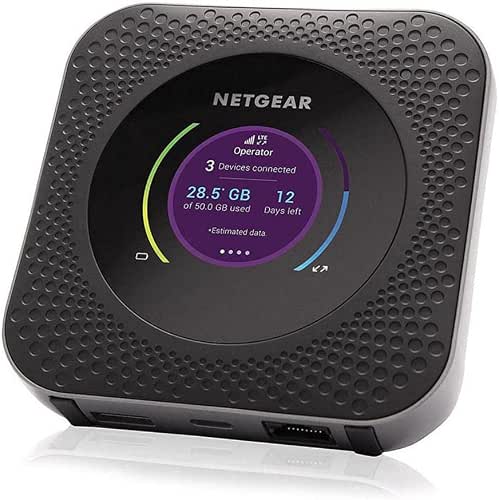
| Reliable Backup | Wireless Connectivity: 4G LTE cellular hotspot (WiFi for local devices) | Portability / Travel-friendly: Portable mobile hotspot for travel (battery powered) | Wired Ports: Gigabit Ethernet port | VIEW LATEST PRICE | Read Our Analysis |
| ASUS RT-AX82U AX5400 Dual-Band WiFi 6 Gaming Router |

| Gaming Powerhouse | Wireless Connectivity: Dual-band WiFi 6 (802.11ax) | Portability / Travel-friendly: Home/gaming router (less portable but usable for travel if moved) — desktop form factor | Wired Ports: Gigabit LAN/WAN ports (multi-port tri-core router with dedicated gaming port) | VIEW LATEST PRICE | Read Our Analysis |
More Details on Our Top Picks
GL.iNet Opal GL-SFT1200 Portable Dual-Band Travel Router
Should you travel light and want a secure, versatile router, the GL.iNet Opal GL-SFT1200 is a top pick: it packs AC1200 dual-band Wi‑Fi, full Gigabit ports, and built‑in OpenVPN/WireGuard into a 145 g pocketable body so you can stream, game, and stay private from hotel or public networks. You’ll get 2.4 GHz up to 300 Mbps for browsing and email, and 5 GHz up to 867 Mbps for gaming and 4K streaming; real speeds depend on setup. It offers two Gigabit LAN and one WAN port, retractable antennas, IPv6 and Cloudflare encryption, multiple use modes, and easy setup resources.
- Wireless Connectivity:Dual-band Wi-Fi (AC1200: 2.4 GHz & 5 GHz)
- Portability / Travel-friendly:Pocket-friendly, lightweight (145 g), travel router
- Wired Ports:Full Gigabit — 2 LAN + 1 WAN
- Security & VPN:OpenVPN & WireGuard pre‑installed; IPv6; Cloudflare encryption
- Multi-device Support:Supports multiple client devices over Wi‑Fi (typical travel router)
- Setup & Management:Easy setup with User Manual and video guide; admin panel for toggles
- Additional Feature:Retractable external antennas
- Additional Feature:Physical toggle switch
- Additional Feature:EasyTethering not supported
NETGEAR Nighthawk 5G Mobile Hotspot M7 (MH7150)
In case you need fast, portable connectivity for work and travel, the NETGEAR Nighthawk M7 delivers Wi‑Fi 7 speeds up to 3.6 Gbps and supports 32 devices, making it ideal for power users who want multi‑device performance on the go. You’ll get 5G/4G LTE compatibility, AT&T and T‑Mobile certification (T‑Mobile eSIM expected March 2026) and Verizon certification pending. Use NETGEAR eSIM worldwide or purchase local plans via the app. The M7 runs about 10 hours per charge, offers USB‑C and optional Ethernet adapter for wired multi‑gig, WPA3 and firewall protection, plus automatic firmware updates.
- Wireless Connectivity:5G/4G cellular + WiFi 7 for local wireless LAN
- Portability / Travel-friendly:Portable mobile hotspot with up to 10‑hour battery
- Wired Ports:USB‑C (data/power); Ethernet adapter supported (sold separately)
- Security & VPN:Built‑in firewall, WPA3 encryption, automatic firmware updates
- Multi-device Support:Supports up to 32 devices simultaneously
- Setup & Management:NETGEAR mobile app for setup, management, and eSIM/data plans
- Additional Feature:NETGEAR eSIM worldwide
- Additional Feature:USB-C direct connection
- Additional Feature:Built-in multi-gig Ethernet adapter
NETGEAR Nighthawk M1 4G LTE Mobile Hotspot
Should you need a reliable backup or travel-ready hotspot that can keep up with multiple devices, the NETGEAR Nighthawk M1 4G LTE is a strong pick—its Gigabit Ethernet port lets you plug into an existing home router for primary or failover Internet while also serving as a portable hotspot for up to 20 devices. You’ll insert a Micro SIM and activate a compatible BYOD plan; the carrier-unlocked unit accepts most carriers (not Sprint legacy), working best with AT&T and T-Mobile. Expect downloads up to 1 Gbps depending on tower distance. Use it to avoid public WiFi and provide dependable backup for poor home service.
- Wireless Connectivity:4G LTE cellular hotspot (WiFi for local devices)
- Portability / Travel-friendly:Portable mobile hotspot for travel (battery powered)
- Wired Ports:Gigabit Ethernet port
- Security & VPN:Private secure wireless network to avoid public Wi‑Fi (standard hotspot security)
- Multi-device Support:Connects up to 20 devices simultaneously
- Setup & Management:Simple SIM insertion and carrier activation; basic hotspot UI for management
- Additional Feature:Gigabit Ethernet port
- Additional Feature:Micro SIM required
- Additional Feature:BYOD carrier compatibility
ASUS RT-AX82U AX5400 Dual-Band WiFi 6 Gaming Router
Should you game on both mobile and desktop and want low latency plus strong Wi‑Fi 6 performance, the ASUS RT‑AX82U is a compact, gamer‑focused choice: its Mobile Game Mode and dedicated gaming port prioritize traffic, while a 1.5 GHz tri‑core CPU and support for 160 MHz channels deliver the throughput and responsiveness you need. You’ll get AX5400 dual‑band speeds, priority routing, and reduced lag for competitive play. AiProtection Pro and Instant Guard secure your network and remote access. Use AiMesh to expand coverage, the ASUS Router app to tune settings, and customizable Aura RGB for a personalized, gaming‑oriented look.
- Wireless Connectivity:Dual-band WiFi 6 (802.11ax)
- Portability / Travel-friendly:Home/gaming router (less portable but usable for travel if moved) — desktop form factor
- Wired Ports:Gigabit LAN/WAN ports (multi-port tri-core router with dedicated gaming port)
- Security & VPN:AiProtection Pro (Trend Micro) and Instant Guard VPN feature
- Multi-device Support:Designed for many home clients; prioritized gaming device support and MU‑MIMO/WiFi6 client handling
- Setup & Management:ASUS Router app for setup, mode selection, and feature control
- Additional Feature:ASUS Aura RGB lighting
- Additional Feature:Dedicated gaming port
- Additional Feature:1.5 GHz tri-core CPU
Factors to Consider When Choosing a Mobile Router
While picking a mobile router, you’ll want to check network compatibility to make sure it works with your carrier and supports the right bands. Consider speed and bandwidth for your typical usage, battery life for how long you’ll stay connected, and security features to keep your traffic safe. Also look at ports and connectivity options—Ethernet, USB, and SIM slots—to match your devices and needs.
Network Compatibility
Because network support determines whether your mobile router will actually connect where you need it, you should verify the device’s supported cellular bands, technologies (4G LTE vs 5G sub‑6/mmWave), and advertised categories so they match your carrier and local coverage. Also confirm SIM type and provisioning — nano, micro, physical SIM, or eSIM — and whether the router handles carrier activation or BYOD plans. Check carrier certification and unlocked status so firmware or provisioning won’t block registration. Make certain the unit supports VoLTE, carrier aggregation, and dual‑SIM or eSIM fallback for seamless failover between networks. Finally, match the router’s advertised categories and throughput to your carrier plan and expected real‑world performance near local towers.
Speed And Bandwidth
Often you’ll find that a router’s headline specs don’t tell the whole story about speed and bandwidth. You should check the supported wireless standard—Wi‑Fi 6/802.11ax gives higher throughput and better efficiency under load than Wi‑Fi 5. Compare theoretical link rates per band: 2.4 GHz often peaks at a few hundred Mbps, while 5 GHz can hit multiple Gbps with wider channels and higher modulation. Verify spatial streams and channel width (2×2 vs 4×4 MIMO; 20/40/80/160 MHz) since they affect peak bandwidth and multi‑device performance. Don’t forget wired backhaul: Gigabit versus multi‑gigabit Ethernet can bottleneck speeds. Finally, review real‑world throughput under expected conditions—simultaneous devices, distance, and interference—rather than trusting peak numbers.
Battery Life
Don’t overlook battery life—it’s the single biggest practical factor for a mobile router’s usability, since capacity (mAh) and real‑world drain determine how long you can stay connected between charges. You should use mAh as a baseline—units range from about 2,000 to over 10,000 mAh—then adjust expectations for your usage: light email and browsing lasts far longer compared to continuous streaming or tethering many devices. Check how cellular radios, Wi‑Fi band choice (2.4 vs 5 GHz), signal strength, and device count affect drain. Prefer models with fast‑charging and pass‑through operation so you can run while charging. Finally, seek power‑saving modes, adjustable transmit power, and configurable sleep timers to stretch runtime whenever full performance isn’t required.
Security Features
Whenever you pick a mobile router, prioritize strong encryption, updatable firmware, and secure management controls to keep your connections private and resilient against attacks. Make sure the device supports WPA3, or at minimum WPA2‑AES, to protect Wi‑Fi credentials and block offline brute‑force attacks. Prefer routers with built‑in VPN client/server support like WireGuard or OpenVPN so you can encrypt traffic end‑to‑end on public networks. Choose models that offer regular firmware updates and automatic update options to close vulnerabilities promptly. Look for a firewall with NAT, SPI, or intrusion detection/prevention and the ability to create isolated guest networks. Finally, verify secure management: enforced strong admin passwords, multi‑factor authentication, HTTPS/SSH remote access, and the option to disable unused services such as WPS and UPnP.
Port And Connectivity
Security features protect data, but physical ports and connectivity determine how and where you can use that protection. Check the number and type of ports—Gigabit Ethernet LAN/WAN and a USB-C or USB-A port—since Gigabit preserves wired speeds and USB-C handles power and high-speed tethering. Confirm Ethernet ports support both WAN and LAN modes so the unit can be a primary router, bridge, or backup gateway. Should you need cellular access, make certain a SIM or eSIM slot (correct size) and consider dual-SIM or multi-SIM for failover. For heavy wired use or external modems, look for multi-gig Ethernet or USB 3.1/3.2. Finally, verify external antenna connectors or detachable high-gain antennas for better reception and placement flexibility.
Size And Portability
How compact should your mobile router be depends on how and where you plan to use it: in case you’ll pocket it for daily commutes, aim for lightweight, palm-sized units (about 100–200 g), but should you need all-day battery life or rugged durability, expect more bulk. Consider weight and dimensions initially: smaller devices fit pockets and bags, while larger ones offer longer batteries. Antenna design affects size and performance—foldable or retractable antennas enhance reception but increase deployed footprint. Built-in ports (Ethernet, USB-C) and removable covers add thickness; fewer ports mean sleeker travel profiles. Finally, choose casing based on use: water-, dust-, or crush-resistant models withstand outdoor or backpacking conditions but typically weigh more. Balance portability with required features.
Setup And Management
Size and portability affect how and where you’ll set up your router, but once you have it with you the setup and management determine whether it works safely and smoothly. Check whether the router supports both app-based and web-based administration so you can choose quick mobile setup or deeper browser configuration. Verify built-in VPN clients and simple toggles so you can enable OpenVPN or WireGuard during initial setup for immediate privacy. Confirm supported authentication methods—WPA3, WPA2-PSK, captive portal—and that default admin credentials are documented so you change them at initial boot. Look for eSIM or multi-SIM, USB tethering, or Ethernet WAN options and clear activation guides. Make certain firmware update mechanisms are accessible so you can promptly install security patches.
